Forum Replies Created
-
-
8 years ago in reply to: preroll on iOS 9.3.5


Hello Daniele,
thank you for the video!
I was not able to reproduce the issue on iOS 9.3, but it did appear on iOS 11.2 when I played the video again and again like in your video. We are working on upgrading the Flowplayer component of FV Player to version 7, so if there is some rare bug, that should fix it.
I will check if it’s related to the VAST ad and also test if I can reproduce the image upload issue you are having.
Thanks,
Martin
Hello Charles,
could you please try to install the plugin from a ZIP file which you get at https://foliovision.com/my-licenses -> Download FV Player Pro? If that works, there might be some issue with your WordPress sites and our plugin install code, so please let us know.
Thanks,
Martin
Hello Daniele and Michael,
we finally got to work on this and we are doing some final testing, please check here: https://foliovision.com/player/demos/vast-ads
The first player has an ad which is not skippable, so you see a text about how much it will take to finish and a mute button.
The second one comes with a skip button from the ad provider, so it also gets the mute button.
Thanks,
Martin8 years ago in reply to: Deleting description field
Hello Alex,
I don’t know all the details about it, but once it’s finished you shouldn’t be having any issues with the characters like the above.
However are you sure it makes sense to use such symbol for SEO reasons?
Thanks,
Martin8 years ago in reply to: Activity Log of Videos played by the user
Hello CCMT,
I see your website is using four jQuery libraries at once – one if from some fancybox-youtube-videos plugin, one is in your theme, one from WordPress core files and the last one loads from https://code.jquery.com/jquery-1.10.2.js.
That can only cause trouble as the event bindings get lost and so on. I would suggest you try to disable that plugin and use some other theme for a bit and see if it works.
Thanks,
Martin8 years ago in reply to: Setting Up Video Quality Switching
Hello x1d,
the quality switching works with Amazon S3, however then it’s not switching the qualities automatically – unless you would host a HLS stream there.
I would only recommend Amazon S3 as a video hosting if majority of your visits comes from a single country where the Amazon S3 server (bucket) is located. For world-wide video distribution you should be using CloudFront with it.
Thanks,
Martin
Hello Michael,
thank you for supporting independent software!
Looking forward to get it fixed for you.
Thanks,
Martin
Hello Daniele,
this would be possible, if you check how wp_ajax_fv_wp_flowplayer_video_position_save action hook is handled you can see where the data is saved, so it should be possible to add some code there.
So we will discuss your request in our team, but I cannot promise you that we will actually work on this any time soon, as we are reworking how the FV Player playlists are stored currently.
If such feature is important for your work, we would be happy to accelerate development of a function like this if you would order our custom development services.
I imagine to make it most useful we could also store on what page did the user watch the video, that way we could create a page which would like all the watched and unfinished videos to each user.
Thanks,
Martin8 years ago in reply to: preroll on iOS 9.3.5
Hello Daniele,
unfortunately there is no image. Perhaps you submitted the message before it finished uploading?
I tested https://foliovision.com/andrea-test on iPad with iOS 9.3 and I see the player styling is broken. There must be some bug in the CSS minify process. If I open it using https://foliovision.com/andrea-test?test=1 (the query argument ?test=1 blocks the CSS optimizaiton), then it works nicely. So I disabled the CSS optimization for now.
Are you having this issue on your website too?
Thanks,
Martin
Hello Mike,
unfortunately not anymore, as it’s past 4 PM here. We could take care of it first thing on the Monday though.
Have a nice weekend!
Thanks,
Martin8 years ago in reply to: Deleting description field
Hello Alex,
utf8mb4_unicode_ci is required to store these symbols. It’s strange that you are using just utf8_general_ci, as WordPress 4.2 was updating the tables to utf8mb4_unicode_ci automatically – although with some difficulties, as explained in our article – WordPress 4.2 Database Update Difficulties
I’m not sure how to force the update, but you can play with the “db_version” database option and see if setting it below 31533 will force WordPress to re-try that update.
Actually it seems like some suggestions can be found here: Switch WordPress from utf8 to utf8mb4 retrospectively
Thanks,
Martin8 years ago in reply to: Deleting description field
Hello Alex,
I believe this is related to your database. I didn’t had any issues with this, the ? symbol was accepted. The database where I tested this was using utf8mb4_unicode_ci collation. Perhaps your wp_postmeta table is using something else.
Thanks,
Martin
Hello Claudia,
FV Player 6.5.1 is out and it fixes the issue.
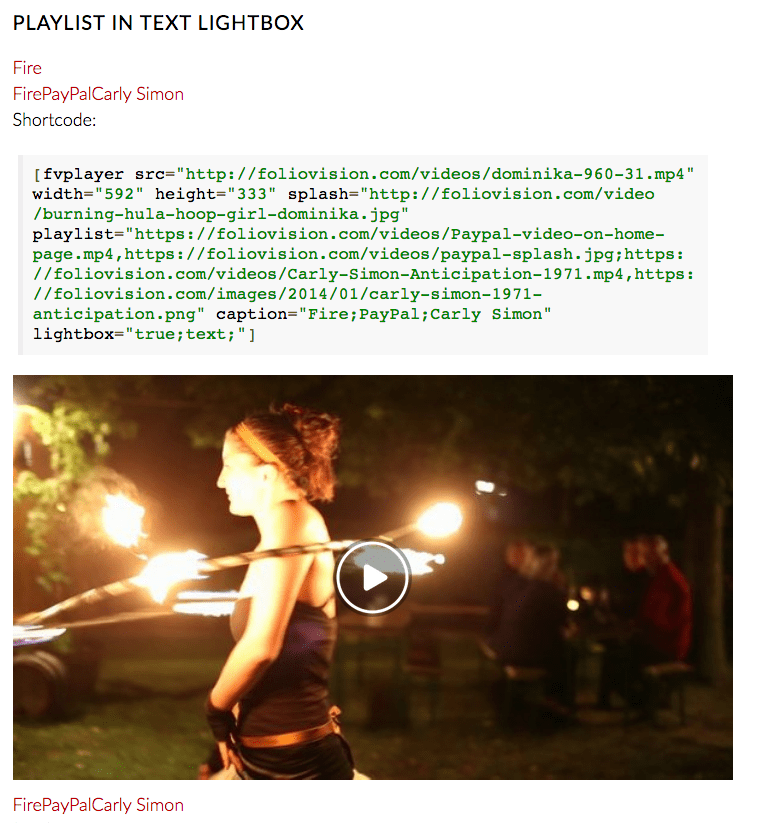
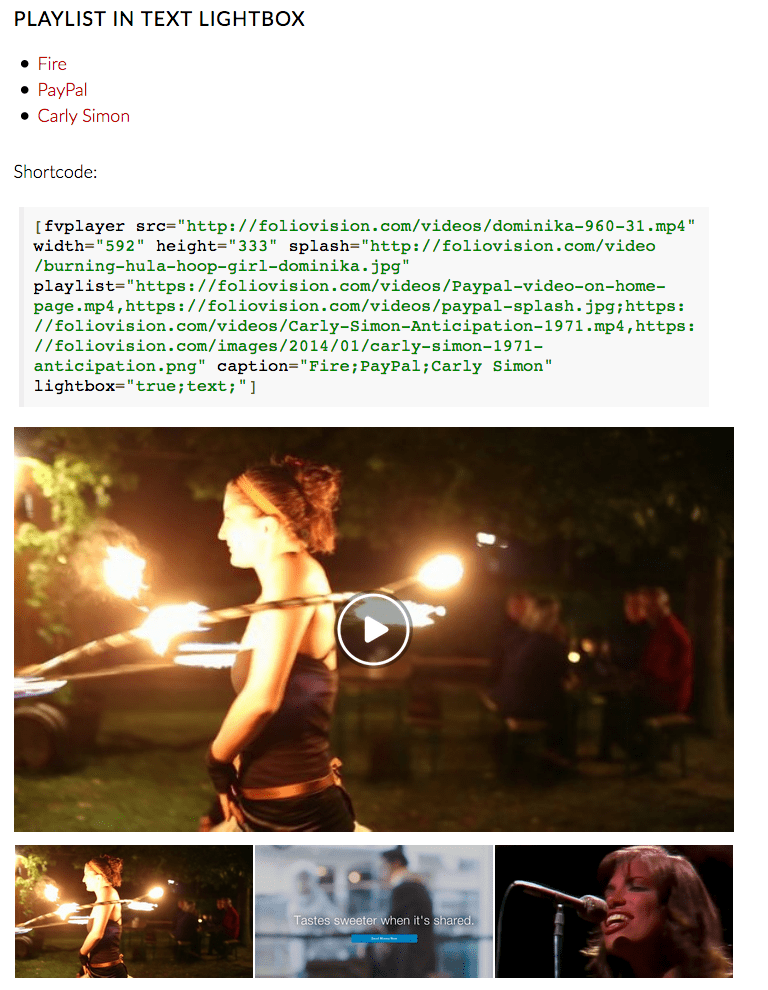
Also, if you use lightbox text links on a FV Player playlist it will render them all as a list of text links instead of showing them next to each other without spacing as it used to. We just didn’t count on anybody on using that combination.
I’m attaching screenshots of before and after.
Thanks,
Martin8 years ago in reply to: Pro features stopped working
Hello Greg,
sorry about not answering earlier, I found that you actually replied to the forum notification emails, rather than replying to the forums here and then there were some crossed signals in our team regarding who is going to answer that.
Please check https://foliovision.com/my-licenses and download FV Player Pro there.
Thanks,
Martin
Hello Michael,
thank you for the login, I had a quick look, but was not able to figure it out – it seems these jQuery Ajax requests are somehow not executing properly on your website.
You can check how this work on our site here: https://foliovision.com/player/demos/video-position-saving You can test both logged in and not logged in.
We would be happy to resolve the issue right on your website with the pro support, however we can’t do it sooner than 3rd of April as in Slovakia we have some state holidays for the Easter.
I expect the versions strings are stripped by some plugin.
Thanks,
Martin
Hello Michael,
sorry that it’s taking so long, we finally made some progress on this. We just need to finish up the testing.
Thanks,
Martin
Hello Michael,
it’s a new feature, so I’m having a look to make sure it works for you.
I checked on https://www.afrolandtv.com/hair-that-moves-trailer/ and it worked just fine. Since I tested as guest user it stored the video position into browser localStorage, which is a technology similar to cookies. The cookies are only used if localStorage fails, as they have a much lower capacity (we could only remember a couple dozen of videos there).
So you don’t have to worry about these cookies at all – FV Player is able to store them just as WordPress is able to set them when you log in to the website. We are also not working with the PHP session.
However I’m noticing that you are stripping the version strings from script URLs. So perhaps your browser was still getting the old script when you run your test. Here’s why to not strip the version strings from URLs of JavaScript and CSS files (short version: your browser won’t know it should download the scripts again if there was a change in any of hem): https://foliovision.com/2017/06/wordpress-cdn-best-practices
As a quick fix you can try to purge your Cloudflare cache and clear your browser cache too. Then this should work for you. You can also test as a guest user and you only need to play the video, let it play for a while, then reload the window and play again – it will continue playing where you left off.
Thanks,
Martin8 years ago in reply to: php 7.1 compatibility
Hello Tom,
we only execute ini_get(‘safe_mode’) if the PHP version is older than 5.3. But I see it’s just causing some warnings, so I removed it completely now for the next release.
Thanks,
Martin
Hello Dennis,
the Amazon S3 URL signature is a basic protection of the video – it makes it impossible to embed the video on some other website (hotlinking). However it’s still possible to download. The video streams like HLS or MPEG-DASH are harder to download, but with the right tool it’s still possible.
Only thing that prevents your videos from being stolen in DRM, where user might be able to download the video, but it won’t play without the decryption key. FV Player Pro provides this with encrypted HLS streams created on AWS.
And even then the video can be screencaptured, so if somebody has the time, he will succeed, although our DRM text gives you hope of tracking it down: https://foliovision.com/player/securing-your-video/protecting-videos-with-drm-text
You can check our overview of video protection options here: https://foliovision.com/player/securing-your-video/protecting-video-from-downloading
Regarding what Firefox reports – I found that it doesn’t report any data for a video (pseudo)streaming connection that is currently running or in use. I was able to get more accurate data in Google Chrome – there you see a running count of MB downloaded for each video.
Thanks,
Martin
Hello Dennis,
just open the browser developer tools, go to the Network tab and check the number of MB transfered at the bottom of it in the status line. It counts for all the data transferred in the pageload, so to get more accurate count just for the video you need to clear it before you start the video playback. In Google Chrome it’s the crossed round icon at the top, in Firefox it’s a trash can icon.
What I mean about video protection is that even if you set the start/end time web developers might be able to get to the full video.
Thanks,
Martin8 years ago in reply to: Uscreen support
Hello Medal,
I wasn’t able to find information about their API. Are you interested in just the video playback, or also some other features? Can you post some video which you would like to see play in FV Player?
Thanks,
Martin
Hello Dennis,
it’s not suitable for protection of videos, like you serve only a part of the video to unpaid members and full video to paid members. We don’t recommend our start/end feature for video protection.
However if you are concerned about bandwidth, it only loads the start of the video (like first 2 seconds or so to get the headers) and then it loads the specified part of the video only and stops loading. However this might differ a bit for each browser. I tested in Google Chrome and Firefox. And the behavior is already different there – in Chrome it only loads first 150 kB and then seeks and in Firefox it loads as much as first 5 MB. I guess it depends on the video too, I was testing with MP4 video here: https://foliovision.com/player/demos/custom-start-time
Thanks,
Martin
Hello Dennis,
FV Player 7 will improve this behavior – if you play some video and let it buffer for a while, it stores that buffered portion of video and you can seek back to it without having to wait for that part of video to load again.
However it only works in the single playback session. If you come back to the video later, you have to buffer it again, specially if you are protecting the video with URL signature to make it impossible to hotlink.
Thanks,
Martin8 years ago in reply to: Issues with ExoClick "In-Stream" ads
Hello Jeny,
I checked what happened to your forum posts – your IP address was on the blacklist of the antispam service we are using. That’s why your new forum topics didn’t appear.
Eduard will get back to you about the VAST issue.
Thanks,
Martin8 years ago in reply to: Using FV Player with WP Offload to S3 Pro
Hello Ryan,
it looks to me like you created some custom functionality for your website around FV Player, which handles the file uploads and then shows them with FV Player. Could you please confirm?
How are you passing the video URL to FV Player? Do you just create a [fvplayer…] shortcode with the URL in it? Seems to me you should be doing that dynamically with wp_get_attachment_url() as the WP Offload to S3 Pro authors suggested. The code might look like the second code sample in FV Player API guide: https://foliovision.com/player/advanced/api-programming
We are reworking the way how FV Player stores the video information. There will be a set of database tables with the player properties, video information and video meta information. We can certainly let the WP Media Library items hook to the player via their IDs rather than URLs there. In fact, is the src parameter in [fvplayer] shortcode has a numerical value, it could just load that media item.
Thanks,
Martin8 years ago in reply to: Audio only with the Ab Loop function
Hello Chris,
the accuracy of the loop markers is a the biggest limiting factor on that. It’s more accurate to use the hotkeys (i and o). So if you listen to the beat and you hit these keys carefully you get an loop which if good enough for musicians to play on top of it.
However since the HTML5 video engine is a bit limited there is a noticeable glitch which is around 100 – 200 ms. So it’s not perfectly in the rhythm.
I did some experiments and we can bring it down to about 50 ms if we improve the code a bit. It seemed almost perfect to me as a guitarist. It depends on the length of the look as well – if you are looping 8 or 16 bars, it’s good enough, but looping of 1 or 2 bars it’s just too distracting.
The second video on https://foliovision.com/player/demos/user-ab-loop has a strong beat, so you can do some testing there, but it would be better if you let us improve the timing first.
Thanks,
Martin8 years ago in reply to: Trying to get property of non-object in
Hello Tery,
sorry about the delay on this, please let us know if you are still having these issues and what are the PHP line numbers now.
Thanks,
Martin8 years ago in reply to: Detect if video is watched to the end
Hello Gerald,
thank you for pointing out the mistake, it’s fixed now. We didn’t notice there is anything wrong as we had Google Analytics on on our website – that’s what _gat is for. I fixed it now.
Thanks,
Martin8 years ago in reply to: Error in frontend.php on line 163
Hello Vijay,
if you get that error, you must be using PHP 5.2, which is too old. Although WordPress runs on PHP 5.2.4 and above, it’s not recommended anymore as there are even some security issues with in that version.
We will fix this in our plugin though.
Thanks,
Martin8 years ago in reply to: Detect if video is watched to the end
Hello Gerald,
the code you found uses the same principle of the FV Player Google Analytics tracking – you have to watch the entire video to make sure it tracks. So if you just seek to the end of the video it won’t trigger.
I tested the code to be sure it’s working and found that it uses one of FV Player Pro variables in the Ajax call. I changed that to use what’s available in the free plugin.
Other than than it works. When testing, make sure you watch the full video, or you click through it carefully to make sure you see each quartile of the video – you can also debug that on this line: https://gist.github.com/foliovision/2c266598333ecbd1f151#file-fv-player-custom-ajax-tracking-js-L38 You should see that all of fv_custom_track_start, fv_custom_track_first quartile, fv_custom_track_second quartile, fv_custom_track_third quartile and fv_custom_track_complete if being triggered.
Thanks,
Martin8 years ago in reply to: pop-up menu on long pages
Hello Andy,
please reinstall the plugin from this ZIP file: https://github.com/foliovision/foliopress-wysiwyg/archive/master.zip
Then clear your browser cache, load the post editing again and the issue should no longer be happening. The problem is that Google Chrome is handled as Safari in the FCKeditor code, so we put in a code to do it differently for these contextual menus.
Thanks,
Martin
Hello Allyn,
thank you for the bug report! We fixed it for the upcoming FV Player release. If you need it right now, you can get it here: https://github.com/foliovision/fv-wordpress-flowplayer/archive/master.zip
Thanks,
Martin8 years ago in reply to: Disable Video Ads For Logged-in Users
Hello MBD,
you shouldn’t be modifying any plugin core code.
Instead, you can unhook the function which puts in these video ads via WP filters API by putting this code into your theme functions.php file:
add_action( 'init', 'fv_tweak_video_ads' );

function fv_tweak_video_ads( $arg ) {
  if( is_user_logged_in() ) {
    global $FV_Player_Pro;
    remove_filter( 'fv_flowplayer_playlist_items', array( $FV_Player_Pro, 'video_ads' ), 10, 2 );
    remove_filter( 'fv_flowplayer_playlist_item_html', array( $FV_Player_Pro, 'video_ads_item_html') );
  }
}
Please let us know how it goes. We could add an option for this as well, but then some websites will require that the user has a paid membership and then it goes really complex. We should master that though.
Thanks,
Martin8 years ago in reply to: PeepSo Incompatibility Issue
Hello Clod,
the filter hook to allow us to tweak the video display should be available in PeepSo video plugin version 1.9.7 (due around March 20).
Thanks,
Martin
Hello Harold,
you can use a CSS like this to prevent it:
#fv_player_pro_boxOverlay {
    pointer-events: none;
}
However we will be changing the lightbox library used by FV Player in a month or two, so you will probably have to update it then.
Thanks,
Martin8 years ago in reply to: PeepSo Incompatibility Issue
Hello Clod,
everything that is configured in the global settings would work – to yes to AB loop and the logo. But everything that requires more data specified in the shortcode – such as the subtitles – won’t work.
Thanks,
Martin
Hello watchthepix,
yes, you should be seeing a note in FV Player Pro settings that only the “Exoclick zone ID” part of Exoclick ad code is required.
However I see that you get following error on your website on the JavaScript console:
invideo.js?ver=4.9.4:6 Uncaught TypeError: $f.addPlugin is not a function
    at invideo.js?ver=4.9.4:6
Please submit that to Exoclick ads support, it seems as if they are trying some extra ad initialization. They try to use some addPlugin call of Flowplayer which doesn’t exist – it’s something that existed in Flowplayer 3, but not in Flowplayer 6, which is the core of FV Player. It seems to me that their video player detection code is flawed, as they seem to work with Flowplayer 5 too, which is not that far from Flowplayer 6.
Thanks,
Martin8 years ago in reply to: PeepSo Incompatibility Issue
Hello Clod,
I see, we thought you just want to show the videos insterted with PeepSo Video addong in FV Player. If you would like tho use FV Player in your posts created in PeepSo, then you will have to talk to them to allow use of shortcodes. If we would have to provide a new video button like PeepSo Video addon does, it would be a fairly big project.
Thanks,
Martin8 years ago in reply to: PeepSo Incompatibility Issue
Hello Clod,
we got a reply from PeepSo CTO Matt:
We get these embed codes straight from the APIs of the video hosting services. I can pass this entire output through a filter, but not sure how useful would that be for you?
I ensured him it’s just what we need, so hopefully it will be part of one of the next versions. Then it should be really easy for us to let FV Player display these videos.
Thanks,
Martin8 years ago in reply to: Same VAST tag for some videos
Hello Florian,
we were thinking of adding presets. Currently FV Player has a single global configuration (skin, various special buttons and so on). So you could create multiple presets of such configuration and also specify different VAST ad for each. However it’s not currently a priority.
If you are a PHP programmer you can also use the WordPress filters to set the individual player VAST ad URL based on (for example) post category, FV Player has a “fv_flowplayer_args_pre” filter available: https://foliovision.com/player/advanced/api-programming
Thanks,
Martin8 years ago in reply to: Converting JW Player shortcodes
Hello Florian,
hopefully the JW Player shortcodes reference images which still exist in your database and it’s just bug on our end.
Could you please check if opening URL like https://xxxxx.com/wp-admin/post.php?post=538511&action=edit opens a “Edit Media” screen for the correct image file and that the image is displayed?
Could you please reinstall FV Player from this ZIP file and see if it fixes the issue? https://github.com/foliovision/fv-wordpress-flowplayer/archive/jw-player-import-fix.zip
To do that you will have to first deactivate and delete the current FV Player plugin you are using. WordPress will warn you that you might loose settings and data, but it’s not the case with out plugin, no settings now videos will be lost. You can also just replace the files via FTP.
Thanks,
Martin
Hello watchthepix,
next release of FV Player Pro will have a fix for this in its beta release – only zone ID will be the mandatory parameter.
To get this fix right now you can just download a new copy of the plugin from https://foliovision.com/my-licenses and then install from that ZIP file. To do that you first have to deactivate the plugin which you are currently using, then delete it (WordPress will warn you that you will lose some data, but it doesn’t apply to our plugin, no settings nor videos will be lost) and then use Plugins -> Add New -> Upload function with the ZIP file.
Thanks,
Martin8 years ago in reply to: PHP Notice on the line 748
Hello Leho,
I’m sorry about the delay on this, if you would provide your VTT file, there is chance we would come to this earlier.
But I know what it’s like when you submit a bug report along with a suggestion how to fix it and the plugin authors don’t seem to care.
Could you please reinstall FV Player Pro from a fresh Zip file you get at https://foliovision.com/my-licenses and let us know if that fixes your issue? I added the initialization of the variable like you suggested.
Thanks,
Martin8 years ago in reply to: PeepSo Incompatibility Issue
Hello Clod,
thank you, I had a look at the plugin, made some notes and will discuss possibilities of adding support for it with Alec.
Thanks,
Martin8 years ago in reply to: Cannot activate plugin after update
Hello Ian,
sorry about that. We fixed it and released FV Player 6.4.2. I see where the mistake was made and also why our automated testing didn’t catch it – it only applies on PHP version lower than 5.5 and we only run very basic tests on that version. That’s something to improve.
Thanks,
Martin
Hello Aldric,
sorry about that. We fixed it and released FV Player 6.4.2. I see where the mistake was made and also why our automated testing didn’t catch it – it only applies on PHP version lower than 5.5 and we only run very basic tests on that version. That’s something to improve.
Thanks,
Martin
Hello Brian,
new release of FV Player Pro in its Beta brach(here is how to switch to it) plays the Vimeo HLS streams on Androind 4.3 and above. We figured out it was the HLS subtitles which were causing the issues on it.
It should be released later today. It should fix your Android issues with certain Vimeo videos you were having. I was no longer able to replicate the issues you were having.
Thanks,
Martin8 years ago in reply to: Player takes a while to switch to HD
Hello Evélina,
we adjusted this to pick the best stream automatically. Until now it was always using the first one, but it makes more sense to let it check what streams are available and pick what is most suitable. I tested this with a mobile internet connection and I was getting the low quality stream, on fast connection I get the HD right away and there is no noticeable slowdown in video loading.
Please reinstall FV Player from http://wordpress.org/plugins/fv-wordpress-flowplayer/ and let us know how it’s going.
In FV Player 7 you will also get the quality switching menu for these HLS streams on the desktop computers (which use HLS js), so you will be able to switch to HD stream even on slow connections – you will just have to wait longer for it to load.
Thanks,
Martin8 years ago in reply to: PeepSo Incompatibility Issue
Hello Clod,
I checked the Hello World plugin for PeepSo, but it’s too basic.
I see the VideoSo plugin works pretty nicely: https://www.peepso.com/downloads/vidso/#prettyPhoto
Not only it adds a button to insert a video, but it then also lists there videos on your profile etc. So it’s not easy to beat. If we only make sure shortcodes are supported it won’t list the videos so nicely and users will also have though time inserting the videos.
I imagine we could change the way the videos from VideoSo are displayed to use FV Player, but I guess it would be a custom programming job.
Thanks,
Martin8 years ago in reply to: Speed buttons do not show on ipad
Hello Debbie,
actually YouTube doesn’t offer these video speeds for YouTube videos at all. It must be giving using some special video stream for iPads which doesn’t support changing of the playback rate.
Thanks,
Martin8 years ago in reply to: Amazon S3 – html5: network error
Hello Dennis,
thank you for the video. Actually the “Default Expiration Time” setting only applies when not using “Amazon S3 Ajax (Pro)”. We should be hiding that setting for users who enable “Amazon S3 Ajax (Pro)”.
So your video shows that it actually worked for you this time and as I explained increasing the timeout won’t change anything. You can even see the video request which ended up with HTTP 403 error – because the link has timed out.
So I wonder why it wasn’t working for you before, specially as you have cache disabled in your browser and you should always be getting fresh JavaScript files.
You can test https://foliovision.com/player/demos/amazon-signed-urls by playing that video right there, then pausing it and coming back later. That will show if the issue is related to your website or to FV Player Pro code or to your specific situation somehow.
Blocking mouse right click might discourage some users, but you can still get at the page HTML code by looking for that function in the web browser menu.
FV Player dones’t work with PHP session. The PHP session takes place between the browser and the server hosting the website, while your videos are hosted on AWS, so it don’t see how that could be related.
Thanks,
Martin8 years ago in reply to: Amazon S3 – html5: network error
Hello Dennis,
thank you for the screencast.
I was not able to reproduce this error on the second video here: https://foliovision.com/player/demos/amazon-signed-urls Could you please test on that link as well? I reduced the timeout of the video down to 10 seconds for that page, so it should be easy for you to test it out.
Could you please double check that Settings -> FV Player -> Integrations/Compatibility -> “Prefer Flash player by default” is disabled on your site?
Thanks,
Martin8 years ago in reply to: force download of videos
Hello Marius,
thank you for posting the details of your setup privately.
We were recently solving some video download issues on one of the websites. In the end we added a KeyCND pull zone in front of the video storage server, which reduced its traffic, improved speed and it also has a setting for force download.
Also, you mentioned you use the fv_player_pro_boxElement class. That comes from Colorbox which we use for lightbox. We will be changing that to Fancybox soon.
Thanks,
Martin
Hello Ash,
we are almost finished with a new FV Player API function which lets you register FV Player custom video fields. You call a single line of PHP and you get a post editing meta box with the “Add Video” button which brings up the shortcode editor and it also previews the video that is inserted.
Wouldn’t that solve your issues? Let us know, I’m eager to get it finished and post some documentation.
Thanks,
Martin8 years ago in reply to: iframe shows black frame and scroll
Hello Angel,
I see that the playlist doesn’t size properly in the iframe embeds, we will fix that.
Thanks,
Martin8 years ago in reply to: PeepSo Incompatibility Issue
Hello Clod,
Eduard is gone for a long weekend, he will get back to you about PeepSo.
Regarding FV Player Pro – please make sure you access https://foliovision.com/my-licenses with the account which you used to buy FV Player license, if you have one. If you purchased with PayPal, it used your PayPal email address to create your account.
Thanks,
Martin8 years ago in reply to: Expiration for HLS Encrypted video
Hello Ash,
unfortunately we made no progress on that.
We recommend using encrypted HLS streams which is far better protection than a URL signature.
We are currently working on integrating Amazon bucket browser into FV Player, that should make your video posting from AWS easier.
Thanks,
Martin
Hello Ash,
please let us know more about your use case – why would you need to decode the encryption key at some other time than when you are posting the video into some page with shortcode editor?
Thanks,
Martin8 years ago in reply to: Autoplay mute
Hello Angel,
could you please post more details about your solution for benefit of other FV Player users? You can post code in the <pre> tags.
Thanks,
Martin8 years ago in reply to: Remove ads for people who have paid
Hello Gary,
please check our programming guide: https://foliovision.com/player/advanced/api-programming#filters -> fv_flowplayer_args_pre
That filter shows you how to adjust the player shortcode arguments before display. It checks for “autoplay” URL query argument, so that is the place where you could check the user membership/payment.
To get rid of the ads you would have to set the desired shortcode argument properly, depending on what kind of ads you use: https://foliovision.com/player/basic-setup/shortcode-parameters#ads
For simple overlay ads it would be ad_skip=”yes”, for preroll/postroll video ads available in FV Player Pro it would be preroll=”no” or postroll=”no” and for VAST Ads use vast=”skip”.
add_filter( 'fv_flowplayer_args_pre', 'fv_tweak_fv_flowplayer_args_pre' );

function fv_tweak_fv_flowplayer_args_pre( $args ) {
  if( 1 /* check user membership here */ ) {
    $args['ad_skip'] = 'yes';
    $args['preroll'] = 'no';
    $args['postroll'] = 'no';
    $args['vast'] = 'skip';
  }
  return $args;
}
Thanks, Martin
Hello Gary,
FV Player doesn’t insert any widgets, but please check if enabling Settings -> FV Player -> Integrations/Compatibility -> “Disable saving of color settings into a static file” won’t fix your issue.
Thanks,
Martin8 years ago in reply to: how to add video to already existing playlist
Hello Gary,
we are working and adding a database of videos and playlist into FV Player.
At the present time you have to find the playlist in your post or page and update it there. It works using shortcodes, which is quick and efficient solution for simple plugins, but now we need something better for FV Player, so we are working on it.
Thanks,
Martin
Hello Gary,
I installed the Advantage theme from https://wordpress.org/themes/advantage/
At a glance I’m not seeing any issue. Where can I find the masthead settings and what steps do I need to take to reproduce the issue?
We are also happy to fix the issues directly on your website if you purchase the Pro support here: http://foliovision.com/pro-support
Thanks,
Martin
Hello Ash,
we forgot to mention we also need to know your region setting for AWS Decoder.
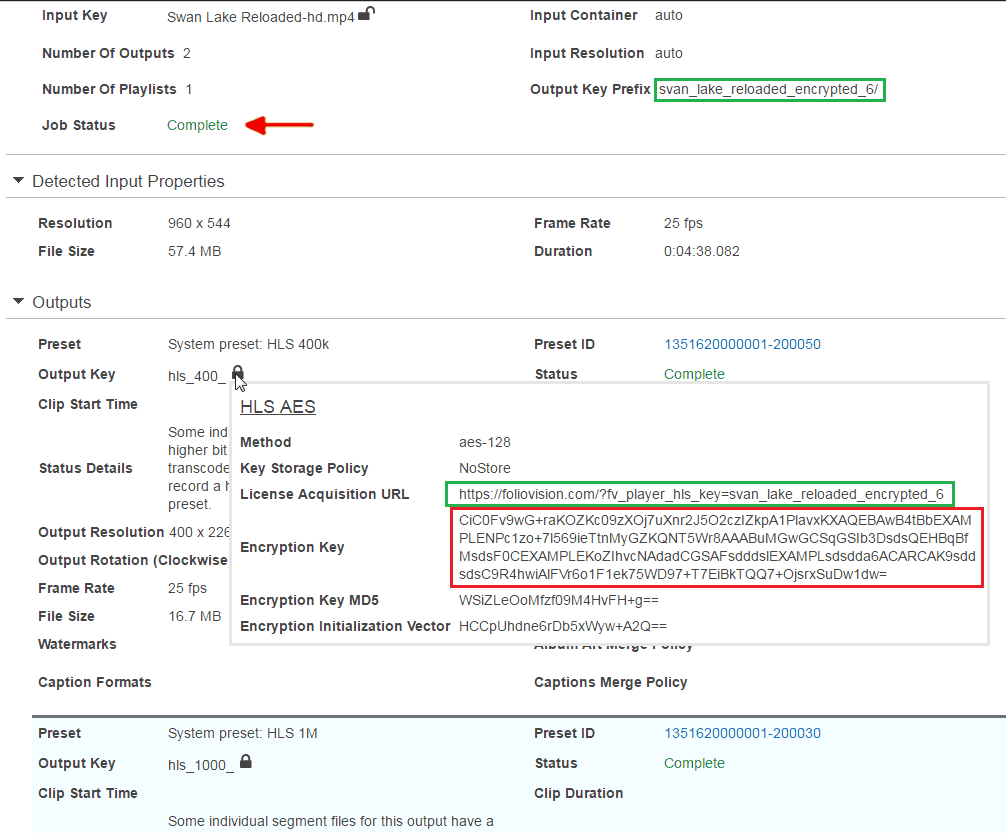
You also posted 3 lines for the video Encryption Key, it should be the part highlighted in red only: https://foliovision.com/images/2015/04/encrypted-hls-key.png
We improved the AWS Decoder to report the full error back to you. Please reinstall FV Player Pro from a ZIP file which you get from https://foliovision.com/my-licenses Then switch it to Beta: https://foliovision.com/player/basic-setup/switching-fv-player-pro-to-beta Then when you try to decode your video encryption key you will get an error message from AWS which should help you with understanding what’s wrong with your setup.
Thanks,
Martin8 years ago in reply to: Autoplay mute
Hello Angel,
please let us know how did you set the video for silent autoplay. The volume setting is stored in browser local storage (similar to cookies). If you use the proper method for muted autoplay it should not matter what the stored volume is.
Thanks,
Martin8 years ago in reply to: Dynamically set video URL
Hello Hector,
please check https://foliovision.com/player/advanced/api-programming#how-to -> QUICK JAVASCRIPT SAMPLES -> Player initialization via JavaScript.
Thanks,
Martin
8 years ago in reply to: Amazon S3 – html5: network error
8 years ago in reply to: Amazon S3 – html5: network error
Hello Dennis,
you are probably using some plugin which improves the scores your site gets in GTmetrix. It’s removing the version numbers from the plugin JavaScript file URLs. So when there is a new version of a plugin, users might be getting the old version from their browser cache.
It might be even happening to you and it might be the cause of why the video reload doesn’t work for you, but I noticed you have cache disabled in browser developer tools, so it should not be the case.
Thanks,
Martin8 years ago in reply to: FV Pay Per View Number of Devices
Hello Richard,
we just released FV Player Pay Per View 0.5 which brings following improvements:
* Fixing video rental duration in email text to respect the settings
* dding option for video rental button text and other messagesIf you don’t see the update available, please grab the new version from https://foliovision.com/my-licenses as we found there was a bug in the licensing code.
We are also discussing the possible improvements of the IP restrictions in email support thread.
Thanks,
Martin
Hello Brian,
we let Safari 11 play the MPEG-DASH stream, that should fix the issue.
Thanks,
Martin8 years ago in reply to: Any way to auto-generate a splash image?
Hello Jeff,
we are working on adding tool which will let you grab the splash screen from any video position which you like.
The first video frame is often black and not all browsers support it. It would also mean more traffic on your video hosting server/CDN. But with FV Player 7 we could check that too, seems like it might make it work for mobile, but I wonder what part of video has to load for this to work.
Thanks,
Martin8 years ago in reply to: Video Ad setting not saving
Hello Ran,
could you please check this with your server tech support? They might be using mod_security module or something similar that filters the POST requests. It might be the cause of the issue here.
Thanks,
Martin8 years ago in reply to: Adding a Class to the Video ads link
Hello Nate,
it actually doesn’t insert an anchor, but hooks to click event on player. So there is no place where such class could be added.
You will have to ask the mobile app developer about this, perhaps you can put some hashmark into the ad URL which will also make it open in the default browser?
Thanks,
Martin8 years ago in reply to: Amazon S3 – html5: network error
Hello Dennis,
the query string version in the JavaScript file makes sure you are always using the latest up to date code of any plugin (once it’s updated in wp-admin).
So there is a slim chance that you are simply not getting the latest FV Player Pro JavaScript code and that’s why the video playback doesn’t recover for you. But I think the issue might be with your system clock, we need to see what you get with the latest FV Player Pro on your JavaScript console, as described in my post: https://foliovision.com/support/fv-wordpress-flowplayer/troubleshooting/html5-network-error#post-63006
Thanks,
Martin8 years ago in reply to: Licence keeps dropping out
Hello Richard,
thank you for the bug report, this has been fixed and FV Player Pay Per View 0.4.1 released.
You probably won’t see the new release because of the issue, but if you change the license key to something else and then put it back it should work. Or you can download the plugin ZIP file from https://foliovision.com/my-licenses
Thanks,
Martin8 years ago in reply to: Amazon S3 – html5: network error
Hello Dennis,
it’s just about letting the browser know there is some new JavaScript code. If the query string version on the JavaScript URL is removed the web browser will hang on to the old JavaScript file for much longer and won’t get the updated code on time. This won’t change anything you do with your membership website, but I wonder if this could be part of the reason why the S3 videos fail for you like that.
Thanks,
Martin
Hello Nate,
you are appending to the class attribute, which is a string of CSS classes, so if you need to append another one you need to include a blank space:
$attrs['class'] .= ' fp-player-mobile';
Then it should work.
I would recommend you adjust the player dimensions as needed using some other filer, I described that in the other thread: https://foliovision.com/support/fv-wordpress-flowplayer/how-to/accessing-video-player-through-wordpress-rest-api#post-62458
Thanks,
Martin8 years ago in reply to: Amazon S3 – html5: network error
Hello Dennis,
thank you, that proves that the video URL is loaded with Ajax as it should be. But I’m not sure why the video error is not detected properly and why it won’t try to reload the video for you.
Could you please reinstall FV Player Pro from a fresh ZIP file which get here? https://foliovision.com/my-licenses -> “Download FV Player Pro”
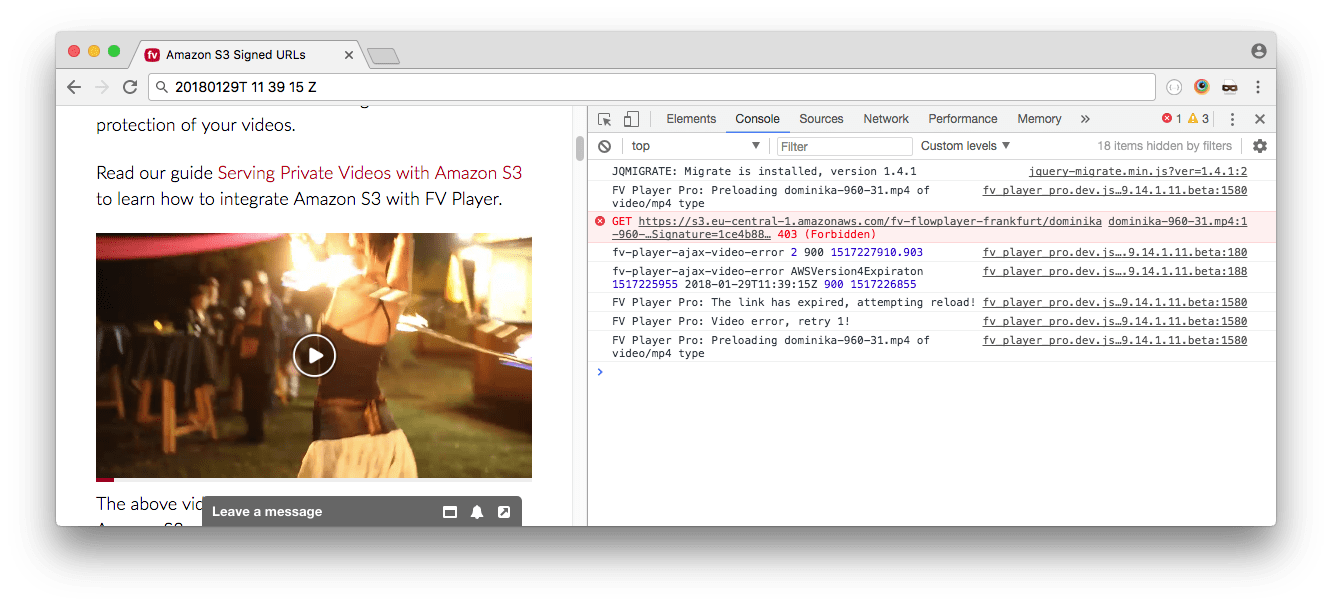
Then you will see a log on the browser JavaScript console (it’s the first tab of Developer Tools named “Console”) when the video error occurs and why it didn’t occur. I’m attaching a screenshot of what I’m getting on https://foliovision.com/player/demos/amazon-signed-urls So we will need to see these console log messages, mainly the “fv-player-ajax-video-error” ones.
I noticed your are stripping the query string versions (here’s why no to do so: How to use WordPress with CDN), so please also make sure you clear your browser cache.
Thanks,
Martin
Hello Nate,
that div element is there to make sure the player is sized properly in responsive designs. If it causes black bars above and below the videos in your mobile app, then I guess FV Player JavaScript is not getting the correct window width.
You can just try to hide .fp-ratio in your mobile app CSS and see if it helps.
Thanks,
Martin8 years ago in reply to: Start a video muted in the shortcode editor?
Hello Dan and hummelmose,
I have to correct Eduard here a bit – the new silent autoplay in FV Player 7 helps making sure the video is allowed to autoplay on mobile devices. But it doesn’t give you the opportunity to start the video muted.
A script like this in your site footer or theme JS file will make your video muted:
flowplayer( function(api,root) {
	if( jQuery(root).parents('.muted').length ) {
		api.bind('ready', function(e,api,video) {
			api.conf.muted = true;
			api.mute(true);
		});
	}
});
All you have to do is place the shortcode in a div like:
[fvplayer ...]Thanks,
Martin8 years ago in reply to: Video Ad setting not saving
Hello Ran,
thank you for the link to the page where you are having issues with the YouTube video. What does the “Check Template” button says when you click it? It should complain about the second copy of jQuery library found in your site footer: https://code.jquery.com/jquery-1.10.2.js
jQuery is a JavaScript library required by some of the FV Player functions. However when you load it twice on the same page you just break most of the event hooks that it created. It likely breaks all of your plugins that work with jQuery, not just FV Player.
Please get rid of that and your videos will start to play. We are also happy to fix the issue for you, just order our pro support.
—
However that doesn’t explain the video ad saving issue. There should be no problems with YouTube and Vimeo video ads. You mentioned that when you enter an MP4 path like http://mydomain.com/wp-content/uploads/2018/01/WhatsApp-Video-2018-01-21-at-11.56.05-AM-1-1.mp4 that it saves.
What about when you enter one of our public video paths: https://s3-eu-west-1.amazonaws.com/fv-player-unprotected/dominika-960-31_HD.mp4 Will that one save?
If you buy our Pro support, we will solve this issues as well. I think it might be related to your host filtering these Vimeo and YouTube URLs in some way.
Also, do you get the same problem when you try to save the video ads in some other browser?
Thanks,
Martin8 years ago in reply to: Amazon S3 – html5: network error
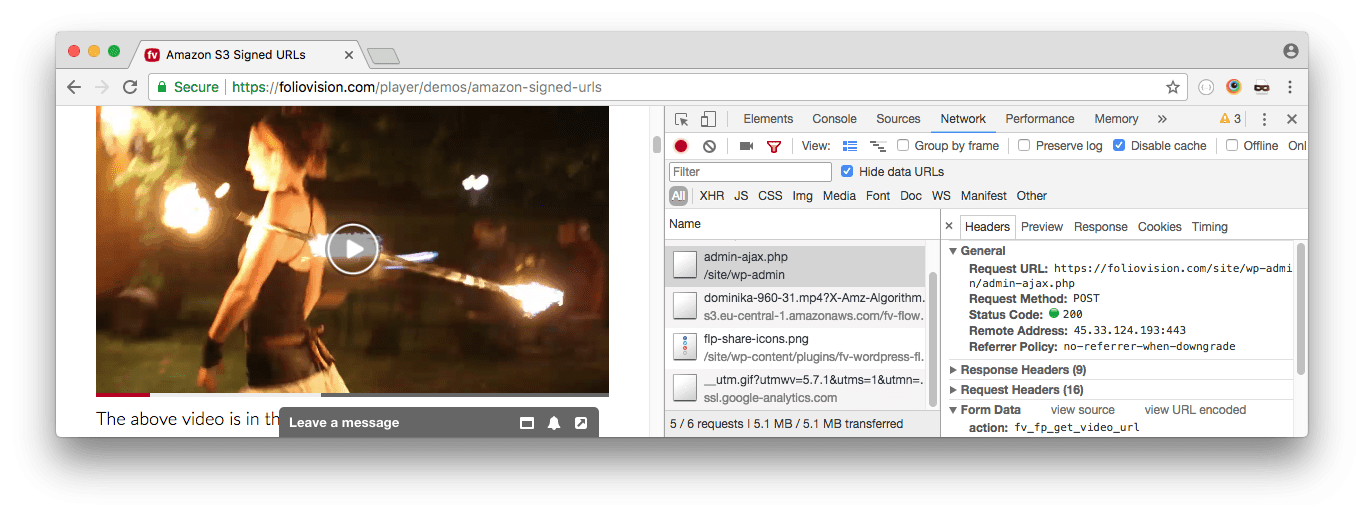
You can also check the admin-ajax.php requests which you see in network activity. Does any of them send “action” parameter with value of “fv_fp_get_video_url” as seen on the attached screenshot?
Thanks,
Martin8 years ago in reply to: Amazon S3 – html5: network error
Hello Dennis,
do you see “dynamic_domains” in page footer when “Load FV Flowplayer JS everywhere” is enabled?
From the HTML you sent to us it seems that you are serving a pretty bare-bones page HTML which then loads the membership content using Ajax. That might be the culprit, although the above setting helps – it helps all the e-learning sites with WPLMS system for instance.
We are also happy to fix the issue for you directly on your website, just order our pro support.
Thanks,
Martin8 years ago in reply to: Video Ads not loading correctly
Hello Nate,
I wasn’t able to reproduce this issue. You can check how it works for us here https://foliovision.com/player/demos/roll-custom-video -> “Playlist”.
Please check if you are using last FV Player (6.4) and latest FV Player Pro (0.9.14). Otherwise there might be an issue, although we would like to avoid it. One of our goals is to provide less updates to users who are not on FV Player Pro Beta release.
FV Player 7 (in beta testing by some of the users) also improves the video ads serving – they are served even if you hit a playlist item directly and there is an option to show the ads even in between the videos.
Thanks,
Martin8 years ago in reply to: Splash image using http rather than https
Hello Deborah,
what exact [fvplayer…] shortcode do you get?
Could you please check if you also get a http:// link when you insert an image using the WordPress “Add Media” button?
Thanks,
Martin
Hello Marc,
thank you for the bug report!
In our experience it’s easier to always prefer the https:// links. However we did put in a fix and it will be part of the next FV Player version.
In the meantime you can get the new version here if you are in a hurry: https://github.com/foliovision/fv-wordpress-flowplayer/archive/master.zip To reinstall FV Player from that you will have to first deactivate and delete the current FV Player plugin you are using. WordPress will warn you that you might loose settings and data, but it’s not the case with out plugin, no settings now videos will be lost.
Thanks,
Martin8 years ago in reply to: Amazon S3 – html5: network error
Hello Dennis,
thank you for the links. I see, your theme is doing something special for the members – it appears the member content is loaded using Ajax. If you use Ajax to load your pages with videos you need to enable the Settings -> FV Player -> Integrations/Compabitility -> “Load FV Flowplayer JS everywhere” setting.
Please let us know if it helped. FV Player only loads its scripts on pages which contain FV Player (to make sure there are no scripts which are not absolutely needed – for page speed reasons), so if you load the pages with videos using Ajax, FV Player needs to be set to load on all pages using the setting mentioned above.
Thanks,
Martin
Hello Brian,
we were able to replicate the issue on Android 7.1, it’s weird. What helped was loading HLS for that device. Vimeo HLS streams were not safe to play on Android 4.4, but perhaps they work fine on Android 6 and above, we need to check.
Thank you for the video. Could you please play the FV Player video in your Safari and then right click it and choose Inspect Element? You should be able to find a video element easily and see what it’s playing – please see the attached – it’s taken from my Safari 11.0.2 where it plays just fine.
As you can see it plays an m3u8 video – HLS stream. Then you can copy that URL and open it in browser directly – will it play?
You should be also able to test with the HLS and MP4 videos taken from Vimeo directly – just open your video like this: https://vimeo.com/249186045/settings/file – you should be able to see “Access your video files” section which several input boxes. Could you please check if these play properly?
Thanks,
Martin8 years ago in reply to: Amazon S3 – html5: network error
Hello Dennis,
please check the wp-admin -> Plugins screen. There you will find both “FV Player” and “FV Player Pro”. The FV Player Pro version needs to be 0.9.14 in order for it to reload the video and FV Player needs to be 6.4 to make sure the full error message won’t appear.
However the issue seems to be that there is a problem with how FV Player Pro parses your video URLs.
Please check your page HTML and see if you find “dynamic_domains” JavaScript array with “region-nae.s3.amazonaws.com/{YOUR BUCKET NAME}” as one of the values.
We need the following to be able to check:
* exact shortcode which you are using (mainly the video URL part)
* “Amazon Bucket” field content from Settings -> FV Player -> Hosting -> Amazon S3 Proteted ContentPlease send these over, we won’t publish it, or you can use https://revealit.me service (no registration required, really easy to use and also secure) to do so.
Thanks,
Martin8 years ago in reply to: Video Ad setting not saving
8 years ago in reply to: Video Ad setting not saving
Hello Ran,
could you please let us know what exact links and video URLs are you entering? A screenshot with the values would help too (if you log in to our forums you will be able to upload images).
What happens if you just try to add simple words or numbers?
Also, what page does it go to when you say it’s a 404 error page? A screenshot would come handy as well, but it has to show the browser location bar.
What other plugins are out using?
Does it also happen with disabled JavaScript?
Thanks,
Martin8 years ago in reply to: Amazon S3 – html5: network error
Hello Dennis,
FV Player 7 is a couple of weeks away, it brings features such as remembering the playback position for users, silent autoplay for mobile, video playlist controls and a lot more. We are working with the core Flowplayer team on fixing some of the bugs too, is it uses the new Flowplayer 7 (not so new now, but it still gets new bugfix releases).
Thanks,
Martin8 years ago in reply to: Amazon S3 – html5: network error
8 years ago in reply to: Amazon S3 – html5: network error
Hello Dennis,
actually the region is not the reason for buffering problem, it’s the reason why FV Player Pro didn’t reload the video on failure. Version 0.9.14 which is now our fixes it in its Beta release.
The video URL was getting displayed due to a bug which I already explained, FV Player 6.4 fixes it.
FV Player 7 will have more improvements, we are working on automated testing for it.
Thanks,
Martin
Hello Bill,
could you please try again? I suppose you downloaded the file while it was still uploading.
Thanks,
Martin8 years ago in reply to: FV Pay Per View Number of Devices
Hello Richard,
we could provide a global configuration preference for this, so you could set it down to 2 browsers.
However it’s not the number of plays, it’s just the number of browsers that can get to the video in the set Rental duration period – so that user can’t just send his login to somebody else to watch the video. But we do allow these extra devices in case he wants to watch it on his mobile or in case he has to switch browsers to be able to play.
We could track the number of plays, but it might not work so well for old mobile phones and it all becomes quite tricky. I would have to discuss that in our team, I see it might be a nice improvement if done properly. But I’m not sure if Vimeo On Demand works that way for example.
Thanks,
Martin8 years ago in reply to: force download of videos
Hello Marius,
FV Player Pro 0.9.14 will restrict the download button to only show to logged in users. The idea behind that is to be able to check the user membership level before allowing download – however we are not there yet.
I’m not having issues with FV Player download button in Chrome 63 or Safari 11 or Opera 50 – I click the button and it downloads the video.
I can see the issue in Firefox 57 though. Problem is that they prioritize the Content-Disposition data in the HTTP header of the downloaded file over this: https://developer.mozilla.org/en-US/docs/Web/HTML/Element/a#attr-download
I was looking for a JavaScript workaround and for now I had to simply let FV Player Pro show a message like ‘Please click again with right mouse button and select “Save As…”‘ if the user hits the download button in Firefox, IE or Safari below version 11.
This improvement is part of the Beta branch of FV Player Pro 0.9.14 which will be released today. You can check it here when you are logged in.
We are also working (as you noted) on the download button which will appear right there in the player which will work in playlist and lightbox.
Thanks,
Martin8 years ago in reply to: Amazon S3 – html5: network error
Hello Dennis,
I think I figured this out, the issue was happening when the AWS Signature Version 4 was being used. Practically speaking it was only working for S3 buckets for which you selected no “Region” in the FV Player settings. This region setting for S3 is now a recommended practice and absolutely required for some of the AWS regions (Frankfurt for example).
FV Player Pro 0.9.14 which fixes this issues will be out today.
Thanks,
Martin8 years ago in reply to: Amazon S3 – html5: network error
Hello Dennis,
FV Player 6.4 should be out soon, there is some issue with regeneration of the ZIP files on WordPress.org which we reported.
If prevents the video URL showing to the logged in users unless they can edit the post in which the video is posted.
I’m not sure why the video fails like that for you. You haven’t provided the link to the page where we could see your issue, so can you try on https://foliovision.com/player/demos/amazon-signed-urls instead? The second video loads with an the “Amazon S3 Ajax” option enabled. So you should be able to start playing it, then pause and come back in 16 minutes and see if it fails for you.
Thanks,
Martin