Foliovision › Forums › FV Player › Troubleshooting › Cloudfront HLS encryption – can't generate Decription Key
-


I can not generate Decryption Key for Cloudfront on shortcode editor.
non-encrypted streaming works properly.I tried to add Admin permission to the Cloudfront user like mentioned on this thread but didn’t work.
https://foliovision.com/support/fv-wordpress-flowplayer/troubleshooting/decryption-key-not-generated

-
-
Hello Ash,
What kind of issue are you getting? Did you copy the Encryption Key (step 13 in our encrypted HLS guide) to the shortcode editor , but the Decrypt button didn’t work? Or it was something different?
Thanks,
Eduard
Yes. followed the instruction.
Shortcode EditorVideo tab > Video:
https://********.cloudfront.net/directory/index.m3u8Options > Encryption Key:
key of the index from Elastic Transcoder consoleAlso I’ve set the credential to these settings.
Settings > FV Player Pro > Amazon AWS Decoder (Pro)
Settings > FV Player Pro > Cloudfront (Pro)
Clicked “Decrypt” and nothing happened
I can obtain decryption key with Amazon PHP SDK on same server.
So I guess something wrong with FV Player.
Hello Ash,
Thanks for the detailed explanation. Could you please send us the encryption key from this step and the access keys (those from Settings > FV Player Pro > Amazon AWS Decoder (Pro))? You can do so securely via this free service – https://revealit.me/.
Thanks,
Eduard
Sent Revealit message via Rocket.Chat.
Hi Ash,
I can confirm receiving it. We’ll take a look into this and let you know what can be done.
Thanks,
Eduard
Hello Ash,
we forgot to mention we also need to know your region setting for AWS Decoder.
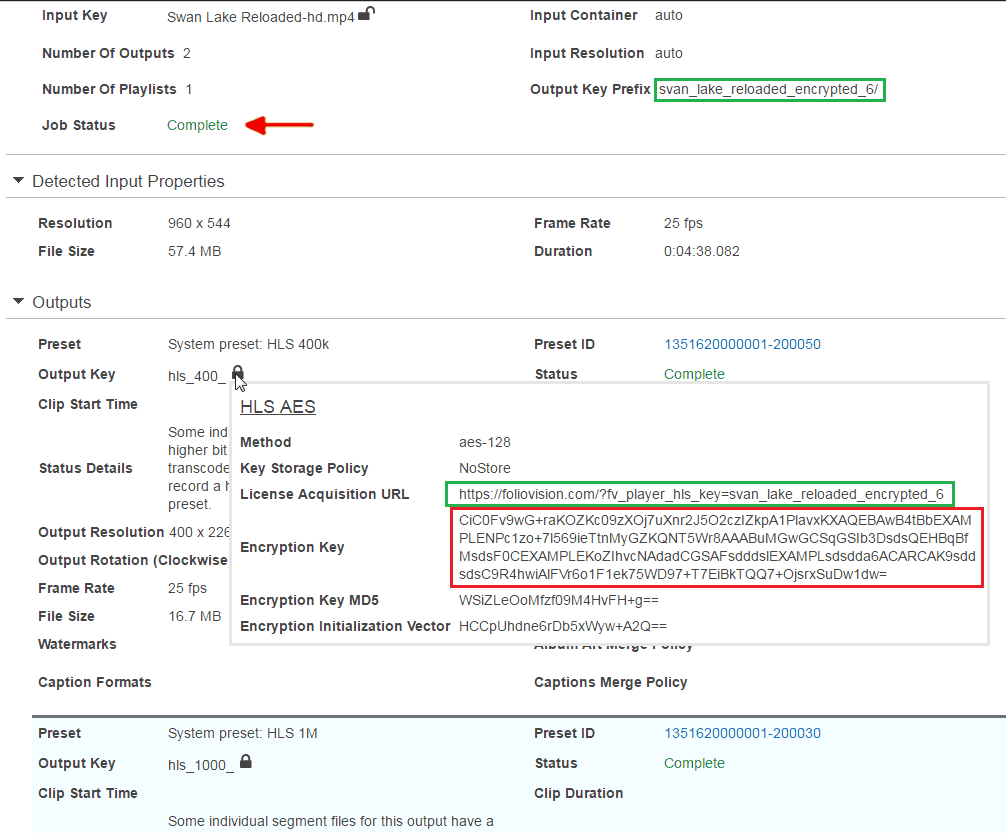
You also posted 3 lines for the video Encryption Key, it should be the part highlighted in red only: https://foliovision.com/images/2015/04/encrypted-hls-key.png
We improved the AWS Decoder to report the full error back to you. Please reinstall FV Player Pro from a ZIP file which you get from https://foliovision.com/my-licenses Then switch it to Beta: https://foliovision.com/player/basic-setup/switching-fv-player-pro-to-beta Then when you try to decode your video encryption key you will get an error message from AWS which should help you with understanding what’s wrong with your setup.
Thanks,
Martin
Thank you.
Problem was region setting for AWS Decoder.
I didn’t notice there is “Oregon” region so I set “US Standard.”
With “Oregon” region, Decrypt button works.
By the way, It would be nice if there was individual decryption key generator on somewhere other than shortcode editor(maybe on Settings page?)
Hello Ash,
please let us know more about your use case – why would you need to decode the encryption key at some other time than when you are posting the video into some page with shortcode editor?
Thanks,
Martin
I’m developing one time coupon system plugin for videos.
Like pay per view.So admins need to input video info on the plugin screen as CPT data.
This will generate FV Player shortcode on the video page.
Generating description key only on the shortcode editor is kinda inconvenient.
Hello Ash,
we are almost finished with a new FV Player API function which lets you register FV Player custom video fields. You call a single line of PHP and you get a post editing meta box with the “Add Video” button which brings up the shortcode editor and it also previews the video that is inserted.
Wouldn’t that solve your issues? Let us know, I’m eager to get it finished and post some documentation.
Thanks,
Martin
Hi,
That may be useful.
Also if there was simple api that can return decryption key, it would be nice.
I noticed that I can use “fv_fp_decrypt_hlskey” ajax action to obtain decryption key.
So I was able to implement it to my plugin page.