• Skip to main content
  • Skip to primary sidebar
  • Skip to footer

Foliovision

  • Weblog
    • FV Player
    • WordPress
    • Video of the Week
    • Case Studies
    • Business
  • About
    • Testimonials
    • Meet the Team
    • We Support
    • Careers
    • Contact
    • Pricing
  • Products
  • Support
    • FV Player Docs
    • Pro Support
  • Login
  • Basket is empty
Affordable VAST/VPAID for Wordpress has arrived. Serve ads with your videos starting today!
    • Docs
      • Installation
      • Changelog
    • FAQ
    • Support
      • Free Support
      • Pro Support
    • PRO

    End of Video Actions

    When the video ends, you might want it to start playing again, revert back to the splash screen, or redirect the viewers to a specific URL. FV Player allows for all that and more with the End of Video Actions.

    You are not confined to just that. Custom HTML pop-ups can be inserted too. Find out more in our Video Actions: HTML Pop-ups guide.

    If you are looking for end of video e-mailing lists, consult the Email Subscription Form Pop-ups guide.

    How to enable video actions

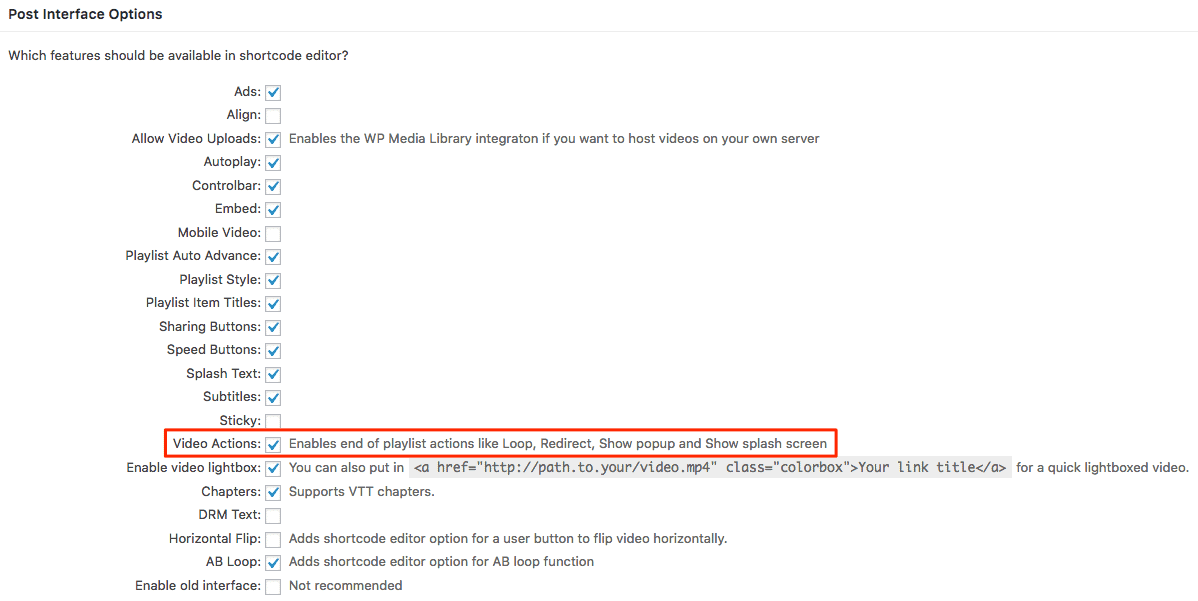
    To enable Video Actions, go to Settings -> FV Player > Setup tab > Post Interface Options and enable Video Actions.
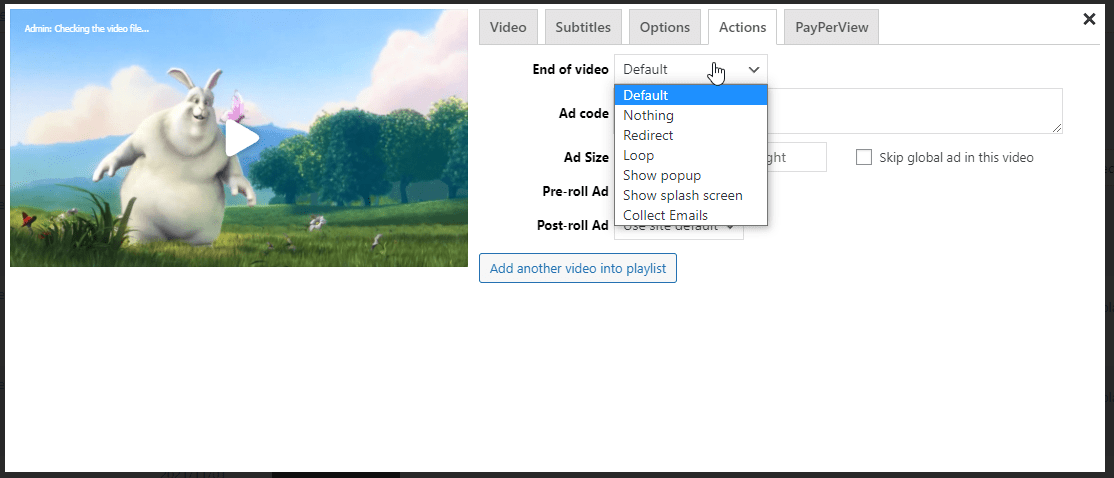
    Once active, it can be found in the Actions tab of the shortcode editor, as a drop down list called End of video.

    You get to choose from these options:

    • Default
    • Nothing
    • Redirect
    • Loop
    • Show pop-up
    • Show splash screen
    • Collect emails

    Default and nothing

    Default points to the default end of video popup, which can be picked in wp-admin -> FV Player -> Settings -> Actions -> End of Video:

    The default pop-up can also be set to none or random.

    The option titled nothing is self-explanatory.

    Redirect

    Once redirect is picked, a field for the redirect URL pops up:
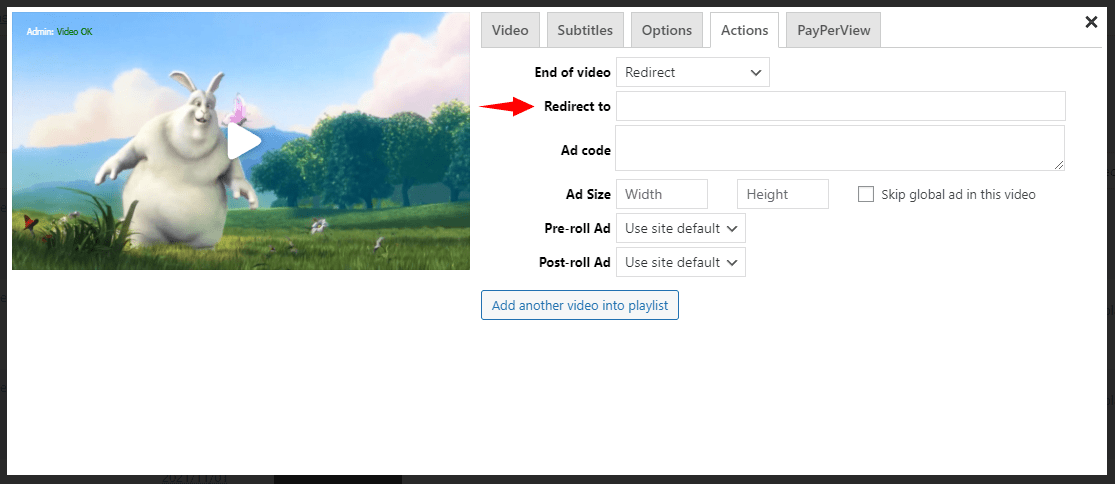
    The viewers will be automatically redirected at the end of the video, with no need to click anything.

    Loop

    The loop option allows for videos to continue looping once Many of our customers use the loop function for creating short homepage animations. Other users use the loop function to make ads play in an endless loop.
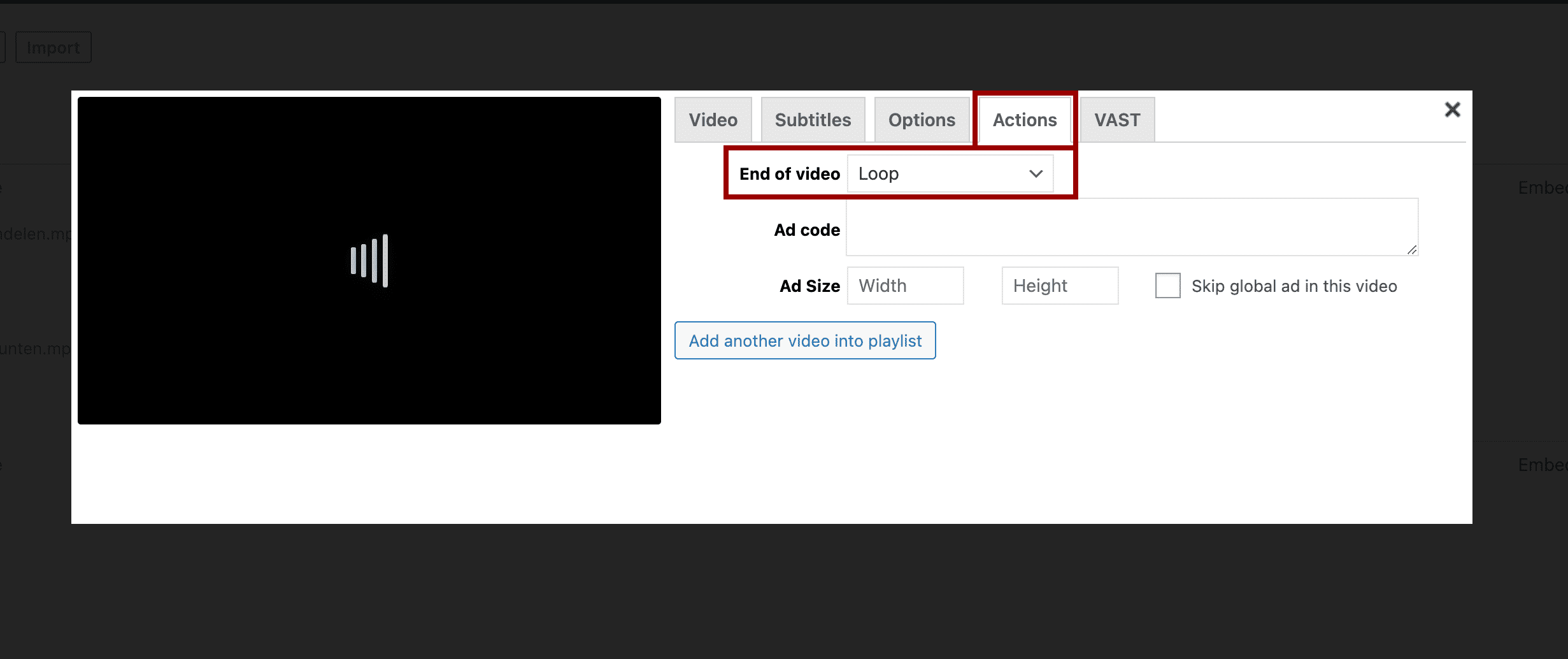
    Video loop is added to each video from within the FV Player videos/playlist library: https://yoursite.com/site/wp-admin/admin.php?page=fv_player

    Show splashcreen

    After playback ends, the video reverts back to the splash screen that was present before playback.

    Show popup and Collect emails

    You can find out more about these options in the aforementioned Video Actions: HTML Pop-ups and Email Subscription Form Pop-ups guides.

    Primary Sidebar

    Setting Screens

    1. Why FV Player?
    2. FAQ
    3. Creating and Managing Playlists
    4. Advanced features
    5. Video Security
    6. Troubleshooting
    7. Tools
    8. Analytics
    9. Audio Player
    10. Live Streaming
    11. Download | Buy
    12. Getting Started
    13. Licensing and Account
    14. Setting Screens
      1. Post Interface Options
      2. Sitewide FV Player Defaults
      3. Autoplay and Preloading
      4. Integrations/Compatibility Options
      5. Mobile Settings, Behaviors, and Limitations
      6. End of Video Actions
      7. Using Video SEO
      8. Optimizing FV Player Loading
      9. Privacy Settings
    15. Video Hosting
    16. Video Membership, Pay Per View and eLearning
    17. Video Advertising
    18. FV Player VAST/VPAID
    19. Casting Options
    20. For Developers
    21. FV Player Demos
    22. Additional Services
    23. Legal

    Footer

    Our Plugins

    • FV WordPress Flowplayer
    • FV Thoughtful Comments
    • FV Simpler SEO
    • FV Antispam
    • FV Gravatar Cache
    • FV Testimonials

    Free Tools

    • Pandoc Online
    • Article spinner
    • WordPress Password Finder
    • Delete LinkedIn Account
    • Responsive Design Calculator
    Foliovision logo
    All materials © 2026 Foliovision s.r.o. | Panská 12 - 81101 Bratislava - Slovakia | info@foliovision.com
    • This Site Uses Cookies
    • Privacy Policy
    • Terms of Service
    • Site Map
    • Contact
    • Tel. ‭+421 2/5292 0086‬