


FV Player player does not require any additional plugins to work. Just download it, activate it and enjoy your video experience.
This guide contains step by step explanation of:
- Installation Steps – FV Player (free version)
- Installation Steps – FV Player Pro (paid and logo free extension)
- Switching to Beta in Pro version
Advanced topics:
Installation – free version
Please note that there is a free version of this player “FV Player” and a paid extension with a lot of extra features “FV Player Pro“.
- You can download and activate it by clicking “Plugins” in the primary sidebar.
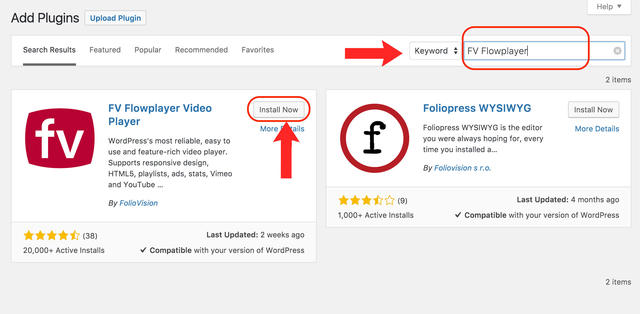
Search for the plugin (“FV Player”) and then click install
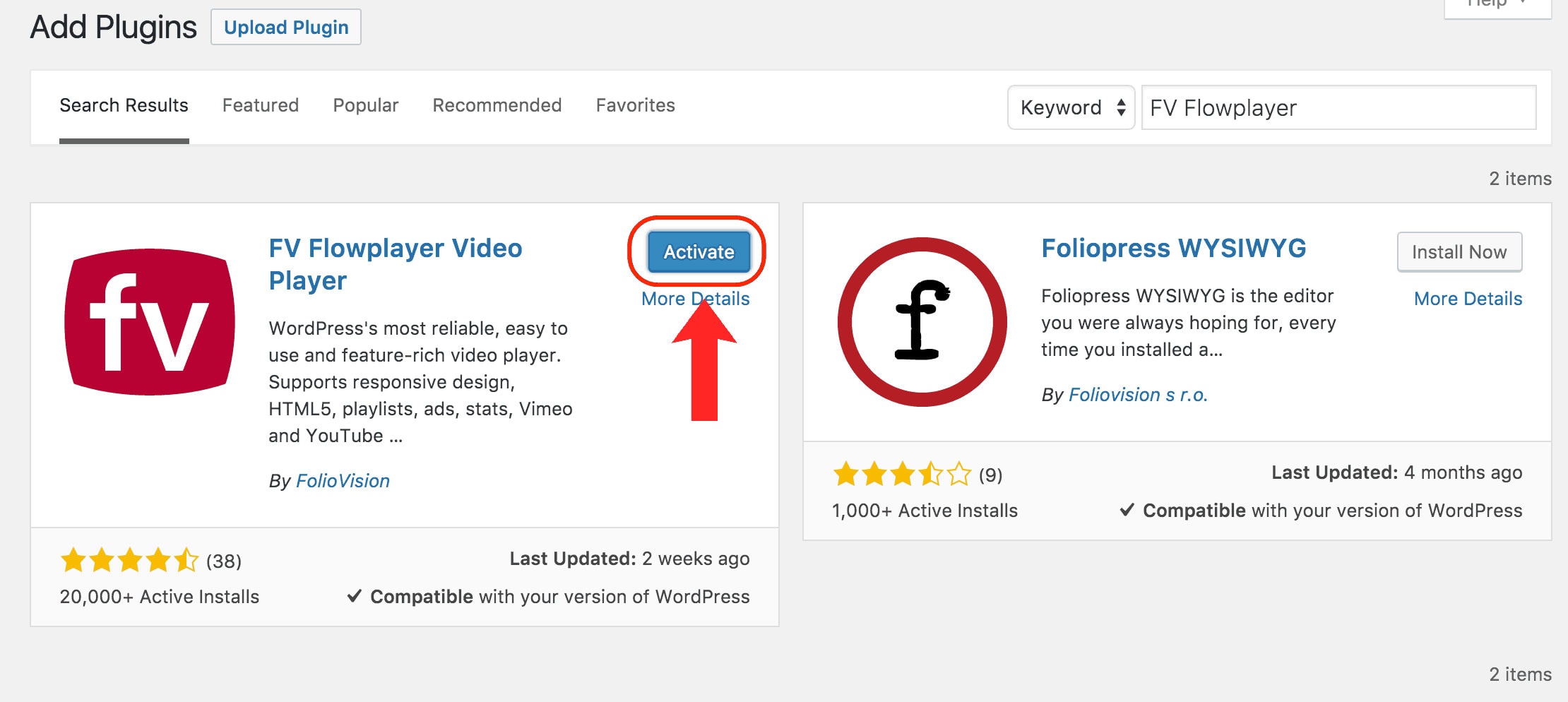
Click activate and start using videos on your site - Alternatively, you can download and unpack the zip archive containing the plugin. Then upload the fv-player directory into wp-content/plugins/ directory of your WordPress installation.
- Navigate to Plugins in WordPress administration interface and activate FV Player.

- Click both Check template and Check videos in the plugin settings screen at Settings -> FV Player to check if everything is running alright.

Checker reports that everything is alright - Optionally, if you want to embed videos denoted just by their filename, you can create the /videos/ directory directly in the web root of your domain and place your videos there. Otherwise, you would have to type in complete URL of video files.



Inserting a license key – Installing Pro extension
Please click here for Installation Steps – Fv Player Pro (paid and logo free extension).
Switching to Beta in Pro version
Please click here for Switching to Beta in Pro version
Advanced topics
Using minify plugins
Minification is used on almost every website with Javascript. Here’s a complete guide on how to set FV Player with four popular minify plugins (Autoptimize, WP Rocket, WP Minify and W3 Total Cache): Using FV Player with Minify Plugins
Server requirements
-
Make sure that your video files use correct mime types. You can simply add the following code into your .htaccess file:
AddType video/mp4             .mp4
AddType video/webm            .webm
AddType video/ogg             .ogv
AddType application/x-mpegurl .m3u8
AddType video/x-m4v           .m4v
# hls transport stream segments:
AddType video/mp2t            .ts
If you use NginX, this is handled in the config files.
-
If you have PHP 4 or older version installed, you will see an error message like this:
<p><code>Parse error: syntax error, unexpected T_STRING, expecting T_OLD_FUNCTION or T_FUNCTION or T_VAR or ‘}’ in /... .../wp-content/plugins/fv-wordpress-flowplayer/models/flowplayer.php on line 4</code></p>The plugin requires PHP 5 in order to run properly. Ask your hosting provider to upgrade to PHP 5, PHP 4 is just too old.
Fixing broken JavaScript
When logged in as the site admin, you might see the following warning instead of working videos:
Admin JavaScript warning:
I’m sorry, your JavaScript appears to be broken.
Here’s what the warning looks like on our site in case JavaScript is not working:

Admin warning appearing instead of playable video to notify the site admin about JavaScript issues

We have decided to have FV player display this warning, because we were receiving some complaints about our player not working, while the issue was actually on our clients’ websites. The website is an ecosystem, and if one part is broken, it might affect the rest of the site – even more, when it comes to JavaScript. If you are facing this issue, then probably other plugins are not working properly either, they just don’t tell you about it.
The most common issues why this message appears are:
- There is a fatal JavaScript error on your site
- You can find out what error is triggered by checking the JavaScript error console of your browser. Here’s a handy tutorial on WordPress.org – Using Your Browser to Diagnose JavaScript Errors
- The solution is to try to switch to a different theme (you can use theme preview) first. If that doesn’t help, turn your WordPress plugins off one by one. If you think you found the conflicting plugin, or you think it’s the fault of our plugin, do not hesitate to use our support forums
- Some library is not loading properly or at all (either jQuery or FV Player)
- This is often a theme or plugin conflict (duplicate loading of jQuery, loading another version of FV player), although we work hard to avoid it. We have also added an automated template check for this in plugin settings, so that’s the first place to check for possible conflicts.
- If all the plugins used the WordPress API properly (namely wp_enqueue_scripts), there should be no issues.
- The solution is to try to switch to a different theme (you can use theme preview) first. If that doesn’t help, turn your WordPress plugins off one by one. If you think you found the conflicting plugin, or you think it’s the fault of our plugin, do not hesitate to use our support forums
- Some blocking item is slow to load and it blocks the JavaScript execution
- This might be the case with any external tracking or ad code, which is not loading asynchronously. It means the item has to load before the browser continues rendering the page. Issue like this might be temporary, for example, if one of the external servers is overloaded.
- We put our JavaScript into footer (the best practice), so if there is a slow to load external item above it, it might take a while for the browser to stop trying to load the external item and load the player.
- The solution is to avoid external scripts, or always use scripts with asynchronous loading. We recommend to run your site through the Pingdom Full Page Test to see what request is slow and blocking the page to load.
If you are still having issues, please use our support forums. We also offer hands-on support, we are happy to help, just order our Pro support.
If you are a programmer, you might find our Troubleshooting Javascript Errors guide useful.

