For the last two years wur WordPress video plugin FV Player has offered basic video playback stats out of the box – providing number of video plays per day along with the number of playback minutes for each video per day. Before that we leaned on Google Analytics for detailed playback stats. These days more and more publishers are abandoning Google analytics or there are video publishers who would like to track video views but don’t have the in-house technical expertise to set up advanced Google Analytics integration.
So we’ve been steadily improving our built-in video stats and video watch tracking. We recently started to track video plays for each WordPress user separately and added a handy CSV export feature.
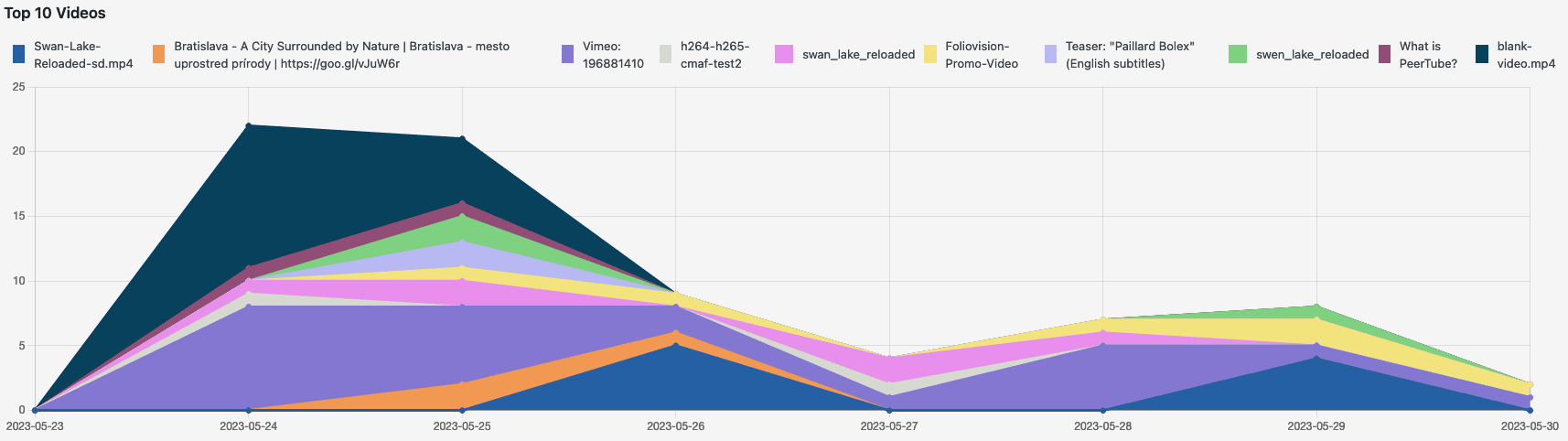
The export gives you a data for a single user which you select. Naturally immediately we were faced a number of requests for much more elaborate reports. Since the whole point of the integrated stats was to offer a simple way to view stats, we are in no hurry to build a full report building framework. Of course, the more features we add, the more byzantine the report requests will become. It’s a Sisyphian task.
The whole point of the current stat system is to make it very easy for publishers to keep track of the most important stats directly in the FV Player. If someone wants to manipulate the stats further, the way to go about it is to download the stats and analyse them in an external application like Apple Numbers, Open Office or Excel.
A full export of all the stats data might sound nice but in the end it’s impossible to work with – you really need programming skills to then parse the large amount of data. Instead what we recommend for users who have both the technical skills and the appetite for massive stats analysis is to query the database directly for the exact data they’d like.
The FV Player Video Stats database tables are clearly structured, so here’s how to create you own custom export.
Structure of the wp_fv_player_stats database table
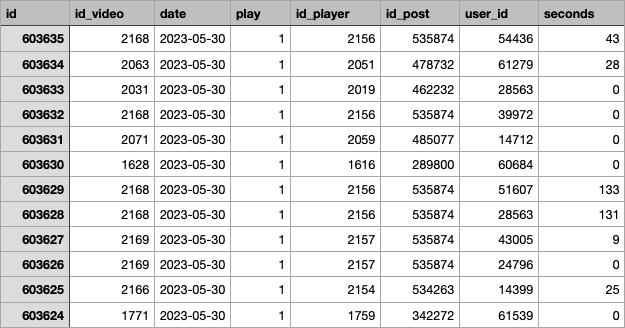
The actual table contains the number of plays and seconds played for the date, FV Player Video ID, FV Player ID, post ID and user ID:
id– row IDid_video– FV Player Video IDdate– dateplay– number of playsid_player– FV Player IDid_post– post IDuser_id– user ID, will be 0 for non-logged in usersseconds– number of seconds played
Export of such data does not suffice for any practical use as it’s just IDs.
Here’s how to use the SQL JOIN to pull in some readable data:
SELECT user_email, date, pl.id AS player_id, src, post_title, play, seconds, ROUND(meta_value) AS duration
  FROM `wp_fv_player_stats` AS s
  # Obtain user data
  JOIN `wp_users` AS u ON s.user_id = u.ID
  # Post title
  JOIN `wp_posts` AS p ON s.id_post = p.ID
  # Video duration is stored in wp_fv_player_videometa
  JOIN `wp_fv_player_videos` AS v ON s.id_video = v.id
  JOIN `wp_fv_player_videometa` AS vm ON v.id = vm.id_video
  # and player ID
  JOIN `wp_fv_player_players` AS pl ON FIND_IN_SET( v.id, pl.videos )
  # Needed to load the video duration from wp_fv_player_videometa
  WHERE meta_key = 'duration'
  # Limit results by date
    AND date BETWEEN '2023-05-29' AND '2023-05-30'
  ORDER BY s.id DESC
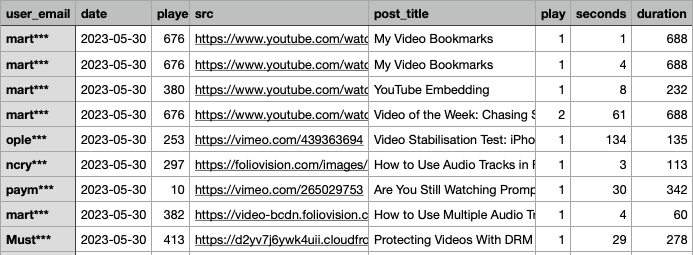
This way you can add more columns as needed, or filter by certain post IDs or taxonomies.

Martin Viceník
Martin graduated as an engineer in Computer Science from Slovak Technical University in Bratislava. He grew up in Liptovský Mikuláš in northern Slovakia next to the beautiful Tatra mountains. He is the developer behind our FV Player.

this is fantastic. how can i have the video title in the report? (the title that is entered into FV player) – as the post title isnt helpful in our scenario….
Hello Ryan,
You can easily change the
SELECTpart of the query from:To:
Thanks, Martin
and can it be run inside phpmyadmin or must be server command
Hello Ryan,
You can use phpMyAdmin too.
Thanks, Martin