Forum Replies Created
-
-


Hi Martin,
thank you for the quick reply. Changing that setting worked.
Merging these two options into one setting might indeed be a good idea to clarify things.
3 months ago in reply to: Rollback to version 7
Hi Martin,
Great, this also changed the empty blocks.
Thank you so much for your help.
I think everything works now as expected.3 months ago in reply to: Rollback to version 7
Our custom post type runs on init as well but with no specific priority.
There are some scheduled video posts where an empty FV player block was inserted but no video set yet. For these blocks I still see the broken block info like:
“Block validation: Block validation failed forfv-player-gutenberg/basic` (Object).Content generated by
savefunction:Content retrieved from post body:
<div class=”wp-block-fv-player-gutenberg-basic”></div>“`
I guess I have to change them manually, right? But this is something I think I can explain to the editors.
3 months ago in reply to: Rollback to version 7
Hi Martin,
okay, I just uploaded the version from the provided link via the plugin file upload and overwrote the existing one.
Now when I open a video post I see the video and no broken block. I will do a view more checks but it seems to work.
3 months ago in reply to: Rollback to version 7
Just to make sure, do you need the whole block code of the page? Because the screenshot above just shows the part with the player.
3 months ago in reply to: Rollback to version 7
3 months ago in reply to: Rollback to version 7
Hi Martin,
thank you for the quick response.
Yes the videos work in the frontend. Just so you know, we use a custom post type called “video” where almost all the videos are placed.
What are the next steps?
Hello Martin,
thank you for the reply and info.
Checking forif( typeof(api.video.click) == 'undefined' ) { ... }seems to work to get the main video. Although it seems a little odd, that the the main video is returning
undefinedwhereas the pre-roll returns the video object.But nonetheless this solves our issue.
Thanks,
Robert
2 years ago in reply to: Use Scroll Autoplay only on a specific page
2 years ago in reply to: Use Scroll Autoplay only on a specific page
Hi Martin,
it’s a static page set as frontpage.
How would I set the postmeta? Just like
add_post_meta( page_id, 'fv_flowplayer_scroll_autoplay' );Or does it need a value as well?Making it a setting sounds like a good idea.
Best regards,
Robert4 years ago in reply to: Permissions for Editor role
4 years ago in reply to: Permissions for Editor role
Hello Martin,
no there is no “Video Ads” menu entry when I log in as an editor. And when I copy the URL to the page (wp-admin/admin.php?page=fv_player_video_ads) I get a message, that I do not have permission to access it.
The only available menu items are “Videos/Playlists” and “Bunny Stream”.
Best regards,
Robert4 years ago in reply to: Every single Video is shown as a playlist
Hello Martin,
You were right, it’s the video ads. When the feature is activated in the global FV Player settings under “Video Ads”, I can see in the player code the playlist part and in the video the playlist controlls.
As you suggested, if I set “No ad” in the actions tab, everything works fine. But this is not a solution, because we have hundreds of videos and can’t set this on every video by hand.
So it seems like the problem here is the “Use site default” option.
The affected website has very strong security measures. I have to check if I’m allowed to grant you access. In any case I would need you IP address to add it the our whitelist.
Best regards,
Robert4 years ago in reply to: Every single Video is shown as a playlist
6 years ago in reply to: Default video size ignored
Hello Juraj,
I’m sorry for the confusion.
Because all videos are for registered users only, you need to login nevertheless. But you can use one of our test accounts. How should I send you the login credentials?
Thanks,
Robert6 years ago in reply to: Default video size ignored
Hello Juraj,
as I said, we will look into the new version and try to convince our client to update.
Because of high security criteria, I need a static IP address to grant you access to the backend of the website. Can you provide such?
Thanks,
Robert6 years ago in reply to: Default video size ignored
6 years ago in reply to: Default video size ignored
Sure, screenshot is attached.
We havn’t updated the plugin because of two reasons:
1) there are over 200 videos on the website and it’s impossible to convert all of them by hand to the new shortcode version
2) our client does not like the fact, that inside the shortcode he is not able to see which video it represents (it’s only the ID instead of the URL)But it is definitely a our goal as the webdev agency to convince them to change.
6 years ago in reply to: Default video size ignored
Sorry, but I don’t have a “Tools” tab there (see screenshot).
But my client is using this version:
FV Player v6.6.6
FV Player Pro v6.6.76 years ago in reply to: Default video size ignored
Hello Juraj,
sorry but I can’t find Tools -> System info on my FV Player Pro settings page. Where is it supposed to be exactly?
6 years ago in reply to: Default video size ignored
Hello,
I have a new problem regarding this topic so I post it right here and don’t open a new ticket. I hope thats ok?
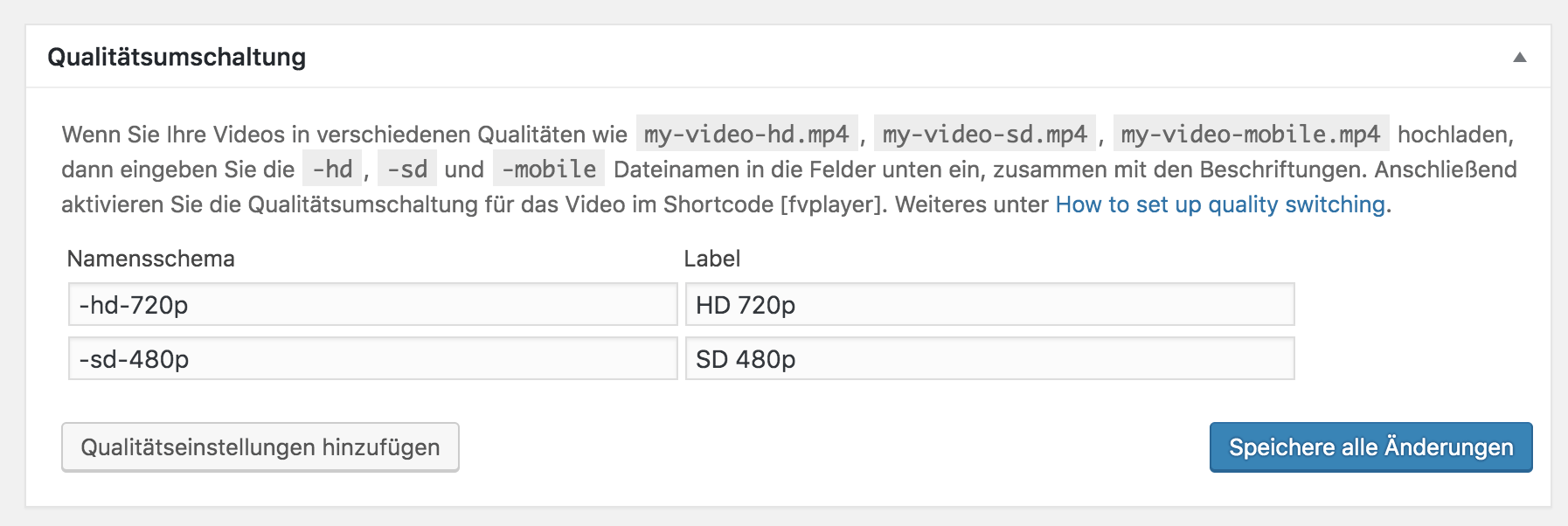
My problem is, that the default ordering of the quality switch does not work. On the options page it is set like that:
Name
-hd-720p
-sd-480p
Label
HD 720p
SD 480pSo the HD quality is first and should be loaded on default by the videos, but that does not work. On the first load the user get the SD video. If he switches to HD everything works fine and his choice is saved in the cookie. Have you any idea what the problem could be?
Kind regards,
Robert
Hello Martin,
strange, but thank you for the check. So I guess you can’t suggest any solution to us?
There are over 200 videos on our clients website which use FV Player and we haven’t tested yet what happens if we update.
Thanks,
Robert7 years ago in reply to: FV Player ID – Shortcode
Hello Martin,
the shortcodes look all like this:
[fvplayer src="..." splash="..." width="1280" height="720" qsel="true"]Only some have an additional parameter (popup) but these are rather old ones and can therefore be neglected.
If it’s not to hard or costly I would really appreciate a solution to bulk change the old shortcodes.I’m on vacation from 8.-20. August, so I will not be able to answer on this topic till I’m back. But maybe you can come up with something until then.
Thanks,
Robert7 years ago in reply to: FV Player ID – Shortcode
Hello Juraj, hello Martin,
thank you both for your reply. Right now the videos are used within a custom video post type and therefore with the classic editor. Because of some special circumstances my clients website is at this time not ready to switch to Gutenberg at all. But I’m in the process of developing a strategy to do so.
Converting the old shortcode by going into each video post type and clicking into the shortcode as recommended in your tutorial is no option because we are talking about almost 200 pages/videos. Is there any bulk way to do this?
If this is not the case I just want to clarify, that it would have no consequences (now or in the future) if the old video shortcodes would stay as they are?
The feature you mentioned about Gutenberg and the preview is not implemented at the current state of the plugin, or is it?
Thanks,
Robert7 years ago in reply to: FV Player ID – Shortcode
Here is a follow-up question: My client has about 200 videos on his website. Now if I would stick to the latest major version (7) of the plugin, all new videos would be inserted on the fv_player admin page. The problem is, that I have no reasonable explanation why none of his past videos are listed on this page. Is there a way (without downgrading) to use the old system?
Kind regards,
Robert7 years ago in reply to: FV Player ID – Shortcode
Hi,
I use this thread because the topic is close to my question.
Since version 7 of the FV Player plugin the insert-video-button on a post/page generates a new shortcode with only an id attribute (which does not indicate which video it refers to). This is a problem as my client does not see anymore which video is used nor which settings are active. Is there a way to get the old shortcode back? If not, I really struggle with using the newest version of the plugin.
Kind regards,
Robert7 years ago in reply to: Show same video popup via two links
7 years ago in reply to: Show same video popup via two links
OK I just noticed, that the wpfp_ID is not always the same. It changes on every page load. So nevermind the question above.
7 years ago in reply to: Show same video popup via two links
Hello Martin,
thank you for your help so far. I’m already working on a JS script for that.
But to trigger the video play-event by JS, I need it’s ID.
Is there a way to obtain the ID by php somehow? Like the WordPress function the_ID(); but for the video.Thanks,
Robert7 years ago in reply to: Show same video popup via two links
Hello Martin,
enabling the sitewide lightbox setting did the trick, thank you. I somehow missed this option.
But is there a way to autostart the video when opened in the lightbox? Right now the user has to click the play button.Thanks,
Robert7 years ago in reply to: Show same video popup via two links
7 years ago in reply to: Show same video popup via two links
Hello Martin,
thanks for the advise, but unfortunately this does not work. I tried using it like this:
” class=”colorbox”><?php the_title(); ?>
and like this:
<?php echo apply_filters( ‘the_content’, ‘‘. get_the_title() .’‘ ); ?>
but both ways don’t work. There is no lightbox.<div id=”video-<?php the_ID(); ?>”><?php echo do_shortcode(‘ [fvplayer src="'. $video_URL .'" caption="'. get_the_title() .'"]‘ ); ?></div>
Do you have any idea?
Thanks,
Robert8 years ago in reply to: URL-Parameter for Video
Hello Martin,
thank you for you answer. This is definitely pointing me in the right direction.
Robert
8 years ago in reply to: Action after livestream ends
Hello Martin,
thanks for your reply, thats good to know.
Unfortunately, I can not provide you with a livestream.
But we will do some tests for ourselves. I will come back to you if I have any further questions.Thank you for your help.
Kind regards,
Robert8 years ago in reply to: Detect if video is watched to the end
Hi Martin,
unfortunately the code was not working for me at first.
I then tried around a bit and found out, that when I delete this query: if (typeof _gat != ‘undefined’) { … } it suddenly works. I don’t know what this “_gat” is but it seems to be undefined because the code after was not executed.Without the query it works as expected.
8 years ago in reply to: Detect if video is watched to the end
Hi Eduard,
thanks for your reply. But should this code/solution still work?
I need to fire an action on the website after the user has watched the whole video.
This has nothing to do with Google Analytics.Kind regards,
Robert9 years ago in reply to: Use colorbox link in theme/template
9 years ago in reply to: Default video size ignored
Ok I tried that. And the video started with the Quality Option I put first.
But that means, regardless what video I set in the Shortcut on the page, it will always use the Quality Switching order. Is that right?So if I set the 720p video as main video in the shortcode but put the 480p quality first at the options page, it will display the 480p version on the page…