Archive for the 'SEO' category

Searchlove 2011 Foundation Bar 24 October

Thursday, November 3rd, 2011
01 Foundation Bar SearchLove L
 
03 Foundation Bar SearchLove L
 
04 Foundation Bar SearchLove L
 
05 Foundation Bar SearchLove L
 
06 Foundation Bar SearchLove L
 
07 Foundation Bar SearchLove L
 
08 Foundation Bar SearchLove L
 
09 Foundation Bar SearchLove L
 
10 Foundation Bar SearchLove L
 
11 Foundation Bar SearchLove L
 
12 Foundation Bar SearchLove L
 
13 Foundation Bar SearchLove L
 
14 Foundation Bar SearchLove L
 
16 Foundation Bar SearchLove L
 
18 Foundation Bar SearchLove L
 
20 Foundation Bar SearchLove L
 
22 Foundation Bar SearchLove L
 
23 Foundation Bar SearchLove L
 
24 Foundation Bar SearchLove L
 
25 Foundation Bar SearchLove L
 
26 Foundation Bar SearchLove L
 
27 Foundation Bar SearchLove L
 
28 Foundation Bar SearchLove L
 
29 Foundation Bar SearchLove L
 
31 Foundation Bar SearchLove L
 
32 Foundation Bar SearchLove L
 
33 Foundation Bar SearchLove L
 
34 Foundation Bar SearchLove L

SEO, WordPress | No comments

Search Love Conference London 2011 – Day Two

Tuesday, October 25th, 2011

Full set of photos of all searchlove 2011 speakers from day two here.

Despite potential hangover from the last nights party, everybody came thrilled to the second day of Search Love Conference in London, co-organized by SEOmoz and Distilled.

The first runner was Ciarán Norris of Mindshare. His lecture Personalization, Profiles and Privacy didn't offer many calls to action, but two of them were important for all marketers:

  • Web is becoming more and more personalized. Get ready for it, you will have to learn more about visitors and treat them individually
  • There are the Web rules, but there are also the legal rules of the country you operate in. If you are tracking your visitors, you may get burnt.

SEO | No comments

SearchLove Conference London 2011 – Day One

Monday, October 24th, 2011

SEO and social web conferences organized by SEOmoz and Distilled gained high reputation as major events in web search industry, and Foliovision is glad to take part once again. London Search Love 2011 was slightly rebranded, but that should not confuse you – linkbuilding and social media still play the key role!

SearchLove Congress Centre

SEO | 3 comments

WordPress SEO plugins review: All in One SEO, Platinum, Yoast compared

Monday, October 24th, 2011

There are a lot of SEO plugins for WordPress. "SEO for WordPress" has become a major catch phrase. Many companies now offer paid plugins which provide a lot of different options and possibilities how to further customize your site SEO to the tiniest details.

How much of it is really necessary or even helpful? Are the basic page title and meta description fields not enough? Should you pay up to $47/site/month for a plugin only to be able to set "noindex" for some of your categories? Will it help you to spend a week of sleepless nights learning what "noindex" is and when it might be helpful or are there other things you might do during that week which might do more to improve your rankings than "noindex".

Here's some alternative suggestions:

  • write the four or five great articles that you've been meaning to do for months
  • go out and comment up a storm on the most interesting weblogs in your sector with a link back to your site. You won't get much Google juice at point but you'll bring new visitors.
  • answer some questions on related forums to the point people trust you and visit your website for additional information

We believe that every site owner and almost every author on a site should be able to do the basic SEO optimization of his or her own site. This means the SEO plugin should be easy to use and have good default options, which won't put the site at risk. Some plugins risk seriously compromising your indexation in Google just by activating the plugin. In Foliovision's opinion, this is totally unacceptable. We believe in safe intelligent defaults. There's no reason the site owner should have to worry about his or her SEO plugin.

Plugins compared in this article:

Some explanation for the terms we use in the comparison tables:

  • Post - any post type, that means post, page or any custom type
  • Taxonomy - any kind of taxonomy - category, tag and all the custom ones
  • Section - section of a website - front page, category archive page, monthly archive page and so on

General information about tested plugins

Let's start by overview of the basic plugin attributes:

Basic properties of SEO plugins
  All in One SEO Pack Platinum SEO Pack WordPress SEO wpSEO Thesis (built-in SEO functions) WooThemes (Daily Edition) FV Simpler SEO
Author Michael Torbert Techbliss Online Yoast Sergej Müller DIYthemes WooThemes Foliovision
Version 1.6.13.2 1.3.7 0.2.3.1 2.7.8 1.8
1.6, Framework 3.7.03
1.6.12
License

GNU GPL 3

Pro version available

GNU GPL 3 GNU GPL 2

Commercial license for 1 site or for unlimited sites

More expensive license for use in client projects

10 day free trial

Commercial GNU GPL 2 (according to license.txt) GNU GPL 2
Interface

Too big, lots of options, uses old HTML. Extra whitespace.

Counts your characters.

Too much options.

Counts your characters.

Lot of different options, tabbed. Quick help everywhere.

Counts your characters.

Simple, only provides custom title and description.

Counts your characters and words.

Too big, lots of options. Contains quick help.

Counts your characters.

Too much confusing options in the options dialog.

Non-invasive, elegant. Quick help.

Advanced options hidden by default.

Counts your characters.

Installation

Red nagging notice displayed until turned off in option.

No extra steps required.  No extra steps required. No extra steps required Activating Thesis template will add all the features. Hard to start using - no custom title or description fields until you turn them on.

No extra steps required.

Compatibility  -

Option to migrate from All in One SEO Pack

Import function for All in One SEO Pack, HeadSpace2 and some other Yoast plugins. Imports data from All in One SEO Pack

If you stop using Thesis, you loose your SEO data - conversion needed.

Support for All in One SEO Pack and Headspace2

Compatible with All in One SEO Pack.

Branding HTML comment in header, ads on the options page

HTML comment in header

HTML comment in header with URL of the plugin website.

"The Latest From Yoast" on your dashboard, can be removed with Screen Options.

HTML comment in header.

Removed in the most expensive license.

Thesis Attribution link in the template - requires a bit of programming to be removed. Big link in logo in the footer.php template. No branding
all in one seo pack
All in One SEO Pack
platinum seo pack editing
Platinum SEO Pack
wordpress seo
Wordpress SEO by Yoast
wpseo
wpSEO
thesis seo
Thesis SEO
woothemes daily edition editing
WooThemes Daily Edition
fv simpler seo
FV Simpler SEO

Conclusion

Interface - The vertical space on websites is precious and it also applies to the WordPress post editing screens. Why some of these plugins use so huge interface boxes, that they took over nearly all of my 1680x1050 screen (Thesis is the worst, others just like to waste a lot of space on large padding)?

Compatibility - SEO functions should not be part of any template. What happens when you need to change your site design? You waste extra time on trying to move your existing SEO data from Thesis into some reasonable plugin.

Branding - Most of the plugins put in their branding in your site HTML code. I don't understand why all the SEO plugins have to be like this, I've never seen that anywhere else! Imagine that you have a site with 20 plugins and now each of them suddenly decides that it's going to put some HTML code in the header to let everybody know what you use this or that great plugin by Mr. XY.

Basic functionality

The basic purpose of a SEO plugin is to allow easy editing of all the extra information which gets indexed by search engines:

  • Title tag
    • this might be different than the post title in WordPress
    • so it's a nice way how to put in some extra keywords
  • Meta Description
    • it's typically displayed bellow each link when you list search results
    • hand written descriptions are the best
    • Google shows meta description based on what keywords are using in the search query, so don't panic if you don't see your descriptions all the time
  • Keywords
    • don't have so much power as they used to

The comparison table of basic SEO functions

  All in One SEO Pack Platinum SEO Pack WordPress SEO by Yoast wpSEO Thesis Woothemes FV Simpler SEO
Title

Changes your titles right after installing.

Customizable formats for different sections of website.

Custom title for front page and each post. Not working when title rewrite is off.


Customizable formats for different sections of website.

Custom title for front page and each post. Not working when title rewrite is off.

Customizable formats for different sections of website.

Custom title for front page, each post, category or tag.

Title rewrite can't be turned off.

Different formats for different sections of website

Custom title for frontpage and each post

Can be disabled, not working when title rewrite is off.

Custom title for front page, each post and taxonomy.

No support for custom post types.

Custom title for front page and each post.

No support for custom post types.

Customizable formats for different sections of website - disabled by default

Custom title for frontpage and each post - used even if title rewrite if off.

Meta Description Manual entry for each post and front page

Category and tag descriptions used for cat/tag archives

Option to use auto-generated description if description or excerpt is not present.

Manual entry for each post  and front page

Category and tag descriptions used for cat/tag archives

Option to use auto-generated description if description or excerpt is not present is on by default.

Manual entry for each post and front page

Manual entry for each category or tag

Manual entry for each post

Auto-generated:

  • Descriptions from post content or excerpt - going until end of sentence
  • Description of category or tag -  titles of listed posts

Manual entry for each post, taxonomy and frontpage

No support for custom post types.

Manual entry for each post and frontpage (depends on actual WooTheme).

No support for custom post types.

Manual entry for each post and front page

Category and tag descriptions used for cat/tag archives

Option to use excerpt as meta description - disabled by default

Meta Keywords

Optional list of categories and tags for each post

Manual entry for each post and front page

Optional list of categories and tags for each post

Manual entry for each post and front page

Manual entry for each post and front page

Function to check if your custom keywords are used in the post.

Function to suggest keywords using the Yahoo BOSS API

Manual entry for each post

Auto-generated:

  • From excerpt, titles of listed posts, tags
  • Only nouns used
  • Only keywords above certain length used

Manual entry for each post, taxonomy and frontpage.

No support for custom post types.

Manual entry for each post and frontpage (depends on actual WooTheme).

No support for custom post types.

Use categories and tags as keywords by default

Manual entry for each post is by default disabled

Conclusion

Title - most plugins require title rewrite enabled to start using the field for SEO title. Title rewrite is by default "on" in most of the plugins, so what happens when you don't want to use it and you are happy with you titles as they are without the plugin? You get no custom SEO titles, or you have to tweak the rewrite to not change the structure of your titles.

Desciptions - the only thing what really matters here is the hand-written description. You don't need to auto-generate that, as search engines will do so by themselves.

Keywords - are not considered by search engines so much anymore.

SEO editing fields for custom post types are missing in Thesis and WooThemes Dail Edition.

Advanced SEO functions

Most of the plugins contain some additional options which might be and might be not helpful for your site. 

  • Noindex
    • tells search engines not to put the webpage into its index
  • Nofollow
    • tells search engines that the link should not influence search engine rankings of the target
  • Noarchive
    • prevents content from being stored in search engine cache
  • Canonical link
    • sets the URL under which the webpage should be indexed in search engines
    • WordPress takes care of this on its own for posts and pages
  • Directory tags
The comparison table of advanced SEO functions
  All in One SEO Pack Platinum SEO Pack WordPress SEO by Yoast wpSEO Thesis Woothemes FV Simpler SEO
Duplicate content prevention

Canonical link.

Noindex and nofollow settings for sections.

Canonical link.

Noindex and nofollow settings for sections and each post.

Noindex and nofollow settings for sections and each category or tag

Custom canonical link for each category or tag

Canonical link.

Noindex and nofollow settings for sections.

Canonical link.

Noindex, nofollow and noarchive for each post, section, taxonomy and front page.

Noindex for each post and archive sections.

Nofollow for

Canonical link.

Noindex setting for archives and search.

Directory tags  - Noodp, noydir settings for the whole website.

Noodp and Noydir for each post and also for the whole website.

Noydir setting for the whole website. Noodp, noydir settings for the whole website.  -  -
Other features

Short title for pages in WP page menus

Lists SEO fields on WP-admin posts listing

301 redirection for the post when extension has been removed.

Optional <head> section clean up

Remove category prefix function.

XML sitemap generator.

Built-in breadcrumbs

Extra links back to your website in your RSS feeds.

.htaccess editing

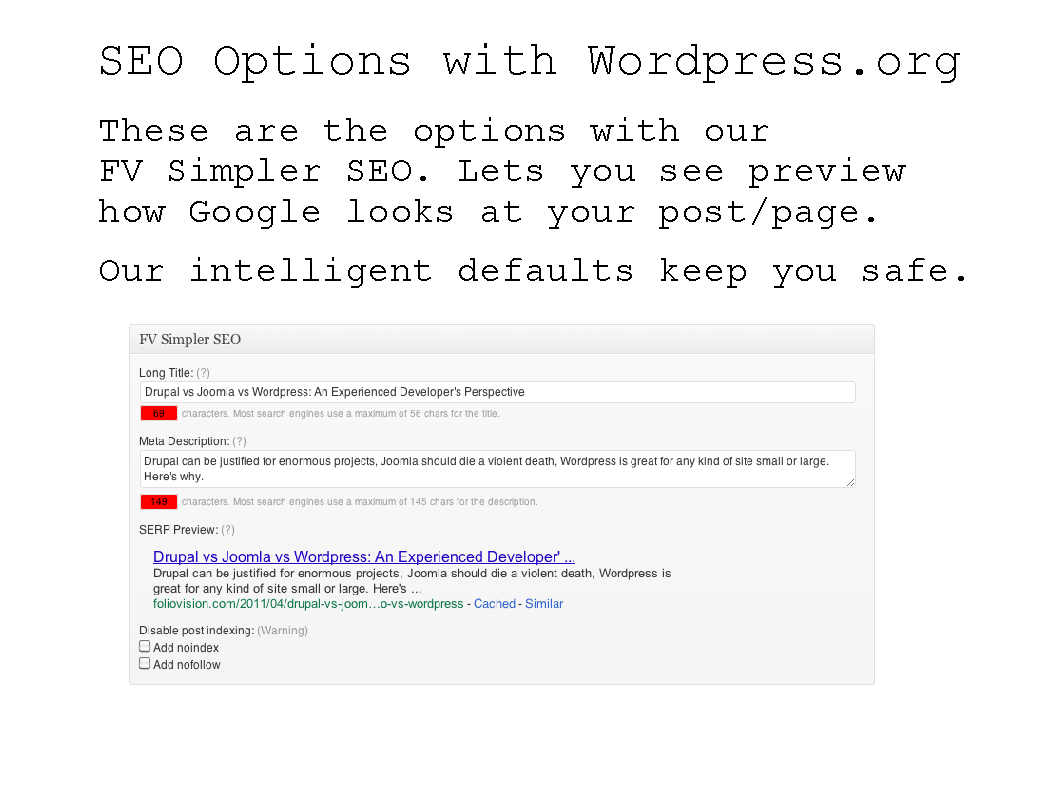
SERP preview

Remove category prefix option

Extensive settings of auto-generated keywords 301 Redirect for the post URL -

Short title for pages in WP page menus

SERP preview

Conclusion

Thesis offers some crazy anti-SEO options, like making sure your front page won't get indexed. That's really a dangerous function, imagine somebody turns it on by mistake and you find out about it few months later. Your search engine rankings would probably be way lower than they used to be. If somebody is doing really a special site which needs to have noindex on front page, surely he can do it without Thesis.

WordPress SEO by Yoast offers a nice SERP preview feature, but it doesn't respect the character limits on title and description. It also has many different features, perhaps more than a SEO plugin should handle. I imagine it's hard to switch to another plugin later is you already like the provided breadcrumbs or XML sitemaps.

Miscellaneous

Here's little extra from our experience. Reasonable Default Options are one of the reasons why we started our own SEO plugin. We were not happy to tweak the settings (or plugin files) on each site over and over again.

Miscellaneous
  All in One SEO Pack Platinum SEO Pack WordPress SEO wpSEO Thesis (built-in SEO functions) Woothemes FV Simpler SEO
Support Non-responsive developer (not willing to add features even after donation) Support provided via website.  Quick and responsive, using the WP.org forums. Paid support Customer support forum Customer support forum

Support provided via website, on-site troubleshooting for a small donation

Monthly updates when new features are requested

Default options

Changes your titles right after installing.

Noindex on by default on all archives, except for tag archives. 

Changes your titles right after installing.

Noindex on by default on search and monthly archives.

Changes your titles right after installing.

Changes your titles right after installing.

Noindex on by default on all archives. 

Noindex and nofollow on by default on all archives except for category pages. 

Noindex and nofollow on by default on all archives except for category pages.

Puts nofollow on your posts!

Noindex on by default on search pages. 
Bugs we noticed Checking "I enjoy this plugin and have made a donation" won't remove the ads or HTML comment from header.

Title rewrite doesn't work in WP 3.1.

Auto-redirect loops when post slug is a single digit or two digits.

Auto-redirects takes the request string and passes it to SQL without proper escape. Possibly a security hole!

Creates around 40 options in wp_options table.

Titles broken in fresh new WP 3.1.1 with Twenty ten template - fixed by "Force rewrite titles" in the options.  -  - "Make links from this post/page followable by search engines." option doesn't work.  -

Conclusion

Default options - When you install a SEO plugin, make sure you check how the default options change your titles. With FV Simpler SEO, you don't have to be afraid, as there is no change unless you rewrite the title yourself.

Watch out for WordPress SEO, it relies on the template to use the most correct function to display the meta title tag, which is not the case of the standard WordPress template (it uses some extra echo statements in the HTML of title tag). However - the plugin should be able to handle that without destroying the titles in the first place.

WooThemes Daily Edition put's nofollow into header of your posts by deafault. This can be turned into follow in options or changed for individual posts (not working on our test site with clean fresh WP 3.1.1.) We recently had a client install a WooTheme and deindex his site. Needless to say we helped him out of the bind but he was unnecessarily freaked out. Bad choice Woo. But then based on hard experience we don't like Woo Themes or most other commercial WordPress themes at all.

Which one is the best?

Depends. If you like to play around with WordPress and you are interested in the most finest SEO tweaks, then check out WordPress SEO by Yoast. If you are a writer, or you don't want to worry about your SEO plugin deindexing you by accident, then our FV Simpler SEO is the safest and easiest to use by far.

If you think otherwise or want to recommend another plugin, we'd love to hear what you like about the other plugin and why. If you have any suggestions on how to improve FV Simpler SEO, let us know.

SEO, WordPress | 6 comments

Google Chromium Binaries: Here’s where Google hide the nightly builds of Chrome without the spyware

Thursday, June 23rd, 2011

We don't allow Google Chrome to be used at Foliovision.

There's a couple of reason.

Chrome as a browser sends a lot of information back to Google.

Even worse you need to install and leave installed the Google Pack Updater, which is constantly monitoring your computer and sending encrypted date back to Google.

As spyware, Google Pack Application updates is almost unprecedented.

On the other hand, we do allow the use of Chromium and quite like it as an alternative to Safari or Firefox.

The problem is home page of Chromium only offers links to the instructions for building Chromium from scratch. Not fun. Very time consuming, restricted mainly to programmers.

chromium source code link on home page no binaries

There is a nightly build, though, Dorothy. Google keeps moving it around. It used to be here:

http://build.chromium.org/buildbot/snapshots/chromium-rel-xp/

For some unaccountable reason, that URL 404's now (don't Google know about 301 redirects?).

Google Chromium link in search 404

The real download URL for a Mac build is now here:

http://commondatastorage.googleapis.com/chromium-browser-continuous/index.html?path=Mac/

Enjoy a modern, fast, open-source browser without spyware. The open source community is good that way, keeping the spyware out of apps.


News bulletin: alternative download link - http://build.chromium.org/f/chromium/snapshots/Mac/

Your guess is as good as mine which will go dead first.

IT, SEO | 10 comments

Ten steps to build a great mobile version of your website

Monday, June 13th, 2011

Building mobile versions of websites was an arcane art for a couple of years. And not all that necessary as only a minority of people had smart phones and even fewer of them were using them to actively browse the web. Over the last year as the devices get better and better, more and more visitors are using their smart phones to visit websites.

If you don't already have a mobile version of your site, it's time to put one in right now. Here's how you do it, from A to Z. If the beginning seems a bit complicated, just push ahead. There's an easy point form summary at the bottom of the article.

If you have even a reasonably busy WordPress site, you need to have a caching solution in place. Without caching, you'll get your site kicked off shared hosting lickety-split or you'll cripple performance on your VPS. Visitors like fast sites and cached sites are two to five times faster than uncached sites. For WordPress, there are three major choices in caching solutions: WP Super Cache, W3 Total Cache and Hyper Cache.

For a mobile site, you need to have a caching solution which will pass through mobile clients quickly and reliably to your mobile version.

Of the three above, by far the most reliable is WP Super Cache. Donncha O Caoimh has been providing reliable code (and an almost unspellable name) for five years now. (Donate here. We did.)

Start by making sure your caching plugin is properly set up. These settings are not the default but are where you want to be. Donncha includes the most compatible and much slower defaults in his plugin (good idea, as new WP users can get some benefits with little risk). Here are Donncha's main instructions to get WP Super Cache to really fly and to reduce your load times for Google (good for SEO):

  • Mod_Rewrite. The fastest method is by using Apache mod_rewrite (or whatever similar module your web server supports) to serve "supercached" static html files. This completely bypasses PHP and is extremely quick. If your server is hit by a deluge of traffic it is more likely to cope as the requests are "lighter".
  • If you are not using legacy mode caching consider deleting the contents of the "Rejected User Agents" text box and allow search engines to create supercache static files.
  • Likewise, preload as many posts as you can and enable "Preload Mode". Garbage collection will still occur but it won't affect the preloaded files. If you don't care about sidebar widgets updating often set the preload interval to 2880 minutes (2 days) so all your posts aren't recached very often.

Now it's time to get ready to set up the mobile version. First you need to make a choice on building your own mobile solution or starting with a mobile plugin. We recommend using a plugin as starting from scratch is a lot of busy work. There's really not all that much room 320 x 240 pixels for creativity (the exception proves the rule guys) so you may as well set up something attractive and standard and business-like. There are a couple of good plugins out there to give you a running start.

Free and slightly unreliable: WP Mobile Pack.

WP Mobile Pack works or broken

Paid and very good but with some issues outside of Apple's i-universe: WP Touch Pro. Here's a WP Touch Pro feature chart (there is/was a free version as well).

You'll want a full list of user agents for which you will serve the mobile version. Next, make sure the list of user agents match in both your mobile plugin and in your cache plugin.

Here's a list to match WP Super Cache's list of mobile user agents which you can copy and paste into the user agent theme preferences in WP Touch Pro.

Mobi
Mobile
MMP
240x320
400X240
AvantGo
BlackBerry
Blazer
Cellphone
Danger
DoCoMo
Elaine/3.0
EudoraWeb
Googlebot-Mobile
hiptop
IEMobile
KYOCERA/WX310K
LG/U990
MIDP-2.
MMEF20
MOT-V
NetFront
Newt
Nintendo Wii
Nitro
Nokia
Opera Mini
Palm
PlayStation Portable
portalmmm
Proxinet
ProxiNet
SHARP-TQ-GX10
SHG-i900
Small
SonyEricsson
Symbian OS
SymbianOS
TS21i-10
UP.Browser
UP.Link
webOS
Windows CE
WinWAP
YahooSeeker/M1A1-R2D2
iPhone
iPod
Android
BlackBerry9530
LG-TU915 Obigo
LGE VX
webOS
Nokia5800
iPhone
iPod
incognito
webmate
Android
dream
CUPCAKE
froyo
BlackBerry9500
BlackBerry9520
BlackBerry9530
BlackBerry9550
BlackBerry 9800
BlackBerry 9780
webOS
s8000
bada
IEMobile/7.0
Googlebot-Mobile

This list doesn't include the WP Super Cache substrings as they are too short and dangerous to use in WP Touch Pro as WP Touch Pro matches substrings throughout the user agent, while WP Super Cache matches substrings against just the beginning of the user agent. Pasting the full list of substrings into WP Touch Pro makes full Safari and Opera display mobile versions (they match on "tosh"). We'll keep working on a better version of mobile agents for WP Touch Pro and post it here.

If there's a problem, all that will happen is that mobile user will get the standard site uncached.

Here's the WP Touch Pro theme preferences where you should paste the user agents above:

WP Touch Pro user agents

There's some discussion about whether to give a full site or the mobile site to an underpowered device which can't really handle the full WP Touch experience.

In principle these weak web browsers like Opera Mini 4 have special mobile modes to deal with standard sites, doing the reformatting themselves. But the reformatting will be easier if they are starting from WP Touch's advanced mobile version.

The difference won't be that great.

Here are some screenshots of WP Touch Pro iPhone version and Opera Mini minified version.

Opera Mini WP Touch Pro version
Not bad for a start if a bit too wide
Opera Mini WP Touch Pro filtered mobile
that's more like it and includes site colours

The minified version of the normal website through Opera's built-in mobile proxy is not much worse but the navigation (not shown) is much more difficult. And you have to rely on the end user to turn on minified versions. Relying on the end user is a fool's game.

Opera Mini full site Opera mobile proxy filter

WP Super Cache handles mobile settings a bit differently than W3 Total Cache and Hyper Cache. WP Super Cache doesn't let you hand in a list of mobile devices but generates it itself and puts it in .htaccess along with the basic rewrite rules. Here's what the list looks like:

RewriteCond %{HTTP:X-Wap-Profile} !^[a-z0-9\"]+ [NC] RewriteCond %{HTTP:Profile} !^[a-z0-9\"]+ [NC] RewriteCond %{HTTP_USER_AGENT} !^.*(2.0\ MMP|240x320|400X240|AvantGo|BlackBerry|Blazer|Cellphone|Danger|DoCoMo|Elaine/3.0|EudoraWeb|Googlebot-Mobile|hiptop|IEMobile|KYOCERA/WX310K|LG/U990|MIDP-2.|MMEF20|MOT-V|NetFront|Newt|Nintendo\ Wii|Nitro|Nokia|Opera\ Mini|Palm|PlayStation\ Portable|portalmmm|Proxinet|ProxiNet|SHARP-TQ-GX10|SHG-i900|Small|SonyEricsson|Symbian\ OS|SymbianOS|TS21i-10|UP.Browser|UP.Link|webOS|Windows\ CE|WinWAP|YahooSeeker/M1A1-R2D2|iPhone|iPod|Android|BlackBerry9530|LG-TU915\ Obigo|LGE\ VX|webOS|Nokia5800|iPhone|iPod|incognito|webmate|Android|dream|CUPCAKE|froyo|BlackBerry9500|BlackBerry9520|BlackBerry9530|BlackBerry9550|BlackBerry\ 9800|BlackBerry\ 9780|webOS|s8000|bada|IEMobile/7.0|Googlebot-Mobile).* [NC] RewriteCond %{HTTP_user_agent} !^(w3c\ |w3c-|acs-|alav|alca|amoi|audi|avan|benq|bird|blac|blaz|brew|cell|cldc|cmd-|dang|doco|eric|hipt|htc_|inno|ipaq|ipod|jigs|kddi|keji|leno|lg-c|lg-d|lg-g|lge-|lg/u|maui|maxo|midp|mits|mmef|mobi|mot-|moto|mwbp|nec-|newt|noki|palm|pana|pant|phil|play|port|prox|qwap|sage|sams|sany|sch-|sec-|send|seri|sgh-|shar|sie-|siem|smal|smar|sony|sph-|symb|t-mo|teli|tim-|tosh|tsm-|upg1|upsi|vk-v|voda|wap-|wapa|wapi|wapp|wapr|webc|winw|winw|xda\ |xda-).* [NC]

The advantage of this system is that it makes bypassing normal processing ultrafast (the movement happens at an OS level, rather than on invoking PHP).

It also means you as the end user don't get to fiddle endlessly with what devices to include. You'll have to count on Donna to choose the right ones.

Which it seems he does.

As you can see, it's very complete, including iPhones, Androids, Palm, Blackberrys, Palms, Nokias, Symbian.

On the other end though, if you are using WP Touch Pro, you'll have to give it a list of devices. Look out for versions under 2.2. The Skeleton template 1.0.8.1 does not handle blackberrys very well. Skeleton Template 1.2 definitely does, so if you're having trouble, make sure to upgrade WP Touch Pro to the latest version and then update your template.

Both Hyper Cache and WP Super Cache have built in compatibility with WordPress Mobile Pack. If you haven't already jumped on the WP Touch Pro bandwagon, WP Mobile Pack might be worth a try as it's already fully integrated to two of the top cache plugins and free. Unfortunately, WPMP appears to have some compatibility issues and is not kept up to date. You'll have to do some digging of your own to get it to work properly.

Once you are up and running, you'll want to test your settings. Here are the easy tests. Opera has a desktop emulator for their advanced mobile browser and an online java version for Opera Mini.

http://www.opera.com/mobile/demo/
http://dev.opera.com/articles/view/opera-mobile-emulator/

Test for iPhone with Safari by enabling the developer menu and then reassigning user agent. On a Mac, I recommend Keyboard Maestro to set up a hot key on the menu command (usually application menu items can also be done in keyboard section but it's a bit trickier). I've assigned command-U and it really speeds up testing for different user agents. You can also then use Safari to test for Blackberry user agents and other exotica.

Ideally you'd have at least a few real mobile devices with which to doublecheck your site. An iPod Touch is a great inexpensive stand-in for an iPhone/iOS. Opera Mini will install into most devices in parallel with the main browser. Make sure to navigate around to be sure everything is working.

When you know that your mobile versions are making it through you'll want to sit down and have a think about what someone visiting your site on a mobile browser would want to see (insurance calculator, mortgage calculator, listings search, catalogue or weblog posts) and put those front and center. You might even want to remove large sections of your site which won't display well on a mobile device from mobile navigation.

With multiple mobile device formats (think iPad), WP Touch Pro has alternately display models which it handles internally.

So to recap here are the steps.

How to Quickly Build a Great Mobile Version of Your Site

  1. Put together a list of user agents which you would like to show a mobile version (the longer the merrier, there's no sense in being parsimonious here).
  2. Set up your cache plugin not to pass through mobile devices (not to show cached full pages). Recommendation: WP Super Cache which comes with baked in list.
  3. Set up your mobile plugin to serve a mobile version to those same user agents (if you miss a few, no worries). WP Touch Pro recommended.
  4. Check appearance with Safari in iPhone mode and with Opera Mini online emulator.
  5. Tweak appearance to match site colours.
  6. Tweak menu items to show what is important for mobile and hide what is irrelevant for mobile or will not display well.
  7. Remove mobile plugin branding (branding on commercial plugins/themes is obnoxious: are you listening Brave New Code?).
  8. Add a large 512 pixel icon for people who bookmark, create automatic apps in Safari. (WP Touch Pro feature).
  9. Test that mobile versions are being served up to the principal user agents and browsers with Safari.
  10. Test on whatever real devices you do have.
  11. Send your client to visit the site on his or her mobile device (remember what I said about adding Blackberry user agents: this is the moment of truth, an astonishing number of clients will have Blackberrys).
  12. Prepare to do this for all the rest of your clients.

Every site should have a mobile version now. WP Super Cache and WP Touch Pro make it very easy for developers to provide high quality mobile versions at an affordable price. There's no excuse not to offer clients an affordable mobile version of their site.

SEO, WordPress | No comments

Seesmic Social Media Client – Social Cluttering Done Right

Monday, April 4th, 2011
raccoon web
Seesmic Logo

Every web marketer using social media on a daily basis needs a social media client. You simply can’t log in and out of dozen different Twitter or Facebook accounts manually several times a day. So the concern is not ‘if,’ but ‘which?’

Originally built as a social video sharing service by French entrepreneur Loic Le Meuron, Seesmic purchased Twitter client Twhirl soon after its inception and set its route as an ambitious social media client. After acquiring Ping.fm a year ago, Seesmic’s creators decided to try to climb to the leading position on the social media management market, and the slightly overblown statements on their site try to persuade visitors that they’ve already succeeded. So, what is Seesmic? A good solution for social media management? Maybe. Will it “take your online brand to the next level?” Not so sure about that.

SEO | No comments

Link Building: The Role of SEO in a Website’s Long Term Success

Monday, March 21st, 2011

Here's what I learned about link building and SEO on March 18 in London at Distilled's Linklove Link Building Seminar. And some catchup with what I learned at Distilled and SEOmoz's two day ProSEO Expert Training in October 2010 (Day Two).

This time I was just the photographer. Now that everyone's counting on me for perfect pictures, I really have to pay attention to what I'm doing with the camera and can't keep the detailed notes which I used to.* This is my more personal overall strategic takeaway. For detailed speaker by speaker notes, don't miss John Doherty's excellent and quite distinct summaries.

Will Critchlow Distilled Founder
Will Critchlow Distilled Founder explaining SEO scale in 2011

Keeping it clean

In October's two day seminar, the Distilled/SEOmoz team were still working to keeping it very clean. No one was really supposed to talk about the bad stuff they were doing, let alone recommend it. Squeaky clean seminars about building out content, researching competitors, strategy and site architecture.

By the time the speakers were done it seemed clear that SEO was a dead end. The only way to compete and win was by inventing, populating and promoting great sites. While this is a lovely ideal, it's rose-coloured glasses. It also marks down the SEO field to some extent. So this time in March, the pendulum swung full the other way with lots of avowed black hats or at least dark grey sombreros on the stage coming clean about their world, with presentations on how dominate Google via illicit tactics.

Rand Fishkin blackhats will go bankrupt
Rand Fishkin making an impassioned case against Blackhat

In particular, Martin MacDonald (head of search in Seatwave ticket exchange) and Russ Jones (CTO at online marketing company Virante) were there to talk about what they do and what they've done to rank and win. Apart from Rand Fishkin, there was little talk of ethics.

SEO's, Investment Bankers and Al Capone

as a group SEO's don't seem to have much better ethics than investment bankers. Martin MacDonald doesn't do paid links anymore because he's seen the light or because he accepts Google's fiat that the only paid links on the web should be from AdSense and made worthless to SEO via javascript. "Paid links just have the lousiest return on investment of any links I could build. You have to pay for them year after year or month after month. Other links require an upfront investment but then don't require maintenance."

Martin MacDonald Seatwave admonishes
Martin MacDonald making the case for industrial strength SEO

All the speakers talked about not practicing the black arts on client sites - and the stress of life as a blackhat. Wil Freyland mused on his darker days "You wake up first thing in the morning to check to see if your sites are still in the index."

Martin MacDonald: "You don't want to be explaining to your boss or to your client why their home page doesn't appear in Google's any more even for their own name. It's not a good way to advance a career. Apply these techniques only on your own sites and preferably on sites at least one remove away from your core money sites."

Someone defined an SEO as people who are willing to push the boundaries. I beg to differ. An SEO is someone who helps place his or her sites high in Google's rankings. Preferably with as little risk as possible. In the worst case, any risk should be calculated risk. SEO is a marathon, not a sprint, guys.

Someone compared SEO's to Al Capone. Capone dominated his markets until he was gunned down. Competition feared Capone right to the end. What a crappy way to live and work, under such shadows.

The Man Behind the Curtain

But the core truth about SEO quietly gradually revealed itself in nearly every speaker's presentation. There is only so much you can do for a site via artificial means. The site's own merits assure the long term success or failure of a given site. With the equivalent of steroids, we can pump our athletes up for one big day or one big season. But they will fall to pieces if they don't train and eat properly under the drugs.

I think it was Tom Critchlow mentioned that TripAdvisor.com started with all kinds of mechanical SEO to push their site ahead of everyone in the competitive travel sphere. Without that initial push, TripAdvisor might have been still born. But at the core of TripAdvisor was merit. Not only did they compete hard on the SEO field for a short while, they worked even harder on their website and on their community.

Tom Critchlow Distilled NYC
Tom Critchlow walking the thin line

So SEO is just an integer factor in the long term success of a site. The real exponential multiplier is the merit of the site itself and the viability of the business proposition underlying the site.

Penalties: the importance of link diversity

One crucial tip which came out of the link building seminar and which I urge you to take to heart is link diversity. If your links are diverse even if some are dubious, your chances of a red card from Google go way, way down. If all you have are directory links, it's very easy for an algorithm to see that it's an artificial profile and devalue it to naught. Same thing with social media links, especially from one source. Or from forum spam or from comment links. Or from paid links. Or from site networks. Mix that cocktail up intensely enough, it's hard for Google to see what you are doing and if you really should be devalued.

It's the same illusion as when you go to a bar at night and you see one woman with beautiful eyes, another with a beautiful mouth, another with beautiful hair, another with beautiful skin, another with a perfect bosom, another with long legs. By the time you take in all the different shapes and forms, your mind is just confused and you have just a vague overall impression of beauty. Diversity is the way to win with Google in moderately competitive SERPs and stay safe.

PR and SEO

Will Critchlow, Wil Reynolds (founder of SEER Interactive), Jane Copland (SEO consultant at Ayima) even self-confessed link hijacker Russ Jones all mentioned the importance of PR to successful SEO these days and that the distance between SEO and PR diminishes with each passing year.

Tom Critchlow SEO Joel Test
Tom Critchlow SEO Joel Test. Adapted from the famous Joel Test
for developers. For site owners, not SEO's.

At Foliovision, we don't have an SEO department. We have a Site Promotion department. I think that's a better way to think about SEO these days. SEO is just a way to get the word out about your great site and services. If your site isn't so great and your services are worse, site promotion is a very bad investment.

Tricks to Long Term Success: There is no Trick!

SEO's marginal effectiveness in terms of fueling long term success doesn't remove the strategic factor of planning the growth and appeal of a website, nor the obligation of building a solid foundation which scores highly on Google's algorithms (in more and more markets, really only Google counts). Just once that's done, it's a lot more about improving your site and being exciting than about hijacking links by exploiting CMS security holes or of gaming small Pligg voting sites to vote your site up.

The more time you spend thinking and relying on tricks, the less likely you are to have the mental energy to do what's important with your site. Whether that is to publish great material, useful tools or to bring people together.

For my own clients, we've been heading that way for years. Better and better content and tools. The link building seminar has convinced me that we've done to date is not nearly enough. We must start to compete with Conde Naste and Vanity Fair for quality content in our niches. No one else is willing to pay journalists properly for stories these days, besides Conde Nast and profitable website owners. Ariadne Huffington sure isn't. Time we uppped the ante further.

 ----

Other Coverage (Don't miss Links to Essex and Dogherty above)

_____________________

* In November, when I asked questions with one hand on the camera and the other in the air, many attendees couldn't figure out why the photographer kept asking about SEO. So no questions except behind the scenes. For those still wondering about November, I am a professional photographer and filmmaker by night but the creative director of a succesful marketing and design company with large programming and site promotion departments by day. My private Batman world but with less gunfire.

SEO | 3 comments

Distilled-SEOmoz Link Building Seminar London March 18 2011

Saturday, March 19th, 2011

Here's a preview of the pictures from the Distilled SEOmoz Link Building Seminar in London yesterday. Out of order as I'm just off to catch my plane Now in order and with better captions. Thanks for a wonderful seminar, Will, Duncan, Lynsey and everyone.

Here are the photos with captions. I've written a separate more reflective post on link building and the role of SEO in a site's long term success, inspired by the day.

Linkbuilding lanyards
Linkbuilding lanyards. Come early to avoid the rush.
Distilled SEOmoz linkbuilding crowd
Distilled SEOmoz linkbuilding crowd. A huge turnout again afte Pro SEO.
Many returning faces from Pro SEO.
this way free links
This way free links. The air crackles with energy before the event.
Wil Reynolds medial links
Wil Reynolds tells a cautionary fairy tale about big media links.
I.e. all those links you see on the board behind them, he got them
for a client in the course of two months but the client's rankings
did not rise next to black hat competition in that particular industry.
Playing by the book and going after high profile links will not
win the SEO race. I found this particularly useful as for one of
our own clients, these kinds of media links are something 
that we've been actively seeking like a holy grail to finally
totally dominate his niche. There must be another path
to Xanadu. We will seek and find it.
Wil Reynolds widgets
Wil Reynolds suggests widgets are better than big media links.
The day of widgets is not done. Just do better widgets.
Wil Reynolds SEER Interactive
Wil Reynolds of SEER Interactive. Always smiling,
Wil easily won the crowd to his side.
Wil Reynolds SEO questions
Wil Reynolds answering SEO questions
Jane Copland Ayima
Radiant Jane Copland of Ayima.
Rand Fishkin first question
Rand Fishkin first question breaks the ice.
Jane Copland wows
Lady SEO Jane Copland wows a crowded cigar filled room again.
women in SEO
In fact, more and more women are entering the SEO ranks.
Rand Fishkin questions for blackhats
Russ Jones Virante
Russ Jones of Virante.
Russ Jones linkbait
Russ Jones: how to set your linkbait snares. Ross was interested in
links not content. Any trick to get a link will do. A strong balance
to Rand Fishkin's upcoming impassioned defence of white hat.
Duncan Morris MC
Distilled co-founder Duncan Morris did MC duties for the day.
Tom Critchlow SEOmoz project
Tom Critchlow talking about the SEOmoz project. Target:
SEO tools which currently belongs to Aaron Wall's SEO Book.
"Just links with anchor text won't do it. We've got 15,000
of them. We need to improve the focus of the site."
The solution involved 301ing now secondary pages of the
SEOmoz site from the weblog to the target page.

I would hesitate to do this as it means taking bricks out of the content
foundation to add an extra story. You make your site more fragile and
more vulnerable to a Google penalty by going so top-heavy. Ah, well the
Russian say, he who risks drinks champagne. Or nothing at all.
 
Tom Critchlow Distilled NYC
Tom Critchlow about to open up a Distilled office in NYC.
Tom Critchlow crowdsourcing linkbait
Tom Critchlow: reliable new techniques like crowdsourcing linkbait.
Tom Critchlow SEO Joel Test
Tom Critchlow SEO Joel Test. Adapted from the famous Joel Test
for developers. For site owners, not SEO's.
Questions and more questions
Tom Critchlow answers
Tom Critchlow answers.
Paddy Mooran Distilled
Paddy Moogan, one of Distilled London's top SEO consultants.
Paddy Mooran SEO planning
Paddy Moogan's sessions covered SEO planning in depth.
Paddy Mooran answers
Paddy Moogan answers questions.
amazing seminar graphics pause
Designer Leonie Wharton's amazing seminar graphics during the break
where the SEOs do their best to resemble her spider.
help from experts Rand Fishkin
Rand Fishkin helps out other SEO's just before going onstage.
Rand Fishkin future of linkbuilding
Rand Fishkin putting blackhats out of business
Rand Fishkin blackhats will go bankrupt
Rand Fishkin future Google quality mapping
women link building at last
More women link building this year than every before:
the arrival of more women in the profession suggests that SEO
has gradually gone legit. SEO is now a career on the map and not just
a dark and arcane art practiced by strange wizards
Rand Fishkin Mr Smartypants
Rand Fishkin's Mr Smartypants slide. After raining on every
dark tactic for fifteen uninterrupted minutes, Rand realises he
must make now a positive case for ethical SEO.
Rand Fishkin link equity map
Rand Fishkin offers a link equity map. Everything you need to know
for great success online is in this small photo. Click to blow
it up and read it, even if you didn't attend London Linkbuilding 2011.
Martin MacDonald dark side of link building
Who better than Martin MacDonald to open up the dark side of link building
Martin MacDonald Seatwave admonishes
Martin MacDonald Seatwave is passionate about his SEO.
Martin MacDonald coaches
Martin MacDonald coaches during a break.
Will Critchlow with Warren Buffet
Will Critchlow with Warren Buffet: setting the bar high for SEO
Will Critchlow Distilled Founder
Will Critchlow Distilled Founder scaling up.
Mark Mitchell OMD
Mark Mitchell OMD CEO in quiet moment of remembrance
of fallen colleagues.
Jane Copland answers
Jane Copland delivers answers.
Tom Critchlow contributing to wikipedia
Tom Critchlow contributing to Wikipedia in a positive way.
I had my hand up too. And about three other people.
Rand Fishkin bringing light
Rand Fishkin shoe shot
Rand Fishkin shoe shot: I'm very puzzled by this shot but it
was very important to Rand Fishkin who made a special request
for only one shot on 18 March: this one. If anyone else understands
this shot better than I do, please post in the comments.
linkbuilding London questions from floor
reading the linkbuilding book
Leonie Wharton Lynsey Little bowling
Distilled lead designer Leonie Wharton and events coordintator Lynsey Little
bowling. The organisational masterminds behind the day's events
and the evening's festivities both beautiful in red.
Will Critchlow Distilled bowling
Distilled founder Will Critchlow bowling: a perfect strike or nearly.
Will can bowl. Even in a suit.
Tom Critchlow Leonie Wharton
Tom Critchlow with Leonie Wharton. Practicing the Hugh Grant look
for his upcoming successful stint as an Englishman in New York.
Duncan Morris Lynsey Little
Distilled co-founder Duncan Morris with Lynsey Little
relaxing after a tough day at the conference.
Martin MacDonald still answering SEO questions at night
Mark Mitchell Will Critchlow
OMD's Mark Mitchell and Distilled's Will Critchlow in a reflective moment.
Rand Fishkin does drink beer
Rand Fishkin does drink beer.

License:

Copyright to these pictures belong to Distilled and Foliovision. The photographs are freely licensed for use in connection with reviews or information about Distilled SEO events with attribution to Foliovision and Distilled. For other use don't hesitate to contact me.

SEO | 11 comments

Google Search Settings won’t stick in Safari or OmniWeb: turn off Instant!

Friday, January 7th, 2011

If you don't know about this, here's a great Google tip. Change your search settings to allow 100 search results. It's much easier to go through a lot of search results when they are on a single page than to go through ten at a time. Google has some very good compression so loading 100 results doesn't take much more time than loading 10.

One of our principal areas of business at Foliovision is SEO. So when I upgraded to Apple's Snow Leopard on my main work computer (I only upgraded since Leopard 10.5 won't run on a Macbook Air 11": still prefer Leopard and its quiet reliability), I was horrified to see that I could only get 10 search results from Google in both Safari and Omniweb.

So I thought the problem was with Safari 5 or webkit as Snow Leopard forces an upgrade to Safari 5. I tried the latest version of OmniWeb. Same issue. Impossible to get 100 results. Now I was really unhappy. My work life was about to become miserable rooting through Google search results ten at a time.

I had just installed Chromium* to see how it compares in memory usage with a lot of tabs open as I have just dropped from 8 GB of RAM to 4 GB of RAM and was feeling the pinch. Safari 5 uses a lot of memory with 40 tabs open - what is disappointing is that when you close all the tabs, Safari hangs onto a lot of the memory. Chrome creates a separate mini-application for each tab using even more memory than Safari but when you close a tab it gives back all of its meemory.

So I decided to run the Google results test on Chromium. No problem to get 100 results with Google Chromium.

Google Instant 100 search results in Chromium

Considerably more research alerted me to a solution: turn off Google instant in Google's settings and Safari would yield 100 results again.

Strangely I could get 100 results with Google instant on Google's Chromium, the open source version of Google Chrome. So the issue is not with compatibility between 100 results and instant (I thought perhaps it was a bandwidth issue).

It looks more like a deliberate crippling of Safari and Omniweb to give Chrome a leg up in the Apple browser wars. Even more diabolical, you have to save your settings twice in Safari after turning off Google Instant to get your 100 setting back.

Google wins our Microsoft Embrace-Extend-Extinguish award of the month for their attack on Safari and other webkit browsers.

"Don't be evil." Maybe. Apparently, a little bit wicked is completely fine. See footnote for evidence of outright evil.

* Note: Don't ever use Google Chrome, it's spyware which will not even run without an admin level updater application on your computer! Get the latest build for Chromium for OS X here: cherish that direct link, Google hides it.

IT, SEO | No comments

Why we don’t want VC: How seeking funding can destroy your business and your life

Monday, November 22nd, 2010

At Foliovision, we are growing slowly but surely. With every quarter we have more trained and talented staff, with every quarter we have more clients, with every quarter our principal clients get gradually wealthier, with every quarter we have more experience, with every quarter we've written more and better software. Sometimes one does wish it could all go a lot faster...but what's happening is steady and good.

The alternative to slower organic growth of course is the quick fix of funding, VC funding with massive expansion until acquisition by a big player (big: YouTube by Google, small: Delicious into Yahoo) or public offering (Google itself).

Our luminary colleague in SEO, Rand Fishkin recently started a personal weblog with a more intimate take on events in his life, than his persistent and ever cheery company posts over at SEOmoz.org. Great idea. It's wonderful to see Rand's deeper reflections and concerns, ideas which go beyond the latest change in Google algorithm's and the bright future of SEO.

Rand Fishkin with the lawyers
Rand Fishkin backed by lawyers at ProSEO London November 2010

Apparently as recently as summer 2009, Rand wasted 3 months of his life and SEOmoz's time doing fruitless rounds of musical chairs with VC's. The valuation they shopped was too high. No luck.

In the end, they just had to stop the meetings and just build a profitable company and finish/render commercial a selection of their grandiose projects for conquering the SEO universe (does SEO exist beyond this world of men or is it an unfathomable and nonsensical conceit of a few decades around the turn of the second millenium). Probably the best thing to ever happen to SEOmoz.

Not getting the money was a blessing in disguise. Rand has learned to run a profitable larger company instead. That’s a much better business and human skill than firecracker VC deals which in the end implode a company.

My pledge to myself is that I would always run my company for the staff and for the clients (in that order). I figure that if the staff are very happy and able to work well and stay, the clients will be very happy too. Of course it’s somewhat more complex than that simple rule, but it’s a good starting point.

Trying to run a company for the VC’s instead sounds like a diabolical prospect. In the first year of Foliovision, one of my staff actually gave me Wayne McVicker’s book Starting Something: An Entrepreneur’s Tale of Corporate Culture a cautionary tale if there ever was one. After three years of health destroying work and cares (in the medical equipment business, ironically) and $3 billion dollar IPO, Neoforma founder Wayne McVicker's ends up with a used Volvo and some debt to his stepfather. Highly recommend it.

37signals rise is a counter balance to that experience. The partners have built a business which can afford it's own multi-million dollar office with very expensive renovations. It wouldn't surprise me if they were able to pay for that office with cash. And their 37signals SAAS office suite business keeps growing.

How on earth can one ever make a better world with VC’s on one’s back? And if we’re not making a better world, what is it then that we are doing with our lives?

Business, SEO | No comments

ProSEO Seminar in London Day Two Photos

Friday, October 29th, 2010

People wanted more pictures of their favorite SEO's. For Day Two, we have many more pictures of the SEO's for you. Alas no dancing firebreathing girls today, just a night at the pub.

Personally I found Day Two to hold more surprises and insights in terms of SEO practice. The big highlight for me was Martin MacDonald's hands-on talk on how he rescued a thin content site which had been wiped out in Google's MayDay update.

Sam Crocker, Ben Hendrickson, Andy Davies and Jane Copland all offered actionable insights which you wouldn't easily learn from just keeping up with published SEO material. Rand Fishkin and Will Critchlow's faceoff on big budget linkbuilding covered big picture issues which stimulated long term thoughts on SEO, picking up where Dave Naylor's presentation on Google left off.

ProSEO branding 105
ProSEO branding 105
Russell Smith BBC Data Journalism 106

SEO | 1 comment

First Day at ProSEO seminar with Distilled and SEOmoz

Tuesday, October 26th, 2010

Great first day at the ProSEO 2010 Seminar in London with SEOmoz and Distilled. Wonderful to see old friends again. Here are just a few pictures from the day and some more of the superb night which Lynsey Little organised for us at the opening night party.

These are just a few selects, uncorrected and uncropped. Distilled will have many more photos of the speakers in their own coverage of the seminar.

Click on any picture to enlarge with Lightbox.

The Day

Rand Fishkin
Rand Fishkin
Caitlin Krumdieck
Caitlin Krumdieck


Internet Marketing, SEO | 2 comments

Google 7 Day Indexing Delay: WordPress All in One SEO Plugin

Wednesday, March 17th, 2010

Many sites whose new posts were previously indexed in one day have found themselves waiting 7 day to have their posts indexed. If you are depending on AdSense revenues for visitors clicking on topical recent posts, this is a big problem. I'd imagine that would be about a 60% income drop for your site overnight.

What's causing this issue?

Longtime rogue SEO Michael Martinez is bandying about the theory that the issue is using WordPress SEO plugins. And running around every forum in town shouting it from the rooftops.

Let me reiterate my opposition to the use of "All In One" and other SEO plugins - they are not helping any blogs with search engine optimization. They are bells and whistles, busy working gadgets....

A typical default WordPress installation does a perfectly fine job of allowing you to configure your page titles, URLs, and content. You don't need to embed "Keywords" in meta tags and your autogenerated descriptions will be no better than whatever a search engine would provide (and the search engines will ignore meta descriptions in many queries anyway)....

There is a LOT of confusion over what you need to do with a WordPress blog. The less you burden it with so-called "SEO friendly" features, the less likely you'll screw up your site in the search results.

If you don't know enough about search engine optimization to do it yourself, then you're really in over your head when you depend on a theme or plugin to make the decisions for you.

Installing an SEO plugin will not damage your SEO.

  • Having custom handwritten descriptions can increase your clickthrough 50% or more.
  • Including a good short keywords section with the 5 or 6 top tags for your post can help with Yahoo still.
  • Writing a second structured title for search can really help (your article header should be written for the reader and not for search, i.e. with wordplay and puns and spin and short forms are good. Like a newspaper headline but the page title must include keywords)

So an SEO plugin can really help your SEO with minimal time and trouble.

SEO | 4 comments

Review: Distilled & SEOmoz Expert Training London Day Two

Friday, October 23rd, 2009
Rand Fishkin SEOmoz
Rand Fishkin of SEOmoz opens day two of SEO Pro Training in London

Quicklinks to Day Two Presentations:

  1. Head to Head: Keyword Strategy - Will Critchlow
  2. Head to Head: Keyword Strategy - Rand Fishkin
  3. News site SEO - Rob Ousbey
  4. The Pacman Chunk of the Piechart: Getting Links - Tom Critchlow
  5. SEO is Nothing Without Content - Rand Fishkin
  6. Google Local Search - Tom Critchlow
  7. Universal Search - Patrick Altoft
  8. The limits of automation - Dave Naylor
  9. The right strategy for your organisation - Will Critchlow
  10. International Companies: How to handle multiple countries/languages - Duncan Morris
  11. Question and Answer Day Two SEO Expert Training

Quicklinks to Day One Presentations:

  1. Advanced analytics - Will Critchlow
  2. Getting SEO done against the organisational odds - Richard Baxter
  3. "ROI from social media" - Lucy Langdon
  4. "Diagnosing and fixing penalties, understanding guidelines" - Jane Copland
  5. Scalable site architecture - Duncan Morris
  6. Ranking Models - Ben Hendrickson
  7. Live linkbuilding - Tom Critchlow & Rand Fishkin
  8. Conversion rate optimisation - Ben Jesson and Dr. Karl Blanks
  9. Some of the Q&A

SEO | 4 comments