I’ve written at length about how to move from POP to IMAP on Apple Mail. This is an update on how to improve your experience with IMAP on Apple Mail.
A tendency to multiply outgoing draft messages is the most irritating characteristic of Apple Mail IMAP. Sometimes they expand to 25 versions of the same outgoing message. You don’t want to delete the most recent one but you do have to stomp them out like weeds, sometimes several times per day. Due to this issue, I was considering moving back to POP. There are no settings on the server or in your account settings which seem to cure this trait.

Apple Mail IMAP draft messages
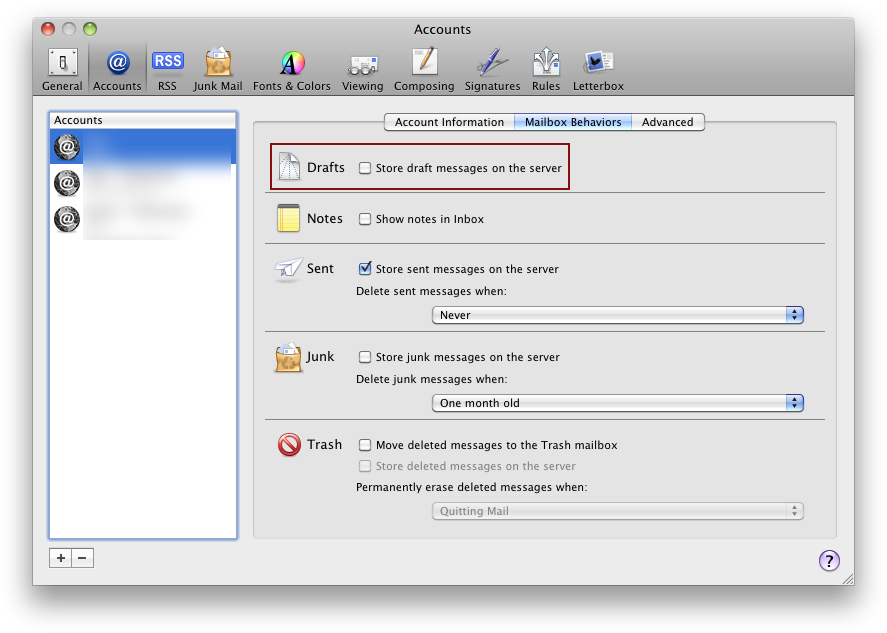
Fortunately there is one clever workaround. Stop using IMAP for your drafts. If you set Apple Mail to save your drafts locally, they don’t proliferate. There is a significant disadvantage. Any drafts which you have locally will not be available on your other computers.
For me, the absence of drafts across my secondary computers is a price worth paying to not have drafts proliferating like rabbits on my main computer* all day every day.
* A Macbook Air 11″ 1.6 GHz 4GB these days: the Macbook Air is holding up well under stress apart from the 4GB of memory which is very tight in a busy Safari sessions with photo editing in the background when one is writing web log posts. Like now for instance.

Alec Kinnear
Alec has been helping businesses succeed online since 2000. Alec is an SEM expert with a background in advertising, as a former Head of Television for Grey Moscow and Senior Television Producer for Bates, Saatchi and Saatchi Russia.


Thank you so much, this has been driving me mad since I moved from POP to IMAP. Rabbit drafts be gone!
Agree! Life saver. Thanks for the tip.
thx. very helpful
You have saved my sanity. Thank you!
Great tip thanks!
Awesome tip!! Thanks a ton.
Thank you for the solution to this problem posted by Alec. It’s one of the very few times I’ve located a viable solution to a problem.
Thanks again.
Tom
Hi Tom,
Glad I could help.
One thing I’ve done which has drastically reduced the time I waste tweaking my computer (and actually allows me to run four of them with less hassle than one used to cost me) is to stop upgrading.
All my Apple computers are on Snow Leopard (and all the company computers are on Leopard). Each new version of Apple software brings a whole new generation of bugs and inconveniences. When you are no longer shooting at a moving target, with stable application versions, life gets much, much better.
I don’t like the changes or new features of Lion or Mountain Lion. As Apple requires you to use the current OS version on new hardware, they’ve just outsmarted themselves out of about five computers sales/year (two for me, another three for Foliovision).
Thanks for the great tip! I don’t recall drafts being saved on the server in the past, but perhaps they were. In any case, the problem is now gone. The multiple drafts seemed to increase like crazy in only a few minutes of editing.
No longer saving IMAP drafts on the server works, but, why has this bug been in there for at least almost two years now? Third-party applications (like Sparrow) don’t suffer from this nasty proliferating bug.
Thanks for the tip – much appreciated
Thank you so much — this problem has been driving me up the wall for months!
Thanks for passing along this simple preference setting. It was driving me nutso!
So, do I click or unclick this? As my configuration is currently unclicked and I’m getting draft after draft after draft saved in my “smart folders”
I wish Apple/Gmail would just fix this stupid glitch. Otherwise I love their mail client…
I guess I just uncheck the box in preferences / accounts called “store draft message on the server” (I have lion) will that fix? Thanks, S (my gmail account refuses to load up as a POP and insists upon loading up as an IMAP. Apparently, once set up as IMAP, always an IMAP)
Hi Suzanne,
Yes, unclicking “store draft messages on the server” will fix the duplicating messages but you’ll only have your drafts locally. I wasn’t aware this awful bug made it across to Lion/Mountain Lion. Pretty sloppy programming.
You can delete (or inactivate) the Gmail account and try to add it back as POP.
I don’t suppose there’s an easy fix to get rid of all the messages that have already been saved? At the moment, every time I search for an email, I get all the drafts to sort through… would love to get rid of them retrospectively (if that makes sense?).
Thanks for the fix going forward though, life saver!
Hi Kate,
Glad I could help.
Just open up your drafts folder and delete all the messages there (making sure you’ve sent anything you plan to send).
How do I make multiple deletes from draft folder?
Hilite them all (select using shift and click) and then command-delete.
I can remove the check mark in Icloud but it will not remove from gmail, I take it off and save but checked it out and the check mark came back??
Hi Kathryn,
Alec
I had the same issue Kathy had with Gmail, checks kept appearing back. Solution is:
1 Quit your mail app. 2 Go to gmail account on your preferred web browser. 3 Then Settings/labels. 4 In labels look for drafts, then click on SHOW IF UNREAD (need to be in black) and then uncheck SHOW IN IMAP on the right side.
After this, you can open your mac mail app and try to uncheck the store drafts messages in the server option.
Hope it helps
Thanks for those detailed tips Santiago!
If Santiago’s tips work for you, please let us know.
Thanks solo much – finally I can see something in my outbox! :) I used to write quite long messages, so they would multiply 20-30 times!!! Crazzzzy! I’m happy again!
Just to let anyone else having this issue know that Santiago’s tip worked for me. Im back to the good old days without hundreds of drafts piling up.
Thanks
Thank you, that did the trick finally. I had repeatedly deleted the drafts manually but they all kept coming back. Now they’ve gone I’m happy to say.
Thank you! The multiple drafts were driving me crazy. I figured it was an easy fix but could not find where to go.
You wrote about drafts multiplying like rabbits, but I have a slightly different problem. When I send 1 email, it shows 4 going out. I just have one account and my system, and whole computer, was wiped totally clean by Apple, just a week ago so it doesn’t see like this could be malware.
Any ideas?
Hi Alden,
Thanks for writing.
I don’t know what version of Mac OS X you are using or what version of Mail. The above is tested on Snow Leopard 10.6.8 with Mail 4.6. Based on all the horror stories about later Mail (a key application for me), I’m glad I’m still on Snow Leopard on all my work computers.
Hi Alec,
Yes, I MUCH prefer 10.6.8 but have had to update to use some other software. I still run 10.6.8 on my production computer. Anyway, do you know of any fixes for Mail 7.3 on Mavericks 10.9.5?
Thanks for writing back, it’s an old thread so I didn’t know if you would be able to.
Cheers, Alden
Hi Alden,
I know the issue with other software. There’s a few applications of which I’d like to use the latest version and can’t (Acorn comes to mind, FCP would be another, could care less about Adobe and their sharecropping model now). The pain saved by not updating is still greater than the pain imposed by the absence of latest versions.
I’d go and visit those Tidbits links. There’s lots of comments over there and Tidbits is as obsessed with Mail as I am (they are also former Eudora power users like me, who even reluctantly moved away from Eudora to Apple Mail). Still miss the power and speed of Eudora.
Of the alternative IMAP clients, I’ve liked Sparrow the best but Sparrow offers a much narrower feature set and is not being updated. Google spoiled that too (just like Google Calendar no longer works with BusyCal 1.6 since 14 November: there’s no good inexpensive paid group alternatives for Google Calendar as free destroyed the market).
When you figure it out, Alden, please post the solution back here.
Thanks!
I don’t get it! How do I make the change from POP to IMAP? Note: box to save drafts on server was unticked and I had still had multiple draft messages!
Hi Brosnan,
You should disable the current POP account and add an IMAP account in Apple Mail with the same credentials. Your mailserver almost certainly supports both POP and IMAP at the same in 2016 (unless the server administrator deliberately turned off one or the other).
If you are working pre-dominantly from one computer this is a good fix and well worth it. Remember though you have to go into each account and execute the fix.