• Skip to main content
  • Skip to primary sidebar
  • Skip to footer

Foliovision

  • Weblog
    • FV Player
    • WordPress
    • Video of the Week
    • Case Studies
    • Business
  • About
    • Testimonials
    • Meet the Team
    • We Support
    • Careers
    • Contact
    • Pricing
  • Products
  • Support
    • FV Player Docs
    • Pro Support
  • Login
  • Basket is empty
Affordable VAST/VPAID for Wordpress has arrived. Serve ads with your videos starting today!
    • Docs
      • Installation
      • Changelog
    • FAQ
    • Support
      • Free Support
      • Pro Support
    • PRO

    Alignment Settings

    Setting up custom alignment is one of the most basic functions of the FV Player. You can do so within the shortcode editor. First, you have to make sure, that this option is active in Settings -> FV Player -> Setup tab -> Post Interface Options. There you can find the Align feature, which should be checked. Confirm with Save All Changes button.
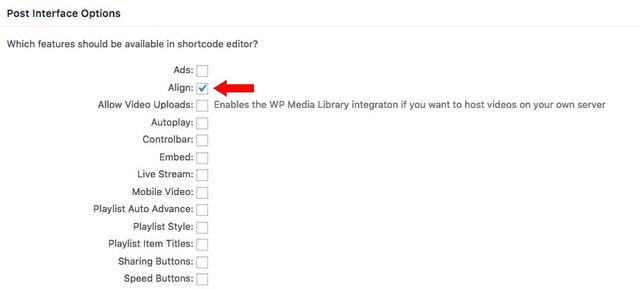


    Activating the align feature
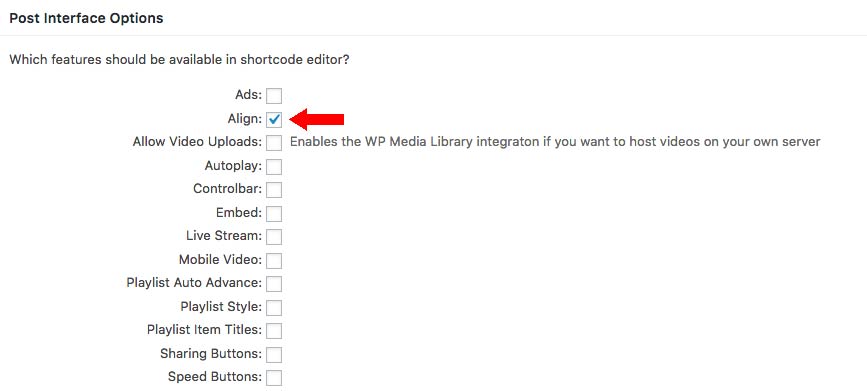
    Now you can see the Align feature among other active features in the shortcode editor. Use the drop down list to choose from three settings: Default, Left and Right. You can also make the changes directly in the shortcode by adding the line align=”left” or align=”right”. 


    Align option in shortcode editor
     

    Example
    Flying Lotus - Putty Boy Strut (Until The Quiet Comes, new album out October 1st/2nd)
    play-sharp-fill
    02:53

    Flying Lotus - Putty Boy Strut (Until The Quiet Comes, new album out October 1st/2nd)

    A right aligned video. Here is the used shortcode:

    [fvplayer src="https://vimeo.com/49760839" width="400" height="226" align="right" splash="https://i.vimeocdn.com/video/343177332-637ae85d6010f2d28feb68e91dfe77b8a7f320f22a67dd20dfeca995c465f56c-d_1920x1080?r=pad" caption="Flying Lotus - Putty Boy Strut (Until The Quiet Comes, new album out October 1st/2nd)"]

    See more examples in this demo – Align Settings

    Primary Sidebar

    Accessibility Features

    1. Why FV Player?
    2. FAQ
    3. Creating and Managing Playlists
    4. Advanced features
      1. Playback Features
      2. Accessibility Features
        1. Subtitles
        2. Interactive Video Transcript
        3. Timeline Previews
        4. VTT Chapters
        5. Sticky Video
        6. Item Titles and Splash Text
        7. Alignment Settings
        8. FV Player Profile Videos
      3. Sharing Options
    5. Video Security
    6. Troubleshooting
    7. Tools
    8. Analytics
    9. Audio Player
    10. Live Streaming
    11. Download | Buy
    12. Getting Started
    13. Licensing and Account
    14. Setting Screens
    15. Video Hosting
    16. Video Membership, Pay Per View and eLearning
    17. Video Advertising
    18. FV Player VAST/VPAID
    19. Casting Options
    20. For Developers
    21. FV Player Demos
    22. Additional Services
    23. Legal

    Footer

    Our Plugins

    • FV WordPress Flowplayer
    • FV Thoughtful Comments
    • FV Simpler SEO
    • FV Antispam
    • FV Gravatar Cache
    • FV Testimonials

    Free Tools

    • Pandoc Online
    • Article spinner
    • WordPress Password Finder
    • Delete LinkedIn Account
    • Responsive Design Calculator
    Foliovision logo
    All materials © 2026 Foliovision s.r.o. | Panská 12 - 81101 Bratislava - Slovakia | info@foliovision.com
    • This Site Uses Cookies
    • Privacy Policy
    • Terms of Service
    • Site Map
    • Contact
    • Tel. ‭+421 2/5292 0086‬