• Skip to main content
  • Skip to primary sidebar
  • Skip to footer

Foliovision

  • Weblog
    • FV Player
    • WordPress
    • Video of the Week
    • Case Studies
    • Business
  • About
    • Testimonials
    • Meet the Team
    • We Support
    • Careers
    • Contact
    • Pricing
  • Products
  • Support
    • FV Player Docs
    • Pro Support
  • Login
  • Basket is empty
Affordable VAST/VPAID for Wordpress has arrived. Serve ads with your videos starting today!
    • Docs
      • Installation
      • Changelog
    • FAQ
    • Support
      • Free Support
      • Pro Support
    • PRO

    Are You Still Watching Prompt

    This feature will prompt the viewer to verify they are still watching the video, by asking “Are you still watching”? This prompt will occur at set intervals, according to what interval has been chosen in the shortcode editor.

    You can set the feature using shortcode:  stillwatching=”1″  (1 = 1 minute). If you want to set the interval for less than one minute, you must use decimal values.  (.5 = 30 seconds)

    This feature can save bandwidth and data by preventing unnecessary video streaming, after the viewer has left the room and is no longer watching, or has fallen asleep.

    This is what the prompt looks like:
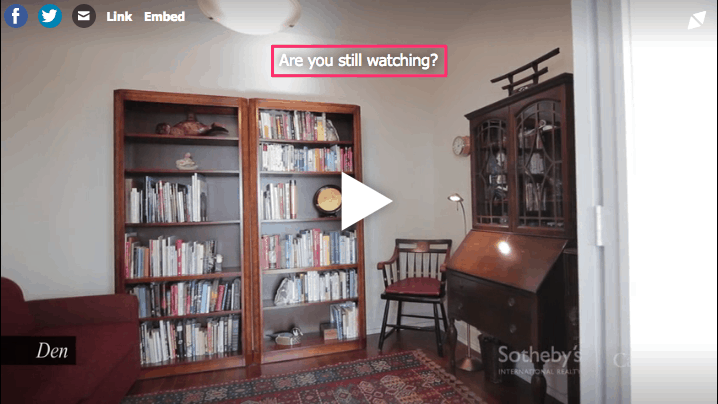
    You can see this feature in action by watching these videos.  The interval has been set to 30 seconds, for the first video.
    video
    play-sharp-fill

    The interval has been set to one hour, for the second video.

    video
    play-sharp-fill

    The preference is called “Prompt to continue watching” and can be set in global FV Player options, i.e. https://yoursite.com/wp-admin/options-general.php?page=fvplayer
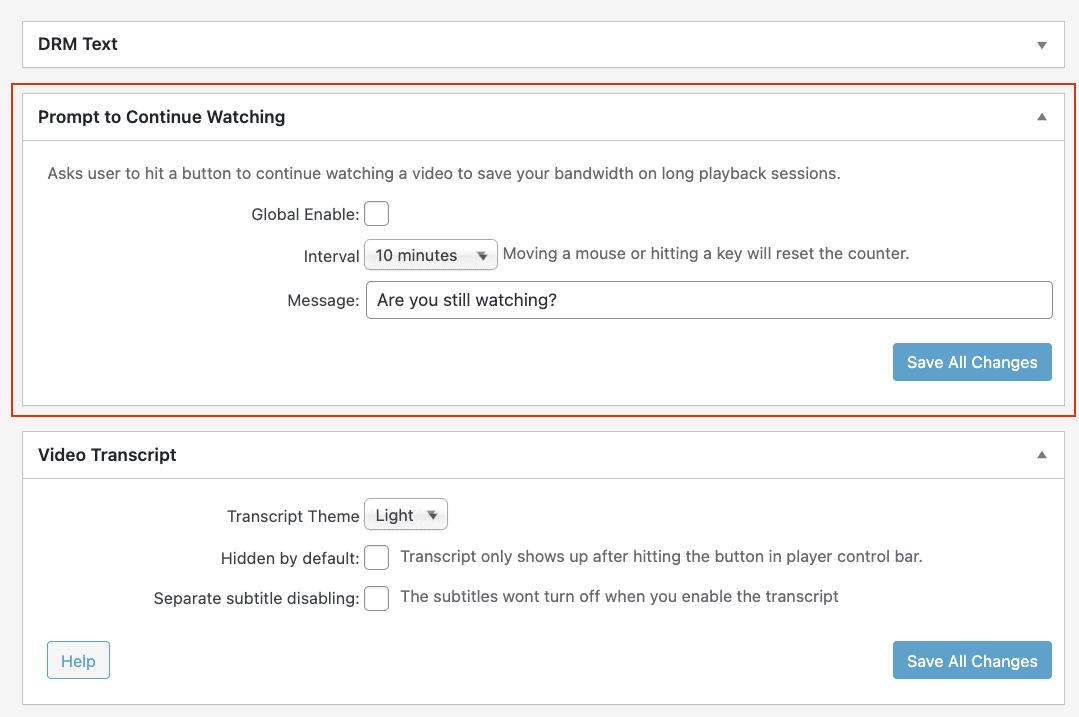
    Prompt to continue watching preference screenshot
    How to enable prompt to continue watching in FV Player

    For the moment, prompt to continue watching is a global setting for a site. If a publisher doesn’t want to trigger it too often, then set it to a high number (one or two hours). This would be a Netflix type situation where s/he doesn’t want to stream episodes to an empty room or a sleeping audience. If your site is a learning site and you would like to stop students from going away and not watching their lessons, then you could set the prompt much lower at three minutes.

    Let us know if you have any other questions or concerns about prompting viewers to keep watching. We are always happy to answer your questions.

    Primary Sidebar

    Playback Features

    1. Why FV Player?
    2. FAQ
    3. Creating and Managing Playlists
    4. Advanced features
      1. Playback Features
        1. AB Loop Function
        2. Autoplay
        3. Pitch Shifter
        4. Speed Buttons
        5. Custom Start/End Time
        6. Video Quality Switching
        7. Are You Still Watching Prompt
        8. Video Position Saving
        9. No Picture Button
        10. Randomize Autoplay Playlist
        11. Video Lightbox Effect
      2. Accessibility Features
      3. Sharing Options
    5. Video Security
    6. Troubleshooting
    7. Tools
    8. Analytics
    9. Audio Player
    10. Live Streaming
    11. Download | Buy
    12. Getting Started
    13. Licensing and Account
    14. Setting Screens
    15. Video Hosting
    16. Video Membership, Pay Per View and eLearning
    17. Video Advertising
    18. FV Player VAST/VPAID
    19. Casting Options
    20. For Developers
    21. FV Player Demos
    22. Additional Services
    23. Legal

    Footer

    Our Plugins

    • FV WordPress Flowplayer
    • FV Thoughtful Comments
    • FV Simpler SEO
    • FV Antispam
    • FV Gravatar Cache
    • FV Testimonials

    Free Tools

    • Pandoc Online
    • Article spinner
    • WordPress Password Finder
    • Delete LinkedIn Account
    • Responsive Design Calculator
    Foliovision logo
    All materials © 2026 Foliovision s.r.o. | Panská 12 - 81101 Bratislava - Slovakia | info@foliovision.com
    • This Site Uses Cookies
    • Privacy Policy
    • Terms of Service
    • Site Map
    • Contact
    • Tel. ‭+421 2/5292 0086‬