• Skip to main content
  • Skip to primary sidebar
  • Skip to footer

Foliovision

  • Weblog
    • FV Player
    • WordPress
    • Video of the Week
    • Case Studies
    • Business
  • About
    • Testimonials
    • Meet the Team
    • We Support
    • Careers
    • Contact
    • Pricing
  • Products
  • Support
    • FV Player Docs
    • Pro Support
  • Login
  • Basket is empty

Validation request failed with uploading video

[Solved]

Foliovision › Forums › FV Player › Troubleshooting › Validation request failed with uploading video

  • Tonia 4 months ago

    Dear support,
    After experiencing problems with our server in Germany connecting to users in Russia, we moved it to a server in Russia.
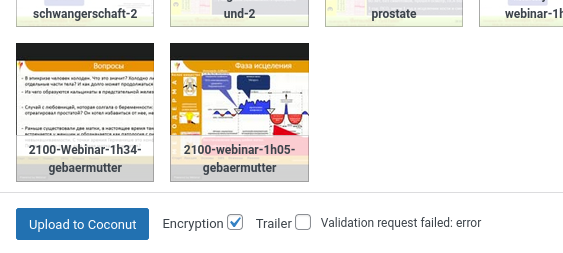
    Everything works fine, except for uploading videos via Coconut encryption. When uploading, the message “Validation request failed: error” appears immediately.
    Can you help me find the cause?
    Kind regards,
    Tonia Nijenhuis

    validation-request-failed
    Validation-request-failed
Viewing 5 replies - 1 through 5 (of 5 total)
  • Martin 4 months ago

    Hello Tonia,

    Please check in wp-admin -> FV Player -> Settings -> Tools -> System Info. What values are reported for “PHP Upload Max Size”, “PHP Post Max Size” and “PHP Upload Max Filesize”?

    Thanks,
    Martin

    Tonia 4 months ago

    Hello Martin,
    thanks for your reply.
    The size in both cases is 1024MB, I send you the complete info report in the annex.
    Kind regards,
    Tonia

    Martin 4 months ago

    Hello Tonia,

    In FV Player 8.0.22 we started to validate the uploads to ensure users of user level Author and above cannot upload malicious files.

    Could you please reinstall FV Player from this link? https://foliovision.com/downloads/fv-player-8.zip

    Then you should see a better error message about why it’s failing.

    Please check the PHP error log as well. There might be some error logged for s3-ajax.php.

    If you are not sure about how to check the PHP error log, the server technical support should be able to give you a hand.

    Or you can install this plugin which makes a list of PHP errors available in wp-admin: https://wordpress.org/plugins/error-log-monitor/

    Then try to upload a video again. The error should be recorded in that PHP error log.

    Thanks,
    Martin

    Tonia 4 months ago

    Hi Martin,
    thanks for your support.
    The error was 413 nginx. I defined the client_max_body_size in nginx.conf and now it works fine.
    This setting was not migrated with the move to the new server.
    Thanks,
    Tonia

    Martin 4 months ago

    Hello Tonia,

    Thank you for sharing the details.

    I see that the default value of client_max_body_size is 1 MB, so that would explain it.

    Seems like we should be checking for HTTP 413 response code.

    Thanks,
    Martin

Viewing 5 replies - 1 through 5 (of 5 total)

Reply To: Validation request failed with uploading video


Please Sign in or Register to upload files.

Related Posts

  1. coconut wizard failed to uplaod video due to server error

    coconut wizard failed to uplaod video due to server error

  2. html5: Video file not found; Can’t parse the request variable.

    html5: Video file not found; Can’t parse the request variable.

  3. Coconut Extra?

    Coconut Extra?

Primary Sidebar

Troubleshooting

    Categories

    • Business
    • Camera Reviews
    • Case Studies
    • Design
    • FV Player
    • Internet Marketing
    • IT
    • Life
    • SEO
    • Slovak
    • Video of the Week
    • WordPress

    Footer

    Our Plugins

    • FV WordPress Flowplayer
    • FV Thoughtful Comments
    • FV Simpler SEO
    • FV Antispam
    • FV Gravatar Cache
    • FV Testimonials

    Free Tools

    • Pandoc Online
    • Article spinner
    • WordPress Password Finder
    • Delete LinkedIn Account
    • Responsive Design Calculator
    Foliovision logo
    All materials © 2026 Foliovision s.r.o. | Panská 12 - 81101 Bratislava - Slovakia | info@foliovision.com
    • This Site Uses Cookies
    • Privacy Policy
    • Terms of Service
    • Site Map
    • Contact
    • Tel. ‭+421 2/5292 0086‬