• Skip to main content
  • Skip to primary sidebar
  • Skip to footer

Foliovision

  • Weblog
    • FV Player
    • WordPress
    • Video of the Week
    • Case Studies
    • Business
  • About
    • Testimonials
    • Meet the Team
    • We Support
    • Careers
    • Contact
    • Pricing
  • Products
  • Support
    • FV Player Docs
    • Pro Support
  • Login
  • Basket is empty

FV Player Pro conflict with Elementor Pro

Foliovision › Forums › FV Player › Bug Reports › FV Player Pro conflict with Elementor Pro

  • Susanne Lampas 4 years, 7 months ago

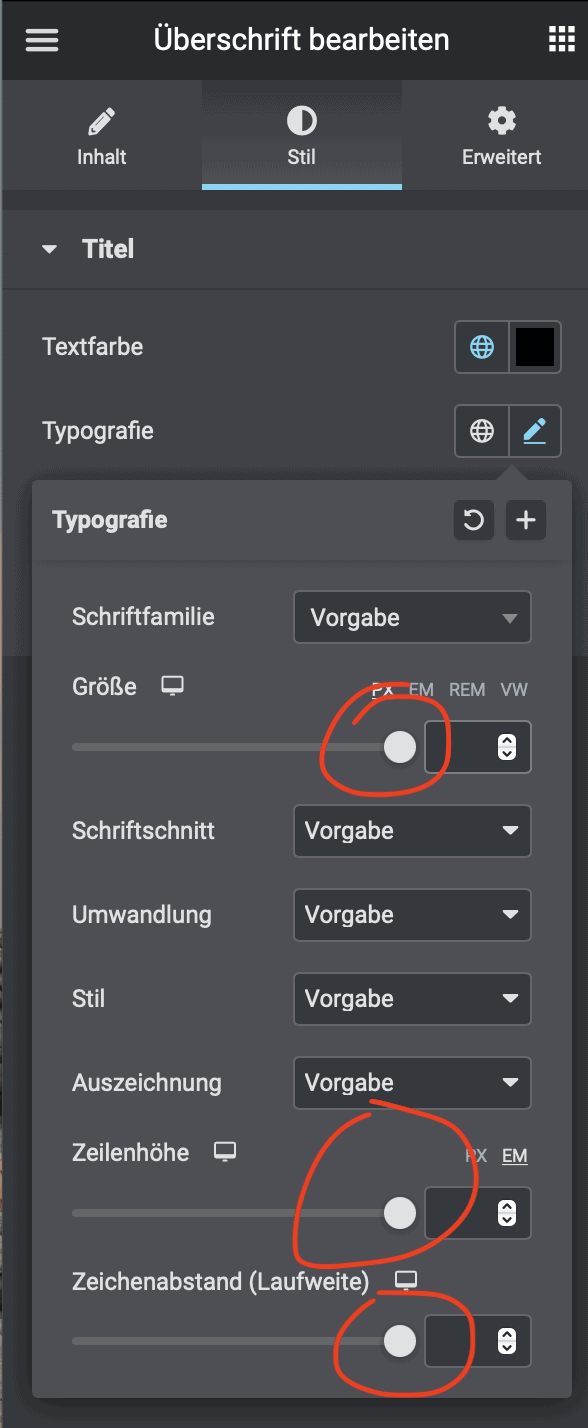
    There is a strange problem with Elementor Pro and FV Player pro activated. All sliders in the element settings for Elementor Pro are frozen in the max position and cannot be moved. This occurs when FV Player version 7.5 is activated. If I use the old version 7.4. activate everything works. Unless I activate FV Player Pro again, it doesn’t work again. Both at 7.5. as well as 7.4.

    bildschirmfoto-2021-06-29-um-00-03-10
    Bildschirmfoto-2021-06-29-um-00.03.10
Viewing 5 replies - 1 through 5 (of 5 total)
  • Mária Stašová 5 years ago
    Avatar photo

    Hello Susanne,

    thank you for bringing this to our attention!

    I was able to reproduce the issue. I will forward this bug report to our development. They will get back to you as soon as possible.

    Thanks,
    Maria

    Martin 5 years ago

    Hello Susanne,

    we will update the noUiSlider component in FV Player Pro. Then it will work.

    Thanks,
    Martin

    Martin 5 years ago

    Hello Susanne,

    the problem is that the new noUiSlider is much bigger than the version which we use. So we will have to only load it when it’s actually used. That should fix the issue with Elementor already.

    Thanks,
    Martin

    Susanne Lampas 5 years ago

    Hi, thanks a lot!
    What am I supposed to do now? Will there be an update soon?

    Martin 5 years ago

    Hello Susanne,

    we have prepared the bugfix for the next FV Player Pro release.

    To get it right now pleaes deactivate and delete the FV Player Pro plugin you are using, then hit “Install Pro extension” at the top of the wp-admin -> Settings -> FV Player screen.

    Then switch to Beta: https://foliovision.com/player/basic-setup/switching-fv-player-pro-to-beta And you will get a Opacity control in Settings -> FV Player Pro -> DRM Text.

    If you still notice any issue please also reinstall FV Player (the free, non-Pro plugin) from this link: https://github.com/foliovision/fv-wordpress-flowplayer/archive/master.zip ?

    To do that you will have to first deactivate and delete the current FV Player plugin you are using. WordPress will warn you that you might loose settings and data, but it’s not the case with our plugin, no settings now videos will be lost. Or you can just replace the plugin files via FTP.

    Thanks,
    Martin

Viewing 5 replies - 1 through 5 (of 5 total)
Reply To: FV Player Pro conflict with Elementor Pro


Please Sign in or Register to upload files.

Related Posts

  1. conflict between flowplayer (FV Player) video plugin and Elementor page builder

    conflict between flowplayer (FV Player) video plugin and Elementor page builder

  2. FV Player Pro conflicts with Elementor Pro video widget

    FV Player Pro conflicts with Elementor Pro video widget

  3. Does it work in Elementor?

    Does it work in Elementor?

Primary Sidebar

Bug Reports

    Categories

    • Business
    • Camera Reviews
    • Case Studies
    • Design
    • FV Player
    • Internet Marketing
    • IT
    • Life
    • SEO
    • Slovak
    • Video of the Week
    • WordPress

    Footer

    Our Plugins

    • FV WordPress Flowplayer
    • FV Thoughtful Comments
    • FV Simpler SEO
    • FV Antispam
    • FV Gravatar Cache
    • FV Testimonials

    Free Tools

    • Pandoc Online
    • Article spinner
    • WordPress Password Finder
    • Delete LinkedIn Account
    • Responsive Design Calculator
    Foliovision logo
    All materials © 2026 Foliovision s.r.o. | Panská 12 - 81101 Bratislava - Slovakia | info@foliovision.com
    • This Site Uses Cookies
    • Privacy Policy
    • Terms of Service
    • Site Map
    • Contact
    • Tel. ‭+421 2/5292 0086‬