• Skip to main content
  • Skip to primary sidebar
  • Skip to footer

Foliovision

  • Weblog
    • FV Player
    • WordPress
    • Video of the Week
    • Case Studies
    • Business
  • About
    • Testimonials
    • Meet the Team
    • We Support
    • Careers
    • Contact
    • Pricing
  • Products
  • Support
    • FV Player Docs
    • Pro Support
  • Login
  • Basket is empty

Auto Play in Safari on Mac Pro Retina Display

[Solved]

Foliovision › Forums › FV Player › Bug Reports › Auto Play in Safari on Mac Pro Retina Display

  • Devin 8 years, 2 months ago

    Hi Foliovision Team,

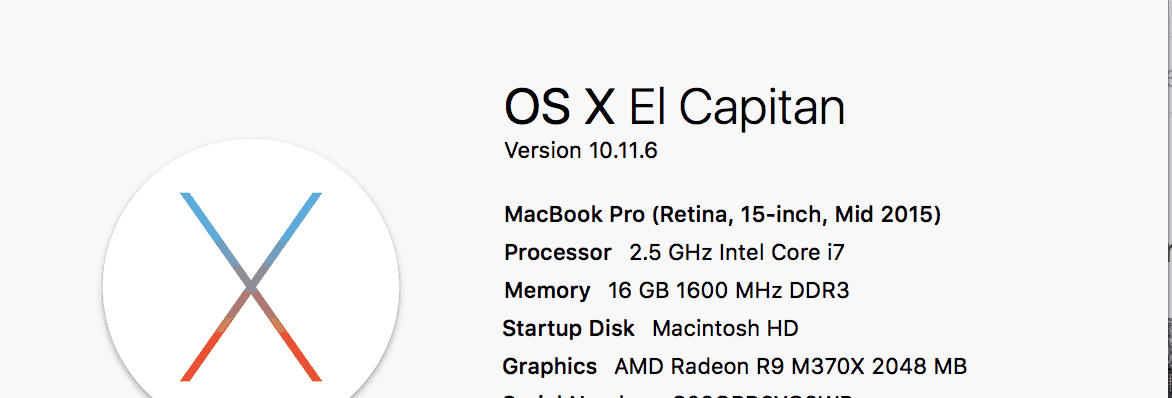
    I had a member on my site report that the autoplay feature was timing out. I was able to replicate it on my mac (see attached computer details). This only happens when I’m trying to watch videos in Safari…works fine in Chrome and Firefox…I open the post page…the video starts to auto play, then goes to a white screen and freezes.

    Let me know if you need any more info.

    Thanks!
    Devin

    screen-shot-2017-11-07-at-1-47-49-pm
    Screen-Shot-2017-11-07-at-1.47.49-PM
Viewing 2 replies - 1 through 2 (of 2 total)
  • Martin 8 years ago

    Hello Devin,

    I see Vimeo fails to play when it’s set to autoplay on Safari. We are working on a fix now.

    Details –

    Safari 11 made some drastic changes to how HTML5 video works on desktop computers – it shares the same limitations as iOS 11 (for iPhone and iPad). The video autoplay is not longer allowed, unless the video starts with muted sound. Safari 10 also shares this limitation and Google Chrome will probably also get to it soon.

    FV Player 7 which we are working is handling this correctly – it autoplays the video with no sound, so then user has to un-mute it.

    The way FV Player 6 handles this is that it lets the video pre-buffer but won’t autoplay. Once clicked it plays with sound.

    However – with Vimeo videos there is indeed a problem in FV Player 6 – it fails to play in Safari 11 if the autoplay is set. So we are working on a fix now.

    Thanks,
    Martin

    Martin 8 years ago

    Hello Devin,

    FV Player 6.3.9 is out. Unfortunately for now we just had to disable autoplay for Safari 11. FV Player 7 will fix it properly.

    We haven’t found issues with Safari 10.1.

    Thanks,
    Martin

Viewing 2 replies - 1 through 2 (of 2 total)

Reply To: Auto Play in Safari on Mac Pro Retina Display


Please Sign in or Register to upload files.

Related Posts

  1. Random auto-play for Vimeo Channel

    Random auto-play for Vimeo Channel

  2. Google Search Settings won’t stick in Safari or OmniWeb: turn off Instant!

    Google Search Settings won’t stick in Safari or OmniWeb: turn off Instant!

  3. Foliopress WYSIWYG glitch in Safari fixed

    Foliopress WYSIWYG glitch in Safari fixed

Primary Sidebar

Bug Reports

    Categories

    • Business
    • Camera Reviews
    • Case Studies
    • Design
    • FV Player
    • Internet Marketing
    • IT
    • Life
    • SEO
    • Slovak
    • Video of the Week
    • WordPress

    Footer

    Our Plugins

    • FV WordPress Flowplayer
    • FV Thoughtful Comments
    • FV Simpler SEO
    • FV Antispam
    • FV Gravatar Cache
    • FV Testimonials

    Free Tools

    • Pandoc Online
    • Article spinner
    • WordPress Password Finder
    • Delete LinkedIn Account
    • Responsive Design Calculator
    Foliovision logo
    All materials © 2026 Foliovision s.r.o. | Panská 12 - 81101 Bratislava - Slovakia | info@foliovision.com
    • This Site Uses Cookies
    • Privacy Policy
    • Terms of Service
    • Site Map
    • Contact
    • Tel. ‭+421 2/5292 0086‬