• Skip to main content
  • Skip to primary sidebar
  • Skip to footer

Foliovision

  • Weblog
    • FV Player
    • WordPress
    • Video of the Week
    • Case Studies
    • Business
  • About
    • Testimonials
    • Meet the Team
    • We Support
    • Careers
    • Contact
    • Pricing
  • Products
  • Support
    • FV Player Docs
    • Pro Support
  • Login
  • Basket is empty

No index option missing in posts

Foliovision › Forums › FV Simpler SEO › Troubleshooting › No index option missing in posts

  • Vibhi 7 years, 10 months ago

    Hi I have a website containing image post basically Humor and other pic So Im thinking to make My category Index and Post no index So How can i do That there is Option to make category No index but there is no option to No index post

Viewing 7 replies - 1 through 7 (of 7 total)
  • Eduard 8 years ago
    Avatar photo

    Hello Vibhi,

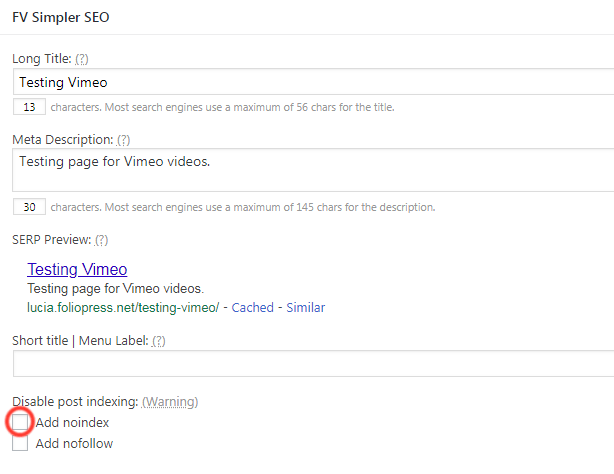
    To be able to add noindex to posts and pages, you will first need to activate in the settings. Go to Settings > FV Simpler SEO > Extra Interface Options and there check the option Add no index checkbox to post editig screen.

    Then you should be able to see the Add noindex button when editing posts (as you can see in the attached screenshot).

    Thanks,
    Eduard

    7dddab8423a509a9ccf6c54278b63d63_image%202018-03-21%20at%2010-31-41%20am
    7dddab8423a509a9ccf6c54278b63d63_Image202018-03-2120at2010.31.4120AM
    Vibhi 8 years ago

    Hi i have a website for image basically funny images. so the problem is this that Writing Meta description is basically impossible so what Settings should i choose
    Im thinking to set categories at index and post to no index does it make sense?
    Any suggestions? for setting

    Eduard 8 years ago
    Avatar photo

    Hi Vibhi,

    Using the “noindex” is available only for posts and pages, so you would have to set it individually for every post. Is this what you are asking about?

    Thanks,
    Eduard

    Vibhi 8 years ago

    Yes im asking about that
    another thing i want to ask
    that i have websites with images so writing description is hard
    so what Settings you guys recommend

    if i use categories meta description it will show it as duplicate

    what should i do

    Eduard 8 years ago
    Avatar photo

    Hi Vibhi,

    I don’t think that using “noindex” on the pages with picture will be helpful, as there doesn’t seem to be a reason for stopping search engines from indexing these pages, even without meta description.

    As for the duplicate, do you have a link to an example page where I could check it?

    Thanks,
    Eduard

    Vibhi 8 years ago

    im not talking about pages im talking about post
    here is my site please recommend me setting
    shoutcinema.com

    Eduard 8 years ago
    Avatar photo

    Hi Vibhi,

    The same what I said above about pages should also apply to posts. I don’t think that using “noindex” would do you any benefit.

    Thanks,
    Eduard

Viewing 7 replies - 1 through 7 (of 7 total)
Reply To: No index option missing in posts


Please Sign in or Register to upload files.

Related Posts

  1. How to restore missing WordPress Featured Image Screen Option

  2. Apple OS X shortcomings got you down? Read some Windows 10 blog posts to cheer up

  3. VAST Ads Now With ‘Silent Start’ Option

Primary Sidebar

Troubleshooting

    Categories

    • Business
    • Camera Reviews
    • Case Studies
    • Design
    • FV Player
    • Internet Marketing
    • IT
    • Life
    • SEO
    • Slovak
    • Video of the Week
    • WordPress

    Footer

    Our Plugins

    • FV WordPress Flowplayer
    • FV Thoughtful Comments
    • FV Simpler SEO
    • FV Antispam
    • FV Gravatar Cache
    • FV Testimonials

    Free Tools

    • Pandoc Online
    • Article spinner
    • WordPress Password Finder
    • Delete LinkedIn Account
    • Responsive Design Calculator
    Foliovision logo
    All materials © 2026 Foliovision s.r.o. | Panská 12 - 81101 Bratislava - Slovakia | info@foliovision.com
    • This Site Uses Cookies
    • Privacy Policy
    • Terms of Service
    • Site Map
    • Contact
    • Tel. ‭+421 2/5292 0086‬
