Forum Replies Created
-
-


Hi Juraj
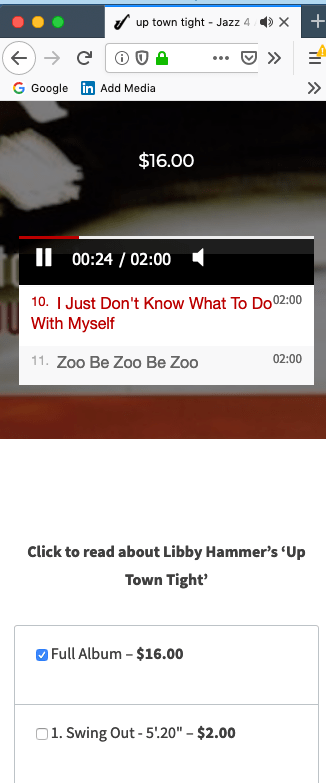
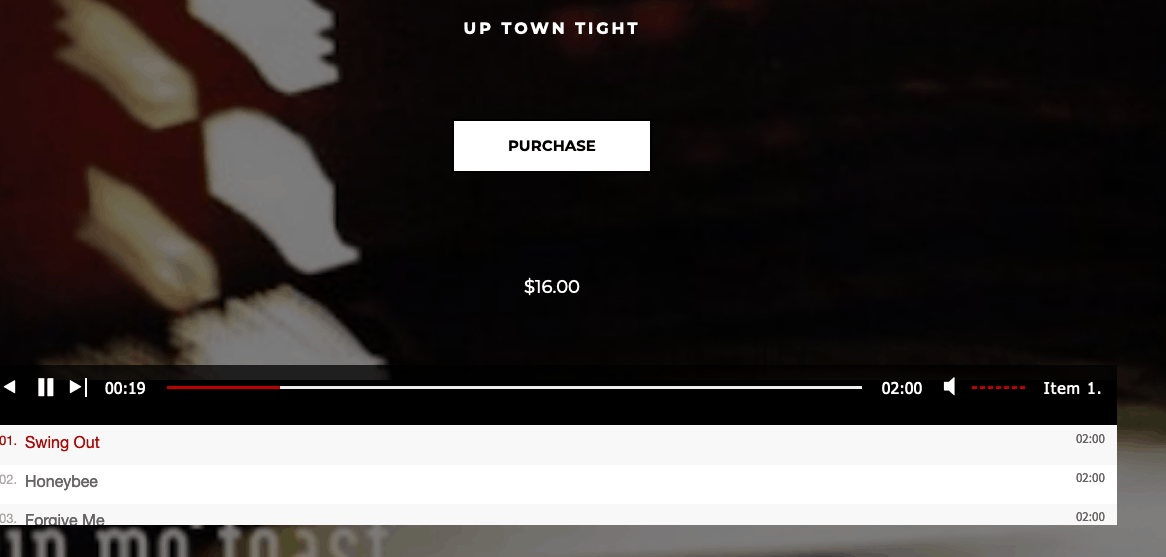
Thank you for your work so far. Immediately after this email, I will order Pro Support Incident. A good example of the fault described in action can be found at https://www.jazz4all.org.au/downloads/up-town-tight/ When at the page, reduce to Mobile view for a small phone e.g. an IPhone 5 or LG Q6 – before you start the player – then start the player. You should then see the problems and behaviours described i.e. the ability to operate the player outside of the player area and faulty operation within the player , the ‘about —‘ pop up link beneath the player not working. Also, in postcard view (in mobile) and on tablet/laptop,the appearance of the word and number e.g Item 1 (when the player is started) which when clicked on gives a list of tracks that extends upwards from the player – this has only recently started to happen.
You will need the password for the site. Martin has all the necessary details for Jazz 4 All .
Regards
Neil
Hi Juraj
Seems to be taking a while for me to get a response regarding the information I was asked to send (1 week so far). I understand you are probably busy. Do you think it would be better if I ordered a Pro Incident support (the $100.00 one)?
Neil
Hi Juraj
Just wondering if you have had a chance to look at the system info and screen shots yet?
Regards
Neil
Hi Juraj
As requested – Please see below the system info and attachements.
Regards Neil
In the first image titled ‘After Player is Started’ – the word ‘Item’ appears on the right hand side. In the second image, you can see the list that appears when ‘Item’ is clicked. The top item (No. 1) is unrepsonsive to clicking.In the third image Mobile View, the player can not be properley controlled inside the lsit of tracks area. Also, the player can be operated up until the area where tracks can be selected for purchase. Finally – the link Click here to read about Libby Hammer’s Up Town Tight’ operates a pop up window – this does not work when this fault is happening.
( System Info removed )
Hi in trying to further explore the possible causes of the problem I looked at the settings and found this under Mobile settings –
• Use native fullscreen on mobile: –
Stops popups, ads or subtitles from working, but provides faster interface. We set this for Android < 4.4 and iOS < 7 automatically.”
I have a pop up with an artist biography on a number of pages and it does not work when the problem we are discussing happens.
I am wondering whether it would be quicker and clearer if you visited the site which is not yet public and sits behind a password page – Martin has all the details.
Regards
Neil
Hi
The fault is seen on the following:
Mac Book Air, 2015 with Mac OS Mojave using these browsers – Safari, Google Chrome and Firefox (All latest versions).
Mobile phones:
Samsung S9, OS Oreo 8.1 – Browser – Chrome.LG Q6, OS Oreo 8.1, Browser – Chrome.
The fault can be created by simply shrinking the screen until it is around mobile size. The fault only appears in relation to a small screen size and only appears when there are more than 3 or four tracks. The player has to be started before the fault will appear.
Regards
Neil
Sorry – one more piece if information – the problem only occurs in Mobile – Potrait view not in Postcard.
Neil
Hi – some additional information – the problem only occurs once the player has been called to play tracks. It also only occurs when the number of tracks in a playlist is greater than 3 or 4. I also noticed recently that when the player is called to action the word ‘Item’ appears on the right hand side of the player. When clicked it presents all the tracks. Can I turn this off as I already have my tracks displayed beneath the player.
Neil
Hi Juraj
Thank you for the advice. The site is only audio at this time (we will begin video streaming a little later). I will do as you have advised but it may be a couple of days or so due to work commitments before I can send all the required info. I will also continue to try out streaming across a number of different tracks and browsers.
Regards
Neil7 years ago in reply to: MediaConvert Guide
Hi Martin
Yes and no!
There are a lot of useful links regarding allowable inputs and outputs and other information. There is also a White Paper https://d1.awsstatic.com/awselemental/howto/How-To-Converting-Amazon-Elastic-Transcoder-Presets-to-AWS-Elemental-MediaConvert.pdf with the script available from GitHub https://github.com/aws-samples/amazon-vod-preset-convert
Far too advanced for me but I am sure with Python being the language I could find a specialist to do this. However, I do not think that it will be too long before MediaConvert will have similar choices to Elastic Transcoder for MP3 to encrypted HLS.
Neil7 years ago in reply to: MediaConvert Guide
Had a quick read of the thread above and also checked out a very good AWS article on MediaConvert at https://aws.amazon.com/blogs/media/how-to-migrate-workflows-from-amazon-elastic-transcoder-to-aws-elemental-mediaconvert/
Regards
Neil7 years ago in reply to: MediaConvert Guide
Hi Martin
Would it be possible to provide ‘audio only’ variations on the instructions in the MediaConvert Guide for users such as myself who are primarily using the FV player for audio tracks?
Regards
Neil7 years ago in reply to: MediaConvert Guide
Hi Martin
You have probably been very busy but it has now been two weeks since I sent you the information you asked for (18/01/19). If the question involves too much time to answer on a free basis I am happy to submit a professional support request – just let me know.
Regards
Neil Barclay
Would using the Amazon S3 protected Content function cause the error we have been discussing?
Neil
Hi Martin
Not sure if you missed my email from late last week with the information you requested. However, I have been checking the various Foliovision player settings under the Hosting Tab. Under Amazon S3 Protected Content I have specified the bucket where the HLS is stored along with encryption keys. However, when I remove either the specified bucket name or the encryption keys, I can no longer access the bucket from within the player editor ‘Add Video’ S3 tab function.
Regards
Neil
Hi Martin
I refreshed the page and my ‘awaiting moderation’ reply disappeared so not sure If you got my reply with the license acquisition URL in it – so here it is again just in case. https://jazz4all.org.au/?fv_player_hls_key=jazz_stream/index
By the way I am working at an annotated document for the other matters we are discussing.
Regards
Neil
Hi Martin – Thank you for the reply. The License Acquisition URL for the MU38 in question is https://jazz4all.org.au/?fv_player_hls_key=jazz_stream/index
Regards
Neil
Hi Sorry with reference to the above there are some inaccuracies which need correcting:
Ok
What are the possible cause/s that produce the ‘hlsjs-lite: Network Error message’ when using encrypted HLSv4 audio files distributed via CloudFront ? I altered the urls to include the Cloudfront domain, I performed an invalidation after doing the recommended Whitelist changes and checking CORS and Cross Domain were in place. HLS.js is eanbled in the settings. Decryption is working. All access keys seem to be fine . The audio files are accessible/viewable in the S3 Browser and are in the relevant S3 output bucket that is part of the three bucket HLS system. The error message is still there (I also did a force refresh on the lap top).
Can you advise what I should check/adjust next to remove this error and allow playback of the Mu38 stream?
Regards
Neil
Hi
What cause/s the hlsjs-lite: Network Error message when using encrypted HLSv4 audio files distributed via CloudFront ? I have checked all my settings CORS, Cross Domain files in the S3 bucket, encryption keys, access keys, Whitehead settings and so on and everything seems to be ok. I have carried out an invalidation to clear the CloudFront Cache but the message continues.
Can you advise what I should check/adjust next to solve this error.
Regards
Neil