Forum Replies Created
-
-
2 years ago in reply to: Enhancing Video Security with FV Player


Hi Martin,
Thank you very much for the detailed explanation and the helpful information. I appreciate you taking the time to guide me through the options for enhancing video protection.
I’ll look into the FV Player Coconut add-on and consider implementing encrypted HLS streams as you suggested.
Thanks again for your assistance!
Best regards,
Hamid
Hi Martin,
Thank you very much for your prompt response and clear instructions. I applied the settings as you suggested, and it works perfectly! The player now occupies the full width while maintaining the video’s original aspect ratio, just as I wanted.
I appreciate your assistance.
Best regards,
Hamid2 years ago in reply to: Incorportate transcript box
Hi Martin,
Thank you for your response.
Yes, I do have the tabs already set up, and I would be able to run a shortcode like [fvplayer_transcript] in one of them. This solution is exactly what I am looking for.
Could you please provide the necessary guidance or instructions on how to implement this?
Thank you very much for your support.
Best regards,
Hamid2 years ago in reply to: Incorportate transcript box
Hi Martin,
I hope you are doing well.
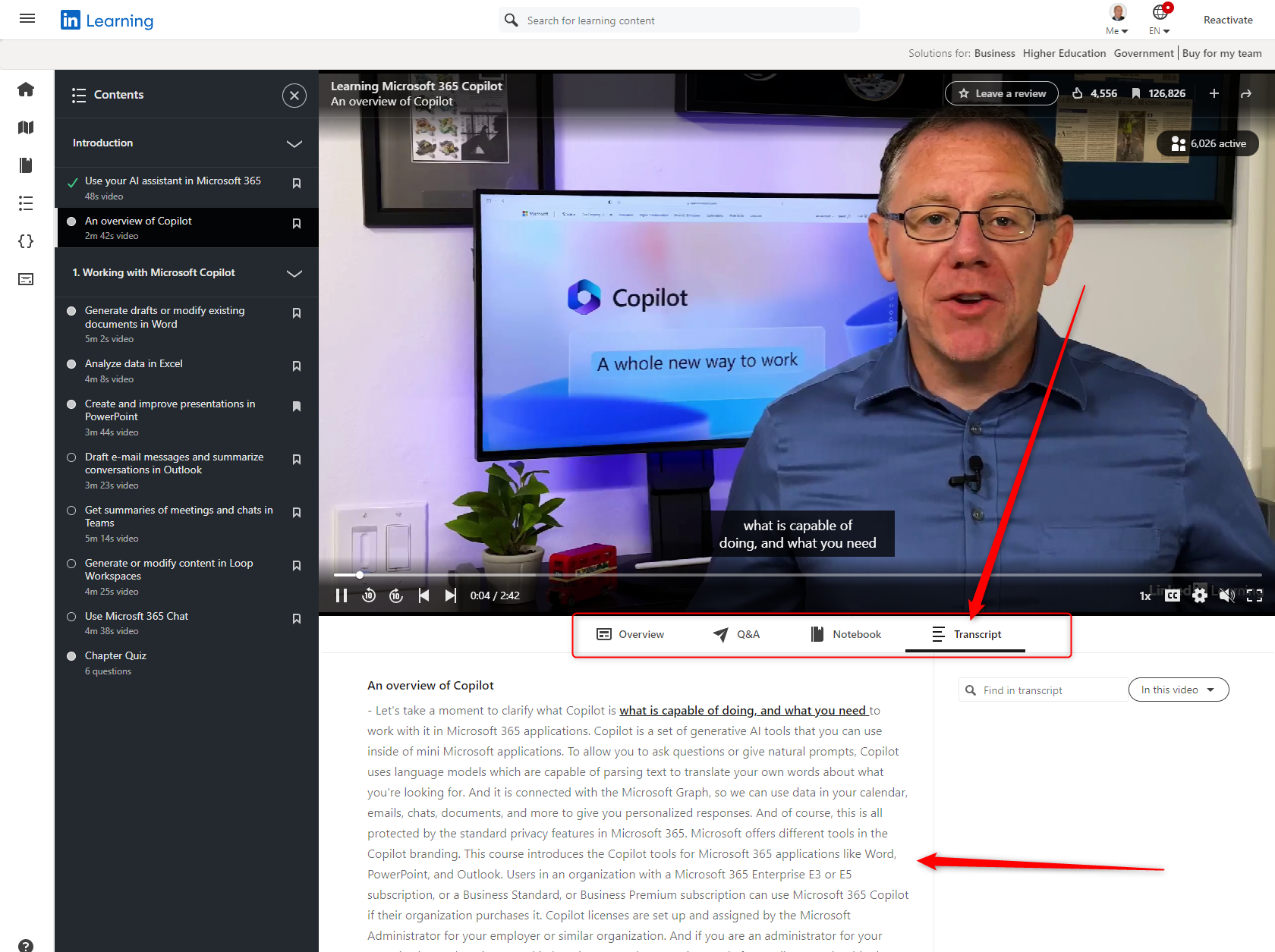
I wanted to follow up on my previous message regarding the transcript feature. As mentioned, I would like to incorporate the transcript box into a fixed area directly below the player, but not floating. I envision having multiple tabs below the player, one of which would be labeled “Transcript” and would contain the transcript.
To illustrate what I mean, I am attaching a screenshot from LinkedIn Learning, which shows a similar setup with tabs below the player, one of which is for the transcript.
Could you please provide guidance on how to achieve this setup?
Thank you very much for your support.
Best regards,
Hamid2 years ago in reply to: VTT Chapters Custom Button
Hi Martin,
I hope you’re doing well.
I wanted to follow up on my previous message regarding the Chapters feature. As mentioned, I am looking for a way to allow users to toggle the visibility of the chapters on demand while viewing the video, ideally through a button in the player or a custom link/button outside the player.
Could you please let me know if there is an existing feature or method in FV Player to achieve this functionality?
Your assistance on this matter would be greatly appreciated, as I need this feature for an upcoming project.
Thank you for your help.
Best regards,
Hamid2 years ago in reply to: Incorportate transcript box
Hi Martin,
Thank you for your prompt response.
To clarify, my goal is to incorporate the transcript box into a fixed area directly below the player, but not floating. I envision having multiple tabs below the player, one of which would be labeled “Transcript” and would contain the transcript.
To illustrate what I mean, I am attaching a screenshot from LinkedIn Learning, which shows a similar setup with tabs below the player, one of which is for the transcript.
Thank you for your guidance on how to achieve this setup.

Best regards,
Hamid2 years ago in reply to: VTT Chapters Custom Button
Hi Martin,
Thank you for your response. I appreciate your help.
However, I believe there was a misunderstanding. I do not want the chapters to be permanently hidden. Instead, I would like the chapters to be visible or hidden on demand by the user while viewing the video. Ideally, this could be done via a button in the player or a link/button outside the player that I would create.
Is there already an existing feature or method in FV Player to achieve this functionality?
Thank you for your assistance.
Best regards,
Hamid2 years ago in reply to: MP4 Video Quality Switching with sub-folders
Hi Martin,
Thank you very much for your prompt response and the detailed instructions. I followed your guidance and implemented the Naming scheme and labels as suggested:
/mobile/ Mobile
/sd/ SD
/hd/ HD
I’m happy to report that it worked perfectly! I truly appreciate your assistance and the clarity of your instructions.Best regards,
Hamid