• Skip to main content
  • Skip to primary sidebar
  • Skip to footer

Foliovision

  • Weblog
    • FV Player
    • WordPress
    • Video of the Week
    • Case Studies
    • Business
  • About
    • Testimonials
    • Meet the Team
    • We Support
    • Careers
    • Contact
    • Pricing
  • Products
  • Support
    • FV Player Docs
    • Pro Support
  • Login
  • Basket is empty

PPV Generated Email Text

[Solved]

Foliovision › Forums › FV Player Pay Per View › Troubleshooting › PPV Generated Email Text

  • Richard Knights 7 years, 12 months ago

    Hi

    Can you tell me where i can change the text of the PPV puchase email notifications that goes to the purchaser, i have tried changing the Easy Digital Downloads emails but it hasnt made any difference.

Viewing 10 replies - 1 through 10 (of 10 total)
  • Eduard 8 years ago
    Avatar photo

    Hi Richard,

    Have you tried to modify it in Downloads > Settings > Emails tab > Purchase Receipts? Because that should be the correct setting for these emails, it even allows you to generate a preview of the email, or send a test.

    Thanks,
    Eduard

    Richard Knights 8 years ago

    Yes we have made changes here but when a purchase is made the email that is sent does not reflect the changes

    Richard Knights 8 years ago

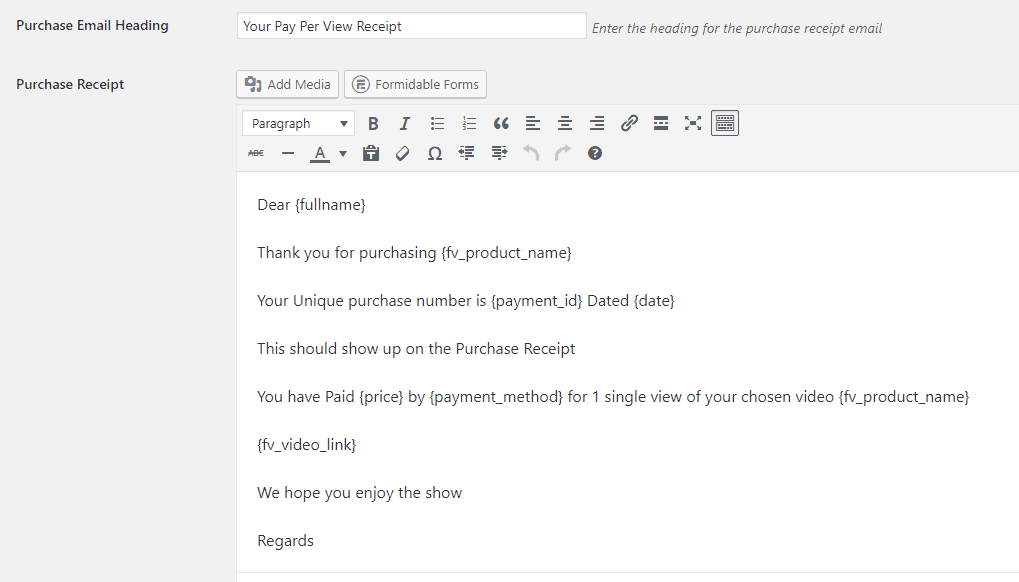
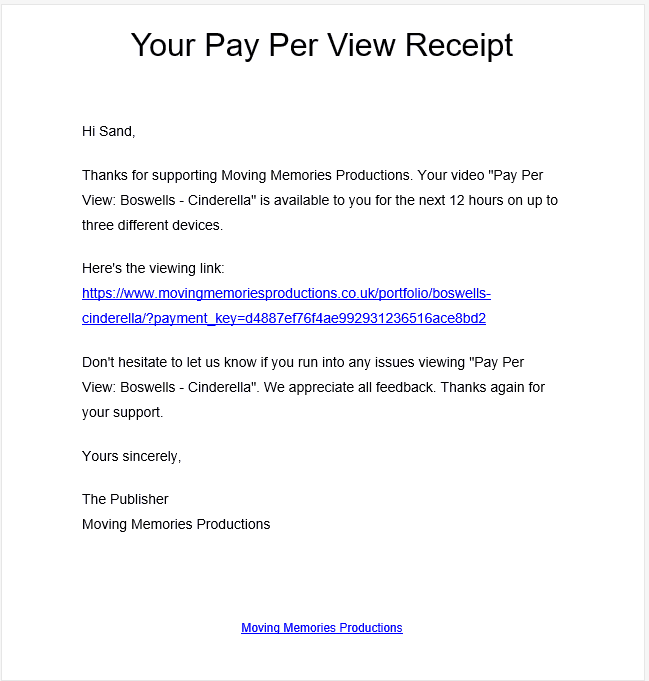
    I have attached 2 example files
    the first example 1 is the backend email template
    example 2 is the actual received email

    example-2
    Example-2
    example-1
    Example-1
    Eduard 8 years ago
    Avatar photo

    Hi Richard,

    Sorry for the confusion. You were right, the email with the purchase receipt is not editable at this moment. We are going to add it to FV Player PPV, it should be in the next update.

    Thanks,
    Eduard

    Stuart Osborne 7 years ago

    Have you any news on when the editable email template will be available it really is naff and needs changing

    Stuart Osborne 7 years ago

    Hi, I havent had a response from 2 weeks ago, can you update me as to when the template will be editable please

    Martin 7 years ago

    Hello Stuart,

    we have added a setting for the confirmation email to the plugin settings screen. It will be part of the next plugin release.

    You can also grab a fresh copy of the plugin from https://foliovision.com/my-licenses and reinstall, we already put this feature in there.

    Thanks,
    Martin

    Richard Knights 7 years ago

    Hi Martin

    Thanks for the update, I have just tried unloading the old PPV and downloading and installing from the licence site, but it has given me the same version as before 7.3.8.727 so no extra setting for the email

    Martin 7 years ago

    Hello Richard,

    sorry about that, I see I forgot to hit the button actually. Please try again and it will be there.

    Thanks,
    Martin

    Stuart Osborne 7 years ago

    Hi Martin

    Yes all is fine we have the template now.
    Many thanks for your support
    Regards

    Stuart

Viewing 10 replies - 1 through 10 (of 10 total)
Reply To: PPV Generated Email Text


Please Sign in or Register to upload files.

Related Posts

  1. How to alter WordPress comment email

    How to alter WordPress comment email

  2. Linked In will spam you to death: they never release email addresses

    Linked In will spam you to death: they never release email addresses

  3. Email Subscription Form Pop-ups

Primary Sidebar

Troubleshooting

    Categories

    • Business
    • Camera Reviews
    • Case Studies
    • Design
    • FV Player
    • Internet Marketing
    • IT
    • Life
    • SEO
    • Slovak
    • Video of the Week
    • WordPress

    Footer

    Our Plugins

    • FV WordPress Flowplayer
    • FV Thoughtful Comments
    • FV Simpler SEO
    • FV Antispam
    • FV Gravatar Cache
    • FV Testimonials

    Free Tools

    • Pandoc Online
    • Article spinner
    • WordPress Password Finder
    • Delete LinkedIn Account
    • Responsive Design Calculator
    Foliovision logo
    All materials © 2026 Foliovision s.r.o. | Panská 12 - 81101 Bratislava - Slovakia | info@foliovision.com
    • This Site Uses Cookies
    • Privacy Policy
    • Terms of Service
    • Site Map
    • Contact
    • Tel. ‭+421 2/5292 0086‬