• Skip to main content
  • Skip to primary sidebar
  • Skip to footer

Foliovision

  • Weblog
    • FV Player
    • WordPress
    • Video of the Week
    • Case Studies
    • Business
  • About
    • Testimonials
    • Meet the Team
    • We Support
    • Careers
    • Contact
    • Pricing
  • Products
  • Support
    • FV Player Docs
    • Pro Support
  • Login
  • Basket is empty

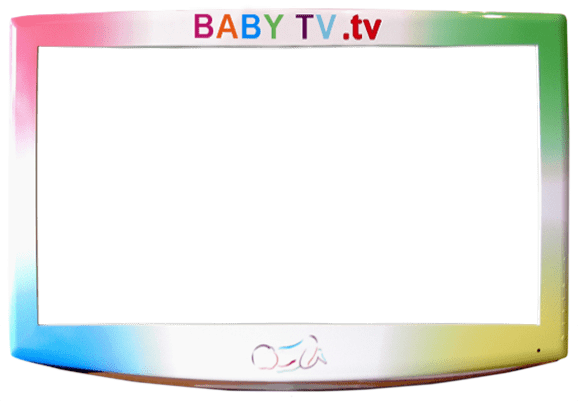
insert FV player inside a graphic such as a branded TV screen .png

[Solved]

Foliovision › Forums › FV Player › How to … › insert FV player inside a graphic such as a branded TV screen .png

  • William 9 years, 4 months ago

    I have a autolooping playlist that I want to display inside a branded tv screen graphic. I cannot find the .css info on this. You display an example on the FV Player plugin settings. Appreciate some help.

    tv
    tv
Viewing 7 replies - 1 through 7 (of 7 total)
  • Eduard 9 years ago
    Avatar photo

    Hello William,

    I’ve passed this question to our design department and they will reply to you shortly with some tips on how to customize the border around the video in CSS.

    Thanks,
    Eduard

    viktor 9 years ago

    Hello William,

    I wouldn’t use border-image in CSS, as it has many issues and the results might be different in each browser. And since it’s important, that the video fits nicely into the graphic, it would be best to wrap it in a DIV that has your custom background. Than you can use background-size: cover; so it spreads nicely around the whole player. Since you know the size of the player, you can easily create that graphic to fit pixel perfect. The wrapping DIV itself can include some padding around, this way you can center the player vertically and horizontally.

    thanks
    vk

    Eduard 9 years ago
    Avatar photo

    Hi William,

    Here’s an example on our page – Custom Frame in Background. It also includes the used the sample of the code used for styling.

    Thanks,
    Eduard

    Eduard 9 years ago
    Avatar photo

    Hi William,

    Here is also a full guide in our FV Player Documentation – How to Make a Frame Around Video.

    Thanks,
    Eduard

    William 9 years ago

    Thanks, it was helpful. The added fun was that the player had to be viewed at an angle and with perspective. No parallel sides. So the below worked. Can’t include the image used, but you’ll get the idea. Enjoy !!
    <div id=”hv1″>
    <style>
    #hv1 {
    position: relative;
    background-image: url(‘//cdn.foliovision.com/media/backgrounds/Waiting_Room.png’);
    height: 405px;
    width: 720px;
    }
    #hv2 {
    position: relative;
    top: 33px;
    left: 455px;
    height: 96px;
    width: 152px;
    -ms-transform: rotate(-2.5deg); /* IE 9 */
    -webkit-transform: rotate(-2.5deg); /* Safari */
    transform: rotate(-2.5deg); /* Standard syntax */
    }
    #hv3 {
    height: 96px;
    width: 152px;
    -webkit-perspective: 19px; /* Chrome, Safari, Opera */
    perspective: 19px;
    }
    #hv4 {
    position: relative;
    height: 96px;
    width: 152px;
    -webkit-transform: rotateY(-.65deg); /* Chrome, Safari, Opera */
    transform: rotateY(-.65deg);
    }
    </style><div id=”hv2″>
    <div id=”hv3″>
    <div id=”hv4″>[fvplayer src="/media/stuff,mp4" width="152" height="96" autoplay="true" liststyle="prevnext" controlbar="no" loop="true" playlist="//cdn.foliovision.com/media/stuff2.mp4" hflip="true"]</div>
    </div>
    </div>
    </div>

    William 9 years ago

    Please move the <div id=”hv1″> from top to above <div id=”hv2″>

    Bill

    Eduard 9 years ago
    Avatar photo

    Hi William,

    Great, thanks for sharing!

    Thank you,
    Eduard

Viewing 7 replies - 1 through 7 (of 7 total)
Reply To: insert FV player inside a graphic such as a branded TV screen .png


Please Sign in or Register to upload files.

Related Posts

  1. FV Clone Screen Options

    FV Clone Screen Options

  2. FV Clone Screen Options User Guide

    FV Clone Screen Options User Guide

  3. FV Clone Screen Options Version History

    FV Clone Screen Options Version History

Primary Sidebar

How to …

    Categories

    • Business
    • Camera Reviews
    • Case Studies
    • Design
    • FV Player
    • Internet Marketing
    • IT
    • Life
    • SEO
    • Slovak
    • Video of the Week
    • WordPress

    Footer

    Our Plugins

    • FV WordPress Flowplayer
    • FV Thoughtful Comments
    • FV Simpler SEO
    • FV Antispam
    • FV Gravatar Cache
    • FV Testimonials

    Free Tools

    • Pandoc Online
    • Article spinner
    • WordPress Password Finder
    • Delete LinkedIn Account
    • Responsive Design Calculator
    Foliovision logo
    All materials © 2026 Foliovision s.r.o. | Panská 12 - 81101 Bratislava - Slovakia | info@foliovision.com
    • This Site Uses Cookies
    • Privacy Policy
    • Terms of Service
    • Site Map
    • Contact
    • Tel. ‭+421 2/5292 0086‬