This post links to the revised version, 5 February 2010, which no longer shares the XSS issues of the Semper Fi version of All in One SEO Pack. Download with confidence.
Since we were not happy about certain features of the original All in One SEO Pack from Semper Fi Web Design we decided to do our own version of it (read the whole story here).
It’s using all the code from the original plugin but there are several modifications which are really important to us and we grew tired of modifying the code over and over again after every plugin update. So we did the modifications to the plugin and added some extra options to allow you to override it.
- We’ve also eliminated the XSS (Cross Site Scripting) vulnerabilities in the original plugin.
- We’ve simplified the user interface
- We’ve also totally simplified the admin interface
- We’ve set extremely intelligent but non-intrusive defaults. WordPress 2.8+ handles page titles and such awfully well on its own. If you have even a decent theme, you have the core SEO you need.
Removing the Keywords field
All in One SEO Pack is showing way to much stuff on the post editing screen:
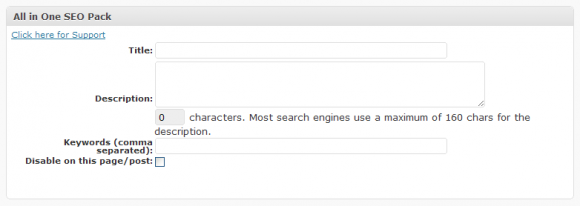
All in One SEO Pack Metabox
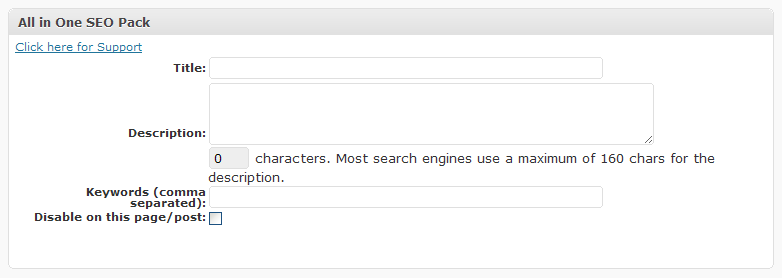
Keywords field seem to be a little bit too much in our opinion. First, as any longtime SEO will tell you, keywords are just not that important. And it’s an extra field which is confusing our clients.
Both tags and categories are used for it by default, so what’s the point on adding any more stuff in it? This is how the post editing of our version of the plugin looks like:

FV Simpler SEO – Editing Metabox
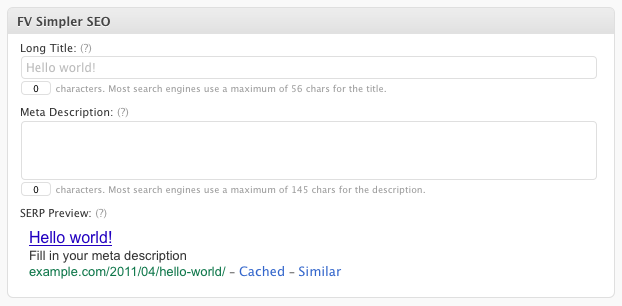
If you really want keywords, you can have them by enabling a single option in the plugin configuration.
Disabling excerpts for descriptions
Another thing which was irritating us is that the WordPress posts excerpts are being used as a meta description if you leave the Description field empty. This is usually ok, but we do a lot of Typepad to WordPress conversions and most of the sites some up with an auto-generated excerpts from the export files.
That’s why we added an option to turn off excerpts for descriptions. Overall our most important objective was to simplify the interface and provide intelligent defaults.

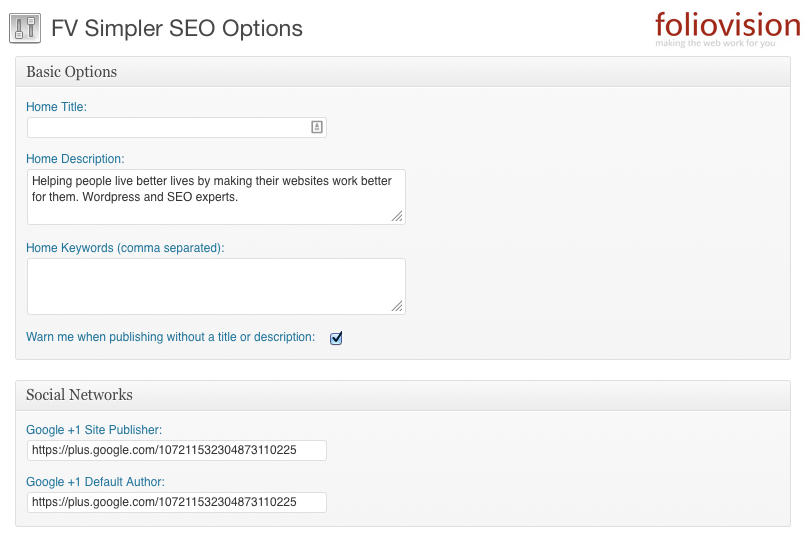
FV All in One SEO Pack: really simple admin options:
Don’t worry all the advanced options are there but out of the way now:
Sensible SEO does not need to be a headache
Advanced features
Since version 1.6.19 we included a noindex and nofollow settings for each post or page. Please look into User guide for usage details.
Version 1.6.20 is shortening your post URLs by default. It picks 3 longest keywords from your post title and adds another one if the resulting post URL would not be unique. WordPress adds number in such cases which is much more ugly. Read more details in our article.
Download
Download the latest version here: FV Simpler SEO Pack
Requirements
WordPress 3.4+

My friend is using your plugin. I’m currently using a different plugin on my site but noticed a lot of inconsistencies. So this will work perfectly.
I stumbled across your site via Google while struggling with the right way to SEO my bunch o’ blogs. I think I want to use your plugin instead of any combination of All-in-One, Platinum SEO, and Robots Meta.
Before making this change I was seeing meta no index lines from some of the above, but now that only FV is running, when I look at the source of reloaded pages, there are no meta noindex lines even though I have all the noindex options checked.
(sound of hand slapping face)My bad! I was thinking there would be some kind of meta statement on the “index” pages like Posts and Pages, when actually only meta noindex statements are needed on the archive pages I opted for noindexing. The fact that other plugins generated these unneeded meta’s threw me off… at least that’s my excuse.
Thanks for making an excellent plugin available.
Hi Lane,
We specifically try not to add all the crud and unnecessary comments throughout your website that the other plugins (specifically All-in-One-SEO Plugin) does. It’s your website and it doesn’t need a lot of our editorializing in the metatags.
Glad you like FV All in One SEO Pack! I think we have the nicest interface as well.
I’m using the Redirection plugin to do a 301 redirect when someone comes to my site from the non-www URL. Does the canonical option in FVAOSEO (what an acronym!) replace Redirection’s function?
Hi Lane,
No Canonical url means that FVAOSEO includesa canonical metatag for Google. In principle you don’t need a canoncial URL metatag but on a rare occasion it might help.
Redirection is what you need.
Hi,
I’m working on a site and using the FV All in one SEO Pack. I’m really happy with it overall and think it’s a great plugin.
However, I’ve noticed one problem with the search title. Although I’m using the default %search% tag under Advanced Options, the title is not displaying the search term. The remainder the title, as well as the titles on other pages, are working fine.
I don’t know if it matters but I’m running the latest version of WordPress with PHP5.
Thanks for your help!
Hello Jennifer,
that’s will be a nice bug fix, thank you….
Fixed. Just upgrade to the fresh 1.6.10 version of our plugin and enjoy.
Thanks, M.
Hi!
Thank you very much for this great plugin. We installed it on our site and didn’t have to tweak anything to get it to work. I do have a question though:
I was looking in Advanced Options and I noticed that the boxes for Canonical URLs and Rewrite Titles are checked by default. Our site already has canonical URLs and I’ve never really noticed anything wrong with the titles, so should I disable those? Or does it hurt anything just to leave them alone?
Thanks :) Michele
Hello Michele,
if you are happy with your current titles, turn that option off. If you want to tweak those titles some more, turn it on. It should be off by default, so thanks for reporting this, I’ll fix that.
Thanks, Martin
Hi there, can you tell me please the most important difference about AIO Seo pack and your plug in? If I do not enable Canonical URL your plugin where I see if is already enabled?
thanks
Hi Mascali,
Thanks for stopping by.
Canonical URL is in advanced options (just click to reveal it).
We’ve simplified FV All in One SEO pack so the beginning SEO can just install it with no harm done to his or her site. All the advanced options are there.
FV All in One SEO has:
At the same time we are completely database compatible so you can switch from one plugin to the other without losing or changing any data.
Thank you Alec
Hey there, I’m attempting to use your plugin and couldn’t get the title field replaced on the home page.
I found on line 1071 something about a backtrack limit error as the likely cause? Is there an easy fix for this problem?
Hello Ivan,
what Wordpress version are you using? Do you have wp_head() in your header template? Does it work with the default Wordpress template?
Thank you, Martin
Hi, what a great version of this plugin! It is really much nicer and simpler to use than the original version. Good work!
Would You consider adding WPML (Multilanguage) support for it? This is actually fairly simple and requires only about 2 lines of code, but the original AIOSEO authors JUST did not want to add this support. But for a multilingual site, it’s very important to be able to translate the home title and description.
Here’s a thread in the original AIOSEO forum about this possibility (and the instructions how to do that!) semperfiwebdesign.com/forum/all-in-one-seo-pack-feature-requests/allow-translation-via-wpml-plugin/
Would be very very grateful, if You added this support!
Hi Illimar,
We definitely want to add multilingual support for FV AIO SEO, the only issue is when we will have a programmer free for a bit. We have the work stacked up quite high for June.
Thanks for the tip.
I’ve read the thread.
If Amir is willing to make the changes to the latest FV AIO SEO (our code is simpler and faster already), we are happy to include them going forward.
PS. We’ve just been working recently on converting themes to Slovak language so we really understand how important it is to do multilingual properly. I’d also like to add PO support so that a user is not necessarily dependent on WPML.
Just to be sure, does this plugin support the automatic upgrading in WordPress? I don’t want to miss having the latest.
I use WordPress Manager DX to manage my blogs, and it runs a cron job nightly to update all plugins in all my blogs.
Hi Lane,
Yes, FV AIOSEO does support autoupgrade.
After using this fv all in one seo, do I still need to use automated-keywords-generator plugin? I will like to know are they same or just all in one will do all these.
Hello Jason,
by default our plugin puts all your tags and category names in to the meta keywords field. I’m not sure how the other plugin works, but this seems to be enough.
Thanks, Martin
Greetings,
Love the plugin, have a suggestion. We would like to be able to specify the noindex header on a per-category and a per-tag basis.
Thanks!
Clint
Hi Clint,
I think that would just make life more complicated for the end user with no benefit for Google rankings.
It would also make the plugin a lot more dangerous (you could really damage your rankings).
So no we won’t be adding this feature unless you can give me a very good argument why we should.
Hi Clint,
We write simple powerful software. This kind of preference makes it very easy for people to do serious damage to their site.
Moreover, I can’t see a scenario where this usage would help a website in Google.
Hi,
According to the WordPress plugin directory page for this plugin, it’s only compatible up to WP 2.9.2 and two people are reporting it’s broken in WP 3.0. Are you working on an update? When would you expect it might be ready?
Thanks! Peter
Hi Peter,
As far as we know, FV All in One SEO pack is working in Wordpress 3.0. Reports of a plug-in not working are often done by our competitors as they are threatened by our superior interface and that our plugin is absolutely free without any visible commercialisation.
If you’d like to try it on Wordpress 3.0 and let us know any issues, we’ll be sure to sort them.
Cheers, Alec
F1 SEO maybe thats a cool name the Formula 1 of SEO :)
Hi Alec
I just installed FL SEO plugin on WP3 ….message came up…………The plugin generated 172 characters of unexpected output during activation. If you notice “headers already sent” messages, problems with syndication feeds or other issues, try deactivating or removing this plugin.
Just to let you know
Rich
Hi Rich,
I think FV All in One SEO still works under Wordpress 3.0 but we’ll look into those error messages next week.
Thanks for the info.
I have several WP 3.0 blogs, and none of them are having trouble with FV. There are problems with some other plugins, though.
For whatever it’s worth, that error message “The plugin generated xxx characters of unexpected output during activation. If you notice “headers already sent” messages, problems with syndication feeds or other issues, try deactivating or removing this plugin.” came up for me when installing non-modified AIOSEO Pro under WP 3.0 just now. Plug appears to work fine, though. Output is where you’d expect.
Googling the error is how I found this place, and learned of the XSS vulnerabilities in AIOSEO, which makes me wonder: what’s the diff between AIOSEO Pro and FVAIOSEO? In other words, what do I lose by making the changeover to address the security problem?
Greetings Peter,
I agree, one could potentially harm their site by enabling this for the wrong category or tag.
In my case, I’ve got a few postings that I’ve got no interest in having Google cache. For example a trademark information and copyright information post. I’ve also got a series of partners posts in a partners category that I’d prefer Google not index.
If there was a way to set the no-index header per post, perhaps a checkbox in the advanced options way down at the bottom of the page, that would work ok, although it would be slightly more error prone. It’s just complex to add all these posts to the robots.txt one at a time.
Thanks again for a great plugin!
Clint
Hi Rob,
We’ll be fixing the error message shortly. As you pointed out, it doesn’t harm functionality.
You lose nothing by moving to the FV version of All in One SEO and gain much.
It’s a shame there’s so many unfortunate folks stuck with the rotten to the core adware All in One SEO which SemperFi picked up as abandonware. Nothing good has been done with All in One SEO for years. Just more and more adware packed in.
Spread the word if you can, that there is a safe, fast and advertising free All in One SEO plugin now available.
Hello Rich and Rob,
the “The plugin generated 172 characters of unexpected output during activation.” error no longer appears in new version of our plugin – 1.6.11 (it was appearing when you installed this plugin for first time, but not it’s fixed). Feel free to autoupdate.
Thanks, Martin
I receive an internal error 500 when i try to activate this plugin on wp3. I also get the error using the All-one-soe version as well.
nevermind. I upgraded the site to 3.0.1 and now all sorts of plugins i couldn’t get to install are working.
Great plugin!
I’m using the plugin v.1.6.11 in WP3.0 with the following problem:
I cannot get the “FV All in One SEO Pack Plugin Options / Home Title:” to work. Instead, Home page title gets picked from “general settings” as is usual w/o this plugin.
Is there a solution for this?
Hi Pekka,
We’ll have a look at this next week. In the meantime, it sounds like if you put the right home page title in general settings and you are good to go.
Thanks for taking the time to report the issue!
Hi, thanks for a very prompt reply!
I can live obviously with it for now. The only drawback is that I really cannot put my keywords in the beginning of the home page title using the general settings. This is quite important seo-wise afaik.
Thanks again.
Sorry for a false alarm!
Actually, now that I looked into it, the problem is not with WP3 but with the theme I use. I tried tour plugin with TwentyTen theme and it works fine.
Sorry about being to rash to jump to wrong conclusions.
Good to see a modification of All in One SEO pack, well done.
Hi,
Great plugin! A few questions:
Is it fully WPMU/multisite-compatible?
I see that All In One SEO Pack now supports SEO for custom post/page types. Will you add this support?
I’d like to know more about the default settings. Some of them are off by default, however they look like good settings. I’m wondering if you can give a summary explaining why certain features are off by default? I’d just like to understand these better and fine-tune if necessary.
Thanks and best regards,
Mark
HI Mark,
Thanks for the questions.
You had asked me about Canonical tags. Canonical tags are not at all necessary in most properly set up sites. Google and the other engines will figure out what is your page. If the canonical function doesn’t work correctly you can actually damage your rankings very badly.
We don’t believe in living dangerously with SEO. What’s important is your content and basic site structure and your page title and page description tags. After that, it’s all backlinks and popularity.
On the other hand, if you do have a site with a lot of URL variations (a shopping site for instance), the canonical tag can be very useful. Therefore if you need it, you can go and turn canonical URLs on.
Making the web work for you, Alec
Thank you. I guess I don’t need to know all the reasoning behind the default settings. I can certainly believe that the right decisions were made. :-)
Regarding canonical URLs, I might have been mistaken in my testing/experimenting.
With your plugin, are canonical URLs turned on by default?
Thanks.
Hi Mark,
Canonicals are turned off by default (I’ve turned them off for Foliovision.com as canonicals were conflicting with our .htaccess settings for the home page and giving a wrong canonical address).
If you do turn on canonicals, it’s a band-aid on deeper issues with your site structure and URLs in most cases. Keep a close eye on them (make sure that the address there is the same one which shows up by default in your browser for any given page or post (with or without final backslash /).
I will write the logic behind all the choices some day. But it’s a full SEO treatise and could be three pages or thirty pages and I just can’t do it in the next few days.
Thanks for the good questions.
Hi,
Hmm, for me, canonicals are on when I network activate the plugin in multisite. I’m not sure whether I should leave them on.
The URLs seem right, for example the home page:
And for an individual post:
This will be a multisite setup focused on ease of use for new users. So I want to make sure the defaults are right, as we want to minimize confusion and support issues.
So I’m not sure…canonicals on or off?
Thanks,
Mark
Hello Mark,
Wordpress puts in <link rel=”canonical” href=”…” /> automatically for posts and pages. If you turn it on in our plugin, it will appear also on index page, archives and so on.
You can turn them off (WP will still put them on single posts and pages.) and I’ll make sure the default is “off”.
Thanks, Martin
Thank you for the reply. And thanks again for the great plugins!
Curious: I have 2 very similar installations of WP running your (nice!) plugin, and one properly shows the Short Title in the Navigation menu and one doesn’t, ignoring the Short Title entry and showing the default WP page title instead. Any ideas on how to resolve?
Hello Randy,
this feature works with wp_list_pages function which is used for displaying menu of pages. Let us know what you use on your sites, if it’s standard Wordpress function, then we should support it too.
Thanks, Martin
Hi Martin,
Randy is probably running a non-standard template which is not properly coded. Fixing such an issue would be a support request.
Thanks for the replies. While I am using customized templates, both the installation that works and the one that doesn’t are very similar, are based on the same standard template, are on the same server running the same versions of everything. I am using wp_list_pages to display the navigation. I have wp_head() at the bottom of my header. While the Long Title and Meta Description is working, the Short Title on one installation is not and instead lists the default WP page title. Any suggestions on how to troubleshoot would be appreciated.
Hi Randy,
you need to check out and play around with these functions in our plugin:
fvseop_list_pages fvseop_filter_callback
(Are they getting your menu of pages at all?)
Hopefully that will help you with your problem.
Martin
Is the plugin compatible with WordPress 3.1? (Or will it be compatible soon?)
Thanks,
Mark
Hello Mark,
I tested it with WordPress 3.1 Release Candidate 3 and all the features are working.
Thanks, Martin
Hi, im using your plugin & i love it! but somehow after i upgraded to 3.0.5 I can’t the settings anymore, i always directs me to “nothing found”. i already tried reinstalling the plugin and still does that error. :( so sad i can’t edit the plugin’s settings. what shall i do? does it has conflict with the new wp upgrade? Thanks!
Hello Alec, I was wondering how your plugin compares to Platinum SEO Pack (wasn’t that another fork of AIOSEO?) I.e. does Platinum suffer from the same performance and XSS issues? I originally switched to Platinum for the automatic 301 redirect functionality. Does FVAIOSEO do that?
I have tried this plug in with several templates and always the same issue–my menu is replaced with categories on the home page. Can this be correected??
Hello Channa,
I checked out Platinum SEO Pack. We consider this plugin to be dangerous. Here’s why:
The automatic redirection uses WPDB object, but the SQL command is not escaped. This function takes the request URL as an argument and passes it to SQL, that’s really really unsafe. If somebody knows how to escape SQL commands well enough, he might be able to pass SQL commands to your Wordpress site directly from his browser!
Platinum SEO Pack also add a nice signature to header, so he would have no problem searching for the target Wordpress sites either.
Thanks, Martin
Hi guys,
Great plugin, I love the streamlined feel to it.
Just one thing though, it doesn’t support custom taxonomy. I have a wordpress theme that has custom portfolio and product pages, but the fields to add the meta info doesn’t come up as the pages use custom taxonomy.
Do you intend to include this function in any updates?
Thanks,
Thanks for that evaluation, Martin. And for your efforts to bring a low overhead SEO solution to the table :)
Have you looked at the new Yoast WordPress SEO plugin? It has the usual SEO functions, plus a number of others. Since I’d like to get the total number of plugins reduced, I’ve used it instead of FV on a few sites. But I’m concerned about what you say about dangers in other SEO plugins, and I wonder if Yoast’s has these same drawbacks. yoast.com/wordpress/seo/
Hello Lane,
we are preparing a comparison article where we will cover the SEO plugin by Yoast too.
Thanks, Martin
Hi guys,
Very grateful for the plugin, thanks.
My problem is that the description does not get picked up by Google. See the image here: adrianpearson.com/wp-content/uploads/2011/03/seodescription.jpg
Am I doing something wrong?
Hi Adrian,
The metadescription will not be picked up instantly by Google. Google does not always use your metadescription for its own excerpt. But usually Google does, so the preview is a good starting point for a well-prepared page. If you don’t like what you see there, you probably won’t like what you’ll find in Google for your site.
Thanks for using FV All in One SEO Pack.
Hi Guys,
Thanks for the great Plugin,
I just noticed some SEO issues with it, that could probably be easily fixed with some know how, I have given it a couple tries with no luck yet.
The basic problem is Page 2 and higher pagination creates duplicate meta descriptions which can be seen in google’s webmaster tools > html suggestions > Pages with duplicate meta descriptions.
I can best explain using your website as an example: foliovision.com/seo/ it has:
as the meta description,
now here’s the problem: foliovision.com/seo/page/2/ foliovision.com/seo/page/3/
also have the identical description meaning that we are probably being penalized for duplicate descriptions on those pages.
The closest solution I have found yet was this: semperfiwebdesign.com/forum/general-all-in-one-seo-pack/how-to-add-page-numbers-to-meta-descriptions…
There is one other post about the issue: malcolmcoles.co.uk/blog/avoid-duplicate-meta-descriptions-in-pages-2-and-higher-of-the-wordpress-loo…
I like how the Paged Format: under Advanced Options in your plugin allows user input like: Page %page% that would be a perfect solution if another option existed to manually choose how to display the description on “Paged” pages.
Hi Leslie,
I don’t know purpose you think is served by offering substantially the same meta-description on top of pagination. I don’t think there is a duplicate description penalty on pagination. I don’t think you should be trying to optimise any page of a paginated post except the first page in any case.
Pagination is really just an adwords/page views trick. Pagination usually leaves lean pages without enough meat to interest Google much.
Making the web work for you, Alec
Hi Alec,
Thanks for your reply, and I do see your point in thinking it’s a waste of time trying to alter each pagination page description when they will likely not see much traffic in any case.
The main reason for me is that our site contains many categories with lots of posts in 10 languages (each language has a custom description)so my Google Webmaster tools looks really scarey in terms of the number of “Duplicate Descriptions” and thought it wasn’t a bad idea to implement something like the plugin already does for paginated titles into the description thereby making it unique too, reducing the my number of duplicate descriptions which may or may not create a penalty(probably not).
Hi Leslie,
FV All in One SEO is oriented towards a simpler interface with intelligent defaults to help a normal user improve his/her rankings. It is not set up as a blackhatter’s aid in near spam situations (pagination, multiple identical doorway pages).
We almost called it FV Simpler SEO and in fact I’m sorry we didn’t.
You should be using custom code if you want to game Google. We have a big SEO plugin article coming next week which should help you choose something more arcane (but don’t blame me when another more aggressive SEO tool gets your site penalised).
Good luck!
Hi Alec. Me too I am following this wp-plugin review cauze I would like to give a try to WP (I am running several websites) and – of course – I am concerned with SEO issues, too.
IMO, you are totally missing Leslie’s point of view: this has clearly nothing to do with any “blackhat” techniques but with Google’s good guidelines, instead (no duplicate […meta>description]).
Maybe, as a good SEO Professional, you ought not to forget that people are clicking on links not just because the page list position itself but the description, too (also).
In facts, you are DO supposed to give each page his own meta tags. Pagination, that is: pages.
So, what are you all talking about:
“It is not set up as a blackhatter’s aid in near spam situations (pagination, multiple identical doorway pages)”
What spam and what blackhat are you all talking about?
I wish to read a simple answer to a simple (legitimate) question, instead. Not tribunals for nothing.
Thank you
Hi Invidie,
Pagination of a single article is a waste of time and a spam technique.
I don’t see any justification of pagination in your rather long winded comment.
Adding a pagination number to a meta-description does not make the descriptions unique, regardless of what the watered down webmaster tools Google offers us say. The search algorithm will see the page description as identical.
If you’d like to create legitimate paginated articles, I suggest you create a subsection with multiple pages. That technology is already available in Wordpress, as for example in our FV All in One SEO section on Foliovision.
Hi guys
I downloaded the FV All in one SEO pack for my 3 websites. I was informed that I should deactivate this pack as it didnt have the keywords field and wouldnt be as effective as the All In one SEO pack. I would like to know just how important this field is for SEO. Your comments below;
“If you really want keywords, you can have them by enabling a single option in the plugin configuration”
How do I get this plug in to add on the keywords?
If I do get it will adding it to my website throw out my article pop ups and inline forms for example? With 60 pages all up I dont fancy doing them again as you could imagine.
Would appreciate your advice on what to do here.
Thankyou.
Hello Wiliam,
I added the instructions how to re-enable keywords to FAQ.
We have a mass description editor called FV Descriptions. We are rewriting some of the code to make it work with any kind of SEO fields, including keywords.
Thanks, Martin
Hi William,
Where on earth did you hear the FV All in One would be less effective than the crappy old code and shoddy user interface of Semper Fi All in One?
Use tags and the tags will show up in the (nearly) useless keyword metatag.
If you really have time to waste playing around by hand with keywords, you enable it in settings.
FV All in One SEO keywords option 1
Hi Martin and Alec
Thanks for your advice and feedback. I am a newbie so please excuse my naive comments ;) Ive recently purchased a product (a website building package) and was recommended by help staff to deactivate it and reinstall the All in one SEO pack. Rather than do that I thought i’d see what advice I could receive here. I’m guessing keywords option isnt a big thing for SEO?
I am assuming then that the FV all in one pack is superior to All in One? I am going to start up other websites so your advice would be greatly appreciated.
Thankyou again for your comments. Very much appreciated.
William
Hi William,
FV All in One has the following advantages over Semper Fi All in One:
Good luck with your new site! You might also like to look at our FV Descriptions plugin for mass editing of your posts for SEO and our Foliopress WYSIWYG for better image SEO.
I’ve been using FV all in one seo for close to a year now and I must say it’s much better than any other plugin for the job.
I have noticed something weird thought.. since the past 3 weeks, when I search for keywords instead of displaying the default description, I see the latest post description being displayed. This is true even when I search for my domain… can the author help with this?
Hi John,
Google and the other search engines are under no contractual obligation to display metadescriptions. They experiment with displaying snippets instead of metadescriptions.
Keep your metadescriptions up to date and accurate though. You never know when the search engines will display them again or if the search engines are using them in some background algorithm.
Making the web work for you, Alec
Hey Alec,
Just to update you.. it was the error from my theme’s author as they had put in their own custom coded if else conditions.
Removed them and everything works fine.. If not for Google, atleast from a visitor/readers point of view, the description and the title compliment, hence gives me one thing less to worry about.
I was wondering, the entire code is rendered through the wp_head hook if i’m not mistaken?
Looking at my page source, other plugins are pushing their css/js file imports into the header, which ends up moving the meta description/keywords much lower.
There’s the title tag, whole bunch of css/js scripts and then the keywords/description.
Is there a way I can have fv all in one seo to be moved right under the title tag?
Right now my header.php has this:
Any ideas?
Hi John,
Thanks for the update.
It doesn’t matter where in the head the metadescription tag is. Google will find it. We might look at trying to pop up higher in the order but it’s not really an SEO issue per se.
Making the web work for you, Alec
PS. While we are happy to answer questions, please don’t continue to try to replace Forex affiliate links in Foliovision.com. I’ve just put Forex on the blacklist so any such comments will go straight to spam.
If anyone else also has an issue with Qtranslate showing all languages in title=”” when hovering over paged menu items, after the latest FV update, I changed fvseop_filter_callback back to the older version and seems it seems to work.
Old code below: (simply replace the new function)
function fvseop_filter_callback($matches) { global $wpdb; if ($matches[1] && !empty($matches[1])) $postID = $matches[1]; if (empty($postID)) $postID = get_option(“page_on_front”); $title_attrib = stripslashes(get_post_meta($postID, ‘_aioseop_titleatr’, true)); $menulabel = stripslashes(get_post_meta($postID, ‘_aioseop_menulabel’, true)); if (empty($menulabel)) $menulabel = $matches[4]; if (!empty($title_attrib)) : $filtered = ‘‘.$menulabel.’‘; else : $filtered = ‘‘.$menulabel.’‘; endif; return $filtered; }
I also resolved my previous issue regarding Page 2 and higher pagination creating duplicate meta descriptions, just on the off chance anyone is interested this is what I did:
Added: $description = $this->paged_description($description);
After: $description = $this->internationalize(category_description());
Then Added this: function paged_description($description) { // the page number if paged global $paged; global $fvseop_options; // simple tagging support global $STagging;
Before: function get_post_description($post)
In general I love the FV All in One SEO Pack. However I’ve just had flagged a small meta description for a category page and can’t see anyway to edit it. From reading through I’m assuming this was deliberate in terms of the design of the plug-in. Personally I would prefer to be able to edit the meta tags for category pages.
Relating to the thread on whether it is legitimate to add page numbers to the title individual page s. I understand your thoughts on split small pages with light content. However on category pages I think this is justified.
Thanks for your great work especially relating to the security of the programme.
Nigel
Hello Nigel,
FV All in One SEO Pack (now entitled FV Simpler SEO) will take your Wordpress category description and use it as meta description. Please try to edit that.
We had a close look at Leslie’s suggestions and we will try to test and put these changes in next version. We just released a quick bigfix version, 1.6.12.1. These new features will have to wait a bit.
Thanks, Martin
Hi, Martin. Thanks for pointing me to the right place for support. So, try as I might, I can’t get the meta description field to display the right stuff — or to display at all, with an unmodified template. Should this be inserted automatically as long as wp_head() is called in the template? Or does it need a special function?
Thanks, Paul
Hi Martin,
Edit the Category Description… Doh! Of course silly me!
It’s very welcome to see that you do actually respond in a speedy and constructive way to queries about your plug-in. Just off to put a little donation in the kitty!
Kind regards,
Nigel
Hello Paul,
yes, meta description is using wp_head(). You should never remove that from template.
Are you saying that this plugin is not working for you with the default Wordpress template – Twentyten? We test this plugin on a lot of different templates, ranging from default WP to most sophisticated paid templates (which we don’t like that much).
It even works with Wordpress 3.2 beta 2 default template, as far as I tested.
Thanks, Martin
Ah, never mind — false alarm. I just wasn’t looking hard enough: seems that the website tagline and the FV Simpler SEO have a bit of a fight on the page marked as ‘home’, which is an easy problem to fix — I’ll just copy the home page’s description from the SEO fields into the website tagline, and be done with it.
Thanks for a very simple plugin!
Hi,
Have you seen this plugin:
wordpress.org/extend/plugins/stallion-wordpress-seo-plugin/
The author says some challenging things about nofollows. Can you let me know if his points are valid?
If so, what is the best way to set up FV Simpler SEO to take advantage of the nofollow practices mentioned by that “other” plugin author?
Thanks,
Mark
Hi Mark,
About no-follow, I would simply suggest not using it. Google added no-follow to create a zero sum game. Basically, you would penalise links with no-follow but Google would still take points away from your links for each no-follow link. So in principle you were weakening your outbound links for no internal gain.
Generally with all these SEO antics, it’s much better to do invisible SEO. Add metadescriptions, use tags for , use a logical site structure which will visitors, have a real sitemap which works.
Google for a long time were running downward ranking filters on sites which had too many SEO signals (quite rightly figuring that whoever would spend so much time on SEO is trying to game their algorithm and should get some negative points to compensate for the synthetic positive ones).
So run your site so that visibly there are no obvious SEO signals. Which is why I suggest never no-indexing things like category pages or tags pages. Now that Google is ranking four to seven pages from a single site such policies look like the stupidity they always were.
We take care not to inject any SEO identification into your site (or branding) with FV Simpler SEO.
I might not even bother with a Google sitemap for some sites, unless I were a breaking news site and need to use some of the quick updating features. Google will trawl your home page and your real sitemap.
After installing Semper Fi All in One SEO, traffic to my blog dropped dramatically, I went to the plugin website for advice, but none was to be had. Long story short: I’m an SEO newbie and have no idea why traffic dropped after the install. I’d love to try out your SEO plugin, but the thought of re-typing all those post title and descriptions is daunting and off-putting. Is there an easier way to transfer them over?
Hello Aspasia,
our plugin is compatible with All in One SEO Pack, it will have the same custom titles and descriptions in it.
There might be some more advanced new options, which are not present in our plugin so they won’t be used, but you will surely get the good basics. And all the advanced options usually are no good unless you are really expert.
Thanks, Martin
Hi Aspasia,
Martin did not state the case strongly enough: FV Simple SEO has all the important options for getting top rankings and great listings in Google, Yahoo and Bing.
And our defaults are on safe settings, exactly to avoid the ridiculous situation you find yourself in where after installing an SEO plugin your site dropped out of the rankings.
We call this Intelligent Defaults.
Good luck with getting your rankings back. FV Simpler SEO with default settings will help.
Making the web work for you, Alec
Hi,
Would you consider adding verification for Bing and Yahoo Webmaster Tools?
Thanks,
Mark
Hi Mark,
Why would you want Bing and Yahoo webmaster verification tools inside an SEO plugin? It’s quite easy to do verification without a plugin.
Sounds like just another thing to break.
Making the web work for you, Alec
>> Why would you want Bing and Yahoo webmaster verification >> tools inside an SEO plugin?
There are multiple reasons this makes perfect sense:
You already include the Google verification tool in your plugin. Why not add the two other most popular ones?
This relates directly to SEO, so it is a perfect feature for an “All In One SEO Pack.”
>> It’s quite easy to do verification without a plugin.
Not on WordPress multisite where users do not have the ability to add code directly.
>> Sounds like just another thing to break.
Not if it’s coded right. And it’s much less likely to break when it’s just a few lines of code added to an existing plugin, as opposed to running a separate plugin for that.
Mark
Alright Mark, you’ve sold me. Added to the upcoming feature list.
I tend to do the verification via html file myself. I don’t like anything visible in the header/code.
Making the web work for you, Alec
Thank you for your flexibility!
I do understand the advantage of doing the verification via uploaded file. I was just thinking of our multisite users in this case.
Thanks again,
Mark
Sounds great, I currently use seo ultimate but am having a few problems with it, so will give FV all in one seo a try.
Hello FV Simple SEO users!
We moved support for this plugins into our new support forums!.
This thread will be closed now.
Thanks, Martin