After trying many Clipboard managers and history tools, the best one I could find for free was ClipX. It is very simple, easy to use and configure and very very useful.
I use it very much especialy in programming to save some text that I will need later on, but it can be easily used in common tasks as well. Installer is very straitforward.
When installed and runned, it shows a tray icon in your taskbar.

ClipX tray icon
Right-clicking on it shows a pop-up menu with useful things.

ClipX roll up menu
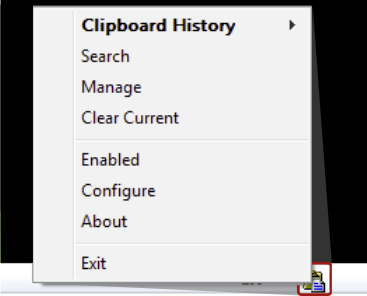
- Clipboard history, where you can save and load all clipboard entries, or even clear whole history, or clear all bitmap entries.
- Search, which is a useful and very quick search.
- Manage, where you can manage your current clipboard.
- Enabled, which lets you to enable or disable ClipX temporarily
- Configure, with properties.
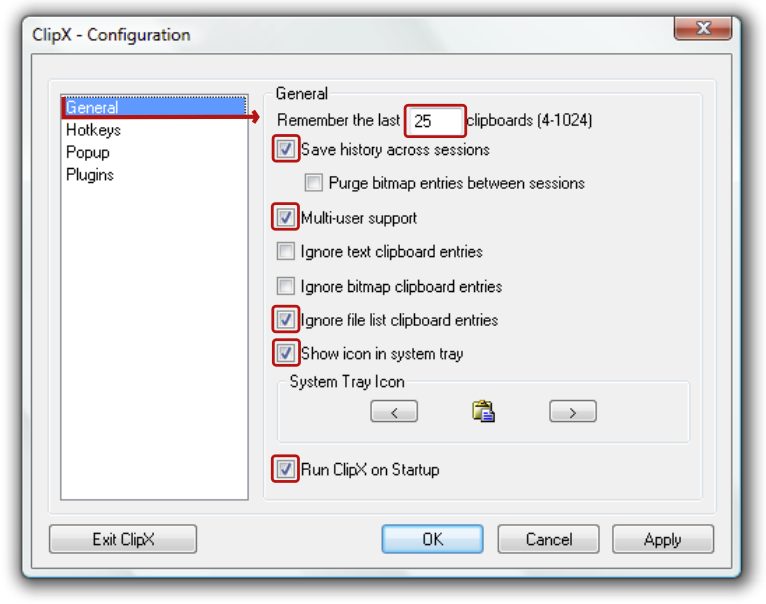
Click on configure to setup ClipX properly. Here are my settings that I use and find quite useful.
On General settings page:
- Remember the last clipboards. I use 25, which is enough for my use. In practice I use mostly 10 last clipboards.
- Save history across sessions (it is useful when ClipX will crash for some unknown reason)
- Multi-user support (so you don’t have to install it for every user)
- Ignore file list clipboard entries
- Show icon in system tray
- I use default System Tray Icon since it evokes clipboard
- And very important thing Run ClipX on Startup
- Leave other options unchecked
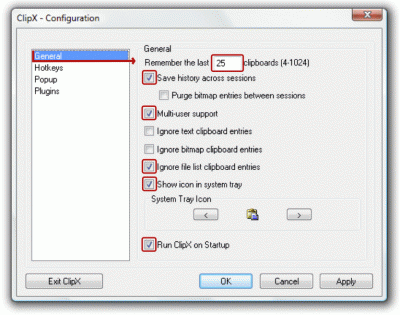
ClipX General settings
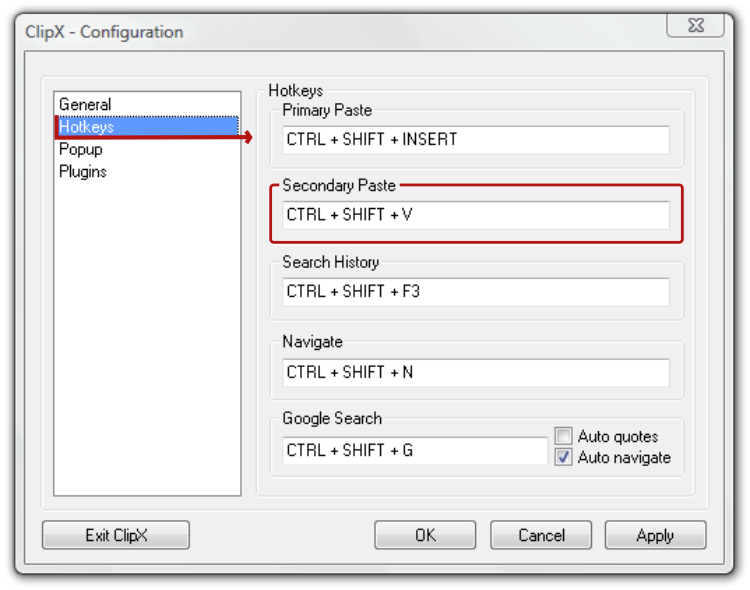
On Hotkeys settings page:
- I use Ctrl + Shift + V as Secondary Paste, but it can be your Primary Paste as well. It is easy to remember because main Windows paste is Ctrl + v
- I don’t use any other feature, but Google Search may be very useful as well. It opens up your default browser and automaticaly makes google to search last entry in clipboard. Be sure to use shortcut that is not used by some programs in which you wanna use this feature. Another thing is that sometimes it opens a new tab in mozilla and safari and sometimes it uses the one opened before. (I’m not very used to this feature)

ClipX Hotkeys settings
On Popup settings page:
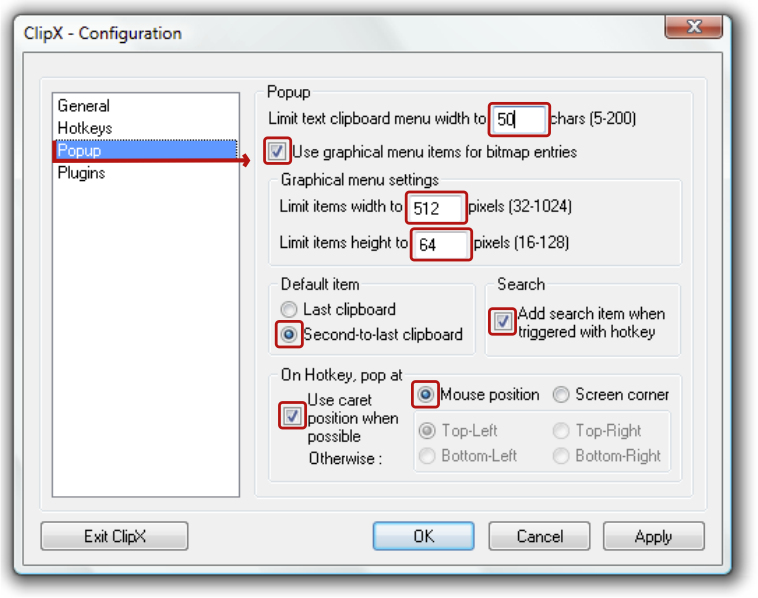
- Limit text clipboard menu width to chars. I use 50.
- Use graphical menu items for bitmap entries. (I don’t use images in clipboard, but someone who uses will probably want to see the thumbnail of image that is stored in clipboard history) Anyway you can have it checked even if you don’t remember images in your clipboard.
- Limit items width to 512 pixels
- Limit items height to 64 pixels
- Use Second-to-last clipboard instead of Last clipboard, since you can access last clipboard by just using Ctrl + v
- Add search item when triggered with hotkey (never realy used this)
- Use caret position when possible, Mouse position

ClipX Popup settings
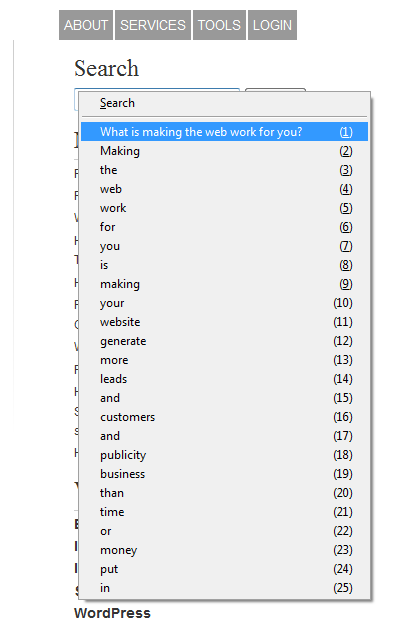
Now you can simply use ClipX simply by using the shortcuts you defined

ClipX is one of my absolute favorite, most useful helper apps ever! Dilemma: ClipX started crashing about four months ago, suspect that it was after an MS patch to WinXP-Pro. Crashes even in Safe Mode with only networking loaded. Any suggestions? I’m beside myself with its loss!
Solved my own problem! Apparently something in “save over sessions” clipboard storage was causing the crash. (Could not really determine where Clipx saves clipboard information, probably as binaries in the registry.) I could not invoke a Clipx function from a right-click of the tray icon; it would always crash. A double left-click allowed be to open the configuration menu. Was then able to uncheck “Save history across sessions”, Apply and Exit Clipx. Restarted Clipx and everything was again working normally. (Life is good!)
Hi, I have been using a far better version of ClipX for many months, the difference is that the “Clip in Use” view has a “Manage” button that allows users to edit and remove entries from the list of clips. I have just moved onto a new pc and am unable to find the download for the improved version. Anyone got any ideas wher it can be downloaded from? Thanx David
Our link is working David. We don’t know about the one you are referring to.
Good luck! Come back and share the link when you find it.
Thank you for this introduction. It is a shame that the creator does not supply one because it seems to be a great program.
I just downloaded clipx because it said it was tiny and it is. It is still working in my Win7 64 bit despite having been last updated back in 2005.
But, as well as saving a history, I was hoping for something that would let me have two paste keys, for the last thing copied and the second to last thing copied. I have one minor grip and that seems to be that I seem to have to press the return key after the “CTRL SHIFT V.” I can’t seem to see a difference between the primary and secondary hot key. They seem to do the same thing – both of them open the menu at the same position, rather than pasting anything.
Well it is only one extra keypress. But I may keep looking at the others (there are a lot) to find one that lets me paste second to last with one click.
Thanks again for the review/explanation itself from years ago. Clipx is still going strong.
The 2008 beta of clipx however does allow one to paste second to last clipboard entry with one key but alas it is a bit buggy so pasting second to last works once, but then it just pastes “v” after that.
Other than that the beta works very well.
I think that it is “the far better version of ClipX” that David Priest mentioned TWO YEARS ago. Sorry. beta is at clipx.org/clipx-1.0.3.9g-setup-x86.exe or for 64 bit at clipx.org/clipx-1.0.3.9g-setup-x64.exe
But I am having some issues so I will check out an alternative. The GLP clipboard manager does not seem to be very advanced. Hmmm.
2 aparently identical computers On mine Clipx works just fine. On my co-workers computer “Ctrl Shift V” is not opening clipX so that we can pick which clipboard entry to use. Is there a windows setting that would prevent this? We use the “Stickies” plug-in as we have to enter standard comments quite often.
Any help appreciated.
Have been using ClipX for ~years~. Tried out numerous clipboard enhancements, and ClipX is by far the best !
The DataRat
I’ve downloaded Clipx but apparently I have no idea exactly how to use it. I’ve looked at everything I could find on its use but I’m just more confused. What I need is a step-by-step instruction outlining just how to make it work for dummies like me. Any help would be appreciated.
The instructions above are pretty detailed Jimmy. Good luck. If you have some more specific questions, we’d be happy to help.
You could also try Ditto if you are having trouble with ClipX: ditto-cp.sourceforge.net/
I just started using ClipX and it’s rather good. One thing that bothers me a lot: whenever you copy an image to clipboard, ClipX creates a temp file in “C:\Documents and Settings\Local Settings\Application Data\ClipX\Storage” folder.
After 24h testing the app in action, the folder size is already 116 MB!! The main reason is that I took many “print screens” which take about 9 MB of space per file.
But here’s the problem, after the images are removed from ClipX history (either by new clips pushing older out of the list, or by using the “clear bitmap entries” function) the temp files in storage folder is NOT pruned. That’s right. Every temp file seems to be retained there for all eternity if user doesn’t remove them manually. :(
I use “Reserved Paste All/Clear” to clear these files, when my work is finished.
Can I still ask questions here? 1 yr ago I used ClipX from a previous job where I was a chat assist. It was very useful as I can save my canned responses in ClipX. When I used ClipX (Ctrl+Alt+Z), it gave a screen showing my edited/ saved canned responses, AND also the things I recently copied (I used Remember up to 10 last only). These are separated by a line. Just like in the image on this link (bluemars.org/clipx/). Just can’t remember which is which, you see there are set of items which are numbered (1)(2) so on. And some are letters (A)(B) so on. Now I can’t figure how to do this again. Help please.
Hi Big,
Thanks for stopping by.
Are you using the same OS as last time round? Which OS are you using now?
Hello, I love Clipx; Unfortunately since I reimaged my computer and reinstalled ClipX it will not save the setting for “Run ClipX on Startup” Or “Save History Across Sessions” I miss this greatly. Every time I boot my computer I have to reset my Hotkeys and general settings. Please help. This is also happening to a friend of mine.
On my win7-64 will remember the history between the time you restart your computer, once not remember
How to do you use the stickie plugin? I don’t see any options (after installing it also) to make an entry stick permanently.
Never mind – i see it inside the “configure” -> plugins : stickies where you can add an entry into permanent. I wish you could right click on an entry directly to make it permanent or have check box against each entry.
There appears to be a compatibility issue between ClipX and the latest version of Snagit (v12). Two of my favourite tools. I can no longer copy an image from the Snagit editor to the clipboard. If I exit out of ClipX, Snagit works fine. I sent the issue to Techsmith but they closed the issue so who knows what will happen. I’m on Win 7 64 bit by the way.
It’s quite amazing tools of Clipx, I use it for several years. Recently, the OS is updated from Winxp to Win7, the Clipx can’t run. I try many method as search in the internet, but failed. Today, I downloaded a package of Clipx-SDK via homepage of Clipx. Run the Clipx.exe in the Clipx-SDK folder, it runs successfully. I don’t know why, but it works. Hope it helpful for others.
Check out Arsclip, pretty cool, just sayin :) Cheers, Burn
joejoesoft.com/vcms/97/ (or bing arsclip)
From the website: ArsClip is a freeware “clipboard manager” utility. ArsClip monitors the clipboard and keeps track of the entries. Pasting is done by using a triggered popup window. This window can be triggered by a hotkey, holding right-click, a special trigger window, and other methods.
ArsClip used to be barebones, but I think I can safely say that it has become a nicely featured and highly configurable program, due to user feedback. The program now specializes in copy-and-paste automation tasks.
Delphi XE2 source code included
Features
I used it for years. Indispensable! Congratulations.
Hi, I love Clipx and have installed the plugin Stickies. I must have used Stickies once as the last history entry has (A) after it. But there’s no Help that I can find and have forgotten(age thing) how I did it. Can someone refresh my memory on how to use Stickies? I’ve gone to Configure>Plugins>Stickies as mentioned above, but still no guidance.
Goto Configure > Stickies (not under plugins > stickies). and there it is obvious on how to use stickies – add new ones, edit existing ones, remove, move the stickies go up and down in the list.
Gary, try right click onClipX icon in system tray, choose “configure” from the menu and then select “Stickies” in ClipX config window on the left
Thank you, Oliver! I have a suggestion for Stickies: Add an option of putting the entries at the top rather than the bottom.
Any way to easily copy the stickies from one Clipx installation to another one. Maybe an INI file or file copy? I use it on multiple computers and would like them to all be the same
I love ClipX simplicity but it leaves one step for user to do manually. If you click on, say, a saved image in its column of saves, it’s loaded back into clipboard. From there one has to manually paste into whatever app one needs. Is there any way to automate this process, any trick or third-party app??? Thanks in advance! Canuck user
I had the same issue with SnagIt not working properly with ClipX running. Every time I try and take a snapshot I get a SnagIt error saying “Unable to output screen capture.” When I close ClipX it works fine.
There must be more than one hotkey. I don’t like it interfering with the original windows clipboard – for example, if I have copied “abc” last with ctrl + c, and I use ctrl+shift+v for accessing clipboard, I want my ctrl+v to paste “abc”, not the last thing I pasted with ctrl+shift+v. It doesn’t make sense that any sort of copy mechanics inteferes with the clipboard ordering, let alone original ctrl+c mechanic.
Otherwise it’d be nice if I can assign hotkeys for the most used manually.
Hi JC,
Clipy/ClipMenu the software I’ve used on macOS for fifteen years, allows the user to assign a shortcut to bring up the menu of the last pastes.
command-v does just do normal paste (last item copied, last item pasted).
I’ve set up control-v to bring up the instant menu of past clipboards where the cursor it. Works a treat.
So yes, I agree with you, a clipboard manager has to have at least a couple of hotkeys.