• Skip to main content
  • Skip to primary sidebar
  • Skip to footer

Foliovision

  • Weblog
    • FV Player
    • WordPress
    • Video of the Week
    • Case Studies
    • Business
  • About
    • Testimonials
    • Meet the Team
    • We Support
    • Careers
    • Contact
    • Pricing
  • Products
  • Support
    • FV Player Docs
    • Pro Support
  • Login
  • Basket is empty

Errors on Chrome for iOS and Android

[Solved]

Foliovision › Forums › FV Player › Troubleshooting › Errors on Chrome for iOS and Android

  • Kobus 9 years, 3 months ago

    Hi guys

    We upload our videos on VideoPress and embed them with the VAST FV Player. The embeds work fine on Chrome for Windows, but the same videos do not load on mobile.

    See the following example: http://maroelamedia.co.za/nuus/sa-nuus/fotos-en-videos-nog-n-tornado-rig-groot-skade-aan/

    The post mentioned contains three videos:
    1 and 2 are directly embedded with the VideoPress shortcode and plays everywhere.
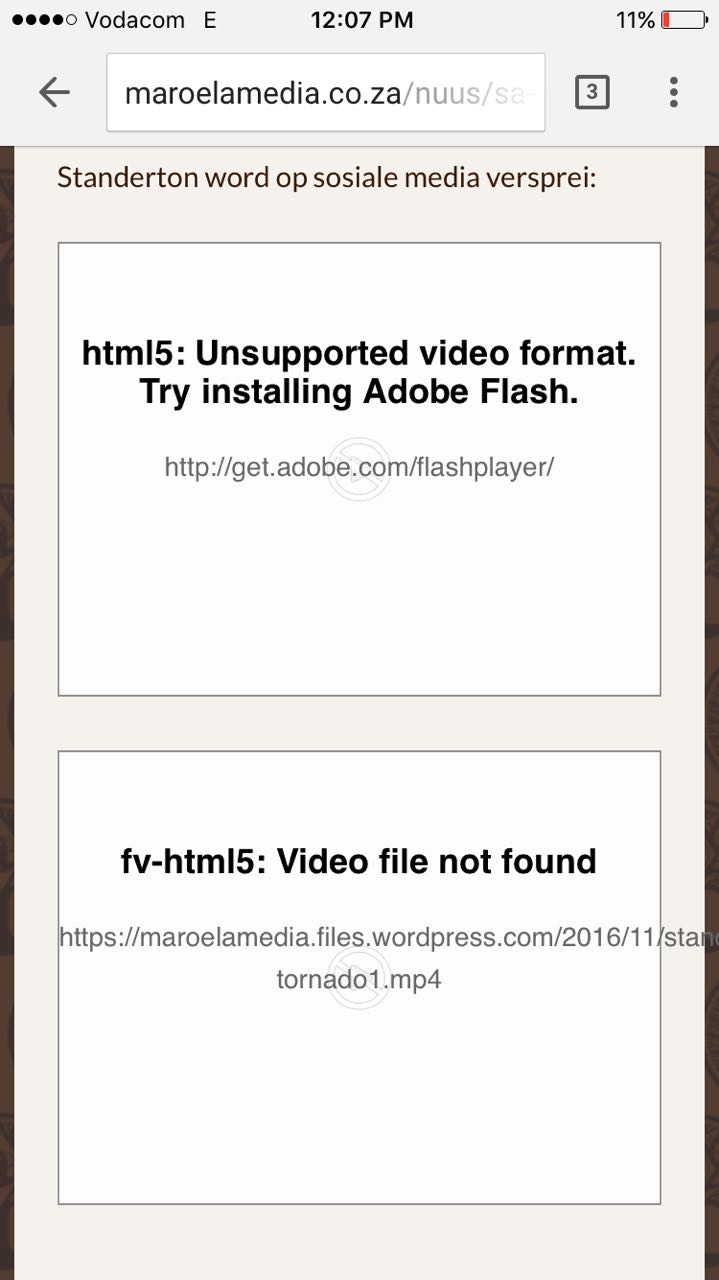
    Video 3 is the same video as 1, but embedded with FV Player. Chrome on iOS and Android says “fv-html5: Video file not found”. This also happens on the Facebook app’s built-in browser.

    The shortcode used for video 3 is [fvplayer src="https://maroelamedia.files.wordpress.com/2016/11/standerton-tornado.mp4" src1="https://videos.files.wordpress.com/zvM7te26/standerton-tornado_fmt1.ogv" splash="https://videos.files.wordpress.com/zvM7te26/standerton-tornado_std.original.jpg"]

    See the attached screenshot for another example: the first video is [fvplayer src="https://videos.files.wordpress.com/zvM7te26/standerton-tornado_fmt1.ogv"] and the second [fvplayer src="https://maroelamedia.files.wordpress.com/2016/11/standerton-tornado.mp4"]

    Please help us solve this issue.

    Best regards
    Kobus

    img-20161114-wa0000
    IMG-20161114-WA0000
Viewing 2 replies - 1 through 2 (of 2 total)
  • Eduard 9 years ago
    Avatar photo

    Hi Kobus,

    It seems that the mp4 video you used as the source (https://maroelamedia.files.wordpress.com/2016/11/standerton-tornado.mp4) and the whole folder ‘/2016/11/’ in your installation is locked for public viewing. I changed the source address to ‘https://videos.files.wordpress.com/zvM7te26/standerton-tornado.mp4’, as the ogv video from the same folder was working, and the mp4 started to work.

    The resulting shortcode:
    [fvplayer src="https://videos.files.wordpress.com/zvM7te26/standerton-tornado.mp4" src1="https://videos.files.wordpress.com/zvM7te26/standerton-tornado_fmt1.ogv" splash="https://videos.files.wordpress.com/zvM7te26/standerton-tornado_std.original.jpg"]

    Thanks,
    Eduard

    Kobus 9 years ago

    Hi Eduard

    Your insight from the outside was exactly what was needed. Thank you for helping us troubleshoot and for your patience.

    Best regards
    Kobus :)

Viewing 2 replies - 1 through 2 (of 2 total)

Reply To: Errors on Chrome for iOS and Android


Please Sign in or Register to upload files.

Related Posts

  1. Automatische Wiedergabe bei Blättern

  2. Scroll Autoplay

  3. Desplazamiento Reproducción automática

Primary Sidebar

Troubleshooting

    Categories

    • Business
    • Camera Reviews
    • Case Studies
    • Design
    • FV Player
    • Internet Marketing
    • IT
    • Life
    • SEO
    • Slovak
    • Video of the Week
    • WordPress

    Footer

    Our Plugins

    • FV WordPress Flowplayer
    • FV Thoughtful Comments
    • FV Simpler SEO
    • FV Antispam
    • FV Gravatar Cache
    • FV Testimonials

    Free Tools

    • Pandoc Online
    • Article spinner
    • WordPress Password Finder
    • Delete LinkedIn Account
    • Responsive Design Calculator
    Foliovision logo
    All materials © 2026 Foliovision s.r.o. | Panská 12 - 81101 Bratislava - Slovakia | info@foliovision.com
    • This Site Uses Cookies
    • Privacy Policy
    • Terms of Service
    • Site Map
    • Contact
    • Tel. ‭+421 2/5292 0086‬