• Skip to main content
  • Skip to primary sidebar
  • Skip to footer

Foliovision

  • Weblog
    • FV Player
    • WordPress
    • Video of the Week
    • Case Studies
    • Business
  • About
    • Testimonials
    • Meet the Team
    • We Support
    • Careers
    • Contact
    • Pricing
  • Products
  • Support
    • FV Player Docs
    • Pro Support
  • Login
  • Basket is empty

Issue with HLS Encryption Not Working for My Videos

[Solved]

Foliovision › Forums › FV Player › Bug Reports › Issue with HLS Encryption Not Working for My Videos

  • Mustafa 5 months ago

    Hi FV Player Support,

    I’m using FV Player with Coconut to deliver HLS-encrypted videos, but my videos still seem easy to download. I suspect I may have accidentally disabled a setting that affects secure playback.

    Could you please guide me on:

    Ensuring that HLS encryption is properly applied to my uploaded videos.

    Enabling any necessary features (like tokenized keys or Stream Loader) to prevent unauthorized downloads.

    Verifying that my Coconut + FV Player setup matches the secure setup used in your demo/test videos.

    Any detailed instructions or recommendations would be greatly appreciated.

    Thank you very much for your help!

    Best regards,
    Dr mustafa

Viewing 7 replies - 1 through 7 (of 7 total)
  • Martin 5 months ago

    Hello Dr. Mustafa,

    Could you please send a link to a page where we can see the issue?

    Thanks,
    Martin

    Mustafa 5 months ago

    Hi Martin,

    Thank you for your reply.

    Here is a link to a test video on my demo site where the issue occurs: https://snow-louse-350558.hostingersite.com/contact/
    I have enabled the encryption option as shown in the attached screenshot.

    Could you please check if the HLS encryption is properly applied and advise me on any additional steps to ensure secure playback?

    Thank you very much for your support!

    Best regards,
    Dr. Mustafa

    screenshot-2025-09-17-234437
    Screenshot-2025-09-17-234437
    Martin 5 months ago

    Hello Dr. Mustafa,

    That checkbox of course only affects the new videos which you upload. Are you sure your video was created with that checkbox enabled?

    Please check in wp-admin -> FV Player -> Coconut Jobs. You can hit the video name in the “Target” column which will show the encoding job arguments as sent to Coconut. Will it show the following?

    "encryption_mode": "...",
    "encryption_key": "...",
    "encryption_key_uri": "..."

    Thanks,
    Martin

    Mustafa 5 months ago

    No it doesn’t show it,
    This is what i see :

    {
      "settings": {
        "ultrafast": true
      },
      "input": {
        "url": "REMOVED FOR SECURITY PURPOSES"
      },
      "notification": {
        "type": "http",
        "url": "REMOVED FOR SECURITY PURPOSES"
      },
      "outputs": {
        "jpg:320x": {
          "path": "//cdn.foliovision.com/New-Project/sprite.jpg",
          "interval": 0,
          "sprite": {
            "limit": 1000
          },
          "vtt": {
            "filename": "sprite.vtt"
          }
        },
        "jpg:300x": {
          "path": "//cdn.foliovision.com/New-Project/thumbnail.jpg"
        },
        "jpg:1280x": {
          "path": "//cdn.foliovision.com/New-Project/thumbnail-large.jpg"
        },
        "httpstream": {
          "if": "{{ input.height }} <= 2160",
          "hls": {
            "path": "/New-Project",
            "version": 3
          },
          "playlist_name": "index",
          "variants": [
            "mp4:240p_320k::maxrate=960k",
            "mp4:480p_700k::maxrate=2100k",
            "mp4:720p_4000k::maxrate=12000k",
            "mp4:1080p_6000k::maxrate=18000k",
            "mp4:0x1440_10000k::maxrate=30000k",
            "mp4:2160p_16000k::maxrate=48000k"
          ]
        }
      }
    }
    Mustafa 5 months ago

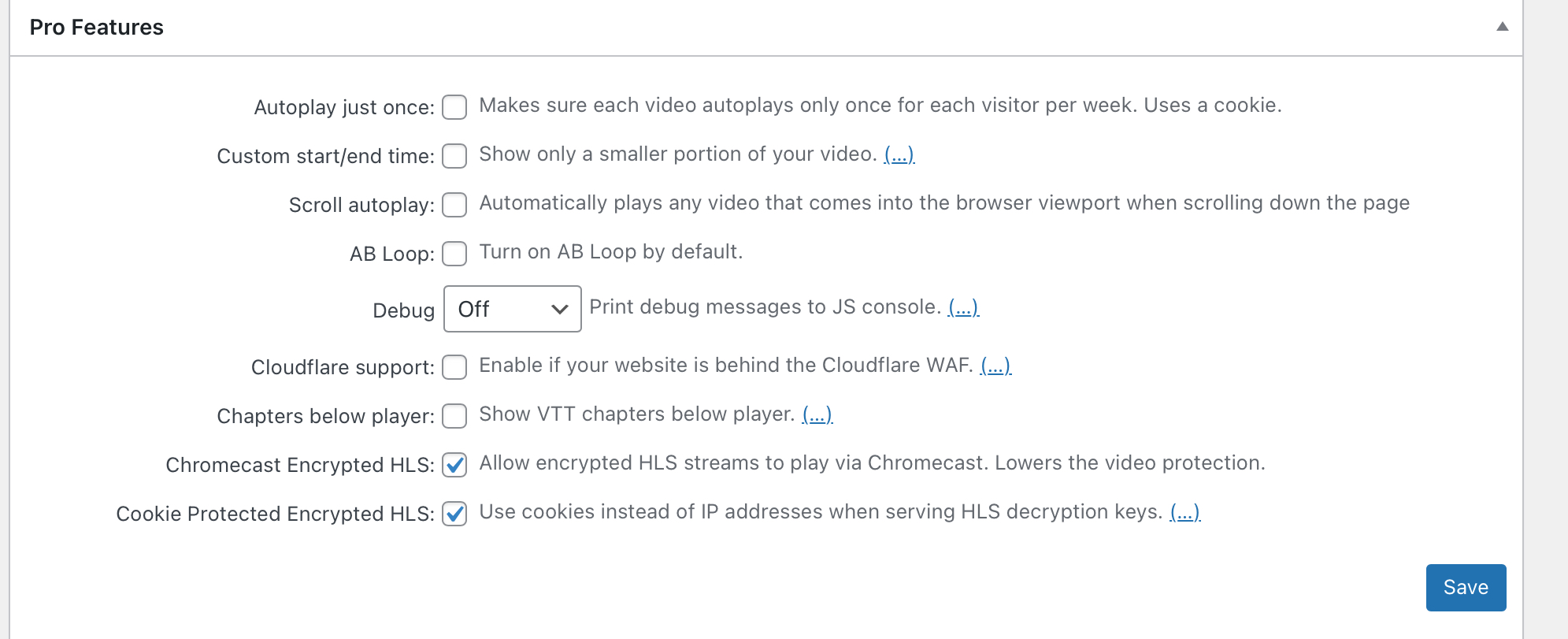
    Another question,
    Should i turn on any one of these settings? And regarding to last two options, are these increasing the video security if i turn them on ?

    img_7175
    IMG_7175
    Martin 5 months ago

    Hello Mustafa,

    Please make sure to update FV Player to the latest version.

    Please enable wp-admin -> FV Player -> Coconut Jobs -> Settings -> Debug. You will see a message like this pointing you to the log file:

    Logging into fv-player-coconut-8-debug-….log. Disabling Debug will delete the log file.

    Then upload a new video – making sure the “Encryption” checkbox is enabled before you start the upload. We will need to take a look at the file.

    The “Chromecast Encrypted HLS” and “Cookie Protected Encrypted HLS” settings should be kept disabled if video download protection is more important than Chromecast or playback using iCloud Private Relay.

    Thanks,
    Martin

    Mustafa 5 months ago

    Thank you martin, I’m tried to upload another video and worked!

Viewing 7 replies - 1 through 7 (of 7 total)

Reply To: Issue with HLS Encryption Not Working for My Videos


Please Sign in or Register to upload files.

Related Posts

  1. Re: Amazon S3 Protecting Data Using Server-Side Encryption

    Re: Amazon S3 Protecting Data Using Server-Side Encryption

  2. Re: Amazon S3 Protecting Data Using Server-Side Encryption

    Re: Amazon S3 Protecting Data Using Server-Side Encryption

  3. Reply To: Amazon CloudFront with Download Protection

    Reply To: Amazon CloudFront with Download Protection

Primary Sidebar

Bug Reports

    Categories

    • Business
    • Camera Reviews
    • Case Studies
    • Design
    • FV Player
    • Internet Marketing
    • IT
    • Life
    • SEO
    • Slovak
    • Video of the Week
    • WordPress

    Footer

    Our Plugins

    • FV WordPress Flowplayer
    • FV Thoughtful Comments
    • FV Simpler SEO
    • FV Antispam
    • FV Gravatar Cache
    • FV Testimonials

    Free Tools

    • Pandoc Online
    • Article spinner
    • WordPress Password Finder
    • Delete LinkedIn Account
    • Responsive Design Calculator
    Foliovision logo
    All materials © 2026 Foliovision s.r.o. | Panská 12 - 81101 Bratislava - Slovakia | info@foliovision.com
    • This Site Uses Cookies
    • Privacy Policy
    • Terms of Service
    • Site Map
    • Contact
    • Tel. ‭+421 2/5292 0086‬