• Skip to main content
  • Skip to primary sidebar
  • Skip to footer

Foliovision

  • Weblog
    • FV Player
    • WordPress
    • Video of the Week
    • Case Studies
    • Business
  • About
    • Testimonials
    • Meet the Team
    • We Support
    • Careers
    • Contact
    • Pricing
  • Products
  • Support
    • FV Player Docs
    • Pro Support
  • Login
  • Basket is empty

Team Viewer

team viewer product selection
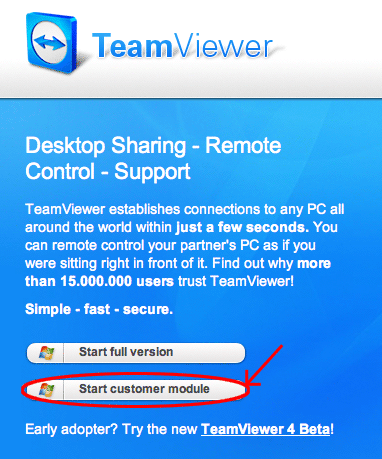

If you need to access remote desktop of someone, there are variety of choises of software. One is Team Viewer.

As user just download the customer module (Start customer module), save it on your harddrive (on your desktop) and run it. For the other side (people that should connect to you), they need to download the other version (Start full version).

The ID and password will be generated for you from Team Viewer. If you are as client, you need to send this ID and password to people that should connect to your desktop. Now you will just wait for them to connect and use your mouse and keyboard and stuff.
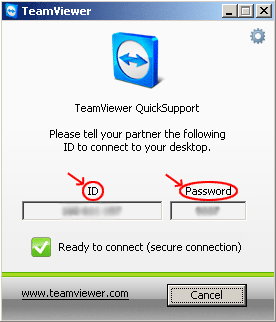

team viewer main window

Reader Interactions

Leave a Reply Cancel reply

Your email address will not be published. Required fields are marked *

Click here to Subscribe without commenting

Primary Sidebar

Multi-platform

  1. Article spinner
  2. Computers and OS
    1. Hardware
    2. Windows
    3. Multi-platform
      1. Skype cleaner
      2. Team Viewer
  3. Pandoc Online
  4. Marketing
  5. Other CMS
  6. Repairing Your Site with Xenu Link Sleuth

Footer

Our Plugins

  • FV WordPress Flowplayer
  • FV Thoughtful Comments
  • FV Simpler SEO
  • FV Antispam
  • FV Gravatar Cache
  • FV Testimonials

Free Tools

  • Pandoc Online
  • Article spinner
  • WordPress Password Finder
  • Delete LinkedIn Account
  • Responsive Design Calculator
Foliovision logo
All materials © 2026 Foliovision s.r.o. | Panská 12 - 81101 Bratislava - Slovakia | info@foliovision.com
  • This Site Uses Cookies
  • Privacy Policy
  • Terms of Service
  • Site Map
  • Contact
  • Tel. ‭+421 2/5292 0086‬