• Skip to main content
  • Skip to primary sidebar
  • Skip to footer

Foliovision

  • Weblog
    • FV Player
    • WordPress
    • Video of the Week
    • Case Studies
    • Business
  • About
    • Testimonials
    • Meet the Team
    • We Support
    • Careers
    • Contact
    • Pricing
  • Products
  • Support
    • FV Player Docs
    • Pro Support
  • Login
  • Basket is empty

Vimeo access token appears to be invalid: You have been banned…again

[Solved]

Foliovision › Forums › FV Player › Troubleshooting › Vimeo access token appears to be invalid: You have been banned…again

  • Cédric 3 years, 11 months ago

    Hi there
    Last week for no particular reason we got this message :
    Vimeo Plus or Pro account is required. Due to Vimeo terms of use we require that we check your account before serving videos via FV Player. Simply create a new Vimeo App (use your site name, site description and site URL) and then copy “Access token” from the “oAuth2” tab.

    There were errors accessing videos that were deleted from our Vimeo. I deleted them from the FV flowplayer database so no more problem. And yet the problem persists. So I contacted Vimeo and here is their answer :
    We checked both the IPs below and we currently do not have any bans linked to them:
    XXXXXXXXX
    IP v6XXXXXXXXXX

    If you have access, the error message we return contains a header x-banned-ip with a value of the IP address we have banned.

    Otherwise, you’ll need to get the IP address from your webhosting service. Again, we need the IP address that makes outbound requests to the Vimeo API.

    The error you’re seeing may also occur when you’re requesting an endpoint that requires an authenticated token. Either an invalid token or an unauthenticated token is being provided.

    If you’re not sure of the token’s validity, use the token verification endpoint documented here: https://developer.vimeo.com/api/reference/authenticationextras#GET/oauth/verify

    Authenticated tokens can only retrieve public metadata from vimeo.com, while authenticated tokens (with the right scopes) can retrieve private metadata and be used in specific use cases (like uploading).

    To generate an authenticated token, you must go through the OAuth workflow, or generate a personal access token on your app management page. Visit https://developer.vimeo.com/apps to get started.

    More information about authentication tokens can be found on our Developer site here:
    https://developer.vimeo.com/api/authentication
    —–

    What should I do ?
    Thanks

Viewing 8 replies - 1 through 8 (of 8 total)
  • Martin 4 years ago

    Hello Cirdec,

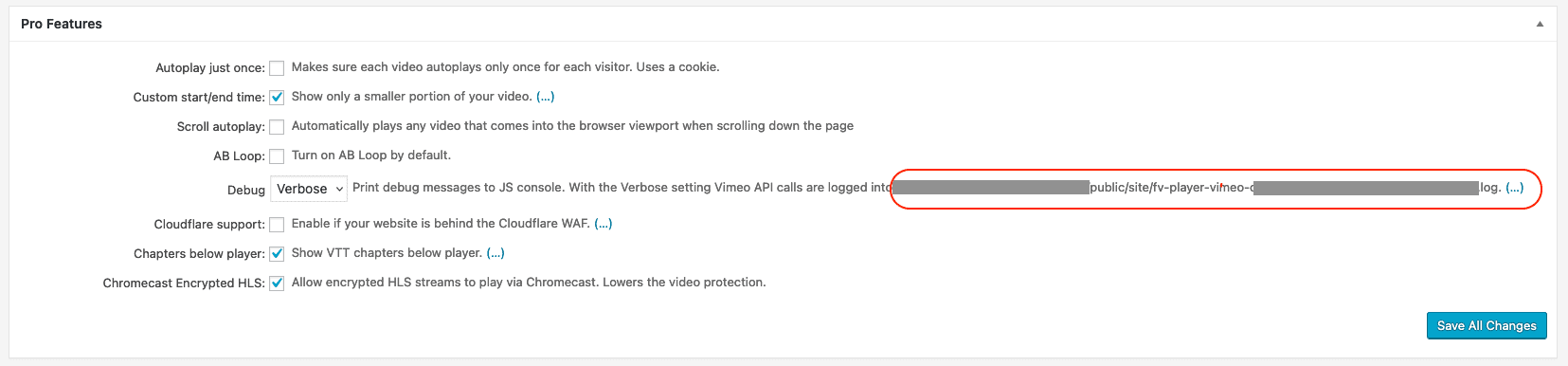
    I’m sorry to hear about the trouble – please check if you still have set Settings -> FV Player Pro -> Pro Features -> Debug to Verbose.

    You should be able to see these headers in the log file which get. You should be able to find the /me request in it and see what x-banned-ip header it gets.

    If you are not sure, please let us know about what file path you get once you click the there dots “(…)” next to that setting. I’m attaching a screenshot to show what I mean.

    Thanks,
    Martin

    fv-player-pro-debug-verbose-file-path
    fv-player-pro-debug-verbose-file-path
    Cédric 4 years ago

    Here ?

    capture-decran-2022-03-10-a-16-19-07-2-2
    Capture-d’écran-2022-03-10-à-16.19.07-2-1
    Martin 4 years ago

    Hello Cirdec,

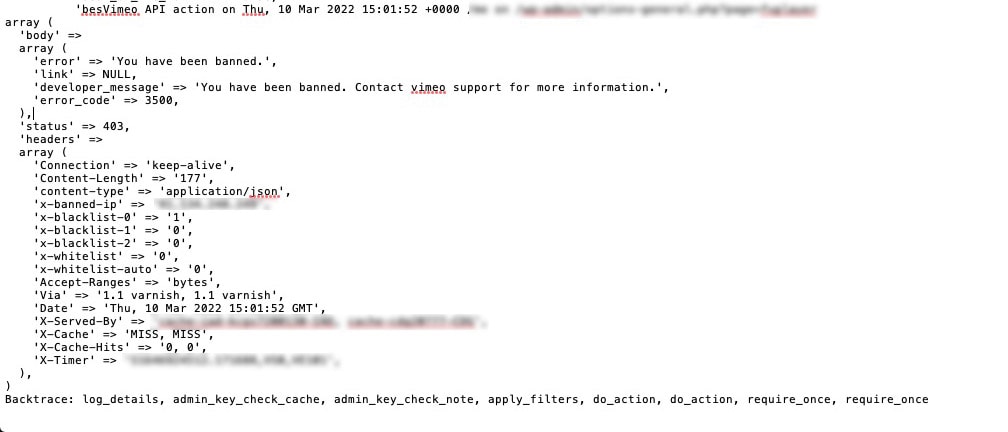
    yes, that’s it. If you scroll up a bit you should see this part too:

    Vimeo API action on Thu, 10 Mar 2022 ... /me on ...

    That “/me” part proves that it’s just a standard request to get the account details.

    Thanks,
    Martin

    Cédric 4 years ago

    What should I do ?
    I sent it to Vimeo support

    Cédric 4 years ago

    Vimeo solved the problem with my log !

    Martin 4 years ago

    Hello Cirdec,

    please let us know if Vimeo mentioned what got you banned in the first place.

    Please disable Settings -> FV Player Pro -> Pro Features -> Debug and delete that file.

    Thanks,
    Martin

    Cédric 4 years ago

    I have disabled the IP ban now.

    Please recheck this after ~30 mins. To avoid this ban ensure that there are no PHP exceptions in the requests that are being made.

    This can cause the ban to reappear.

    Martin 4 years ago

    Hello Cirdec,

    that reply from Vimeo support is very vague. I was expecting they will tell you about the request rate limits (which we respect) and issues when accessing missing videos (you cleaned these up).

    Please ask your web hosting provider how many other websites are on the same IP address as your website – perhaps the issue comes from some other website which might not belong to you at all.

    Or do you see many recent entries in Settings -> FV Player Pro -> Hosting -> Vimeo -> There were {number} errors -> (show) ?

    Thanks,
    Martin

Viewing 8 replies - 1 through 8 (of 8 total)
Reply To: Vimeo access token appears to be invalid: You have been banned…again


Please Sign in or Register to upload files.

Related Posts

  1. Vimeo access token appears to be invalid

    Vimeo access token appears to be invalid

  2. Vimeo access token appears to be invalid

    Vimeo access token appears to be invalid

  3. Vimeo Pro Access Token

    Vimeo Pro Access Token

Primary Sidebar

Troubleshooting

    Categories

    • Business
    • Camera Reviews
    • Case Studies
    • Design
    • FV Player
    • Internet Marketing
    • IT
    • Life
    • SEO
    • Slovak
    • Video of the Week
    • WordPress

    Footer

    Our Plugins

    • FV WordPress Flowplayer
    • FV Thoughtful Comments
    • FV Simpler SEO
    • FV Antispam
    • FV Gravatar Cache
    • FV Testimonials

    Free Tools

    • Pandoc Online
    • Article spinner
    • WordPress Password Finder
    • Delete LinkedIn Account
    • Responsive Design Calculator
    Foliovision logo
    All materials © 2026 Foliovision s.r.o. | Panská 12 - 81101 Bratislava - Slovakia | info@foliovision.com
    • This Site Uses Cookies
    • Privacy Policy
    • Terms of Service
    • Site Map
    • Contact
    • Tel. ‭+421 2/5292 0086‬