• Skip to main content
  • Skip to primary sidebar
  • Skip to footer

Foliovision

  • Weblog
    • FV Player
    • WordPress
    • Video of the Week
    • Case Studies
    • Business
  • About
    • Testimonials
    • Meet the Team
    • We Support
    • Careers
    • Contact
    • Pricing
  • Products
  • Support
    • FV Player Docs
    • Pro Support
  • Login
  • Basket is empty

Google analytics tracking video: “not set” and “master”

Foliovision › Forums › FV Player › Requests and Feedback › Google analytics tracking video: “not set” and “master”

  • Daniele G. 6 years, 8 months ago

    hi,
    I need support regarding some event data on google analytics. I set the track of analytycs and google tag manager and now I need to understand the statistics of my videos (how many users, how many total and partial views, devices, average time, duration, when they leave the video, etc. etc.) We use foliovision Pro on our website with videos uploaded to vimeo.
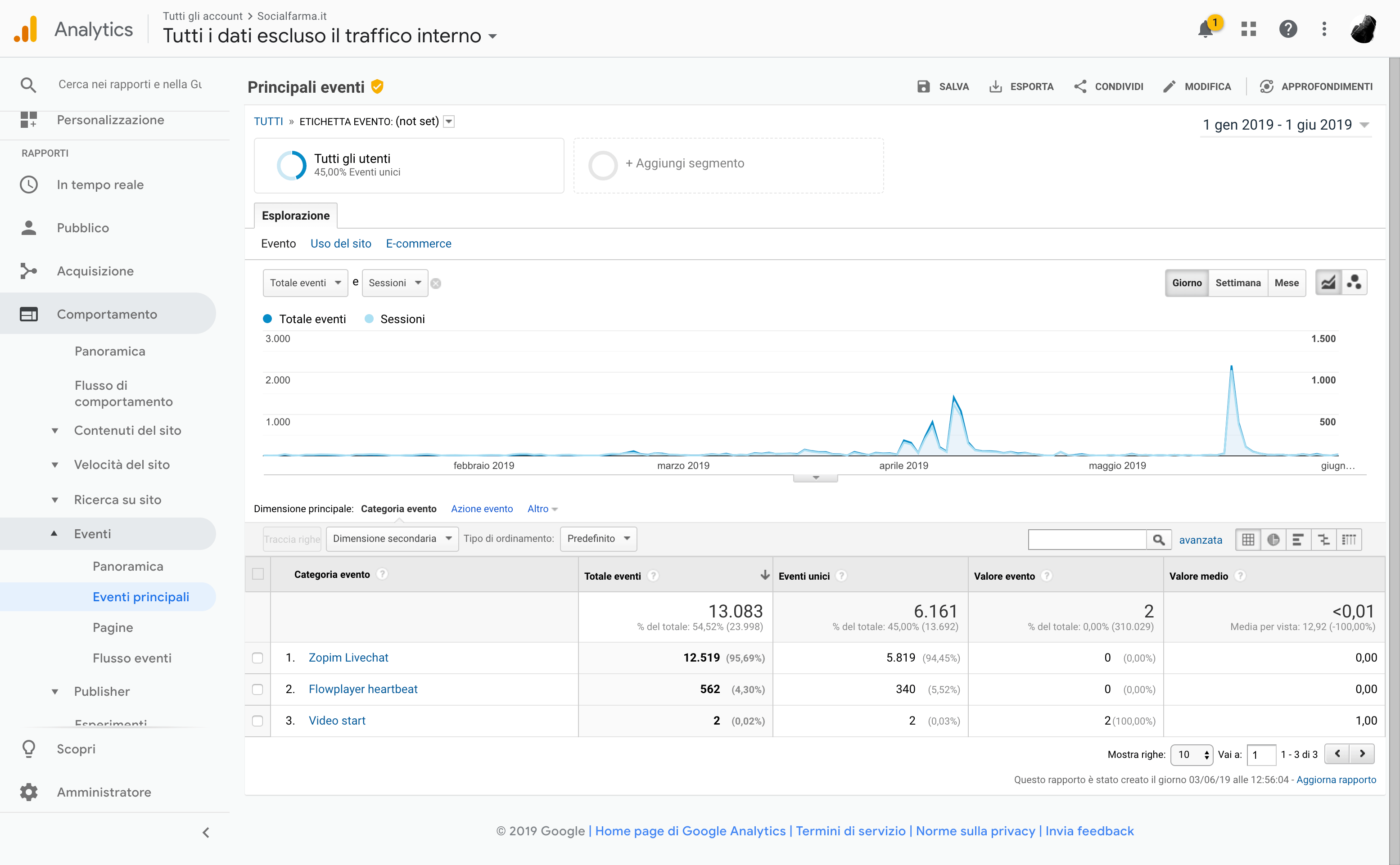
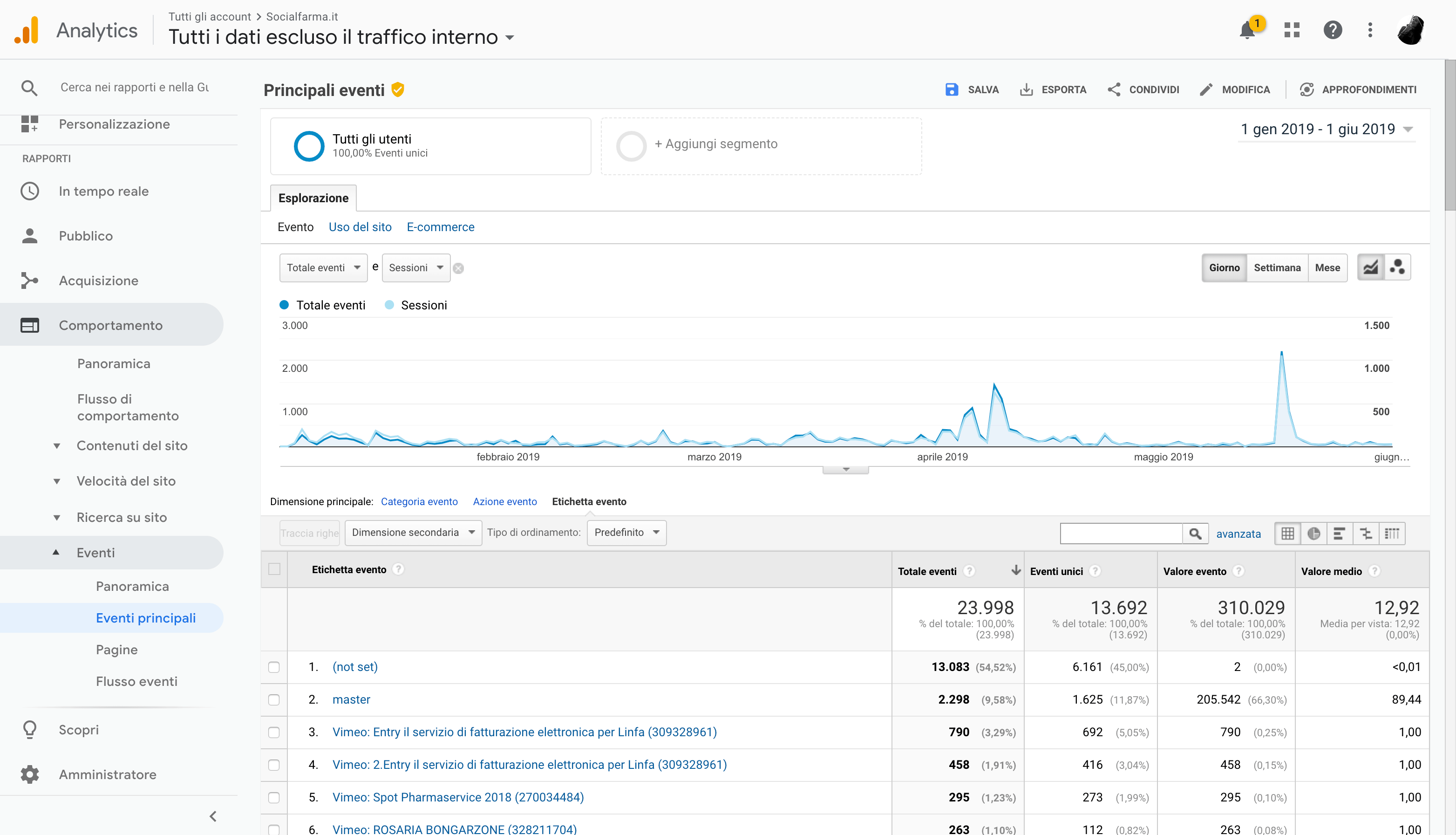
    When I select on analytics top events and as the main dimension “label event” the first two results are “(not set)” and “master”. And then after the titles of the uploaded videos. Numbers of these two first entries are very very consistent, but I can’t understand what they are and what videos they refer to.
    I am attaching screenshots to make the situation clearer to you. Could you help me understand the problem?
    And what are the actions I should perform for the detailed analysis of my videos?
    Thanks a lot.
    Waiting for your answer

    screencapture-analytics-google-analytics-web-2019-06-03-12_58_08
    screencapture-analytics-google-analytics-web-2019-06-03-12_58_08
    screencapture-analytics-google-analytics-web-2019-06-03-12_56_09
    screencapture-analytics-google-analytics-web-2019-06-03-12_56_09
    screencapture-analytics-google-analytics-web-2019-06-03-12_55_42
    screencapture-analytics-google-analytics-web-2019-06-03-12_55_42
Viewing 2 replies - 1 through 2 (of 2 total)
  • Martin 7 years ago

    Hello Danielle,

    you can set the “Secondary dimension” to Behavior -> Page and you will see what URL it occurs on. Perhaps it helps.

    Also set “Secondary dimension” to Behavior -> Event Category and see what it is for these mysterious entries. Seems like “(not set)” might be the Flowplayer heartbeat (sending a report to Google so that tracking doesn’t timeout).

    Thanks,
    Martin

    Alec Kinnear 7 years ago
    Avatar photo

    Hi Daniele,

    While FV Player offers good support for Google analytics and we support basic configuration issues, hands on work analysing your data and customising your reports would be paid development. Would you like to engage Foliovision to work with you on your Google analytics?

Viewing 2 replies - 1 through 2 (of 2 total)
Reply To: Google analytics tracking video: “not set” and “master”


Please Sign in or Register to upload files.

Related Posts

  1. Tracking VAST and VPAID Ads With Google Analytics

  2. 3 New Tricks For Tracking Videos with Google Analytics

  3. Detailed Video Stats in Google Analytics

Primary Sidebar

Requests and Feedback

    Categories

    • Business
    • Camera Reviews
    • Case Studies
    • Design
    • FV Player
    • Internet Marketing
    • IT
    • Life
    • SEO
    • Slovak
    • Video of the Week
    • WordPress

    Footer

    Our Plugins

    • FV WordPress Flowplayer
    • FV Thoughtful Comments
    • FV Simpler SEO
    • FV Antispam
    • FV Gravatar Cache
    • FV Testimonials

    Free Tools

    • Pandoc Online
    • Article spinner
    • WordPress Password Finder
    • Delete LinkedIn Account
    • Responsive Design Calculator
    Foliovision logo
    All materials © 2026 Foliovision s.r.o. | Panská 12 - 81101 Bratislava - Slovakia | info@foliovision.com
    • This Site Uses Cookies
    • Privacy Policy
    • Terms of Service
    • Site Map
    • Contact
    • Tel. ‭+421 2/5292 0086‬