• Skip to main content
  • Skip to primary sidebar
  • Skip to footer

Foliovision

  • Weblog
    • FV Player
    • WordPress
    • Video of the Week
    • Case Studies
    • Business
  • About
    • Testimonials
    • Meet the Team
    • We Support
    • Careers
    • Contact
    • Pricing
  • Products
  • Support
    • FV Player Docs
    • Pro Support
  • Login
  • Basket is empty

Place Transcript inside of Accordion, or make available optionally by other way

Foliovision › Forums › FV Player › How to … › Place Transcript inside of Accordion, or make available optionally by other way

  • Michael H. 7 years, 8 months ago

    I actually have (2) questions, but I think one of them is pretty simple, so let’s start with my challenging request:

    I have installed FV Player Pro, Integrated our Vimeo Pro account, and embedded a video that has a .VTT caption file from Vimeo to our website.

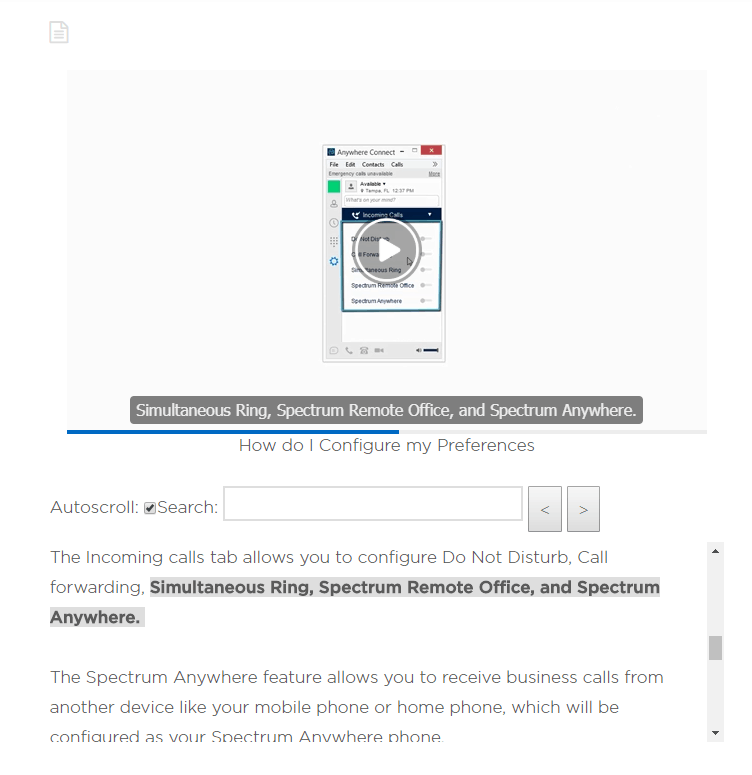
    I followed the Support Docs and was able to successfully add the Interactive Transcript to my video embed…[screenshot attached].

    Is it going to be possible to modify this so that the transcript is displayed inside an accordion….or to add a player button that displays the transcript on-demand, but has it disabled by default? We would like to make this functionality available, but not displayed by default…any insight into this request will help immensely!

    —

    Secondly – If I need to add descriptive text to our Transcript….am I correct that I’m going to want to create a new .VTT file that includes the captions from vimeo, as well as our additional descriptive text — and then link that file in our player shortcode instead of the transcript=”auto” we’re using now with our Vimeo embed?

    fvplayer_screen
    FVPlayer_Screen
Viewing 4 replies - 1 through 4 (of 4 total)
  • Martin 8 years ago

    Hello Michael,

    we were planning to add a button to show the transcript some time ago, so we will discuss it again in our team and let you know.

    You are correct about your second assumption, however I’m not sure if it will appear nicely in the transcript box. That additional description text will need to have some timestamp or it will have to be a part of some existing subtitle line and it might be hard to read when highlighted.

    Is there some VTT feature which we could use for it? I see you can get comments in it: https://developer.mozilla.org/en-US/docs/Web/API/WebVTT_API#WebVTT_comments

    Thanks,
    Martin

    Curt F. 7 years ago

    Just want to chime in with another expression of interest in this feature (an option to show or hide a transcript). I’m working on a project involving listening skills for language learners, and this would make the interactive transcripts even more helpful, so I hope you’re still considering this.

    Lucia 7 years ago

    Hi Curt!

    We will revisit adding of the option to hide/show transcript on demand. I will keep you updated.

    Thanks,

    Lucia

    Martin 7 years ago

    Hello Curt,

    one of the next FV Player Pro releases will have this feature in it. We added it as a “Hide Transcript” global setting. Enabling that makes it hidden by default and you have to hit the “TT” button in the player control bar to see it.

    Thanks,
    Martin

Viewing 4 replies - 1 through 4 (of 4 total)
Reply To: Place Transcript inside of Accordion, or make available optionally by other way


Please Sign in or Register to upload files.

Related Posts

  1. FV Player’s New Feature: Interactive Video Transcript

  2. Interactive Video Transcript

  3. Interactive Transcript

Primary Sidebar

How to …

    Categories

    • Business
    • Camera Reviews
    • Case Studies
    • Design
    • FV Player
    • Internet Marketing
    • IT
    • Life
    • SEO
    • Slovak
    • Video of the Week
    • WordPress

    Footer

    Our Plugins

    • FV WordPress Flowplayer
    • FV Thoughtful Comments
    • FV Simpler SEO
    • FV Antispam
    • FV Gravatar Cache
    • FV Testimonials

    Free Tools

    • Pandoc Online
    • Article spinner
    • WordPress Password Finder
    • Delete LinkedIn Account
    • Responsive Design Calculator
    Foliovision logo
    All materials © 2026 Foliovision s.r.o. | Panská 12 - 81101 Bratislava - Slovakia | info@foliovision.com
    • This Site Uses Cookies
    • Privacy Policy
    • Terms of Service
    • Site Map
    • Contact
    • Tel. ‭+421 2/5292 0086‬
