• Skip to main content
  • Skip to primary sidebar
  • Skip to footer

Foliovision

  • Weblog
    • FV Player
    • WordPress
    • Video of the Week
    • Case Studies
    • Business
  • About
    • Testimonials
    • Meet the Team
    • We Support
    • Careers
    • Contact
    • Pricing
  • Products
  • Support
    • FV Player Docs
    • Pro Support
  • Login
  • Basket is empty

HLS playback failed because the user didn’t interact with the document first

Foliovision › Forums › FV Player › Bug Reports › HLS playback failed because the user didn’t interact with the document first

  • Amr Hamam 7 years, 6 months ago

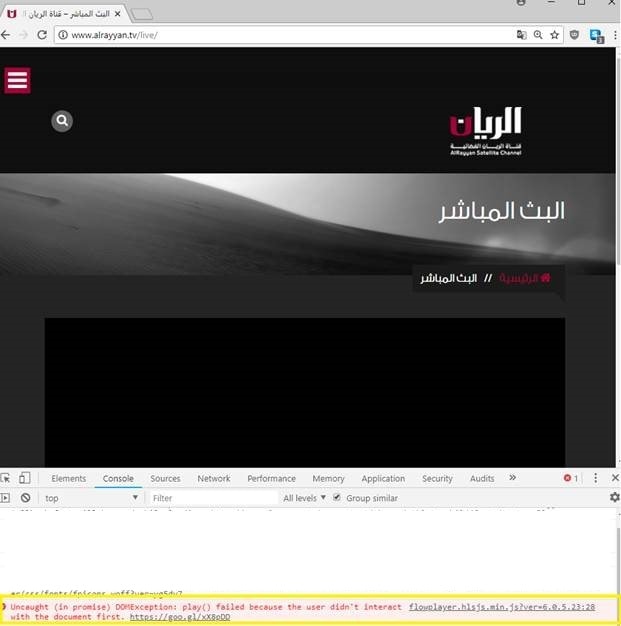
    The live streaming is not working and I am receiving this error in the console ” Uncaught (in promise) DOMException: play() failed because the user didn’t interact with the document first. https://goo.gl/xX8pDD”
    is there any feature in the FV player pro which can bypass this without the need that each user should change google chrome auto play policy himeself?

    • This topic was modified 7 years, 6 months ago by Martin.
    chrom
    chrom
Viewing 3 replies - 1 through 3 (of 3 total)
  • Martin 8 years ago

    Hello Amr,

    are you using autoplay for that video? Are you using FV Player 7 Beta already? https://foliovision.com/2018/06/fv-player-7-beta

    Thanks,
    Martin

    Amr Hamam 8 years ago

    This is a live streaming m3u8 url, so I tried by enabling and disabling the autoplay and live stream options in both Released and Beta, but same problem. How can I fix this ?

    Martin 8 years ago

    Hello Amr,

    I was not able to reproduce this issue. I’m on a Mac, so I used a command like this to open a new Google Chrome browser without any user data associated – that means no records for Media Engagement Index – and the video still played once clicked.

    Applications/Google\ Chrome.app/Contents/MacOS/Google\ Chrome --user-data-dir=fake-folder --incognito --auto-open-devtools-for-tabs {your page URL}

    The error which you are getting should really only occur for videos which are set to autoplay.

    Here is my exact user agent string:

    Mozilla/5.0 (Macintosh; Intel Mac OS X 10_12_6) AppleWebKit/537.36 (KHTML, like Gecko) Chrome/67.0.3396.99 Safari/537.36"

    Please find out about yours on http://www.whatsmyua.info/ and send it over.

    Thanks,
    Martin

Viewing 3 replies - 1 through 3 (of 3 total)

Reply To: HLS playback failed because the user didn’t interact with the document first


Please Sign in or Register to upload files.

Related Posts

  1. FV Player’s New Features: YouTube Subtitles and Fixed Error Reporting in Chrome

  2. WordPress user and page management glitch

    WordPress user and page management glitch

  3. FV Player and Autoplay Issues

Primary Sidebar

Bug Reports

    Categories

    • Business
    • Camera Reviews
    • Case Studies
    • Design
    • FV Player
    • Internet Marketing
    • IT
    • Life
    • SEO
    • Slovak
    • Video of the Week
    • WordPress

    Footer

    Our Plugins

    • FV WordPress Flowplayer
    • FV Thoughtful Comments
    • FV Simpler SEO
    • FV Antispam
    • FV Gravatar Cache
    • FV Testimonials

    Free Tools

    • Pandoc Online
    • Article spinner
    • WordPress Password Finder
    • Delete LinkedIn Account
    • Responsive Design Calculator
    Foliovision logo
    All materials © 2026 Foliovision s.r.o. | Panská 12 - 81101 Bratislava - Slovakia | info@foliovision.com
    • This Site Uses Cookies
    • Privacy Policy
    • Terms of Service
    • Site Map
    • Contact
    • Tel. ‭+421 2/5292 0086‬