• Skip to main content
  • Skip to primary sidebar
  • Skip to footer

Foliovision

  • Weblog
    • FV Player
    • WordPress
    • Video of the Week
    • Case Studies
    • Business
  • About
    • Testimonials
    • Meet the Team
    • We Support
    • Careers
    • Contact
    • Pricing
  • Products
  • Support
    • FV Player Docs
    • Pro Support
  • Login
  • Basket is empty

After switching to version 8: “Block contains unexpected content” error

[Solved]

Foliovision › Forums › FV Player › Bug Reports › After switching to version 8: “Block contains unexpected content” error

  • Girish M. 1 year, 3 months ago

    I have a website with many encrypted HLS streaming videos (hosted on AWS) that were put online with fv player version 7 in Gutenberg block editor.

    Now I switched the fv player from version 7.5 to 8.0.12 and 8.0.9 beta.
    The good news is: The videos are still playing.

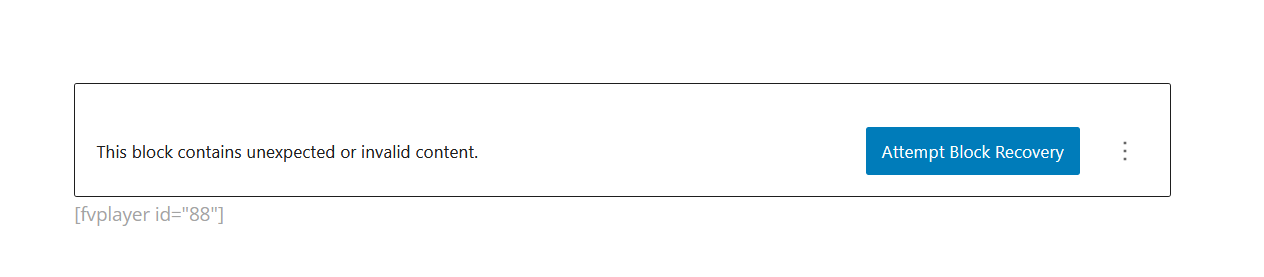
    However, the website tells me “block contains unexpected content”, see screenshot Shot-1.

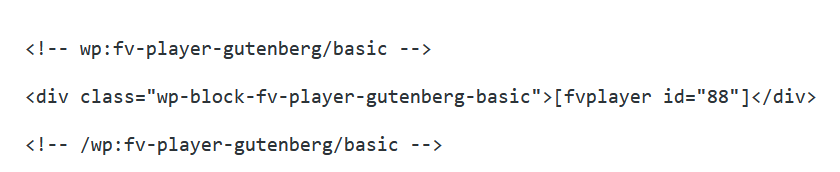
    Looking at the html code shows (see screenshot Shot-2).

    When I try to recover the block, it is changed to (see screenshot Shot-3).

    And the editor has forgotten or does not show me the details.
    After switching back to the old version, everything is accessible again.

    What can I do?

    Thank you for your help!

    Michael Gallmeier

    shot-3-clipboarder-2024-11-22-006
    Shot-3-Clipboarder.2024.11.22-006
    shot-2-clipboarder-2024-11-22-005
    Shot-2-Clipboarder.2024.11.22-005
    shot-1-clipboarder-2024-11-22-004
    Shot-1-Clipboarder.2024.11.22-004
Viewing 3 replies - 1 through 3 (of 3 total)
  • Girish M. 1 year ago

    The problem seems to be related to the custom post type.
    All my videos on the website in question are in custom post types.
    I created a normal post and put a video there, then switched to the new fv player, and was able to edit the post and the video details!

    Greetings,
    Michael

    Martin 1 year ago

    Hello Michael,

    Thank you for the bug report. I found that FV Player wouldn’t convert the old blocks properly into the new format for the custom post types which are registered later on.

    Now this has been fixed. Please reinstall FV Player from this ZIP file: https://foliovision.com/downloads/fv-player-8.zip Only the main FV Player 8 plugin needs to be reinstalled and nothing else.

    Please let us know if that won’t fix the issue. We will include the fix in the future releases.

    Thanks,
    Martin

    Girish M. 1 year ago

    Works!
    Thank you for the fast reaction!
    Greetings,
    Michael

Viewing 3 replies - 1 through 3 (of 3 total)

Reply To: After switching to version 8: “Block contains unexpected content” error


Please Sign in or Register to upload files.

Related Posts

  1. FV Player Gutenberg Block

    FV Player Gutenberg Block

  2. FV Player Pro Version – Vimeo Video Security

    FV Player Pro Version – Vimeo Video Security

  3. Block editor jumping since using chapters below player

    Block editor jumping since using chapters below player

Primary Sidebar

Bug Reports

    Categories

    • Business
    • Camera Reviews
    • Case Studies
    • Design
    • FV Player
    • Internet Marketing
    • IT
    • Life
    • SEO
    • Slovak
    • Video of the Week
    • WordPress

    Footer

    Our Plugins

    • FV WordPress Flowplayer
    • FV Thoughtful Comments
    • FV Simpler SEO
    • FV Antispam
    • FV Gravatar Cache
    • FV Testimonials

    Free Tools

    • Pandoc Online
    • Article spinner
    • WordPress Password Finder
    • Delete LinkedIn Account
    • Responsive Design Calculator
    Foliovision logo
    All materials © 2026 Foliovision s.r.o. | Panská 12 - 81101 Bratislava - Slovakia | info@foliovision.com
    • This Site Uses Cookies
    • Privacy Policy
    • Terms of Service
    • Site Map
    • Contact
    • Tel. ‭+421 2/5292 0086‬