True Wordpress WYSIWYG: Foliopress

Foliopress WYIWYG Editor For Wordpress
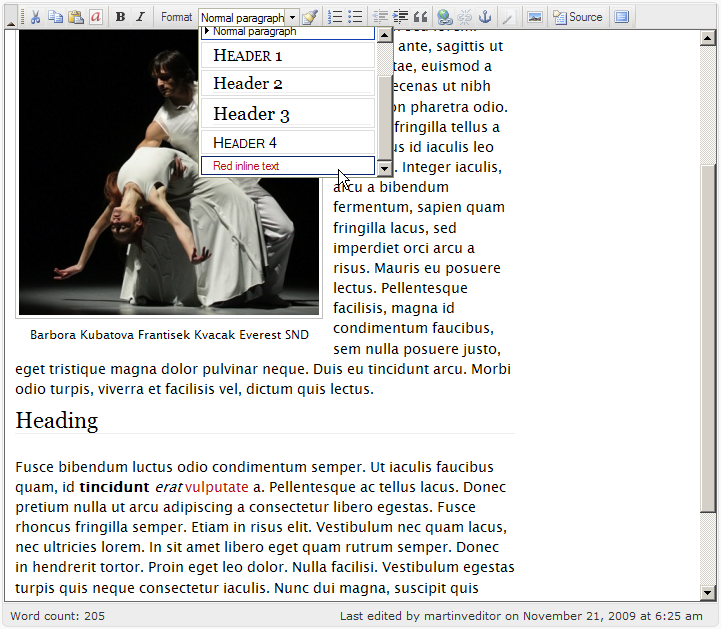
Foliopress WYSIWYG is the editor you were always hoping for, every time you installed a new content management system:
- Foliopress WYSIWYG is simple and correctly configured straight out of the box.
- Foliopress WYSIWYG handles images and text equally well.
- Foliopress WYSIWYG gives you SEO ready images (properly labelled with caption and alt and title tags).
- Foliopress WYSIWYG is simple enough to use that your clients will love it.
- Foliopress WYSIWYG has all the extra control and flexibility you want to be able to do advanced coding on your content pages.
- Foliopress WYSIWYG looks great in your browser window. No more eyesore when using an online text editor. We aren't living in the 90's anymore and our online text editors shouldn't? look like WordStar.
- Foliopress WYSIWYG has easy and quick access to source code for experts so your programmers won't get frustrated and turn it off.
- Foliopress WYSIWYG produces standards compliant html quickly and easily.
- Foliopress WYSIWYG is forgiving: even if you make some terrible HTML/XHTML errors Foliopress WYSIWYG? will always give you or your clients it's best version of your document without erasing it.
- Foliopress WYSIWYG does true WYSIWYG. You can actually see the text in your edit box the same way it is in your content box (simple three step point and click configuration).
- Foliopress WYSIWYG will never go out of date: Foliopress WYSIWYG is assembled from best of breed open source projects so it will always be on the cutting edge of web design. The parts are carefully assembled as modules with no modifications to core code so you can always drop the latest version of the core libraries in for a seamless and instant upgrade.
- Foliopress WYSIWYG is so easy and fun to use, that you just might want to retire your word processor and write all your documents online.
- Foliopress WYSIWYG is easy to upgrade. Just drop the latest version in your plugin folder and you are up do date.
Please read the installation guide for other requirements and installation instructions!
Please read the FAQ before posting questions about plugin issues!
Foliopress WYSIWYG is now available.
Download for WP 2.2+ to 3.0 (works on latest WP too!): Foliopress WYSIWYG


79 comments on “True Wordpress WYSIWYG: Foliopress”
01

Hi! Thank you for this great plugin, I have been using it several weeks.
Everything was fine, just some days ago suddenly image management stopped working. I can’t upload pictures, create subfolders, or send older pictures into post, nothing reacts. also the standard WP image uploadin stopped working (i try to upload, but nothing happens…). Any idea whats the problem?
Thanks a lot!!!
02

Hello Tom,
If Wordpress built-in upload isn’t working either, it sounds to me like hosting issues and not Foliopress WYSIWYG issues.
You could try changing permissions on the upload directories.
03

Hi guys, thank you very much for your great plugin.
The new editor toolbar is really perfect for my usage, simple and agreable.
I have only one problem : like reported before, the shortcut button for wp plugin “NextGen Gallery” that was added to the default wp editor doesnt show up, even with the full toolbar.
I know your plugin offers a images manager too but the functions of ngg seem more fitted to what i need.
As i would be unable to write myself a fck plugin or something, im asking you guys, how could i do to get that button back ?
Thanks a lot for your help !!
04

Hi Eric,
Thanks for writing.
NextGen Gallery is one of the worst Wordpress plugins around. We were called in to rescue a Wordpress site falling apart under NGG. Our resuscitation attempt was successful but gave us a lifelong distaste for this convoluted and processor hungry code.
You can emulate most of the functionality with our SEO Images/Foliopress WYSIWYG just by putting the thumbnails in a single post (works conveniently up to about 20). You’ll get a lightbox slideshow. This gallery type post was created with Foliopress WYSIWYG: http://uncoy.com/2009/05/choreolab-09.html
We have no plans to support NextGen Gallery. If I were you, I’d avoid NGG altogether. Your site will run faster, smoother with less compatibility issues. It will also be far more future proof.
05

I really like what you guys are doing here. When I get some time I plan to test it out.
I noticed you are not fans of NGG and I agree it does run fairly slow. (Before I put my foot in my mouth, I know I should test out your plugin first)How would you suggest that I get the same or similar functionality when I have a gallery that is usually in the 150 picture range?
Thanks for the suggestions.
06

Hi Joseph,
The way I solve this issue (huge image uploads), is to put selects (up to 20) inside Wordpress with Foliopress WYSIWYG/SEO Images and then link out to a Smugmug gallery for 100 images (in the case I need it).
Smugmug is set up for all the heavy lifting including selling images and it keeps Wordpress lean.
It’s very rare that one would have more than 10 must see photos of any given event.
Just be more selective. Your readers will thank you.
PS. If you decide to sign up for Smugmug you can save $5 with this code: mIQp9QbUmqWu6
07

Love your foliopress plugin but, I noticed that when I am using it with other plugins like “More Fileds” and “Flutter” that add additional wysiwigs on the post/page admin panels, it removes the secondary wysiwigs. The main content one works fine, but any text areas that were added no longer have their editors. Do you know of a workaround for this?
08

Hi Brent,
We haven’t programmed Foliopress WYSIWYG to work with multiple WYSIWYG. This is generally a big issue with multiple WYSIWYG editors. I would suggest that you don’t use WYSIWYG for your secondary fields.
09

Hello Brent,
I did a quick test with the “More Fields” plugin and I can see the problem. The JavaScript code which is putting on the secondary WYSIWYGs – TinyMCE is not working, as TinyMCE is disabled.
I wrote down the code, maybe we can make it work with our editor in one of the next versions.
10

Hi Brent,
Great plugin!
Only one problem, if installed with mailpress the editor in mailpress is not working. It defaults to html editor.
Also there is problem with “Insert media” button. It shows popup and everything but when I select image and click insert, popup clears out and no image is inserted.
Do you have any idea?
Thanks in advance
11

Hi Simon,
I checked on the Mailpress issue and it’s really not working. However we want to make it compatible in one of the next versions.
We tested the Insert media button extensively and it’s working. Are you seeing any JavaScript errors in your Firefox? Can you create a test editor account on your site for me to see the problem?
Thanks,
M.
12

Hey there,
I just stumbled over your WYSIWYG editor for Wordpress in search of one that is not that messy as TinyMCE (and even Advanced) is. So far it looks nice, though takes longer to load each time I edit a post/page…
What really bugs me is the styles import thingy, as it is so easy in TMCE – how can I get
a) my styles applied visibly to the content in my editor window and
b) get all the styles from my theme automatically added to the css dropdown?
Any help appreciated… looking forward to having an editor that is…. sweet ;).
Best
Sam
13

Hello Sam,
a) & b) please read WYSIWYG installation guidehere. I’m sure it will help you a lot. We want to make it easier, so we are open to suggestions.
b) You need to customize the dropdown manually. If you have and idea how to add all the styling automatically, we will love to hear about it. It would not be a problem to add it all there, but that’s not what you/we want. There’s a lot of styling in the style.css which isn’t applying to the actual text/html elements.
Thanks,
M.
14

1st of all, thanks for another alternative to the standard WP wysiwyg editor.
Previously I’ve used the tinymce advanced editor for most of my WP sites and found it fairly functional but ocassionally problematic. SInce I’ve been happy with fckeditor on a few drupal installs I thought I’d give your plugin a try on a test WP site.
My impressions so far are:
It seems light and fast in limited testing and seems to do what it does well. The image manager works particularly well.
BUT -
The absence of features has me questioning whether it will be a viable replacement for what I’ve been using.
I have read the previous comments and your answers to those, and understand that you have concerns over bad markup…..Should I assume that fckeditor (in itself) produces this markup in its base form ? Options for font, font color, strikethrough, underline, background color are all noticably absent as far as I can see. Fckeditor (versions I’ve used at least) also has custom template capabilities that I find very useful.
I guess I’m just wondering if theres a way to utilize this plugin AND take advantage of ALL the “normal”(in my experience)fckeditor features even if it means doing some minor config alterations ?
tia, Teros
15

Hello Teros,
we don’t like using font and font colors as it puts a ugly inline CSS. Instead we added a customizable drop-down menu to the latest version which you can download here.
We recommend you adding some classes for different fonts and fontsizes in your CSS and then just to add it to the dropdown.
If you are not ok with that, you can still just customize the toolbar and add all the default buttons to it.
All of that can be done within the plugin options page & CSS customization, all the info you need is here: http://foliovision.com/seo-tools/wordpress/plugins/wysiwyg/installation
Thanks,
M.
16

Hi-
Thanks so much for all your work on Foliopress. It’s a default install on all the sites I create for clients. I have one small issue in that I can’t seem to resize the height of editing window in any browser. What am I missing?
Thanks again!
-Jeff
17

Hi Jeff,
Thanks for your kind words. We use it as default as well now across a whole lot of sites. Tough to work on a site which doesn’t have Foliopress WYSIWYG.
Edit Window Height: We always try to stay close to default Wordpress so that our clients are not dependent on our plugins. So the preference for editing the height of your windows in Settings –> Writing –> Size of the post box. The default size is what you set for the built-in editor.
It’s probably worth adding redundant access to that preference in our own preferences window. I know I always have to remember to go and change the settings in Writing as well.
Cordial regards,
Alec
18

I succesfully installed the plugin but cannot get the SEO Image Management popup to work.
When trying to place an image into my post I click on the “Quick insert Image” button and I get the KFM File manager.
All I see is the left section (search and Directories) but they are empty and so is the middle section.
I do not see anything to upload.
I played around with the permission settings (775 and 777) but nothing worked so far.
note: I am running the blog in a directory from the main site ie http://www.mywebsite.com/blog <- wordpress is installed in the blog directory.
19

Hi Andy,
For the moment Foliopress WYSIWYG image management works with Firefox 2+, IE 6+, Camino 2+. The image management is not working with Safari or Chrome yet (we’re working on it). However the text editing features are working with both those browsers.
If you are still having trouble with your install, we’d be happy to troubleshoot your install. Having us do it for you is just $30 and we’ll have the work done within a day.
Thanks for stopping by.
20

Hello Andy, hello Alec,
I still (see above 16th September) have the same problem as Andy on 3 wp installs. Thats why I still use the Nextgen-gallery-plugin, because it works reliably and wouldn’t cost me $90 to “fix” … hehehe just pokin’ ;-)
21

Hi Everyone,
The pasting in IE is fixed now. There is an advanced rich text button now on the default toolbar that you can turn on or on if you want to post with formatting (only recommended within a post, not from external sources).
Hi Alan,
Actually it would cost you $30, as we’d fix one of your sites and let you know what the issue is and you could repair your installs on the other two sites yourself.
Foliopress WYSIWYG is the best SEO friendly WYSIWYG on any platform and it’s free. Sorry that’s not enough for you.
If your time doesn’t have any value, that’s your problem. Ours does.
In any case, if you’re using NextGen gallery, there’s not much we can do to help you as your Wordpress site will always be broken as long as NextGen gallery is running.
22

We’ve been using the rich text paste, and it works well. Is there any way to tell it to default to “on”? — My users continuously forget to push the button every time they go to edit a post.
23

Hi Matt,
Leaving the rich text button on is a real danger as a single paste from IE or Firefox or Safari can totally spoil a page. Cleaning the post out is quite arduous.
That said if you really want paste to default to rich text, here’s what you do:
Let us know how it goes.
24

ok, so I tried installing a new Wordpress blog at the root level. Also, I am using Dreamhost.
Then I installed the wysiwyg editor and went over to edit a post.
I click on the image manager and still nothing. I see the Search function and the directory “section” but it’s all blank.
I cannot upload images and there is no directory structure at all.
25

Hi Andy,
We have a Dreamhost account (mass storage, would never dream of using Dreamhost for a production site, nor Bluehost or any of the budget oversold hosts). We’ll give the latest Foliopress WYSIWYG a test again later this week (it’s worked on Dreamhost in the past).
26

Hello Andy,
we found out that Dreamhost is escaping quotes (” “) in HTTP POST and that is destroying JSON in our Image Management Tool (even though magic quotes are off). Here’s a patch for current plugin version until we fix it in new version of plugin:
kaejax.php.txt
Just rename it to kaejax.php and copy it over the original file in wp-content/plugins/foliopress-wysiwyg/fckeditor/editor/plugins/kfm/includes/
27

Alec & Martin, that update to the wysiwyg on Dreamhost is working beautifully.
28

Hey Martin,
GREAT JOB!!! fixed my problems with it too. FYI same problems have occurred on hosteurope.
Hi Alec,
didn’t mean to set you off. Foliopress-Wysiwyg absoulutely IS a great and valuable plugin!!!
And as much as I appreciate your work and publishing it for free, I’m a little miffed that your bashing nextgen so much because I think it didn’t deserve it. Why not let it be a matter of taste and opionion.
btw. my time IS valuable too and I already spent 2 days with troubleshooting on this to figure out that nothing was “broken” on my servers. neither with or without nextgengallery.
29

Hi Alan,
NextGen Gallery is awful. In SEO terms, NGG is a disaster. The code inside is a real mess as well. No better way to slow down a Wordpress install. You can build much more attractive galleries inside Foliopress WYSIWYG which work with Lightbox and virtually no server overhead (flat files served with the lightbox javascript executed locally on the visitor’s computer).
You could have saved a lot of your valuable time by sending us the $30 to fix your site and supported Open Source software while you were at it. We send OSS companies and programmers money all the time to make fixes in their software or just because we like the software. Sent $300 to the creator of WP Super Cache this month. Sent $10 yesterday to the guy who writes SiteSucker and we don’t even use SiteSucker much. If we start to use it some more, we’ll donate again.
In any case, thanks for the report on HostEurope.
30

Trying to embed youtube video using FV WYSIWYG editor and the embed code is completely removed when publishing. Is that Wordpresss or FV WYSIWYG? Any fix?
Using: FV WYSIWYG v0.9.7, WPMU v 2.9.1
31

(please disregard my earlier comment. After some searching around, this is a well-documented security issue in WPMU – hacks abound.) Thanks for your plugins!
32

I’m having some trouble preserving embedded blank paragraphs, i.e. “ ”, which are stripped out when I save the post. I have some not-so-html-savvy web customers who need this feature.
WP & plugins I’m using:
WordPress – 2.9.2
FolioPress WYSIWYG – 0.9.8
Disable WPAUTOP – 1.0
Disable wptexturize – 1.0
Any ideas? Many thanks! -B
33

Hello Bodhi,
You should be setting up the CSS in the back end and in the front end so that your users neither need nor want to mess around with double carriage returns.
If you want to have more white space between paragraphs you should put something like this into your CSS:
#entry p { padding-bottom: 10px; }
If your webpage shows correctly and the problem is just in the editor, make sure you have WYSIWYG mode properly configured using this guide. If there’s some problem with the display even in the WYSIWYG mode, you can enter the above CSS into Custom WYSIWYG CSS in plugin options.
Of course you might want to play with the exact padding value and you must enter the right CSS selector, #entry should work with most templates.
If you really can’t live without extra carriage return, you can use Shift + Enter at the end of paragraph.
If you really need these empty paragraphs, you can just replace line 39 in foliopress-wysiwyg/fckeditor/editor/plugins/foliopress-clean/fckplugin.js with this:
//strChange = strChange.replace (“<p> </p>”,”"); // disabled to allow empty paragraphs
But you have to be careful to do the fix again after each plugin upgrade then.
We really recommend you to go the clean CSS way.
Thanks,
M.
34

This WYSIWYG editor is great! Thanks.
Any change there’s a standalone version of it? (One that you can plugin in to custom CMS sytems)
35

Hey,
thanks for your job.
Any way to have a button to choose fonts ? :)
36

Hello Luca,
what you want to do is to create some classes with different font faces (if you know a bit of CSS you won’t have any problem with this) and then add it into the Custom Dropdown. More on this topic in Installation guide
Hello Jon,
you should be able to hook our editor somewhere the same way as FCK Editor. However it’s relying on WP options, so you will have to take care of that – I think playing with custom-config directory will get you the idea. Maybe it’s enough just to remove it from the fckeditor/ config files. For image management tool, which is based on KFM, you will have to configure your db in configuration.php somehow and maybe also remove some of the WP options.
Thanks,
M.
37

Hello,
My client is used to the WordPress core image gallery management. I am testing your plugin to give them more functionality for text editing.
I am having the same problem as tom. The core image management no longer works with your plugin enabled. When inserting an image, the shortcodes within the post are the same, but the resulting parsed html gives me an img tag with an empty source. I tried setting permissions for all the images in the ..wp-content/uploads to 777 but this did nothing either (doesn’t seem relevant).
Here’s a sample shortcode produced:
[image title="parts" size="full" id="2422" align="right" linkto="default" ]
Here’s the resulting html:
Any ideas?
38

grr… Im sorry, I’ll change all the greater/less than symbols:
[a href="%22default%22"][img src="" alt="" title=""parts"" class="align"right" size-"full" wp-image-"2422""]
39

Hi Chris,
We designed Foliopress WYSIWYG to work only with the real html image links. Most of our Typepad to Wordpress clients come over with the images already inside the html (we clean it up on the way to be better styled with our default lightbox styling, with some very fancy regex).
Our main commercial clients are usually starting not from Wordpress.
But I see the issue. We’ll try and do something about the parsing to pick up the Wordpress default images.
Thanks for bringing this to our attention. And thank you for the clear and detailed bug report.
40

BTW, I’d recommend going forward your client use our image management. It’s much stronger for SEO and is far more resilient if s/he ever decided to change platforms. But we should still have legacy compatibility.
41

Hello,
Upon installing and using Foliopress for the first time, I began to see the js error below, which now prevents me from using Foliopress properly.
The error started happening immediately after using the “Quick Insert Image” option. I am now unable to use it, when I click its button it just does nothing.
Webpage error details
User Agent: Mozilla/4.0 (compatible; MSIE 8.0; Windows NT 6.1; WOW64; Trident/4.0; SLCC2; .NET CLR 2.0.50727; .NET CLR 3.5.30729; .NET CLR 3.0.30729; Media Center PC 6.0)
Timestamp: Fri, 12 Mar 2010 23:10:08 UTC
Message: Syntax error
Line: 3
Char: 1
Code: 0
URI: http://www.*****.com/.*****./wp-content/plugins/foliopress-wysiwyg/fckeditor/editor/plugins/foliopress-clean/fckplugin.js
42

Hi, I’ve managed to get foliopress installed and mostly working (I had to change all PHP file permissions to 755). However when I go to add link or add photo and try and browse the server I get the error “error: “//images//” could not be created” Any ideas? At the moment the “path to images” option is set to “test/” so I don’t know why it is trying to create an “images” folder. Cheers.
43

i have installed Foliopress on a client’s web site. just wondering, it appears that installing Foliopress disables the autosave function. is it true? or am i just imagining it? thanks!
bodhi
44

Hi Bodhi,
You are right: for the moment we don’t use the built-in autosave (although we do support versions, so you can just save a draft when you are concerned about losing the content). But we are looking into supporting autosave in the next version. Thanks for the suggestion!
You are using Foliopress in the right way. It’s the ideal editor for client sites, focused on ease of use and with no complications for the non-technical persons.
45

I’ve browsed around comments on this plugin, and have a couple of quetions that I haven’t found an easy answer to.
1] Is this working for an editor using Safari?
2] Do I have to buy it?
3] A gallery of 20 images sounds meagre. It sounds more like a page about something with up to 20 images. Does it work with any gallery modules that can handle more than 20? Or is there a way of implementing “gallery” that as a new Wp user I can’t envisage.
Regards
Miriam
46

Great job guys. I’m very impressed by the level of commitment by your team.
I have run into some issues on a recent project. I really love the interface however my project requires to use the nextpage ( to create columns (page column plugin). This often times causes rendering problems within the wysiwyg. Is there a way to rectify this?
47

Hi Miram,
Thanks for writing.
I think your questions are mainly answered here: http://foliovision.com/seo-tools/wordpress/plugins/wysiwyg#comment-22732
There is no limit of 20 images in a gallery page. How many you put there is up to you. Foliopress WYSIWYG is convenient for galleries of up to about 20 to 30 images. After that it may not be the best tool. I’d be surprised if you or anyone else has more than 30 images which visitors would like to see together on a single page. It sounds like your galleries should be subdivided.
Hello Chris,
thanks for reporting this, can you provide some screenshots? For the actual site, you can also provide URL if possible, but for the editor, screenshots would tell us much more about the problem.
Thank you,
Martin
48

HI FV Guys,
I was learning to use your WYSIWYG editor very happily. But recently I upgraded to WP 3.0 Beta 2 and Now I can’t seem to get it to work again. In 2.9.x all I had to do was configure the settings and it appeared in place of the WP Editor, but now it doesn’t. I’m assuming that you guys just haven’t gotten around to the update yet, but I thought I’d drop you a note just tom ask if there is something (simple) that I can do in order to enable it. If not, can you give me a general idea of when you might be updating?
Again, thanks for all the great plug-ins you guys have provided the community.
49

Hi Tony,
We will certainly be supporting Wordpress 3.0. We have not moved to update Foliopress WYSIWYG yet, as you’ve noted. But by full release we’ll update almost immediately. I don’t recommend getting ahead of Wordpress official releases as the release schedule is already breakneck without using development versions. Issues with Foliopress WYSIWYG will be just the start, as a fully functional plugin suite requires a stable platform.
The less time one has to spend tinkering with the mechanics, the more time one has for writing and photography and marketing.
Thanks for your kind words.
50

Hey guys!
I got ahead of myself and updated to Wordpress 3.0 (before reading Alec’s write up on it today). So I’m having issues with FV WYSIWYG, which is the greatest, and am now stuck with the generic Wordpress version.
But the strange thing is that when you add a new post, you get the Wordpress editor. But when you go to edit and already existing post, the FV WYSIWYG shows up. So is there a tweak that I can do to have it show up on new posts as well?
Thanks again and I hope you all are doing well.
Take care
Brian
51

Hi Brian,
Sorry to hear about your issues. We plan to do updates to Foliopress WYSIWYG, FV Flowplayer and FV All in One SEO Pack quite soon (next couple of weeks) to make sure that at least basic functionality works in Wordpress 3.
In the future, do be careful about getting out there on the bleeding edge. Lots of other plugins won’t work properly either. Do you really want to spend your days/nights troubleshooting new OS?
Major graphics houses always run a full version behind with Apple OS (and that seminar was back in 2003). They can’t afford to have their systems down while Apple and Adobe quarrel over API’s. Now that you are a web publisher, you can’t either.
52

First, if you can add tags to your plugin on Wordpress Extend, I suggest you add ‘TinyMce’ and ‘editor’ to your plugin. I found it only by accident, and such great work should be accessible:)
Second, some related questions on images. First, all my images are remotely hosted for speed, bandwith, handling and maintenance reasons. I have placed captions on all my images according to Wordpress ‘[caption= which surrounds the tags and ends with [/caption]‘ specifications but this editor does not recognize them. In fact, if I edit a post, it destroys the caption which no longer shows.
Is this a Wordpress 3.0 issue? Or do I need to redo a caption somehow if I edit my posts using the Fckeditor? If so, what is the html, since I see no button to insert captions? Currently my image captions are styled using default Wordpress class names.
Thanks for your input. Great plugin.
53

FYI, I found this site searching for a solution to TinyMCE regarding toolbar button usage.
When I clicked on tables or image buttons, a blank window appeared and my browser attempted to download the htm plugin file. It appears there are any number of causes for this issue, all poorly documented, and it extended to the TinyMCE advanced plug-in also.
Rather than track down all the issues, I found the solution in your wonderful WYSIWYG editor, with the exception of the caption issue listed above.
Hopefully this comment will direct more Wordpress users to your site who experience the same issue as me.
54

Hi Jim,
Thanks for the tips about our listing in the Wordpress plugin database.
We do have an issue with captions as our solution is predicated on being compatible with all CMS not just Wordpress. After you’ve published a photo with Foliopress WYSIWYG, you just have When you’ve added images with our plugin you can switch to another CMS with no loss, unlike Wordpress’s built-in solution with it’s custom short tags.
Perhaps we can add a converter when opening posts but it will not be two way, it will be one way.
Wordpress’s whole way of handling images is very database intensive, clunky and not portable (every included image or attachment is eleven database calls). Our way of handling images means that there are no database calls, even if you add twenty images to a single post. Plus our handling of SEO is much more complete (just name your image properly before you upload it).
55

Thank you for your reply. I got the caption to work (the editor treats it as text, which is fine).
And yes, it was the Wordpress treatment of images that inspired me to offload them to an image site. I use both Picasa and Flickr. There are some good plugins to help upload and access them.
Images and text do not belong together in the same database; the processing is much different. Your editor solves the majority of Wordpress issues. In fact, as an old programmer, I can say that the Wordpress core could be much more adept and faster at the same time. I believe they have strategy issues which dearly affects usability.
Thank you again for the wonderful plugin. I can tell from your work that your team is thinking:)
56

Hi Jim,
Thanks for your kind words.
We are working on a one way converter of Wordpress images into Foliopress WYSIWYG images on post open (it will be an option in preferences). We will set some intelligent defaults for converting Caption and the other attributes into static format. Once converted images will be straight html and easily managed. It should make people’s posts load more quickly with a lower server load as well (advanced aching can help even the current Wordpress system though).
Let us know if you run into any other issues.
57

Hi,
Thank you for developing such a wonderful plugin. I found it of great use especially when I have copy & paste some contents and have them appear exactly as they appear originally.
However, there are a few issues. I use WP completely as a CMS.
1. I use the php tags by enabling the PHP Execution plugin. When I save the page, the php tags are wiped out.
2. I use the RB Internal Link plugin which displays a small icon in the editior. After enabling your plugin, RB Internal Icon does not appears.
These are few basic issues that I am facing. For this reason, I have keep enabling and disabling your plugin to get the desired action.
It will be great if there is some workaround to this, especially for the use of php tags.
Regards,
Alok
58

Hi Alok,
We have no particular desire to make Foliopress WYSIWYG work with live PHP in the posts. Putting live PHP in posts is a huge security risk and defeats the purpose of a templated CMS. Use John Godley’s Sniplets if you must put PHP in your posts.
We don’t know anything about RB internal link plugin. If you’d like to hire us to custom code support for it, we have added support for other plugins who want a menu bar item, please contact us via the contact form. Alternatively, if you are a programmer yourself, you can add this yourself.
Thanks for using Foliopress WYSIWYG.
59

Hello,
I’m sure your editor is so good by the simply fact you do not want to include all the compatibility issues on the editor. It is a good system to avoid problems.
Anyway, I’m using WP3.0, but it is not clear (I hope it is) if your editor is now WP3.0 compatible.
Our editor is having a lot of problems with the tinymce advanced editor and the css and we need to throw it down asap.
Thank you in advance
60

Hi Ivan,
We’re pretty sure that Foliopress WYSIWYG is compatible with Wordpress 3.0. Let us know if you run into any issues.
Thanks!
PS. You’re right, Foliopress WYSIWYG is a much more advanced code friendly editor than TinyMCE. As I’ve mentioned, we developed it to give our clients a better environment as well, where they wouldn’t break pages by opening them and they could get real WYSIWYG
61

Hello, it appears, in the folipress settings tab, “FCKEditor skin”.
Does it means Foliopress is based on fckeditor ?
62

Hello Ivan,
Yes, the core of Foliopress WYSIWYG are FCK (editor) and KFM (image manager), both best of breed open source projects. There are hundreds of hours of customisation and addition
1. to make them work perfectly with Wordpress
2. to make them look much better and provide true WYSIWYG
3. to make them the most powerful SEO solution for images out there for Wordpress
On the plus side, most documentation for FCK editor also applies to Foliopress WYSIWYG if you are into micromanaging the internal settings. We’ve carefully chosen what options to make available as basic, advanced and expert but for very special cases, you can dig into the code.
63

Hi Alec
I have an iPad and would like to use it to compose posts through the Wordpress dashboard. However, WYSIWYG does not currently work on the iPad. I don’t want to use the Wordpress app, which is plain awful, and I love the Foliopress image file system.
Is this something that could addressed in a future plugin update…or is it a bigger Wordpress issue?
Take care
Brian
64

Hi Brian,
Much as we would like our Foliopress WYSIWYG editor and our SEO Images file manager to work on the iPad, it’s not likely to happen on the current version as they are both very javascript dependent and the version of Safari running on the iPad is not fully compatible with normal Safari.
We suggest using a dedicated Wordpress posting app on an iPad and then coming back to add the images later from a desktop computer. Manipulating images on an iPad is a pain in the neck anyway.
Due to content production issues on the iPad, I’ve chosen to go with a powerful netbook instead (11″ screen, Core 2 Duo 1.2 GHz processors).
We don’t have a recommended Wordpress posting app for the iPad yet. If you could look around and let us know which one we should recommend that would be great.
Foliopress WYSIWYG should be fully compatible with a posting app as we include the full html in our code. We are also working to automatically convert entries posted with the outmoded and cumbersome WP AutoP missing paragraph tags.
65

Hi
I installed the foliovision wysiwyg editor and I get this: Toolbar set “Foliovision” doesn’t exist
I read the FAQ and the file is present in the location specified however it does not load in the browser. The folder has the 755 permissions.
Would like some guidance please.
Thank you
Lance
66

I should say i’m very satisfied with your quick answer on the install and setup of the editor on my server.
Which i noted now is when i need to add a thumbnail in the post, i can not use the image button on the editor because it does not makes thumbnails. Instead of this, i should use the ‘Set thumbnail’ in the edition page, but there is a little problem: I do not see a way to set the size of the image (thumnail, medium, large) anywhere.
Could be nice to set as a thumbnail an image within the foliovision editor image button.
67

Hi Lance,
The “Toolbar set ‘Foliovision’ doesn’t exist” has been popping up more frequently lately. We’ll be putting in a fix today or tomorrow to make it disappear. It seems to affect about 10% of installs depending on how one’s server is configured.
If you’d like to have a go at fixing the issue yourself, there is detailed info about the Foliopress Toolbar Set issue in our FAQ.
Thanks for the info.
68

Hi Ivan,
Glad our install service worked for you!
Please go and have a look in advanced preferences. You can set the image sizes there. Thanks!
69

Hello Lance,
we released the fixed version yesterday, let us know when you got a chance to test it.
Thanks,
Martin
70

Hi!
I’m getting
“There is a problem opening your configuration file. Please check if http://127.0.0.1/wp30/wp-content/plugins/foliopress-wysiwyg/custom-config/foliopress-wysiwyg-config-js.php is executed in PHP correctly.”
in the settings page. The file seems executing ok. This is on a local XP install, WP3 and nginx 0.8.46 webserver. Ideas?
Thank you.
71

Hi Bo,
We’ve eliminated this error (affecting just the people with the previous toolbar loading issue) in version 9.15. We’re releasing 9.15 as I write this.
Thanks for letting us know!
PS. A side benefit of these configuration changes is that Foliopress WYSIWYG loads faster. That is true for everyone.
72

Hi,
I was editing a page and noticed that there’s an additional space ( ) at the bottom and I can’t remove it. We are using WordPress ver. 3.0.
73

Hi Myreen,
It’s possible to remove the paragraph with the empty space but it will often come back. Most javascript editors add this single line as a way to make sure you can enter new text. We can and sometimes do strip the single paragraph (check the advanced options) but it can still slip in. It will always reappear on reopening the post (otherwise you wouldn’t be able to add new text).
My simplest suggestion is to make a layout which does not change or break depending on a single blank p tag at the end of the post. That’s easily done with CSS.
74

Actually Basic works. But when I select default I get errors for H1 until H6 :
“The FCKConfig.CoreStyles['h5_1'] setting was not found. Please check the fckconfig.js file”
after I click OK on the 5 or 6 errors the editor shows up in the background.
75

Hi Andy,
Thanks for your report.
As far as I know you are the only one experiencing this issue. Foliopress WYSIWYG is working well on dozens of hosts and many hundreds of websites including Wordpress 3.01.
I’ve sent you a note about handson help for your site.
76

Hello: I’ve read some good things about this plug-in and since I’m not completely happy with FCK Editor I’m going to give this a try. I have a few questions about installation:
1. Should I deactivate FCK Editor first?
2. Once I install Folio, will it affect the formatting of previous posts and drafts? If so, how?
3. Will it affect images that are in previous posts?
Many thanks.
77

Hi Ken,
You can just turn off FCK and turn on Foliopress WYSIWYG. We suggest keeping images in yourdomain.com/images in monthly folder and not in yourdomain.com/wordpress/wp-content/media/images. But that affects only new images.
Images you upload with our plugin will remain in place even if you switch to another plugin in the future as well.
Good luck.
78

Hey all!
I ran into an issue where Wordpress is having issues creating thumbnails and was wondering if this might be related to the WYSIWYG image plugin. Here’s the error message I’m receiving:
# 10988. Not enough memory (3251/3841kB) for http://…/.jpg!
# 10988. Not enough memory (3253/3841kB) for http://…/.jpg!
# 10988. Not enough memory (3292/3841kB) for http://…/.jpg!
# 10988. Not enough memory (3293/3841kB) for http://…/.jpg!
Any guesses?
79

Hi Brian,
Sounds like you need to increase PHP memory (standard is 32 MB, Foliopress WYSIWYG/Wordpress works better at 64 MB).
Speak to your host.
Leave a Reply