Thoughtful Comments

  • Is your site on a hot topic?
  • Does your site attract some difficult commenters?
  • Do you get a lot of comments?

If the answer to any of these questions is yes, you need our plugin Thoughtful Comments which adds advanced front end comment moderation and cool thread and user banning mechanisms.

We've stress tested Thoughtful Comments on political debate and it knocks Intense Debate and Disqus flat on their backs.

The big advantage of Thoughtful Comments is that it's part of your core Wordpress install so your comments stay local. Local comments mean you are not dependent on someone else's server. Also by keeping your comments local and published on your own site, you get huge SEO advantages for fresh content.

Take the Mercedes of Wordpress comment management for a spin. You'll love to be back in charge of your own site again, able to keep even the riliest commenters and nefarious spammers at bay.

We recommend using WP Spam Free in conjunction with Thoughtful Comments to keep the spammer right off your site.
thoughtful comments 1
Thoughtful Comments
front-end comment moderation
Front-end comment moderation

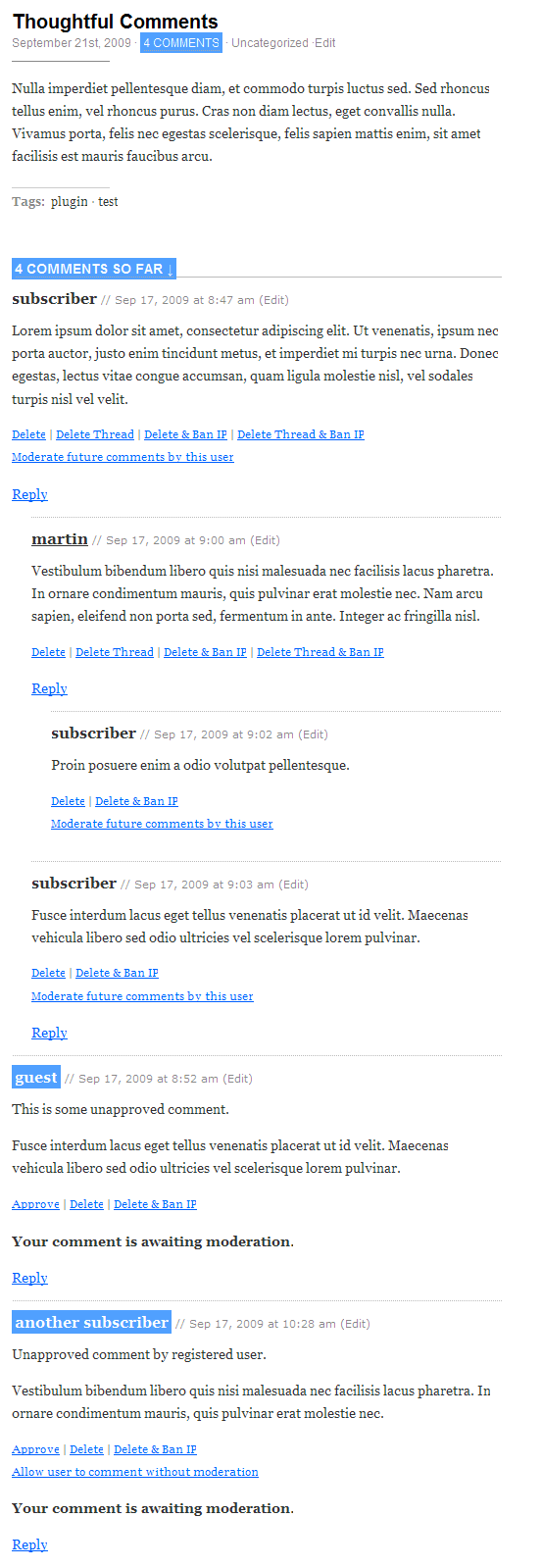
This is the greatest feature of this plugin. It lets logged in editor and admin users to do the following actions with comments while they are displayed bellow the post. No need to get into Wordpress Administration Panels to remove the bad comments.

  • delete a comment
  • delete a comment including all its replies
  • delete a comment and add the author's IP to blacklist (if it's not already in it)
  • delete a comment including all its replies and add the comment author's IP to blacklist (if it's not already in it)
  • approve a comment
  • allow/disallow comment's author to post further comments without moderation

You can see all the features in action on the screenshot.

Unapproved comments shown in front-end

Having a frontend comment moderation system is nice, but it's useless if you can't see the unapproved comments there. That's why our plugin enables logged in editor and admin users to see the unapproved comments bellow the articles, so they can delete or approve incoming comments right away. The name of comment author is highlighted if it's an unapproved comment.

When viewing the blog index or archive pages, the number of comments listed bellow each of the articles is highlighted if there are any unapproved comments. You can hover your mouse over it to get the actual number.
 

thoughtful comments 2
Thoughtful Comments front-end comment moderation

Per-user moderation settings

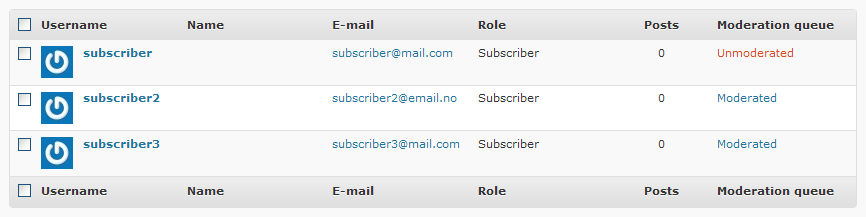
If you are moderating all the comments comments coming to your site - even for the registered users - our plugin let's you put desired users out of this moderation queue by a single click. Then all the following comments from the user will be auto-approved.

You can review this setting in Wordpress Administration Panels - User Management too.
 

thoughtful comments 3
Thoughtful Comments integrated in Wordpress Administration Panels

When the user is Unmoderated, it means that all his comments are automatically approved.

Technology?

Every user action in the plugin is supported by JQuery's AJAX so you get no annoying page reloads every time you approve or delete a single comment. That means JQuery has to be loaded even on the frontpage, but no worries - it loads only for the users which are able to moderate comments - that means registered users who are at least of "Editor" level, so your site won't be slowed down by loading some unnecessary javascript library.

Download

Direct download link - Thoughtful Comments


8 comments on “Thoughtful Comments”

  1. 01

    About the only thing I can think of that I don’t like is that when I reply to a comment, I get shuttled to the compose box down at the bottom of the page. Would be nice to open a compose box directly below the comment you’re replying to, such that you can easily read it for reference as you’re composing your reply.

    Richard at October 23rd, 2009 around 8:10 am
    Jump to the top of this page
  2. 02

    Hello Richard,

    thank you for your feedback.

    I’ve checked on your site and this appears to be a theme related issue. That’s how your template is handling the replies. So it needs to be fixed in the template.

    However we are up to find a solution for this – creating a unified yet good looking plugin solution which would do a nice AJAX reply forms for the comments and would work with all the themes. Maybe it could just take control of the whole comments display mechanism – same thing Threaded Comments plugin does – but introducing some more features.

    M.

    martinv at October 23rd, 2009 around 10:58 am
    Jump to the top of this page
  3. 03

    Nice plugin.

    WP users set up in the Author role should only be able to moderate comments on the posts that they write. In the WP backend, Authors can see all comments listed but can only take action on the comments on your post.

    Enabling this plugin allows someone with an author user role to delete comments on any blog post via the front end. Seems like this would be a bug.

    JJ at March 5th, 2010 around 1:24 am
    Jump to the top of this page
  4. 04

    Hello JJ,

    no, it’s not like that. Users with author user role are not able to delete comments on any blog post via the front end with our plugin.

    On the other hand, they are not able to do so even on their own posts, so that could be considered as a missing feature.

    What other plugins are you using if you experienced the problem you describe?

    Thank you for your input.
    M.

    Martin at March 5th, 2010 around 2:07 am
    Jump to the top of this page
  5. 05

    I think you’re right. Was playing with the plugin on a sandbox site I’ve got. And at some point, I believe I turned on Role Manager to give authors the moderate comments permission.

    seems like your plugin could be modified rather easily to do a check on a logged in user.
    Something like…
    IF post-author-id == logged-in-userid THEN display moderation tools

    JJ at March 5th, 2010 around 12:21 pm
    Jump to the top of this page
  6. 06

    Hello JJ,

    we just released a new version of the plugin which allows authors to manage comment bellow their own articles. You can simply upgrade the plugin in wp-admin menus.

    It uses the same checking mechanism as Wordpress – current_user_can(‘edit_post’, $post->ID) (which by the way doesn’t sound so good, but that’s how is Wordpress checking the permissions for comment moderation in wp-admin section).

    Thanks,
    M.

    Martin at March 8th, 2010 around 4:59 am
    Jump to the top of this page
  7. 07

    This plugin is rated very highly however it does not really do what I hoped it would do for my blog – nest/thread comments and allow readers (and authors) to reply directly to previously posted comments.

    I believe this is to do with my theme – MNML – but I can’t seem to find any tutorials online that actually go through how to update the theme.

    I also do not require my readers to log in, and don’t wish to. I also do not want to moderate comments before they are published.

    Should I pursue using Thoughtful Comments and MNML? Should I give up?

    Cassandri at March 20th, 2010 around 8:14 pm
    Jump to the top of this page
  8. 08

    Hello Cassandri,

    Thoughtful Comments does not handle comment display/threading/replying. That’s all Wordpress. But as I can see, some people have problem setting their themes properly to handle all of that (and I don’t blame them, it’s a real hassle), so maybe our plugin should allow you to set up the basic threading/comment reply configuration by a single click in plugin options.

    Also, Thoughtful Comments by default won’t change your moderation settings.

    This is how you get the moving reply form.

    Here’s how you make sure your theme will handle threaded comments correctly: check out the new comments loop

    If you want to do some design tweaks on it.

    I checked MNML template code and it’s not using the proper new comments loop.

    I hope this helps.

    Thanks,
    M.

    Martin at March 21st, 2010 around 1:37 am
    Jump to the top of this page

Leave a Reply

  •  
  •  
  •  

You can keep track of new comments to this post with the comments feed.