With the huge sites we build over time with and for our clients, one of the most painful parts is keeping the broken links out.
There are online checkers that can handle small sites (up to about 50 or 100 pages) but when you want to scan a site with 300 or 500 pages or more, you need a desktop application.
We use and recommend the Site Audit tool in WebCEO for advanced website checking, but a lot of the time, WebCEO is overkill. We don’t care if our images have the alt tag. We don’t care if our pages are considered slow right now. We just want to catch and fix the broken links.
In cases like this, we use Xenu Link Sleuth. Xenu Link Sleuth is a labour of love, created by an anti-Scientology programmer (every report contains a banner ad against Scientology). It’s fast and reliable. Really fast.
For Xenu to do a maximum amount of good and not give too much useless information you need to get the settings right. Here are the ones we use:
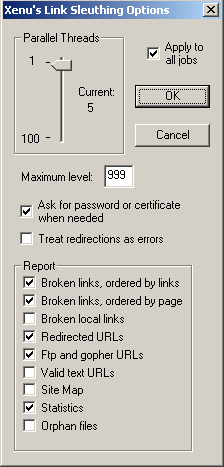
Xenu Link Sleuth settings
Why these settings?
From the top:
- Parallel threads should be reduced to 10 or less. Five is even better. With thirty threads, there is a good chance you will overwhelm you shared server.
- Apply to all jobs checked: you don’t want to have change these settings for every project.
- Ask for password or certificate when needed will allow you to spider hidden parts of the site. Be careful about being logged in or not with Internet Explorer, or Xenu might go through your CMS. A properly written CMS shouldn’t delete content without a confirmation dialog but this is an option to be careful about.
- Redirections as errors should be off. While I do consider redirections errors for the most part, they are less urgent to address than broken links, especially internal ones.
- FTP and gopher URLs. Should be checked. If you have these links, it would be good to know if they are working or not. I haven’t had any large ftp links on any of our sites, so I don’t know if Xenu downloads the whole file or just touches it to make sure there is something on the other end. Checking the documentation, apparently Xenu only gives a list of ftp files. Useful enough to do a handcheck.
- Valid text URLs will give you a full list of all the URLs in your site. You don’t need this.
- Site Map will create a sort of sitemap based on site structure. It’s generally not been satisfactory for modern sophisticated dynamic site. More confusing than anything else. Leave it turned off.
- Statistics will give you a very good summary of your scan.
- Orphan Files you should always leave turned off. It can’t handle ID type anchors which means it reports a lot of correctly working anchors as broken. The orphan files options has never given me any worthwhile information.
Here is the short version of the statistics:

Xenu Link Sleuth Statistics
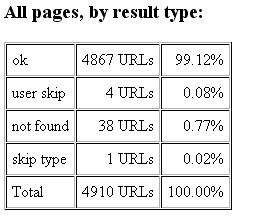
Very nice. Very simple. We aren’t doing too badly here, at over 99% ok.
One reason this looks so good is thanks to Xenu Link Sleuth itself.
To get best use of Xenu Link Sleuth, you’ll want to set it to browse external links, but make sure to add a list of URLs not to check in the same format as here (with http://):

Xenu Starting Point dialog
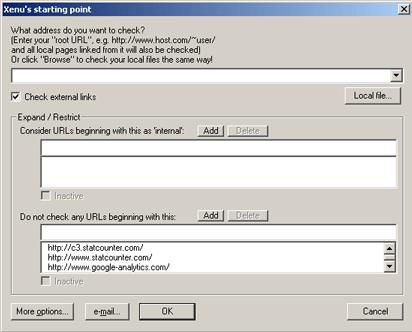
The example above is only applicable to our sites. You’ll have to include your own tracking services yourself. If you don’t get this right, you’ll get errors on every page and your reports will be next to useless. Make sure to include the http:// and then the full base URL of each service. Including shorthand like “google” or “statcounter” won’t work. Trust us. We’ve tried it.
The simple solution to false errors on external linksis to turn off Check external links. This way the off site trackers are not checked. But external links aren’t checked either. It’s worth the extra trouble to get it right. It might take you two or three tries, but once you’ve figured it out once, you will be able to run Xenu trouble free in the future (although sometimesI’ve had trouble getting the Do not check any URLs preference to stick).
Other worthwhile link checking alternatives to Xenu include
- the W3C link checker. Online. Simple, straightforward, free. Times out after 100 pages.
- the SEOMoz Crawl test. Online. Unpaid version 5 pages. Paid version 50 pages. Very detailed reports. Nice formatting.
- WebCEO. Desktop application. Most comprehensive reports. Unlimited crawling. Paid, multipurpose tool. Can be depressing as all get out – it finds every flaw in your website.

how to use xenu using command line in windows?
Hello Kunal,
We haven’t been using Xenu Link Sleuth via the command line.
Given the amount of configuration necessary for a successful run (see shots above), I wouldn’t bother with running Xenu from the command line. If you are trying to build a totally automated spider, you might want to start with something open source. Although Xenu Link Sleuth is free, the source code is not available.
Cordial regards.
Thank you for the very good tutorial. There is just one thing missing – advice about searching for orphaned files. I made this work once but I have forgotten how to use the FTP settings. I appreciate the comment ID tags, but I think I would get some useful info out of it. Thanks again. Dave
If disk space and policies allow, a simple way to do the orphan test is make a copy of your site locally and look for the orphans right there.
Hello Warren,
That’s a good idea. Most of our sites are dynamic these days so getting a copy to work locally is a fair amount of work. But for static sites, or very simple dynamic sites, that’s a great idea, thanks for sharing.
Isn’t remote vs local an almost entirely different issue than static vs dynamic. For a dynamic site the main problem tends to be the lack of hard coded href links, much of the site only is accessed via click events and the like.
Even if you run Xenu on the live server it won’t work it’s way past the opening page if there aren’t any static links to follow.
Hello Warren,
We use static links. What I mean by dynamic is database driven. Of course a database driven site can be run locally. But it’s a significant amount of extra overhead setting the site up and troubleshooting it in two different server environments (your webhost and your local Apache configuration, assuming LAMP).
So it’s easier to run Xenu against the live server. But make sure to set the simultaneous connections lower than five if you don’t want to either slow down your server or get Xenu banned by security mechanisms.
I just finished exploring XENU 1.3 and found it really helpful in testing web applications. We also tried Xenu for Site menus (such as drop downs, site navigation menus etc) but were unable to get any result. Can you please confirm if we could infact use it for site navigation menu testing as well?(without manually clicking on each menu sub level individually). The site menus are written in JavaScript while each sub level menu points to some live urls (which are obviously hard coded) I wanted to inquire is there a way or any Xenu feature , through which Fiddler can check all urls/link specified in Menu drop down without manually clicking them.
Hello Ahmed,
Glad Xenu helped you too! Xenu is one of the greatest tools ever built in the area of web development.
Your problem is the javascript. Xenu is not equipped and will not be equipped to handle javascript (I’ve corresponded with Tilman Hausherr and while he is very nice, he is very clear about the focus of Xenu).
FYI, here is the future feature list for Xenu Link Sleuth. The only item on that list likely to happen would be robots.txt support.
In any case, Google for the most part can’t read javascript menus either. So you need to add replacement menus in the footer or use a more sophisticated kind of mixed javacript/html menu. Basically, if you want to make your life easier and get some rankings in Google, drop the javascript.
All the best.
Thanks for your reply. Can you please also remove my one ambiguity. I tried Xenu for testing web sites where login is required, it seems to be skipping those pages which require authentication by providing user login and password and pulls up rest of all pages of the websites. Is there a way Xenu can be used to check all the signed in pages?
Thanks
Generally, yes, it is possible to check authenticated pages with Xenu Link Sleuth. You have to already be logged in to the site in question in Internet Explorer and then tick one of the preferences to check authenticated pages.
Be very careful about using the authenticated page checker. Developers often leave all kinds of delete buttons in their authenticated pages as they know spiders won’t be running through them (although in this case, Xenu would).
I am unable to find the option you mentioned for Authenticated session. I m using Xenu 1.3 didn’t find this option in Preferences?
Hello Ahmed,
You are welcome.
I assure you that the feature is in Xenu but we don’t use it ourselves. You’ll have to experiment (try logging in to a site and then running Xenu on it). I believe this functionality is documented on the Xenu site.
I too am unable to find any preference to check sites that require login/authentication.
I see some reference in the documentation about setting up a proxy or something. Does anyone have any experience checking sites that require authentication with this application?
Broken links was a real pain for me. Thanks for the tip!
Hi,
I am new to Xenu and I have a question which I think is very trivial … I have a report of broken links. Now I want to see on what pages on the site the links are on. For example: I see the link A is not valid. Now I want to see that link A can be found on page ABC. Than I can start fixing it. I can’t find it in the report or anywhere else. I must have missed it somewhere, for it seems so obvious.
Hi Jaap,
What you are looking for is in the html report. Click r to generate an html report and you will have lists broken down by page and by link.
Good luck.
One note, you really don’t have to worry about Xenu doing deletes on authenticated pages (or running ads on public facing anonymous pages for that matter). Xenu does not execute an HTTP GET – it executes an HTTP HEAD to fetch only the head contents. While Xenu may find JSP pages that offer the delete functionality, it would never be able to access any of the content in the body.
I am not able to test in logged in pages. Can any one help me on how to do this in logged in pages.I followed all the steps given in tech.groups.yahoo.com/group/xenu-usergroup/message/930, but its not working for me.
We don’t use Xenu on logged in pages as we find it’s too dangerous, despite Eric’s recommendation above.
Hi, I am trying to get started on Xenu. when its “what address you want to check” i enter the domain name example.com/ I get the mesaage forbidden. have i written it correctly. Please advise. Regards Sartaj
Amazing way to check our life website or blog :) Thxs, i very glad to see this post cause i have tons of blog and cannot be check one by one :) U make all things easy.
God Bless u
Xenu has saved my life (version with wildcard support is great and useful for me), simply the best free software to search broken links I have tried !
i find the tool very useful and would like to use it for QA on my site after every new version release. any chance to have command line support for xenu?
My biggest compliment for Xenu is how much it “teaches-by-making-you-fix-it”—that is, if a webmaster is intent on fixing what the webmaster did incorrectly. I’ve learned TONS and understood WHY my code was wrong, just by going through the report and seeing how machines “see” my website. …. My biggest issue with Xenu is understanding this message “Links that aren’t spidered (e.g. webforms and dynamically generated links) will appear as orphans in this list”. It’s perplexing to have one sub-directory “index.html” linked correctly back up through to the main site index.html, but the sub’s index page is listed as an orphan. Huh? Another beef is about “hidden” directories used by WYSiWYG Editors, like Frontpage… Xenu finds and lists as Orphan all those _vti and _private folders that Fp makes for organizing a web’s structure. I ended up with 2,000 orphans just from those dumb hidden folders—arrgh. BUT the hidden directory pages were MIXED in with other orphan pages, so I had to copy-move the true orphans to a separate list. I truly WISH Xenu could accept a block list of many URLs to ignore, rather than adding one by one; if so, I could just feed back to Xenu what Xenu showed in the Report for what to block. Otherwise, the program is reliable, fast, accurate, and can be a great learning tool.
Hi all,
I have used xenu tool. Could anyone help me out to run xenu tool from command line. My next step is to integrate it with jenkins. Please help !!
Hi all,
Can Xenu perform this?
Thanks Sowmya
Sowmya, to check links on a site which requires authentication, you can do the following: