• Skip to main content
  • Skip to primary sidebar
  • Skip to footer

Foliovision

  • Weblog
    • FV Player
    • WordPress
    • Video of the Week
    • Case Studies
    • Business
  • About
    • Testimonials
    • Meet the Team
    • We Support
    • Careers
    • Contact
    • Pricing
  • Products
  • Support
    • FV Player Docs
    • Pro Support
  • Login
  • Basket is empty

Vimeo issues on iOS

Foliovision › Forums › FV Player › Troubleshooting › Vimeo issues on iOS

  • CXL 7 years, 2 months ago

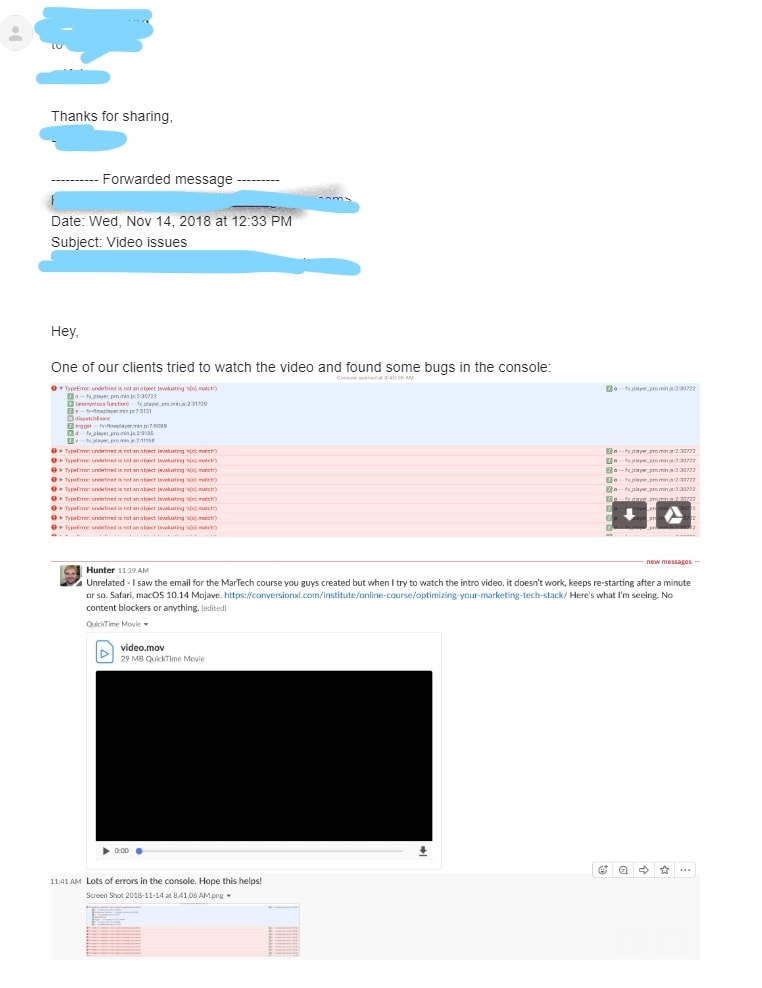
    I am also getting issues with playing videos (HTML5 video not found video/mp4) with Safari on iOS devices and macOS devices, and sometimes with Chrome. The issue occurs sporadically with users all around the world and has occurred in our office (Located in US)

    We host our videos on Vimeo using the Pro integration with MPEG-DASH enabled.

    Disabling MPEG-DASH had no effect.
    Specifying CDN location had no effect.
    Videos play normally on Vimeo

    I have attached log output our customer has sent.

    What are next steps in debugging process?

    inkedchrome_2018-11-14_13-10-18_li
    Inkedchrome_2018-11-14_13-10-18_LI
Viewing 12 replies - 1 through 12 (of 12 total)
  • Martin 7 years ago

    Hello Leho,

    I see you are using FV Player 7.2.10.727.beta.
    We just released FV Player 7.2.11.727.beta which should help.

    The thing is that Safari and iOS don’t trigger any error even if a video stops playing in the middle of it. We were trying to solve that as other users were running into some issue with that.

    But now it turns out that the HTML5 video event which we used (stalled) is not reliable enough and under some circumstances it can cause playback issues too.

    So the FV Player Pro 7.2.11.727.beta no longer listens to that problematic event.

    We will go back to using a more primitive but also more reliable approach which is already part of FV Player base plugin. In that one is the video stops progressing on Safari and iOS for no reason it shows a button to reload the video. At the same time if it senses that the video has progressed this button is removed.

    Thanks,
    Martin

    CXL 7 years ago

    Thank you, going to testing this right now.

    CXL 7 years ago

    Is there a Slack channel you guys have that we could join?

    Martin 7 years ago

    Hello Leho,

    unfortunately we don’t have one.

    Please let us know if you are still having any issues.

    Thanks,
    Martin

    CXL 7 years ago

    7.2.11.727.beta now broke video plays for Chrome users.

    I noticed if you click video Play button really fast during page load / initialization, video starts playing.

    If you let everything load, browser idle, then you get”Yet again “Couldn’t find the required video type: video/fv-mp4”

    This beta experience overall hasn’t been good. Every release one set of browsers gets their experience broken.

    CXL 7 years ago

    I had to revert back to “fv-player-pro active none 7.2.9.727” to hotfix things for Chrome customers, but now iOS might be broken again.

    CXL 7 years ago

    How can we help improve your testing process so we can get more stability going?

    Martin 7 years ago

    Hello Leho,

    I moved your issue to a new ticket.

    There was no change in 7.2.11.727.beta which could cause what you are describing. There must be some other tricky issue or a bug which is causing what you described. It seems as if the data which was cached for these Vimeo videos on your websites was not valid. But that is supposed to be cleared during the upgrade process automatically. I haven’t noticed this issue when doing the same upgrade, so I wonder what could go wrong.

    Our automated testing doesn’t seem to detect tricky issues like this unfortunately. It works with desktop Google Chrome and iOS Safari.

    The iOS bug which you were getting earlier was caused by 7.2.10.727.beta. If you are on 7.2.9.727 it’s safe.

    Thanks,
    Martin

    CXL 7 years ago

    Thanks for the info. Support chat seems to be quiet for now, so perhaps .9. is working.

    PS we could provide a known restricted login to our video Institute so it’d be easier to take a look if any of your engineers needs to. Would this help in diagnosis, are you interested?

    CXL 7 years ago

    I just purchased some separate licenses for our staging domains.

    CXL 7 years ago

    Maybe the “works with quick Play click” issue is related to “Site speed improvement – Dash.js (or HLS.js) is only loaded for Vimeo videos when you play the actual video, lowering amount of kB to load the page”

    This sounds like it could be involved in a race-condition like thing.

    Martin 7 years ago

    Hello Leho,

    please just create a login for support@foliovision.com.

    You don’t need a separate license for your staging domain if it’s a subdomain of your actual live site domain.

    That “Site speed improvement” could be part of the issue indeed (we tested in on both desktop and mobile with both fast and slow networks speeds though). We tested it some more and decided to revert that change actually – the site speed improvement is not big enough and it makes the initial video start slower.

    Thanks,
    Martin

Viewing 12 replies - 1 through 12 (of 12 total)

Reply To: Vimeo issues on iOS


Please Sign in or Register to upload files.

Related Posts

  1. MPEG-DASH

  2. New Features: Vimeo MPEG-DASH Support and More

  3. Update: Issues With Vimeo on Older Android Devices

Primary Sidebar

Troubleshooting

    Categories

    • Business
    • Camera Reviews
    • Case Studies
    • Design
    • FV Player
    • Internet Marketing
    • IT
    • Life
    • SEO
    • Slovak
    • Video of the Week
    • WordPress

    Footer

    Our Plugins

    • FV WordPress Flowplayer
    • FV Thoughtful Comments
    • FV Simpler SEO
    • FV Antispam
    • FV Gravatar Cache
    • FV Testimonials

    Free Tools

    • Pandoc Online
    • Article spinner
    • WordPress Password Finder
    • Delete LinkedIn Account
    • Responsive Design Calculator
    Foliovision logo
    All materials © 2026 Foliovision s.r.o. | Panská 12 - 81101 Bratislava - Slovakia | info@foliovision.com
    • This Site Uses Cookies
    • Privacy Policy
    • Terms of Service
    • Site Map
    • Contact
    • Tel. ‭+421 2/5292 0086‬