• Skip to main content
  • Skip to primary sidebar
  • Skip to footer

Foliovision

  • Weblog
    • FV Player
    • WordPress
    • Video of the Week
    • Case Studies
    • Business
  • About
    • Testimonials
    • Meet the Team
    • We Support
    • Careers
    • Contact
    • Pricing
  • Products
  • Support
    • FV Player Docs
    • Pro Support
  • Login
  • Basket is empty

Admin: Video OK _ hlsjs-lite: Network error

[Solved]

Foliovision › Forums › FV Player › Troubleshooting › Admin: Video OK _ hlsjs-lite: Network error

  • ihan u. 1 year, 4 months ago

    fvplayer 8.0.5
    Hi. i have HLS media files that Encrypted per segments in S3 bucket.
    CORS headers for various types of video hosting is Enabled on S3.
    Because my aws account is new, i cant use CloudFront.

    by default i cant play HLS in any browser . Admin: Video OK _ hlsjs-lite: Network error

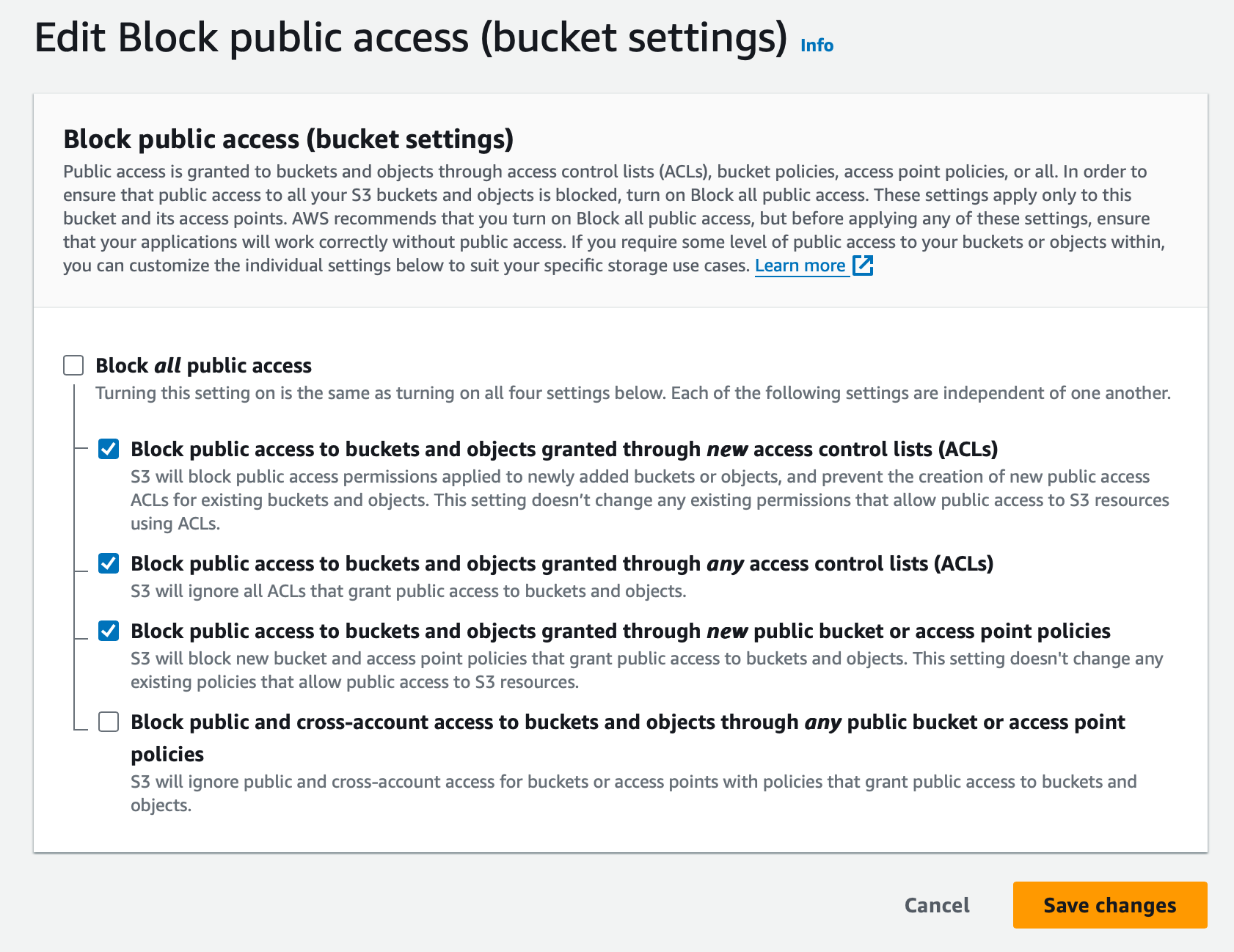
    when i turn of & unckeck “_ Block public and cross-account access to buckets and objects through any public bucket or access point policies”

    and add code like this on bucket policy, everything is OK and fvp can play hls in all browsers.

    {
        "Version": "2012-10-17",
        "Id": "Policy1111111111111",
        "Statement": [
            {
                "Sid": "Stmt1111111111111",
                "Effect": "Allow",
                "Principal": "*",
                "Action": "s3:GetObject",
                "Resource": "arn:aws:s3:::mybucket/*"
            }
        ]
    }

    bu i want to hide my .m3u8 links on inspect elements. please help, whats your suggestion !?

    screenshot-2024-09-12-at-09-16-35
    Screenshot-2024-09-12-at-09.16.35
    screenshot-2024-09-12-at-09-13-11
    Screenshot-2024-09-12-at-09.13.11
    screenshot-2024-09-12-at-09-19-13
    Screenshot-2024-09-12-at-09.19.13
Viewing 1 replies (of 1 total)
  • Martin 1 year ago

    Hello Ihan,

    The CORS headers are required by the web browser to be able to load the HLS m3u8 and video files. Only a browser which supports HLS natively does not need it and practically speaking it’s just Safari on iOS.

    You cannot really hide the HLS streaming links in your browser developer tools. Our description of different protection methods can be found here: https://foliovision.com/player/video-security/video-protection-methods/protecting-video-from-downloading

    We do have a way of making it more difficult though, but even the encrypted HLS streams created by FV Player Coconut cannot be downloaded with bare browser video downloading tools and require extra steps to crack the protection.

    Thanks,
    Martin

Viewing 1 replies (of 1 total)
Reply To: Admin: Video OK _ hlsjs-lite: Network error


Please Sign in or Register to upload files.

Related Posts

  1. Admin: Video OK… But hlsjs-lite: Network error

    Admin: Video OK… But hlsjs-lite: Network error

  2. hlsjs-lite: Network error

    hlsjs-lite: Network error

  3. Hlsjs-lite Network error with bunny.net

    Hlsjs-lite Network error with bunny.net

Primary Sidebar

Troubleshooting

    Categories

    • Business
    • Camera Reviews
    • Case Studies
    • Design
    • FV Player
    • Internet Marketing
    • IT
    • Life
    • SEO
    • Slovak
    • Video of the Week
    • WordPress

    Footer

    Our Plugins

    • FV WordPress Flowplayer
    • FV Thoughtful Comments
    • FV Simpler SEO
    • FV Antispam
    • FV Gravatar Cache
    • FV Testimonials

    Free Tools

    • Pandoc Online
    • Article spinner
    • WordPress Password Finder
    • Delete LinkedIn Account
    • Responsive Design Calculator
    Foliovision logo
    All materials © 2026 Foliovision s.r.o. | Panská 12 - 81101 Bratislava - Slovakia | info@foliovision.com
    • This Site Uses Cookies
    • Privacy Policy
    • Terms of Service
    • Site Map
    • Contact
    • Tel. ‭+421 2/5292 0086‬