• Skip to main content
  • Skip to primary sidebar
  • Skip to footer

Foliovision

  • Weblog
    • FV Player
    • WordPress
    • Video of the Week
    • Case Studies
    • Business
  • About
    • Testimonials
    • Meet the Team
    • We Support
    • Careers
    • Contact
    • Pricing
  • Products
  • Support
    • FV Player Docs
    • Pro Support
  • Login
  • Basket is empty

How to find reporting in new Google Analytics

[Solved]

Foliovision › Forums › FV Player › How to … › How to find reporting in new Google Analytics

  • Joe W. 5 years, 3 months ago

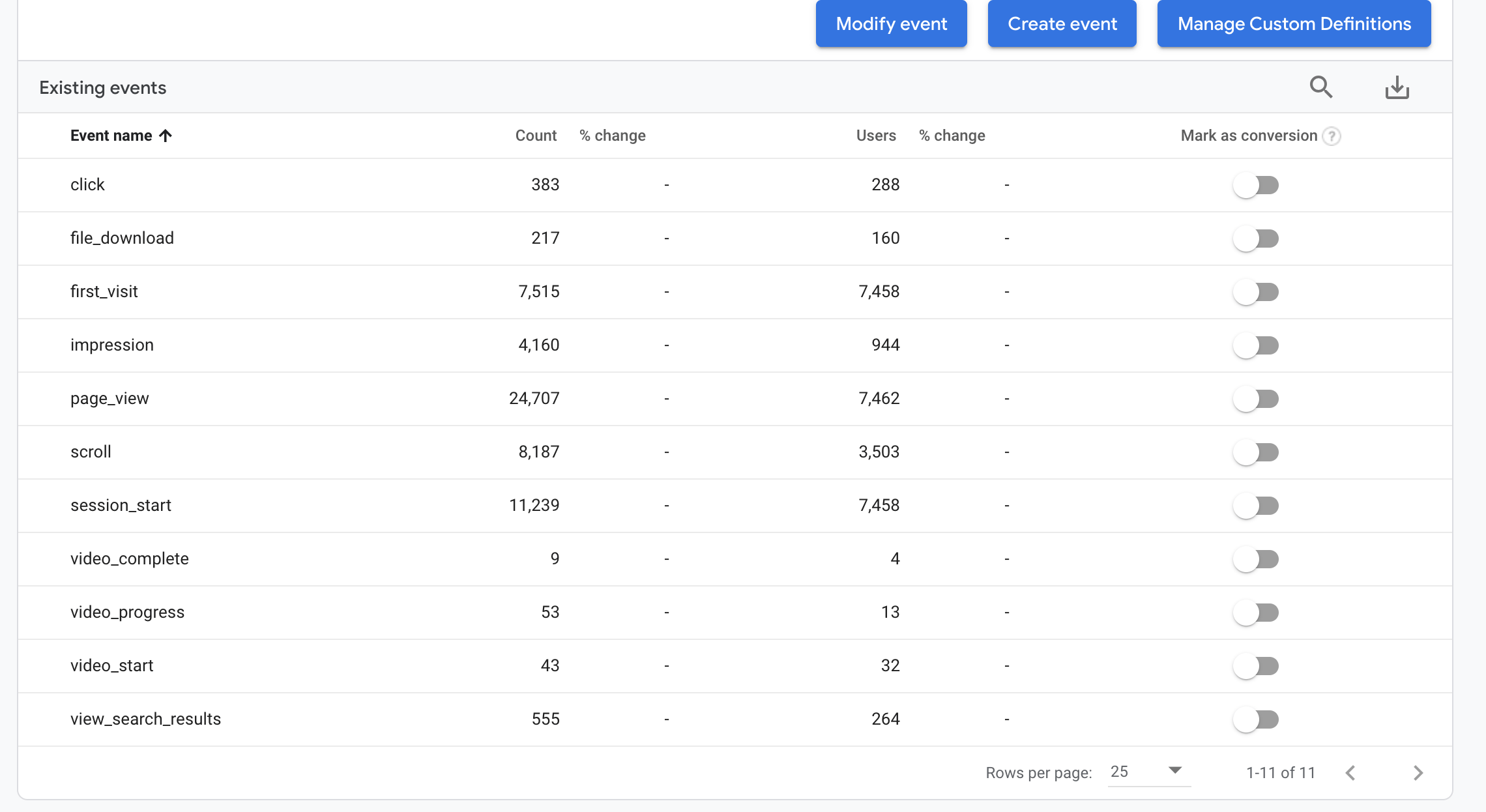
    Hello, Recently Google upgraded their Analytics from the old UA system to the new G Analytics system. The new interface seems pretty robust, however the Foliovision instructions for Google Analytics are now outdated. Will new instructions be posted soon? Also, I can see all of the video events listed in Google, but how does one figure out which video that the data refers to (see image)? I appreciate your direction. Thank you.

    screen-shot-2020-12-15-at-4-30-29-pm
    Screen-Shot-2020-12-15-at-4.30.29-PM
Viewing 2 replies - 1 through 2 (of 2 total)
  • Chiara Rendekova 5 years ago
    Avatar photo

    Hi Joe,

    Thanks for reaching out to us, and for your suggestion.

    Since the new Google Analytics 4 events have no notion of Category, Action, and Label, unlike Universal Analytics reports, Google Analytics 4 reports do not display Event Category, Action, and Label data related to a particular video. See the detailed comparison between Universal Analytics and Google Analytics 4 data models: https://support.google.com/analytics/answer/9964640?hl=en.

    Since users started migrating from Universal Analytics to the new Google Analytics 4 system, we’ll take a closer look into this in the next days to see what the options of displaying the event details for a particular video are and implement the updated information into our documentation.

    Thanks,
    Chiara

    Mária Stašová 5 years ago
    Avatar photo

    Hello Joe,

    we have added tracking for the new Google Analytics 4 model.

    In order to get it, please reinstall a new version of FV Player from this link: https://github.com/foliovision/fv-wordpress-flowplayer/archive/refs/heads/3808609681-ga4.zip

    To do that, you will have to first deactivate and delete the current FV Player plugin you are using. WordPress will warn you that you might loose settings and data, but it’s not the case with our plugin, no settings now videos will be lost. Or you can just replace the plugin files via FTP.

    We do not have a guide regarding the new model as of yet, but will have one in the coming days. However, the events are nearly the same as for the Universal Analytics, so you shouldn’t have much trouble in the meantime.

    You can find the video events in Life cycle -> Engagement -> Events

    Thanks,
    Maria

Viewing 2 replies - 1 through 2 (of 2 total)
Reply To: How to find reporting in new Google Analytics


Please Sign in or Register to upload files.

Related Posts

  1. Detailed Video Stats in Google Analytics

  2. Using Google Universal Analytics with FV Player

  3. Cómo usar Google analytics con FV FLowplayer

Primary Sidebar

How to …

    Categories

    • Business
    • Camera Reviews
    • Case Studies
    • Design
    • FV Player
    • Internet Marketing
    • IT
    • Life
    • SEO
    • Slovak
    • Video of the Week
    • WordPress

    Footer

    Our Plugins

    • FV WordPress Flowplayer
    • FV Thoughtful Comments
    • FV Simpler SEO
    • FV Antispam
    • FV Gravatar Cache
    • FV Testimonials

    Free Tools

    • Pandoc Online
    • Article spinner
    • WordPress Password Finder
    • Delete LinkedIn Account
    • Responsive Design Calculator
    Foliovision logo
    All materials © 2026 Foliovision s.r.o. | Panská 12 - 81101 Bratislava - Slovakia | info@foliovision.com
    • This Site Uses Cookies
    • Privacy Policy
    • Terms of Service
    • Site Map
    • Contact
    • Tel. ‭+421 2/5292 0086‬