True Wordpress WYSIWYG: Foliopress

Foliopress WYSIWYG is the editor you were always hoping for, every time you installed a new content management system.

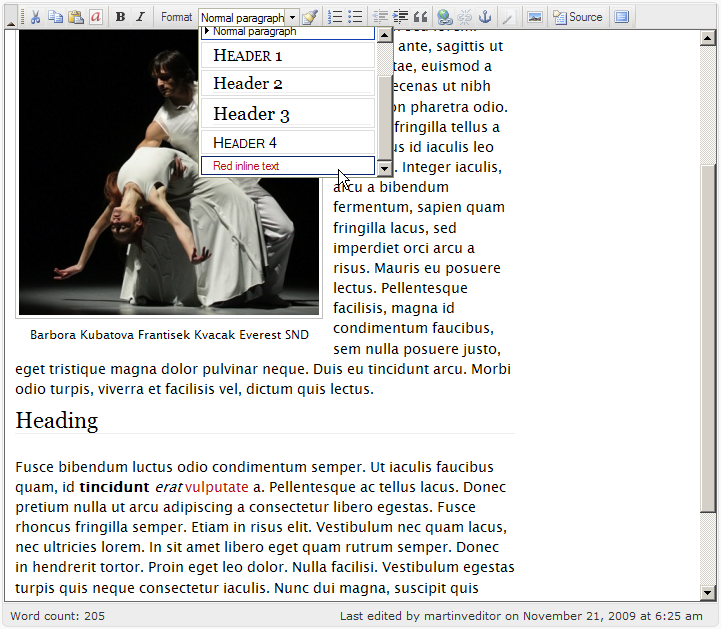
Foliopress WYSIWYG toolbar preview2
Foliopress WYSIWYG toolbar preview
  • Foliopress WYSIWYG? is simple and correctly configured straight out of the box.
  • Foliopress WYSIWYG handles images and text equally well.
  • Foliopress WYSIWYG gives you SEO ready images (properly labelled with caption and alt and title tags).
  • Foliopress WYSIWYG is simple enough to use that your clients will love it.
  • Foliopress WYSIWYG has all the extra control and flexibility you want to be able to do advanced coding on your content pages.
  • Foliopress WYSIWYG looks great in your browser window. No more eyesore when using an online text editor. We aren't living in the 90's anymore and our online text editors shouldn't? look like WordStar.
  • Foliopress WYSIWYG has easy and quick access to source code for experts so your programmers won't get frustrated and turn it off.
  • Foliopress WYSIWYG produces standards compliant html quickly and easily.
  • Foliopress WYSIWYG is forgiving: even if you make some terrible HTML/XHTML errors Foliopress WYSIWYG? will always give you or your clients it's best version of your document without erasing it.
  • Foliopress WYSIWYG does true WYSIWYG. You can actually see the text in your edit box the same way it is in your content box (simple three step point and click configuration).
  • Foliopress WYSIWYG will never go out of date: Foliopress WYSIWYG is assembled from best of breed open source projects so it will always be on the cutting edge of web design. The parts are carefully assembled as modules with no modifications to core code so you can always drop the latest version of the core libraries in for a seamless and instant upgrade.
  • Foliopress WYSIWYG is so easy and fun to use, that you just might want to retire your word processor and write all your documents online.
  • Foliopress WYSIWYG is easy to upgrade. Just drop the latest version in your plugin folder and you are up do date.

Please read the installation guide for other requirements and installation instructions!

Foliopress WYSIWYG is now available.

Download for WP 2.2+ Foliopress WYSIWYG version 0.9.3.


Tags: , ,

del.icio.us Digg Ma.gnolia StumbleUpon Technorati Jump to the top of this page


26 comments on “True Wordpress WYSIWYG: Foliopress”

  1. 01

    […] Foliopress WYSIWYG and Foliopress Images The best for last. Like many web developers these days, we are using Wordpress as the core for our sites. Over the last two years we’ve built our own frameworks, including page management and better admin sections. Finally we’ve completed the crown jewel, Foliopress WYSIWYG and Foliopress Images. It’s what makes writing this post and adding attractive Google images ready thumbnails so easy. The best part is that Foliopress WYSIWYG is truly a drag and drop ready to go editing system with image management. No trolling through config files to be up and running at full efficiency. […]

    Web Tools We Use to run Foliovision at December 31st, 2007 around 11:53 am
    Jump to the top of this page
  2. 02

    I really like your plugin and have installed on 2 of my sites. When I tried to install it on my 3rd site, I got these errors:

    Error loading http://yoursite.com/wp-content/plugins/foliopress-wysiwyg/custom-config/foliopress-wysiwyg-config-js.php.

    and “Toolbar set “Foliovision” doesn’t exist”

    Any ideas how I can fix this? All site are running on a shared account from hostgator.

    Louise at October 5th, 2008 around 11:51 am
    Jump to the top of this page
  3. 03

    Hello Louse,

    Thanks for the kind words. Peter will be in touch with you with some suggestions later today.

    Cordial regards,

    Alec

    alec at October 6th, 2008 around 1:08 am
    Jump to the top of this page
  4. 04

    Hello Louise,

    it seems that the path provided by plugin to FCK is incorrect. Check if that file is accessible by that link http://yoursite.com/wp-content/plugins/foliopress-wysiwyg/custom-config/foliopress-wysiwyg-config-js.php.

    Next make sure you use proper config file. Correct one is located on our website on this page. Download the plugin again and use the clean install.

    Third, check in .htaccess (for apache) that this link is not redirected anywhere else.

    Best regards,
    Peter

    peter at October 6th, 2008 around 6:16 am
    Jump to the top of this page
  5. 05

    Peter-

    Thanks for the quick reply.

    The link is NOT accessible. I checked and I can access it on other sites on which the plugin is working.

    I just can’t find a difference between the working and non-working sites, even as to file structure. I have even made sure the .htaccess files are identical.

    When you mention using the proper config file, do you mean the one included in the plugin download or is there another one. I have deleted the plugin files and reinstalled with no difference.

    Thanks for your help-
    Louise

    Louise at October 7th, 2008 around 2:53 pm
    Jump to the top of this page
  6. 06

    Hello Louise,

    This file stores and generates configuration for FCKeditor, therefore is very important. There may be some issues from server, blocking direct access to files that are in some path. That will certainly enhance the security, but will criple many plugins.

    If you want me to help you set it up on your server, you can write me an e-mail peter@foliovision.com . I don’t have any other sugestion. I need to see it, since we haven’t encouter this problem before. I hope you, or we’ll get this resolved ASAP.

    Best regards,
    Peter

    peter at October 8th, 2008 around 6:49 am
    Jump to the top of this page
  7. 07

    Hi,
    Was this problem ever resolved, I get the same problem as Louise. I’d like to use this plugin it looks good.

    Best Regards
    John

    John at October 8th, 2008 around 12:21 pm
    Jump to the top of this page
  8. 08

    Hello John,

    Louise wasn’t back in touch with us. We are looking forward to getting this issues sorted as quickly as possible. Peter will contact you directly to get the problem resolved.

    If anyone has encountered and resolved this issue, please drop a line to peter@foliovision.com so we can upload a new version or new instructions.

    Thanks!

    alec at October 8th, 2008 around 2:26 pm
    Jump to the top of this page
  9. 09

    Peter-

    Thanks for the attention! I just sent an email to you. I have an open ticket with my host Hostgator to see if this may be a security issue on their end. not yours. I’ll report back what I find.

    Louise

    Louise at October 8th, 2008 around 7:29 pm
    Jump to the top of this page
  10. 10

    Ok, guys, here’s the problem & fix that I got back from Hostgator. It was a server permission problem, not a plugin problem. So if you are having similar problems your host may be able to fix this for you.

    “This was the error that was being reported by our servers:

    SoftException in Application.cpp:544: Directory “/home/mysite/public_html/wp-content” is writeable by group [Thu Oct 9 12:35:01 2008] [error] [client 216.110.94.227] Premature end of script headers: /home/mysite/public_html/wp-content/plugins/foliopress-wysiwyg/custom-config/foliopress-wysiwyg-config-js.php

    I corrected the permissions issues and was able to successfully active the plugin without receiving an error.”

    Louise at October 9th, 2008 around 2:57 pm
    Jump to the top of this page
  11. 11

    Hi Louise,
    Thank you very much for sharing this information, I will contact my hosting company and see if they can do the same fix
    Best Regards
    John

    John at October 10th, 2008 around 2:44 am
    Jump to the top of this page
  12. 12

    Hello Louise,

    Thanks so much for the update.

    John, let us know if the permissions fix works for you as well.

    If so, we will add it to the documentation above.

    alec at October 10th, 2008 around 3:45 am
    Jump to the top of this page
  13. 13

    Hello Everyone,

    Anyone who has been having issues getting Foliopress WYSIWYG to run on account of permission issues, the issue is solved.

    The wp-content folder needs very particular write permissions to work with Foliopress WYSIWYG and some other advanced plugins. As Louise pointed out the permissions need to be set to 755 (777 will not work) for security reasons.

    We are looking into workarounds for this but in the meantime, if you are having issues with permissions and Foliopress WYSIWYG, just change wp-content to 755.

    Thanks again Louise.

    alec at October 10th, 2008 around 11:41 am
    Jump to the top of this page
  14. 14

    Alguien sabe si funciona con todos los exploradores. Anteriormente tenia uno que funcionaba con todos los exploradores menos en el Internet Explorer.
    POor favor si lo han probado con la ultima version y funciona me podrian avisar???

    George el Ermitaño at January 30th, 2009 around 3:47 pm
    Jump to the top of this page
  15. 15

    Hello George,

    Yes, the latest version works very well with Internet Explorer. We are using the latest version on about fifteen websites across three different webhosts with no problems.

    Let us know if you have any difficulties and we’ll look into it right away. Foliopress WYSIWYG is an actively maintained project.

    alec at January 30th, 2009 around 8:23 pm
    Jump to the top of this page
  16. 16

    Plugin will not activate get this error after install and trying to activate: Parse error: parse error, unexpected T_CONST, expecting T_OLD_FUNCTION or T_FUNCTION or T_VAR or ‘}’ in /home/content/b/i/b/bibflasso/html/www_westgatemarketing_wp/wp-content/plugins/foliopress-wysiwyg/foliopress-wysiwyg-class.php on line 94

    Elliott Cunningham at April 8th, 2009 around 10:22 pm
    Jump to the top of this page
  17. 17

    The native WordPress Visual Editor isn’t good for much and I seldom use it but plugins such as NextGen Gallery and CForms add a “button” that inserts a shortcode for a gallery or a contact form. This is a very useful feature. When I activate Foliopress they are missing. Is there a way to turn them in Foliopress?

    RickA at May 2nd, 2009 around 3:06 am
    Jump to the top of this page
  18. 18

    Hello Rick,

    The latest version of Foliopress WYSIWYG does work with the extra buttons from Wordpress (and probably NextGen Gallery).

    I’ve worked with NextGen Gallery and hated it. It’s really slow. NextGen gallery doesn’t cooperate well with the core Wordpress code.

    If load speed matters to you, my recommendation is to use Foliopress WYSIWYG as your gallery software within a post.

    If you stick one or two images above the more button, the rest below, you have a very serviceable gallery, combined with SlimBox.

    The very latest version of Foliopress WYSIWYG even works with FTP - very hot, you can upload dozens of images at a time - but I’m not sure that version is up here for download yet. If not, we’ll put it up Monday.

    Thanks for your question, Rick. We are very actively developing Foliopress WYSIWYG so we appreciate your feedback.

    alec at May 2nd, 2009 around 9:54 am
    Jump to the top of this page
  19. 19

    I just installed Foliopress (and the 2 disabling plugins) in WordPress mu 2.7 and it works OK. But even with the setting for “full” toolbars, it seems to have less functionality than Advanced TinyMCE, which I was using before. Even simple stuff like non-breaking spaces and custom classes aren’t available.

    Am I missing something? Do I still need to install another component? If the sites were just for me, I’d be happy with source code, but some of the people I develop sites for won’t touch the source and really need all those tools.

    Though I will say I like the image uploader and the fact that it doesn’t delete empty hard returns or breaks.

    Jersey Bob at May 20th, 2009 around 4:24 pm
    Jump to the top of this page
  20. 20

    Hello Bob,

    The lack of buttons is deliberate. Those extra buttons produce broken markup. If somebody wants to use &nbsp they should be doing it in source code - or usually not at all.

    I think you’ll find with the full toolbar absolutely everything you really need is there. We are working on adding some custom classes, which you could do yourself. The custom classes each person needs are different in any case.

    Thank you for taking the time to let us know about your concerns.

    alec at May 21st, 2009 around 5:41 am
    Jump to the top of this page
  21. 21

    Alec, thanks for responding. The reason I create WordPress sites for clients is so non-technical people can modify content. Some of my clients don’t have trouble making small changes to source code, but most do.

    As for custom classes, what would be great is to populate a drop-down list with my own class names. TinyMCE does that, but it has the disadvantage of putting background images and colors into the editing window, which can make text hard to edit.

    FYI, another toolbar I find helpful is Viper’s Video Tags. It lets you insert the URL of a video on YouTube, Yahoo, Vimeo and other sites, and it creates the embed code.

    Of course, I can’t expect you to re-create every feature that every other editor has, but if your toolbar could be compatible with others, users would have a choice.

    Jersey Bob at May 21st, 2009 around 10:59 am
    Jump to the top of this page
  22. 22

    Hello Bob,

    I agree that allowing classes in a drop down menu is a good idea. We’ll do that in June.

    I don’t like the idea of integrating video code. It changes often and will be a maintenance nightmare. If somebody wants to insert an external video, they’ll have to be able to copy and past into source code.

    As you have noted other editors do lots of other things, but they are difficult to use or ugly. Our stress with Foliopress WYSIWYG is on easy to use, keeping code clean and attractive.

    Thank you for the suggestions.

    alec at May 21st, 2009 around 3:02 pm
    Jump to the top of this page
  23. 23

    Hello Alec,

    first thank you for the great plugin, I am just starting to use it and I have a question.
    If you go to http://k2inc.org/ you will see a horizontal image in the content area. Here is the source from withing Foliopress when I look up the source:

    Beauty
    is best left natural
    Thank you for taking the time to visit Rewind Skin Care

    Some how the around the image always comes back in the source, every edit I make to the page (notice page not post, does that make a difference?), I must clean up the code otherwise the gets republished.

    Both Disable wpautop and Disable wptexturize are installed and activated… any idea what I am doing wrong? I use WP 2.7.1

    Thanks
    Yanik

    Yanik at June 17th, 2009 around 9:16 am
    Jump to the top of this page
  24. 24

    Hello Yanik,

    thank you, have you already fixed the page?

    I’m not sure what the problem is, the page looks nice. Can you please be more specific (which image are we talking about)? I can’t find any of these sentences (Beauty, is best left natural …) in the page source.

    It should not make any difference, if you edit page or post.

    Regards,
    M.

    martinv at June 20th, 2009 around 1:51 am
    Jump to the top of this page
  25. 25

    Alec,

    Thank you for the great plug-ins. They solved the vexing problem with WordPress not supporting commenting out code.

    I’ve turned on the full toolbar and the one button/feature I’m not seeing is “Paste as Plain Text.” I also tried pasting in text, highlighting it, and clicking the Remove Format button, but that didn’t get rid of the inherited formatting.

    Robert

    Robert at June 23rd, 2009 around 11:18 am
    Jump to the top of this page
  26. 26

    Hello Robert,

    Pasting as plain text is a problem we’ve really struggled to fix (we want this feature ourselves). The issue is that Firefox does not allow us to access the clipboard which means we have no way to clean the text before pasting.

    Clipboard pasting will work on IE but the workaround is fairly complicated and would introduce non-feature parity which we don’t want as we recommend our clients use Firefox.

    The workaround we recommend to people on Windows computers is to open Notepad, paste into Notepad and copy back and then paste into Foliopress WYSIWYG.

    An issue that I’m not happy about is that even a plain text paste creates br tags and not paragraphs. That’s a planned fix for the next release.

    alec at June 24th, 2009 around 8:22 am
    Jump to the top of this page

Leave a Reply

  •  
  •  
  •  

You can keep track of new comments to this post with the comments feed.