• Skip to main content
  • Skip to primary sidebar
  • Skip to footer

Foliovision

  • Weblog
    • FV Player
    • WordPress
    • Video of the Week
    • Case Studies
    • Business
  • About
    • Testimonials
    • Meet the Team
    • We Support
    • Careers
    • Contact
    • Pricing
  • Products
  • Support
    • FV Player Docs
    • Pro Support
  • Login
  • Basket is empty

Amazon S3 Oregon signature issues

[Solved]

Foliovision › Forums › FV Player › Troubleshooting › Amazon S3 Oregon signature issues

  • Raylene 10 years, 10 months ago

    The videos will check “OK” until I add my credentials in the FV WordPress Flowplayer settings for S3 secure content.

    I’ve double checked my keys and even created new keys. Still getting the same result.
    My secret key has two plus signs (+) in it – is that normal? Could this be causing the ‘signature’ issue?

    https://s3-us-west-2.amazonaws.com/…./twitter+tour.mp4?X-Amz-Algorithm=AWS4-HMAC-SHA256&X-Amz-Credential=….%2F20150520%2Fus-west-2%2Fs3%2Faws4_request&X-Amz-Date=20150520T082842Z&X-Amz-Expires=900&X-Amz-SignedHeaders=host&X-Amz-Signature=…

Viewing 3 replies - 1 through 3 (of 3 total)
  • Martin 11 years ago

    Hello Raylene,

    I had a look, but I’m not sure why it won’t work. Could you please try:

    1) Rename the file to twitter-tour.mp4 – no blank space or +. We didn’t had issues with it on our second video which is in Sidney though: https://foliovision.com/player/demos/amazon-signed-urls

    2) We upgraded our plugin to use Amazon AWS Signature version 4. To use the version 2, just switch the “Region” field to “Select the region”. It might work that way.

    Thanks,
    Martin

    Raylene 11 years ago

    Hi Martin,

    Thanks for having a look.

    I’m now using a Secret Access Key that doesn’t include any punctuation (it took a few key creations to get one like that). But even with that, my videos wouldn’t check out last night.

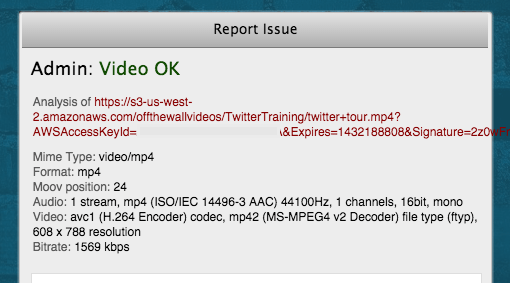
    This evening with my testing, I HAVE been able to get the video to CHECK properly as long as “Select the region” is the Region selection, with and without spaces or +’s in the file name / url. (YAY!) It doesn’t work if I have Oregon (my actual region) selected.

    It’s interesting that it’s the region causing the issue, but there’s no more “signature does not match” error when “Select the region” is the option.

    For now, this seems to resolve my issue.

    Choose “Select a Region” in the FV WordPress Flowplayer > Amazong S3 Protected Content settings.

    screenshot: http://offthewallsocial.com/wp-content/uploads/2015/05/Twitter-Tour-video-checking-OK.png

    Thank you for your help!
    ~ Raylene

    Martin 11 years ago

    Hello Raylene,

    if you select no region, then we use AWS signature version 2. If you do select it, we use AWS signature version 4. That one is required by some regions.

    I was able reproduce your issue with our own Amazon S3 bucket in Oregon. Our fix for this (for AWS signature version 4) will be part of the next plugin release.

    Thank you for the bug report!

    Martin

Viewing 3 replies - 1 through 3 (of 3 total)

Reply To: Amazon S3 Oregon signature issues


Please Sign in or Register to upload files.

Related Posts

  1. Amazon S3 Firmado URLs (English)

    Amazon S3 Firmado URLs (English)

  2. Amazon S3 Open Bucket

  3. Trouble with DD Add Signature Plugin

Primary Sidebar

Troubleshooting

    Categories

    • Business
    • Camera Reviews
    • Case Studies
    • Design
    • FV Player
    • Internet Marketing
    • IT
    • Life
    • SEO
    • Slovak
    • Video of the Week
    • WordPress

    Footer

    Our Plugins

    • FV WordPress Flowplayer
    • FV Thoughtful Comments
    • FV Simpler SEO
    • FV Antispam
    • FV Gravatar Cache
    • FV Testimonials

    Free Tools

    • Pandoc Online
    • Article spinner
    • WordPress Password Finder
    • Delete LinkedIn Account
    • Responsive Design Calculator
    Foliovision logo
    All materials © 2026 Foliovision s.r.o. | Panská 12 - 81101 Bratislava - Slovakia | info@foliovision.com
    • This Site Uses Cookies
    • Privacy Policy
    • Terms of Service
    • Site Map
    • Contact
    • Tel. ‭+421 2/5292 0086‬