Gravatar stands for Globally Recognized Avatar and it’s a nice piece of technology which allows site visitors to maintain a bit of personality across the internet by putting on the same avatar to the comments on all the sites which have Gravatars enabled. Gravatars are an Automattic property but Automattic for the moment are administering the Gravatar site as non-commercial, allowing WordPress and other sites to use them.
We highly recommend using Gravatars on most WordPress site.
There’s one problem with Gravatars. They are very slow to load. Each page with comments on them makes one call per comment to the Gravatar server. While a single call takes only a 100ms, on a page with hundreds of comments, we are talking about major slowdowns. Page loads can take 20 seconds and more.

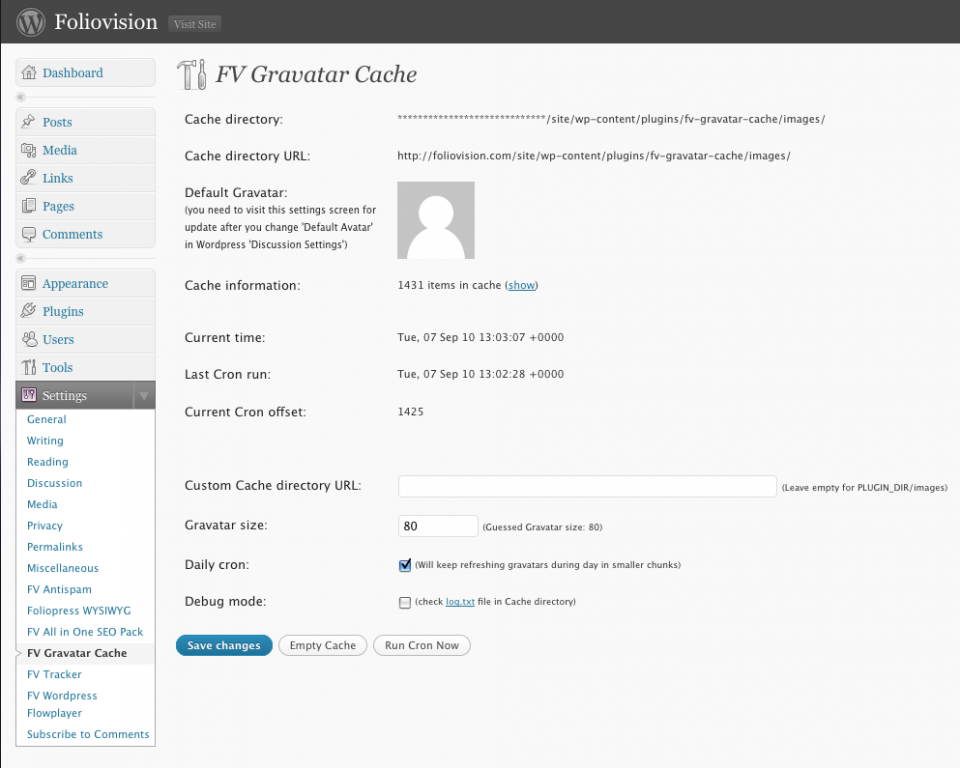
FV Gravatar Cache Options
Here’s what a standard Gravatar URL looks like:
http://www.gravatar.com/avatar/a2b3aae02c752c001ccba49f41b50a08?s=36&d=%3Cpath_to_url%3E&r=R
As at Foliovision we run many sites with high comment levels we needed to find a solution to these slowdowns. Our solution: cache all the gravatars locally.
After installing FV Gravatar Cache, that 20 second page load for a page with a hundred fifty comments should be down to about 5 seconds.
Keep in mind that if you already have a lot of comments on your site it can take between five hours and two days for FV Gravatar to cached all the existing comment gravatars. Any new gravatars will be cached instantly with comment save.
More Technical: How this plugin works
- Caches non-cached and updates cached gravatars in 5 minute intervals.
In each interval 25 gravatars are processed. That means in one hour 300 gravatars are updated. So if your site has 3000 unique comment authors, all the gravatars are updated every 10 hours.
- Caches gravatars on comment submission
This makes sure new site visitors get they properly cached gravatars right away.
- You need to specify the desired size of the gravatars
The default WordPress value is 96, but this is a matter of your templates. It’s best to check out the original gravatar size in your browser first.
- If no gravatar for email address is found, the default gravatar is used
This is good, because normally WordPress has no idea if there is any gravatar for some email address, so you end up with loading the same default gravatar for each user with no gravatar over and over again. That slows down your page loads.
Plugin requirements
WordPress version above 2.7. Compatible up to 3.0.1.
Download
Download from WordPress plugins – FV Gravatar Cache.


Thanks a lot. I will add this to my list of “must-have” wordpress plugins!It will speed up my site quite a bit.
I was surprised to see that even the default gravatar is loaded directly from gravatar.com, what a nonsense!
I am wondering why they do not store the gravatars as image files (instead it’s something like 00c88182ec23fe1da17b92d33de65618)
How am I supposed to add an expiry date as recommended by Google to the files then?
Ok, looks like all non-gravatars avatars are now broken, I get 404 links.
All users without gravatar (filesize 13 byte) have 404 avatars, but people who actually use gravatars are working just fine.
So.. it must be a problem with the “default” avatars that are created. How do you create/cache those?
The problem might be this:
 //  check if gravatar exists
$headers = @get_headers( $out );
if( stripos( $headers[0], '404' ) !== FALSE ) {
return $this->GetCacheURL()."default.png";
}
My default (empty) gravatars are all loaded from gravatar.com and your plugin creates files for them. Then your plugin checks for a 404, but the file exists (13 byte).
When I access the file directly it says “404 File does not exist” thou.
Ok this doesn’t make any sense, I need a nap now will try to look into it tomorrow.
Thanks for the feedback Oliver. We use FV Gravatar Cache on a lot of our busy sites, so we’d like to keep it running smoothly. FV Gravatar Cache does speed load times considerably.
If you find the issue tomorrow, let us know and we’ll update the code right away.
I have tried it on two different servers now and on one it works properly so it won’t actually create empty gravatar files for people without gravatars.
On the other it creates a gravatar (empty 13 bytes file) for all comments for some reason.
I suppose it’s because I disabled fopen on one server and it checks via fopen if it’s a default avatar (compare line 437)
Since fopen is a major security risk I would have to rewrite this check.
Thanks for isolating that issue Oliver.
With what would you suggest we replace fopen for our gravatar checks?
Hi Oliver,
I’m sending you a tweaked main PHP file of the plugin. Can you test it to see if it solves the problem?
I basically added another check for the 404. But I’m not sure if it will solve your problem. Can you provide the email address of some comment which has this bad 404 13B gravatar so I can see it? Or send me one of these 13B files?
That’s a different part of code and has nothing to do with the default gravatars. But if you disabled the fopen function, that might be the reason why none of the gravatars are cached properly. The files are probably containing only some warning instead of the content. Can you check it out?
Anyway, fopen is a standard function and is required to write the cached gravatar files. The more dangerous function is the remote fopen, but we are not using that. Have you any suggestion what we should be using instead of fopen and fwrite to write the cached files?
Can you check if there are any warnings on plugin settings page? It should be wp-admin/options-general.php?page=fv-gravatar-cache on your site. It checks if the directory is writable. If you disabled just the writing permissions, it should display a warning.
If you just disabled the fopen and fwrite functions, the plugin just can’t work, unless there is any other safer function which you think is better and we could use it.
Thanks, Martin
Hi Martin,
It’ working! At first it was stuck processing the very first gravatars and did not run the SQL Update to default.png. After cleaning out the cache folder including the log file, it’s now working just fine (maybe add this to readme.txt for troubleshooting)
I suppose this did the trick: stripos( $gravatar, ‘404 File does not exist’ ).. when I accessed one of the empty gravatars this was exactly what I received as a message.
I’m not that good at programming, but I think there are some alternatives to fwrite and fopen: fwrite alternative: file_put_contents() fopen alternative: file_get_contents() possibly even curl (more resource hungry thou) I disabled fopen in my php.ini, I am wondering why it’s working… will double-check that.
Thank you for taking the time to fix this plugin so quickly, I will certainly look into your other plugins and consider a donation. Oliver
Hi Oliver,
You’re welcome.
A donation would be much appreciated.
Thanks for taking the time to write to us about this issue and look into it with us.
Making the web work for you, Alec
Hello Oliver,
thank you for the bug report, now the new version is released on WordPress.org.
Regards, Martin
I’ve noticed that when I display an image and the containers height and width are set to auto, it ignores the width and height settings within the img html element. So the image is always my default fv_gravatar_cache size. When I disable the cache plugin, the items follow the img elements settings again.
I’ve disabled the auto width and height in my template, however there’s an auto width and height used in the new WP admin bar which causes the image size to be displayed in it’s wp_gravatar_cache setting size.
If you could help out, it would be appreciated.
Hello Tim,
we actually released a new version which is fixing this issue few minutes ago.
Please upgrade and let us know how it works for you.
Thanks, Martin
Hi Martin, The update broke the blank avatar for me – even the settings page show a broken link to the picture. I get
When I display the cached picture, I get for those without gravatar.
Thanks in advance !
Hello Djoh,
please try to resave the options.
Also check if your .htaccess is not restricting access to your cache directory. We just discovered that it can (of course) cause issues, so we will cover that in FAQ soon.
Thanks, Martin