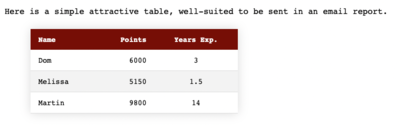
The real trick is with the nth alignment styles which make it very easy to build well-aligned columns.
How to write an ideal service notification

Editor’s note: Service interruption notifications are the unloved sibling of newsletters and welcome emails. They just don’t get enough love — and for the most part are fairly terrible, anonymous, vague and menacing messages, often from a no-reply address. There is a better way.
While software is our main business now, we have some hosting clients for special services. Every once in a while of course there is either expected or unexpected downtime. We strive to let our clients know about these issues in advanced (planned) and in real time (unplanned). We don’t try the tricky move that many hosts do of just trying to hide downtime. Do not try to be anonymous. Do not use no-reply addresses. Keep your communication personable and open, informative and precise.
Email addresses stolen from Adobe in October in spammers’ hands now

It turns out the Adobe data breach user data has started doing the rounds among spammers. Here’s how you protect yourself.
Zero Feedburner Subscribers: Dangers of Free Services
Hosted services are great. Until they are gone. Without notice. Once you have your subscribers on http://yourdomain.com/feed, you can rest easy
Apple Mail IMAP: Sent Mail Showing up in wrong folder on second computer
Whenever you find you have duplicate sent boxes or spam mailbox settings, pick one and make it the blessed folder across all computers.
Apple Mail: Fixing Broken IMAP accounts after a server move
Trouble with your IMAP after a server move? Here are the setting you need to change in Apple Mail to save messages properly.
Apple Mail: Getting rid of multiple draft messages in IMAP
Having trouble with draft messages proliferating like rabbits in IMAP in Apple Mail? Here’s the solution.
Losing Mail with Google Apps
My client wasn’t getting all the completed applications that were going into the database. It turns out that Google Apps/Mail were deleting quotations (even though they were coming from his own domain).

