For some reason Flickr – they should know better as good coders – have decided to be cute and try to prevent downloading of some images. Photographers probably requested the feature so much that Flickr went against their better judgement and coded this hack. We get this kind of silly request from clients all the time: “I want a website where no one can copy any of my content ever.”
If you don’t want people to be able to copy your content, don’t put it on the internet, people.
Flickr, given that they have some good coders working for them, came up with an anti-download hack a little bit better than the standard no save on right click which is easily defeated by just pressing the spacebar or disabling javascript.
The Flickr trick is CSS based and consists of a div which carries the style classes “facade-of-protection” and a div called “spaceball”. Basically Flickr is putting the image behind an empty div so you can’t get at it with your mouse to save it.
In this case, “Disable Javascript” won’t get you access to the image. It’s being hidden by CSS. On the other hand, “Disable Styles” i.e. CSS will.
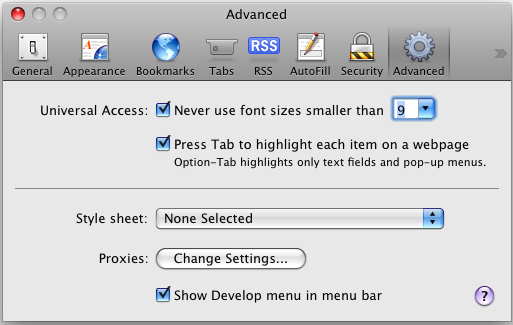
In Safari, if you enable the “Show Develop Menu in Menu Bar” option in advanced settings you will get a nice new menu. Here’s where to enable “Show Develop Menu in Menu Bar”:

Safari Advanced Options Enable Developer Menu
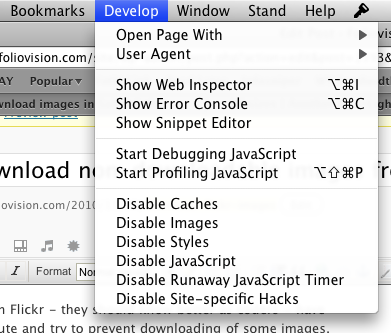
And here’s what the Develop menu offers: an option to Disable Styles.

Safari Developer Menu with Disable Styles option
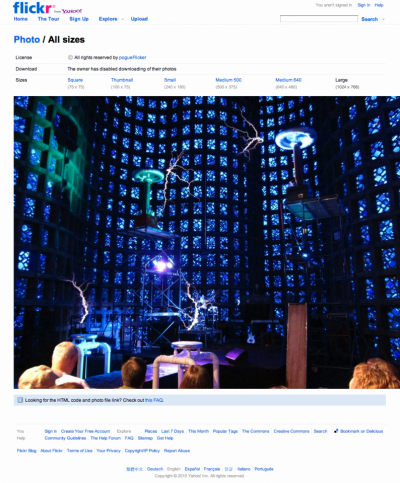
Here’s how a Flickr protected large image page might look like before:

Flickr protected image before disable style
(no lightbox effect on these screenshots as this image belongs
to David Pogue and is only used as an illustration)
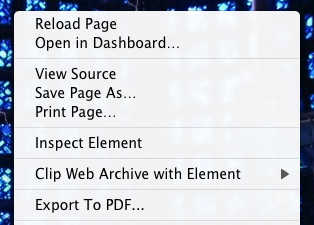
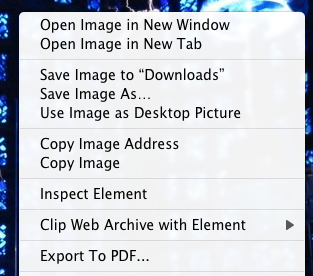
And here is what a right click on the image above would yield: no way to save, view or download the image.

Flickr right click options before disable styles in Safari
If you select “Disable Styles” and then open the Flickr address in a new window, the Flickr page should now look like this:

Flickr protected image after disable style
(no lightbox effect on these screenshots as this image belongs
to David Pogue and is only used as an illustration)
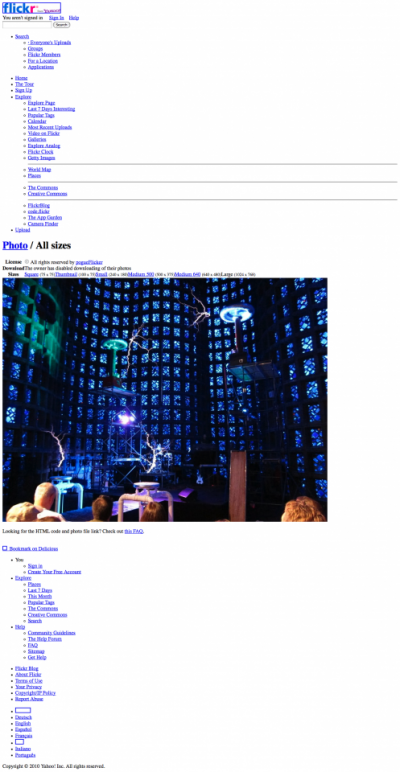
Now you just have to move your mouse over the image and right click and you can download the image or copy it or open it in a new tab:

right click image options after disable styles
This technique also works in Firefox. First install the Web Developers Toolbar to get a way to easily disable styles. Then disable styles via shift-command S or via menu.

Firefox disable styles Web Developers Toolbar
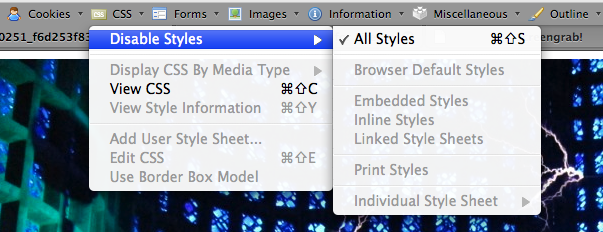
After that you can view, copy or save the Flickr protected image.
Flickr right click options before disable styles in Safari
Keep in mind that being able to save an image does not change the situation in terms of copyright. Copyright remains with the photographer or image owner.
In my case, I just wanted to have a look at Pogue’s EXIF for his low light image from his Canon S95 demo folder, linked to from his “Love Letter to a Camera“.
Unfortunately, when opened up in Preview, these versions do not contain any EXIF info. (David, if you ever do find this how to, I’d still really like to see that EXIF: I’m guessing the lens is at about at 2.5 aperture, the ISO is 400 and the length of exposure is about 1/30 second.)
As it took a little bit too long to figure this out (disabling the Flickr download disable), I want to make sure other people don’t have to waste their time to be able to save Flickr photos.
Remember: if you don’t want people to look at, share or save your work, there’s a much simpler technical solution. Just don’t put it on the internet.
This post is an alternative method to the relatively painful AdBlock Flickr technique from August this year. Thanks to Dave for the description of how Flickr’s image hiding works. If you really want to download a lot of Flickr images often, the AdBlock technique might be worth the trouble.

Alec Kinnear
Alec has been helping businesses succeed online since 2000. Alec is an SEM expert with a background in advertising, as a former Head of Television for Grey Moscow and Senior Television Producer for Bates, Saatchi and Saatchi Russia.


You can also right-click on the image and choose the ‘Inspect Element’ in the contextual menu on the regular Flickr page, then drag the image from the panel that pops up to your hard drive.
Nice solution. It looks simpler than screen grab followed by “stitch photos together” using a 3rd party app. I was surprised the Flickr hack prevented the image appearing if you do a “print to PDF”, but your explanation elucidates why that should be the case.
Thanks for teaching the people how to stil! shame on you!
A pity we can’t teach people how to spell, Venus.
If you don’t want people to be able to save your images or your writing to enjoy later, don’t put them on the web.
A photographer should be flattered that someone likes his or her images enough to save them for reviewing later.
Perhaps you missed this paragraph:
Happy New Year!
Nice. Thanks, now I don’t have to waste a couple of hours figuring it out myself! I was just trying to print a copy for my son to make sketches of medieval tapestries, all of which seem to be copyrighted, annoyingly enough.
Alec this post is BS and you know it, and your justification is total BS. Take this down
Hi John,
Pictures of Medieval tapestries as above cannot be legally copyrighted by the photographer in most jurisdiction (they are copies of existing art work).
I very well might want to keep a local gallery for my own enjoyment and in fact do. The internet is ephemeral.
Go kiss Eric Schmidt’s backside when you find time. One rule for everyone else, another rule for Google (on copyright, privacy, etc.).
It’s my computer and I’ll do what I want with it. Don’t want to share your images? Don’t put them on the internet.
Making the web work for you, Alec
Thanks so much! I came across a few pictures of myself, and couldn’t get ahold of the photographer to send them to me, so this was awesome. Can’t thank you enough
Thank you so much, you helped me to save loads of glorious photos for wellness……
@Alec,
Well if I ever find my images on display at your ‘local gallery’, I’ll be sending you a bill.
Photographers upload photos to sell as stock images that’s why they don’t want you to download them. They are on display, they are not there to be downloaded for free.
What you’re really saying in the article is that just because it’s on display on the internet, it’s free for the public to get a copy for themselves.
Do you go to shops and steal items on display?
Hi Ramone,
I think you are overreacting here. Copyright law hasn’t changed: copyright on the images still belongs to you. Whether someone has to do screenshots or right click makes no difference.
And for what it’s worth, I take a lot of pictures outside – of billboards for instance or art – which are perfectly legal to take for private use. If I tried to republish this art work, I’d run into issues.
I suggest you take an IP lawyer out to lunch (your dime) sometime and have him or her explain to you the limitations of copyright.
Then I’d suggest you pour yourself a nice glass of claret and relax in the evenings, content in the thought that someone somewhere is enjoying looking at the small online images which they were able to save to a folder of favorite images.
The same person is exponentially more likely to buy the full resolution version of your image or a photographer’s published book than someone who saw your image and was unable to save it.
Thanks, I was trying to get racing pics that a local racetrack photographer posts so people can let him know which ones they want to order, and now I can copy them for free and get them printed myself. He may quit being the track photographer if everyone does it and his time photographing and editing are wasted, but so what, at least I get what I want for free.
Mr. pc, please enjoy the song ‘Everything is Free’ by Gillian Welch (you can listen to it for free at grooveshark.com, BTW). This method of saving Flickr pictures was not posted to promote stealing images, but obviously that’s what you thought of instantly and graced us with you hilarious sarcasm. Well, I guess ‘hilarious’ is being a bit kind…
Hello PC/Racetrack Photographer,
If you are happy printing low res crappy copies of the racetrack photos, you are unlikely to be the person who would pay for high quality prints or for the full res digital negative.
I’d suggest you focus on your photography and the quality of your prints and on your marketing and spend less time worrying about putting the digital genie back in the bottle.
If you want to succeed as a race photographer, that is.
Making the web work for you, Alec
This may be new since your article was published, but today I tried for the first time to download a picture from Flickr and discovered it wasn’t possible. (Firefox).
I used your first method, which gave me a 105k reasonable image on my hard drive.
I then clicked on the image which took me to a black background display of the same image with a choice in the top right of “View all sizes.” Clicking this took me to another page with the option:
Download the Original size of this photo.
I did so, and got a 268k image, complete with EXIF information.
Hope this helps.
With Firefox Tools > Page Info > Media > Scroll till you find the image > Rightclick > Copy works but with Maxthon it’s even easier. Click ‘Resource Sniffer’ on the tool bar and just save anything you want.
thanks for your support
Alec, thank you so much for your tip. I guess some folks just don’t understand that the whole concept of the Internet is information sharing, whether it’s grandma’s chocolate cookie recipe or someone’s vacation picture to Hawaii. Don’t put stuff online if you do not want others to see.
why the image is small?
pls help me download pictures from this URL: flickr.com/photos/officialchelseafc/sets/72157629820664598/show/ thank you
used Google chrome all I did was Inspect Element copy image URL paste in new window and saved image as!!!
Right click anywhere > view page info > select media tab > scroll until you see image you want > click save as button > done.
Alec, I completely understand your reasoning for downloading copyrighted images for free. I have my own simpler way of copying protected Flickr images. I only use the copied images as wallpaper on my computer at work. I enjoy the image for a few weeks and then I seek out another. I also save them in a folder in case I ever want to purchase the image for a large print for my collection. My method is simple: I find the image I like on Flickr and copy the tag words used into a Google image search; (the image I want is typically within the first few results) then I select the image and Google shows me the picture in their preview screen where I then right click and hit save as. This doesn’t always work b/c sometimes Google automatically takes me to the page w/o giving me an opportunity to right click. If that happens, I just find another image I like and try again. It typically works within a couple tries but it does take some patience to find an image that works. Also, the image is always pretty low res so I couldn’t print it out any bigger than a wallet size even if I wanted to.
Your posts make a lot of sense and I enjoyed reading them. Photographers need to realize that the Internet is a blessing and a curse- your images reach people in every corner of the world but some of those people will steal your work. If you want to seize the opportunity to expand your customer base with the web, then you have to come to terms with the risks involved- same as every other risk/reward situation in the business world. That’s just the way it is. Once you make peace with that, you’ll be a happier person and probably a better business operator, as well. Of course you want to take steps to limit your vulnerability to those risks but you certainly shouldn’t lose sleep over it or feel bitter about it.
Thanks so much. The instructions you posted and the comments made it simple to save what Flickr tried to make difficult. :-)
The technique I use works perfectly in firefox (for any site – I use it at Pbase aswell). I right click anywhere on the page and click view page info, switch over to the Media tab, and skim through the list for the link that ends in .jpg or whatever, click that and then it shows the full size image in all its glory and you can save the image, or even take the URL for hotlinking for things like reblogging on tumblr.
I’m sure this is possible in other browsers, just in a different way, and I haven’t looked into it myself, but personally, I find this much easier than disabling and reloading a page, and whatever other nonsense.
Think what you want about people who post pictures, scrape pictures, etc. As someone who want to post pictures AND retain copyright, AND perhaps even make a sale some day, I’m grateful to Alec for POSTING what he found rather than keeping it to himself and using it.
I do some events and the organisers use Flickr for photos,I usually can find some but never seem to be able to actually get them though we are told they are free.Its probably me cause I’m not very good but in laymans terms how do Ia get that image from the Flickr site on my pc or iPad into my photos,many thanks for any advice Dean
Hi Dean,
The instructions above are pretty clear. On the other hand, if you are using these photos for presentations, you better be very sure they are indeed Creative Commons or free for distribution.
Downloading pictures for your private use is pretty much at your own discretion despite the intimidating and desperate cries of authority freaks like Jim above. Or inclusion of said photos in an article about the photos themselves as illustration is also fair use.
Presentation use is another matter altogether.
How can you do this on Chrome?
Thanks that’s just so helpful for those who are too poor to afford a mac
…………………./´¯/) ………………..,/¯../ ………………./…./ …………./´¯/’…’/´¯¯`·¸ ………./’/…/…./……./¨¯\ ……..(‘(…´…´…. ¯~/’…’) ……………………..’…../ ……….”…………. _.·´ ……………………..( …………………………
Hi Jess,
Love your ASCII art but the above steps will work just fine on Safari on Windows. Try this command:
C:\"Program Files"\Safari\Safari.exe /enableDebugMenuFirefox with Web Developer Toolbar let’s you do the same thing on Linux or Windows.
So you can take that finger of yours and put it in your…
ears to clean out the wax accumulating between both ends.
Thanks so much for the solution. What you say is exactly right. If you want to sleep with your precious photos under your pillow don’t post them on net. One has to be really innocent to think that people won’t be able to figure out ways to download pics off the net.
I admit I didn’t read carefully through the endless rating in the comments afterwards to see if this has already been mentioned, so apologies if I’m repeating. But anyway, I noticed you said that what you REALLY wanted was the EXIF information from the photo, and, no, the save-as will not get you that version of the photo.
What you want is to simulate Flickr’s “download” feature, and this is simple to do. After you load the page containing the size of the photo you want, use your browser–any browser, on any platform–to do “view page source.” ” This will give you the HTML for the photo’s page. Search for “spaceball.” In the line immediately under that is the URL to the photo. Copy it into your browser’s address bar, and add “_d” just before the .jpg.
I see the NYT columnist has deleted the photo in question, but I’ll use an example of something that isn’t even protected to demonstrate the URL:
farm8.staticflickr.com/7241/7248992138_f5e44fc62c_o_d.jpg
Will download you a nice picture of a section of the Bayeux Tapestry. Note the _d before the .jpg. Without that, you will just get the picture in your browser. It will have the complete EXIF info available (though there isn’t much on that particular photo).
As for the “copyright” stuff, I note that on Flickr’s own FAQ (or some other similar user guide) they warn that while they make it difficult to download photos, it can still be done. They are up-front about this. The truth is the photo, even if it’s made hard to save via the spaceball, is still in your browser’s cache. So it’s already on your hard drive.
The key to the copyright is to NOT use it inappropriately. Where photogs have a legitimate complaint about this is when they start seeing their work on other websites without attribution or remuneration. In my experience though the only people who have to worry about this is people who take pictures of women. They don’t have to be pornographic–they can just be women playing volleyball, for example–and voila, it shows up on some d-bag’s pay-to-play website like “Volleybutts.com” or somesuch. The key is to just go after these scumbags, though I know that takes time and can be hard, since they all operate in loosey-goosey countries where rules don’t matter.
THANK YOU! such a simple solution to a pain in my ass for months now… I don’t know why I didn’t look this up before. Love your comment about if you want something to be private then do not put them up on the internet… Now I can have all the ferrari photos I want!!!
Jawkesh, that wasn’t the idea (pirating). Please be sure to at least properly credit the people whose photos you are republishing.
I do not have google chrome, I have internet explorer 8. How can this be done using that web browser? I ask you instead of endlessly trolling google because you seem competent, knowledgable and able to withstand bad spelling, criticism and some hysteria over copyrighting ;p. And yes I am one of those people who download pics for reference in future renovation and home decor ideas with the web addy so I can buy the quality image later. Silver lining on the cloud.
Hi Jessica,
Thanks for your question.
Chromium is free. Or you can do this with Safari or Firefox (also both free).
If anyone knows how to apply this technique in IE8, please let us know. I’m mainly a Mac user.
Thank you for taking your time to help us. And STFU to those who B**tch about you and your blog. I bet most of their images are sucks as their sad life. Any smart photographer would be aware of internet threats before post their work online. And you must be too dumb to post full size image on flickr. Enough said. Go Internet Trolls go away.. live your sad life.
Thank you VERY MUCH!!!!
Thanks very much! Learn something about web design technique as well. Thanks.
Alec,
Just because somebody publishes a website featuring their photographs, does not give anyone a license to steal. I have no problem with somebody downloading my images for personal, non-commercial use. However, once somebody publishes somebody else’s images on their website without the photographer’s permission, they’ve crossed the line. There is no 100% way to prevent somebody from downloading an image, but you can make it more difficult for them to do so via overlays, watermarks, etc. A lot of unscrupulous people out there. It’s a shame that we have to resort to these tactics, but such is a drawback of the Web.
Thanks for stopping by Steve.
With overlays, watermarks (unless they are very discreet), the only person whose work you damage is your own by damaging the enjoyment of the end user. Anyone with any technical skills can get around almost any so-called “safeguard”.
Anyone who uses your images commercially without permission makes himself or herself eligible to be sued.
The thugs at Getty Images are even making a big business of it, buying up Creative Commons portfolios and then beginning to sue based on an after the fact license change.
You can also right click on the image. Go to inspect Element. Copy the url near >img. Go to the url and the picture should pop up, this time unprotected by any code. Now you can right click and save.
Shey’s way using Firefox seems a like a lot less hassle, and works very well for people like Jess who “can’t afford a mac” (frankly speaking, I wouldn’t use one even if Apple paid me to do that, but that’s a different topic altogether). ::)
Also I apologise for not pointing out other people who suggested the same as Shey. Blame google, as that’s the post it linked me to via it’s search engine – I only realised that method was mentioned several times after re-reading through the thread :)
Thanks for making this public knowledge.
There are obviously other reasons for knowing how to do this besides stealing someone’s work.
A big problem I have with some other artists/content creators is that they seem to be fine with removing rights and features from others so long as it protects their interests. I find this to be an extremely selfish and shortsided point of view. They’ll claim that things like this are about piracy, but it’s really about control.
For example, take a look at this Flickr pool flickr.com/photos/maraid/sets/72157594234429063/ . It’s a lovely collection of old Soviet-era matchbook artwork. As far as I can tell, this is the only resource for these images online of this scope. The uploader has disabled image saving from the pool, despite the fact that they can’t possibly own the copyright to the images (despite what the image credits say these are “slavish” copies which could not themselves be copyrighted, at least in the US).
While I can appreciate the work this collector has put into acquiring these objects, and can acknowledge that they might not exist online at all if not for their diligent efforts, it still doesn’t mean that they should have any more rights to these images than you or I. This is the same selfish mentality that museums employ when they limit the ability to take non-flash photography of public domain works and greedily control the use of said images because they own the physical original.
I agree with Alec that a photographer should be flattered if people find their work beautiful enough an use it (with proper credits).
What none of the whiners here seem technologically astute to bring up is that any time you look at a photograph on a webpage you are already downloading the image. All you’re doing is, essentially, moving the location of this to somewhere the user has control. So, if you’re complaining about stealing, complain to every single person that’s ever viewed a legitimate webpage – they have that image for a given length of time too.
Thanks ! that worked.. :) (y)
Hi Alec, I appreciate your point of view, “If you don’t want people to be able to copy your content, don’t put it on the internet, people.” When I post my images on my site or on Flickr, I internally acknowledge that there are people like you that don’t have the common decency to ask for an image, but would rather take it for their “personal use.” I know it is much easier and faster to just circumvent the minor obstacle of code trying to keep people like you honest. But hey, if I want to share my photos in a limited way, I must accept that there are people like you happy to use my images in any way you want. Right?
This is not like Napster or other file sharing. Flickr users are real people who generally have a love of photography. Many would be happy to share a full-res image with you if you expressed appreciation for the work. Simply downloading images like a commodity is easier for you, but shows no respect for the photographer.
If you are unwilling to ask for the copyrighted image, maybe meet the photographer half way. Go ahead and download her photo, but at least write a nice comment. Try this, “This is a breathtaking depiction of man’s inhumanity to man. The tonal range is striking and the bokeh is as smooth as butter. And while I love this image enough to have it as my background at work, home and facebook, I couldn’t muster enough respect for you or your craft to ask for it.”
Hi Geoff,
Who says I don’t write nice comments?
Again if you don’t want people to look at or scrapbook your images I suggest you not post them to the internet.
To be honest, I think talented photographers would get really tired of constant requests from people wanting to save their images. On the other hand, photo dweebs with little skill or vision would appreciate these very infrequent emails.
On top of that most websites are ephemeral (especially specific URLs) so if I want to see the image in two years (maybe someone is working on a long term project on ceremonial decorations for example), I better have saved it to my own hard drive.
I don’t know why you place musicians below photographers. I assure you musicians are real people with real home, real stomachs and real lives. I purchase lots of imagery and music. And it often starts with free…
I don’t find anything honest or decent or respectful about either your comment or your attitude. Your attitudes belong to the dark ages of big music and big publishing. Again, if that’s your attitude, get your content off the internet Geoff and stay home.
I notice there is no portfolio linked to your name Geoff. What a pity. I would love to see what it is that you are so worried the internet users might be saving for their private use.
Alec, Thank you for responding to my comment. I am disappointed, but not surprised, that you resorted to attacking me rather than my point.
The iTunes model of intellectual property commerce demonstrates that many, if not most people are willing to pay an amount for content that they value and want to consume. In my previous post, I suggest that the payment for my content is simply requesting it from me. You contend that the price of this request is too great and too bothersome. And for you and people like you, I stipulate that asking for something of value may in fact be much too high of an expectation.
You sir, and people like you, are from the dark ages of the internet. The idea that everything is and should be free is unsustainable. Content creators have begun putting up pay walls because you and people like you refuse to voluntarily pay the marginal cost of content that costs real money to generate.
You are the same person that uses ad blocking software, but then complain when content providers demand upfront payment due to lost ad revenue. You are the dinosaur who fails to see the impending ice age.
I honestly hope you enjoy the instagram world that your selfishness has created.
PS: I will happily send you links to my recent digital work, in full resolution. Simply send a friendly email.
Hi Geoff,
I don’t think I neglected to attack your point. You are the sainte-ni-touche running around talking about “honesty….decency….respect”. Put up a pay wall: go ahead. More power to you if you can make it work.
There’s no ice age coming as long as people like you don’t enable the majors to control all the content channels again. Just because you bought a camera and can operate a web browser does not entitle you to be paid for your work.
I don’t see an instagram world. In fact, I’ve never even been on instagram.
You might like to post a link to this precious content which you don’t want people scrapbooking for their private collections for some reason.
I guess, if you were born as a thief, you will grow up to be a thief. It’s an inheritance within your family. What is the reason for you to copy someone else photos and use the exact copy, cut and crop for your commercial purposes or malicious intents.?
People put materials on the web for free public viewing, for smart people who want to learn, get inspired, and come up with their own ideas. Shame on you Alec and your followers. But I guess, you people have no shame, otherwise, you guys wouldn’t congratulate each other.
Alec, Very quickly, I provided no link to my work out of respect to this site, as some of the content is NSFW.
I am not an advocate of most pay walls. They are however necessitated by the attitude that content should be treated as worthless (free) unless people are forced to pay for it. I am an advocate for paying for content because you should, not just because you have no choice.
An “instagram world” refers to the glut of easy-to-produce, near-identical and low quality content that is presented equally without respect to quality or context. That content has its place on the web; but as you admit, even you have no desire to download it for your personal use.
I’m not trying to troll your post or shout needlessly into the dark. As a photographer, I just want express my confusion and distaste for the idea that someone would enjoy my work enough to use it in their personal life, but not spend fifteen seconds to acknowledge it.
In the same spirit, thanks for posting on this blog. I’ve read several of your more recent entries and they are very well written.
Actually it does seem like trolling. If you don’t like people saving your images to their personal scrapbooks, don’t put your images on the internet.
Misuse or commercial use is already covered by law. There’s TinEye out there for you to even audit and monitor.
I suggest you both (protectionist and Geoff) chill out and try to drop your anal tendencies to control what everyone else does. Or go and join the NSA if they’ll take you.
Making the web work for you, Alec
PS. Go and post NSFW links. Unless it’s really hardcore, Foliovision is a free speech zone.
this does not work on firefox.
For me, i am not interested in using someone else’s photo…what i want is the settings(aperture, shutter, ISO, etc) that the person took the photo so that i can improve my own photography.
I found your solution works great used it a little bit differently tried your way first ok but slow. Instead try opening web page with the pics you want then go to develop tab now disable styles and then simply drag and drop onto desktop or desktop folder simple and easy. thanks for your help
While this works I’m going to pirate all the images I can…there’s another way to make money…it’s called a JOB. You’re clicking a camera, you’re not digging ditches or sweeping floors or cleaning toilets. Civilization would be a lot better off if the goverments stopped these handouts for signal waveforms. The only electrical waveform that deserves to be paid for ever is the sound coming out of your electrical wall outlet because once you use it it takes fuel and removes it from existence. Piracy makes a copy, stealing removes the original. These intellectual terrorists need to get on social security disability or get off ther anus and get a job.
Is there anyway you can do this through a smartphone browser?
thank you thank you thank you so much. i really needed one photo for my radio mix cover and there was no way to get in touch with the author of the picture. no contact info or anything. and there was no way i could have ever used a different photo because it is the ONE. you know what i mean. i really wish i could ask photographer’s permission though.
Hi Brent,
I’m not quite as tough on photographers and musicians who want to be paid but I share some of your concerns about digital hoarding. Ironically, the worst offenders are Walt Disney who have attempted to kidnap our childhood fairy tales like Cinderella or real life stories like Pocahontas.
Hi Stern,
You can contact a Flickr user via Flickr if you are a registered user yourself. Republishing a photo for a radio cover mix without permission does indeed infringe on copyright. I advocate downloading Flickr pictures for private storage without permission but not for republication.
I suggest you register at Flickr and contact the photographer directly. S/he is more than likely to want to help you with your project.
Good luck.
I have flick account i have numbers of pics of this sites. Not all people in or photographers are too greed to share their so called work of art. Try to communicate to them and ask a good one copy. I was better to ask permission rather than take their stuff without their knowledge. I am preaty sure they were appreciate a good talk. There is no heart stone in this world but lots of hard headed person.
Hi Mario,
Sorry, there are just not enough hours in the day to enter into negotiations to download an image I just personally want to keep around to look at now and again. Of course if I did use such an image in a project, I would be sure to contact the photographer. Keep your EXIF data up to date photographers, so we can find you later.
Thanks.
Dear Alec: I would like to download images of paintings by famous artists e.g. Mucha, Van Gough etc.
After downloading I would like the sizes reduced and used in jewellery.
My worry is how to get the best quality reproduction. I’m happy to pay for the images but can’t seem to find this information. Would you have time to put me on the right track please. Thank you.
Hi Lesley,
You can use photographs of any of these paintings with no fees as a photograph is just a reproduction and the copyright (expired) lies with the original artist.
Just use Google images. Click Search Tools and then choose Large. Some will be bad blowups but most will be highres. You can always open the image using View Image and then just right click.
Try this sample search for Van Gogh with “Starry Night open.
Google image search large images
Dear Alec: I appreciate so much the information you’ve provided to enable me to download the images from Google. It’s a lovely thing when people will go out of their way to help somebody as you’ve done for me. You’re a dear little thing. Thank you Alec!
Regards, Lesley Lamond
Hi Alec
Good article! I was thinking of creating like a small webapp that returns the URL to highest resolution available of a flickr picture. So basically you paste the URL of the flickr page of the photo, and my app will return links to the actual jpg file. I could then extend this so that users could also paste links to albums and favorite lists and receive links to all the pictures in these collections. Do you know of any legal issues about this? Am I allowed to link (not even embed or anything, just a clear html link) directly to a flickr image? I’m asking you because you seem to be quite an expert on this subject.
Thanks, Oliver
Hi Oliver,
There is legislation against software which is specifically designed to thwart copyright. Read up on legal battles around DeCSS.
Selling software is a different situation than just suggesting free workarounds using existing technology. Although one can presume that eventually sophist clowns running America’s legal system will even make a web page like this one illegal.
I suppose by your logic it would be OK to break into a gallery, steal a painting off the wall, and display it in your home. After all, you would just be taking the painting for your personal enjoyment, not for commercial use or resale. Maybe you would even return the painting to the gallery when you become bored by it — so gracious of you. Or better yet, you could justify your thievery by rationalizing that the artist should never have publicly displayed the painting if they didn’t expect that someone would break into the gallery and steal it.
Hi Bob,
Thanks for your comment.
If you don’t want your photos on the internet, don’t put them there. Analog/gallery only/private collection contexts exist. Use them.
Until now I’ve never seen an anti-sharing person show even a passable piece of art. Would you care to show us some of your works which you would like to publish on the internet but don’t want people saving a copy for private use or reference?
I don’t know how human civilisation would have progressed if we were not able to build on the works of our predecessors. In literature and music and art, we’ve been building on the works which have come before us. I understand Walt Disney (and now you Bob) would like to privatise fairy tales and our common mythology.
Fortunately most of mankind don’t have much patience for your attitude. Over centuries your tendency towards hoarding will remain only as an unattractive footnote in the history of art. To take one example, music has not come to an end due to easy online sharing. Bands come and go, live concerts remain popular. Any musician with the organisational savvy to bring CD’s to his/her concerts sells well there. Sadly most musicians still can’t bother to show up with their own CD’s (I know, as I often buy the CD’s at concerts). The world spins on and, this time, in the right direction.
MoFos like you never go out of style – what kind of BS goes on in your mind. I bet with that argument of “if you don´t want to get stolen don’t put it into the world” you excuse yourself downloading music, movies, books also. Your just a leeches of the lowest class.
What is the typical income of a professional photographer?
(If they made less than I did, I would gladly compensate them for their work.)
Thanks for this!! super helpful!! really appreciate you taking the time to put this together for us to read and follow :)
I just want to have a cute wallpaper of a nice photo I saw on Flickr, but I don’t have 50 bucks for that lol. Sadly I don’t have Safari, any idea how could I do this with Chrome?
“You can also right-click on the image and choose the ‘Inspect Element’ in the contextual menu on the regular Flickr page, then drag the image from the panel that pops up to your hard drive.” err you can’t because if you right-click on the image and choose the ‘Inspect Element’ in the contextual menu on the regular Flickr page, no image pops up and there is no panel on my hard drive.
Hi Koko,
Chromium will do the job.
Hi Rufus,
Sorry about that. Worked for me.
I agree with your comment. This is helpful and the world should be about sharing. Knowledge is power and if there’s a will there’s a way. Whether you’re on the Artist side or the Viewer’s side.
Thanks for the many solutions posted here, finally I can download photos for the simple use of having them as a backgroundpicture on my computer. Many have said it and I will say it again:
If you are a professional who has fear of sharing your pics with 7 billion people, then go and share them with those who will pay for your work and use it in commercials or whatever. If you are not a pro, I will describe to you the feelings that you create: I go to flicker.. I find a beautiful amazing picture and it is protected, know what I do? I click away, it does not interest me anymore, I’d like to show more appreciation, but I can’t, because I search for pics for my folder, for my background and you mess it up by putting a protection. The result is: Your picture gets not viewed and appreciated, you do not get a bookmark, nothing. When I see your name written under a picture, I do not even click on the thumbnail anymore..
Copyright: I do not use said pictures for my works, there are plenty of sites providing free pictures to use as one wants, like pixabay.
Copyright II: By the logic of how some understsand copyright, anything that is an inspiration should cost something. I aknowledge that it is your camera, your time, so you and only you have the right to sell your picture or to show it off on a website, yet you have to use your logic and understand that viewing your pictures privately on a computer or having them as a backgroundpicture is not a crime, it’s an honor. You too are allowed to take pictures of certain architecture that you did not design, nor build, yet it is allowed, you give said people honor by taking a good picture. Imagine if you had no right to do so, or if you had to pay to make certain photographs of parks wich were cared for by people or whatever else were others are involved,? Anyone can claim copyright, but one has to use some sense of righteous logic. So, instead of being angry that others love your works so much that they want to have them, be happy, it is your photo, noone can claim or use it publicly without having to fear consequences.
This is a beautiful comment Ikki. Really these cretin photographers who think they own the world as they held a lens to it deserve the kick in the pants you just gave them.
Fortunately, I think they are a minority of about 20%. Unfortunately a vocal minority.
Thank you so much and Merry Christmas (or at least Happy New Year!).
…but how do you download the original image as opposed to just the largest size?
This method will only get you the largest image which in many cases is the original no?
If there are thousands of pictures of me (boxing fight) and they are not downloadable and the photographer is selling the pics of me, isn’t he stealing my image? Thank you for this piece, I Don’t mind having my face online, but making me pay for it when I didn’t allow the pictures to happen isn’ t ok I think. So again, thank you. I will be stealling his pictures of me ahahah.
I’m using Flickr Downloadr to download photos from Flickr in bulk.
Hi Francisco. Thanks for pointing out the irony of photographers taking unauthorised pictures of people and then holding the subject to ransom. There have been a number of prominent cases of celebrities being sued by paparazzi for reposting images of themselves to instagram: Gigi Hadid, Jennifer Lopez, Emily Ratajkowski are just a few of the big names.
So in the United States at least, you won’t be able to republish the photographs you download from the photographers page. But you can put them in your permanent scrapbook for your heirs. Copyright is not forever, it lasts for a maximum of 70 years from the photographer’s death. Your grandchild could write a biography of you and include those photographs which you downloaded and carefully saved with your digital archive.
I notice I used to be quite a bit feistier than I am now, looking back at my responses from 2013. The photographers who don’t want people to add their images to personal scrapbooks continue to astonish me. It still amazes me that out of all the copyright militia who stopped by not one was able to post a link to original work, worth defending in such absolutist terms. Having spent more time in the company of photographers in the last five years than with music video cameramen and dancers, it’s apparent that photographers as a group suffer sharply from control issues. We believe that somehow we can nail down the world, whether with our images or our laws.
It’s not true gentlemen (and ladies). The only element of life which is certain is its passing. We are here but a brief instant and then no more. Ansel Adams is no more. His copyright endures another 34 years. It hasn’t made a spot of difference to him for the last thirty-six years.
Enjoy life, enjoy creating, find a way to be paid for your work – or work in a bank like T.S. Eliot, or in a library like Philip Larkin – and make beautiful things. The world – and life – is beyond our control.