In this day and age, running a computer without some kind of an outgoing firewall is like driving your car with your eyes closed.
There are so many malfeasors – from phishers to corporate spies – trying to track you and place you and grab you every time you check your email or you browse the web, that everyone needs a firewall.
You can test this on OS X by installing Little Snitch and scrolling through your messages. A few of the outgoing calls are for innocent images, mainly they are for tracking tags and tracking images.

Little Snitch – a few of the Edgesuite calls on one week fresh install!
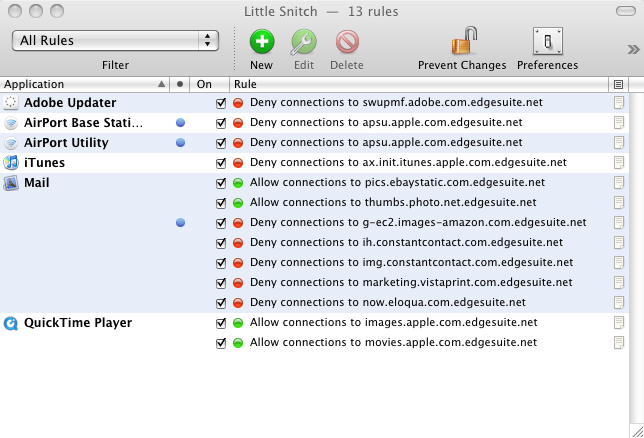
Little Snitch is free for 3 hour periods at a time so it can be installed to test and find out what domains you’d like to be blocking.
For long term blocking of nasty sites OS X, your solutions are threefold:
- buy an outgoing firewall, i.e. Little Snitch. A bit pricey at $30 a license but it’s Little Snitch or go hungry
- configure your hosts file to block most of the major offenders (people do keep lists)
- use GlimmerBlocker control panel to block the baddies via internal proxy (works on all browsers)
Of the three, GlimmerBlocker was the best and the simplest. Until after a year and a half GlimmerBlocker decided to seize up and prevent me from editing WordPress sites. Apparently it’s database got full or something. I lost eight hours trying to troubleshoot this mystery when I desperately needed to work so GlimmerBlocker is banned now. A pity as GlimmerBlocker is free.
A hosts file is also great. By adding bad sites to the hosts file and redirecting them to localhost (127.0.0.1) you stop them dead in their tracks.
One of the more complete lists of domains to block via hosts is kept online here: http://www.mvps.org/winhelp2002/hosts.txt
To edit your hosts file on OS X, the quickest way is to use Terminal to give TextEdit root access to the hosts file.
- Open a terminal window and type the following: sudo /Applications/TextEdit.app/Contents/MacOS/TextEdit /etc/hosts
- Hit return and enter your admin password when prompted and again hit return.
- Your Hosts file should automatically open in TextEdit.
- Copy the hosts from http://www.mvps.org/winhelp2002/hosts.txt or ssomewhere else (mvps wastes a lot of space on the x-rated zone for those of us not into: alternative suggestions to mvps welcome)
- Paste it into your text hosts file.
- Save.
- Test that hosts is working by browsing to one of the domains listed in mvps.
- Continue to edit and save at your leisure (at each save the hosts file is updated and live: well done Apple).
Unfortunately both LittleSnitch and the hosts file suffer from the same fatal flaw. They don’t allow wildcards. So for instance, one of the worst bits of spyware around is Infusionsoft. Every time you get an email from a subscriber of infusionsoft they want to know if you opened it. Therefore every image is specific to you. But each user has his or her own subdomain, i.e. empowered.infusionsoft.com.
If you block infusionsoft.com in hosts with 127.0.0.1 infusionsoft.com, you will only block the homepage. You would have to block 127.0.0.1 empowered.infusionsoft.com for each and every Infusionsoft subscriber who sends you email.
Little Snitch automates this process and allows you to make the block application specific. I use Apple Mail exclusively as my email client (looks great, full feature set and very fast, btw) so Little Snitch and I pick off these offenders one by one.
What I really want though are wildcards in Little Snitch so that I can ban all infusionsoft.com subdomains with a single *.infusionsoft.com within Apple Mail. The same applies for edgesuite.net within Apple Mail (Edgesuite is for corporate email spies like Apple and eBay, Infusionsoft is for slippery marketers like Rich Schefren and friends like Mike Filsaime).
When is the Objective Development team going to get off their backsides and improve Little Snitch by adding wildcards? There is a three page thread in their forum which goes back to 2004 asking for subdomain blocking in Little Snitch. What’s particularly galling is that ObDev have not even bothered to answer our concerns.
Until Objective Development add a subdomains/wild card feature to Little Snitch, you may want to hold off on the purchase. Managing outgoing requests one subdomain at a time is very tedious work.
In the meantime, if you’d like to block certain domains or you have doubts about a certain piece of software, there is a free solution. You can turn Little Snitch on for three hours while you deal with spam email or install new software, take note of the domains you’d like to block and then add those domains to your hosts file.

Alec Kinnear
Alec has been helping businesses succeed online since 2000. Alec is an SEM expert with a background in advertising, as a former Head of Television for Grey Moscow and Senior Television Producer for Bates, Saatchi and Saatchi Russia.


An alternative to mvps can be found at someonewhocares.org/hosts/ – I have not compared their lists.
Hi…
Just thought I would post my findings and this may help a few to understand… Little Snitch and the wild card thing!!!
I added a simple rule… Deny All Applications from connecting to DOMAIN “adobe.com”… I used Adobe because they have a large network, ideal for demonstrating this feature… ;-)
All of the IP addresses followed by “via DOMAIN adobe.com” in the list below, were retrieved by Little Snitch on creating the rule DOMAIN “adobe.com”… You can get the IP addresses retrived by clicking the info symbol in the top right of the Little Snitch window…
I then added a bunch of deny by HOST rules for sub domains of adobe.com… All of the lines / IP adresses that do not have “via DOMAIN adobe.com” are from these rules…
I have combined all the returned IP addresses from the DOMAIN adobe.com rule and sub rules together as a list – see below.
As you can see from the list I needn’t have added all of the rules for subdomains of “adobe.com” because it seems Little Snitch had that covered when I hadded “adobe.com” as a domain rule…
Note: I did a few tests tweaking subdomains IP addresses via the hosts file and it seems like Little Snitch keeps it self up to date with DNS changes to domains…
Little Snitch keeps me happy and is perfect at what it does, Snitching on your apps when they want to talk to the world… It puts you in control which is how it should be, it’s your computer and network connection after all…
The list
66.235.132.154 via DOMAIN adobe.com 66.235.132.156 via DOMAIN adobe.com 66.235.132.158 via DOMAIN adobe.com 66.235.132.233 via DOMAIN adobe.com 66.235.133.24 via DOMAIN adobe.com 66.235.133.44 via DOMAIN adobe.com 66.235.133.46 via DOMAIN adobe.com 66.235.133.48 via DOMAIN adobe.com 66.235.136.149 via DOMAIN adobe.com 174.143.230.172 via DOMAIN adobe.com 192.150.8.45 via DOMAIN adobe.com 192.150.8.60 192.150.8.60 via DOMAIN adobe.com 192.150.8.100 via DOMAIN adobe.com 192.150.8.117 via DOMAIN adobe.com 192.150.11.30 192.150.11.30 via DOMAIN adobe.com 192.150.14.21 192.150.14.21 via DOMAIN adobe.com 192.150.14.69 192.150.14.69 192.150.14.69 via DOMAIN adobe.com 192.150.14.174 192.150.14.174 via DOMAIN adobe.com 192.150.16.54 192.150.16.54 via DOMAIN adobe.com 192.150.16.59 via DOMAIN adobe.com 192.150.16.60 via DOMAIN adobe.com 192.150.16.72 via DOMAIN adobe.com 192.150.16.103 192.150.16.103 via DOMAIN adobe.com 192.150.16.108 192.150.16.108 via DOMAIN adobe.com 192.150.16.116 via DOMAIN adobe.com 192.150.16.117 via DOMAIN adobe.com 192.150.17.247 192.150.17.247 via DOMAIN adobe.com 192.150.18.63 192.150.18.63 192.150.18.63 via DOMAIN adobe.com 192.150.22.22 192.150.22.22 via DOMAIN adobe.com 192.150.22.30 192.150.22.30 via DOMAIN adobe.com 192.150.22.40 192.150.22.40 via DOMAIN adobe.com 209.46.39.53 via DOMAIN adobe.com
Yes, it’s true. LittleSnitch did add wildcards recently, at least in a test version (and now perhaps in the main release).
Do not get complacent. There’s information leaving your computer that Little Snitch can’t stop (via the default Apple connections which are allowed by default, or via special kexts installed to get around Little Snitch).
But it’s a lot better than nothing.
I really like bunny rabbits.